Page 355 of 572

08 SIENNA_U (L/O 0801)
347
2008 SIENNA from Aug. ’08 Prod. (OM45455U)
OPERATION OF INSTRUMENTS AND
CONTROLS
Air conditioning system
Front manual air conditioning systemControls 348
. . . . . . . . . . . . . . . . . . . . . . . . . . . . . . . . . . . . .\
. . . . . . . . . . . .
Air flow selector settings 351
. . . . . . . . . . . . . . . . . . . . . . . . . . . . . . . . . .
Operating tips 351
. . . . . . . . . . . . . . . . . . . . . . . . . . . . . . . . . . . . \
. . . . . . .
Front automatic air conditioning system Controls 354
. . . . . . . . . . . . . . . . . . . . . . . . . . . . . . . . . . . . \
. . . . . . . . . . . . .
Air flow selector settings 357
. . . . . . . . . . . . . . . . . . . . . . . . . . . . . . . . . .
Operating tips 357
. . . . . . . . . . . . . . . . . . . . . . . . . . . . . . . . . . . . \
. . . . . . .
Side vents 359
. . . . . . . . . . . . . . . . . . . . . . . . . . . . . . . . . . . . \
. . . . . . . . . . . . .
Rear manual air conditioning system Controls 360
. . . . . . . . . . . . . . . . . . . . . . . . . . . . . . . . . . . . \
. . . . . . . . . . . . .
Air flow selector settings 361
. . . . . . . . . . . . . . . . . . . . . . . . . . . . . . . . . .
Rear automatic air conditioning system
Controls 362
. . . . . . . . . . . . . . . . . . . . . . . . . . . . . . . . . . . . \
. . . . . . . . . . . . .
Air flow selector settings 364
. . . . . . . . . . . . . . . . . . . . . . . . . . . . . . . . . .
Air conditioning filter 364
. . . . . . . . . . . . . . . . . . . . . . . . . . . . . . . . . . . . \
. . . .
SECTION 1 9
Page 356 of 572
08 SIENNA_U (L/O 0801)
348
2008 SIENNA from Aug. ’08 Prod. (OM45455U)
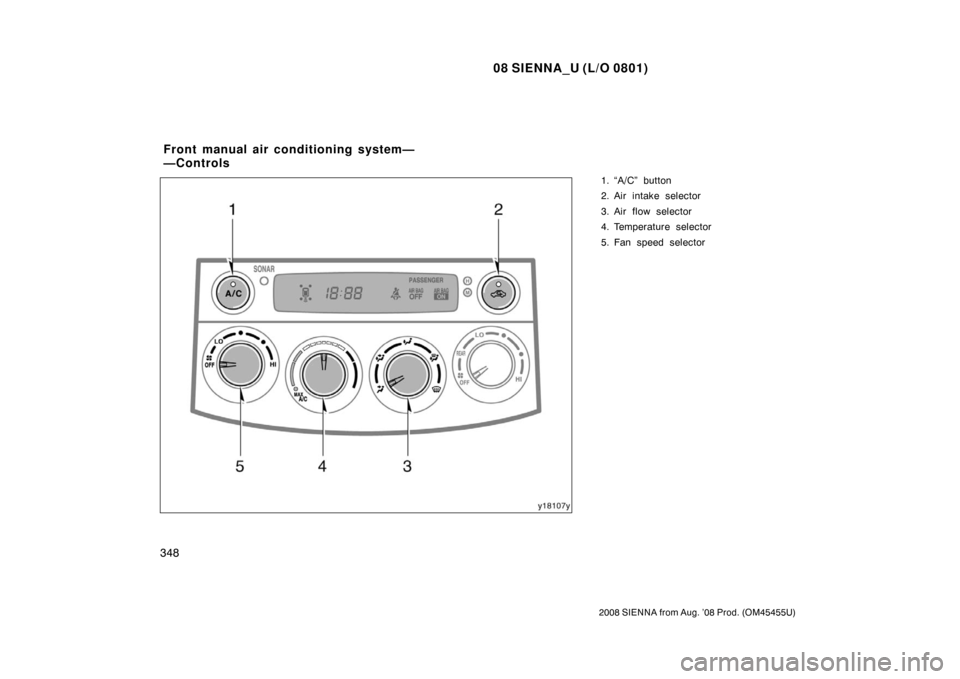
1. “A/C” button
2. Air intake selector
3. Air flow selector
4. Temperature selector
5. Fan speed selector
Front manual air conditioning system—
—Controls
Page 358 of 572
08 SIENNA_U (L/O 0801)
350
2008 SIENNA from Aug. ’08 Prod. (OM45455U)
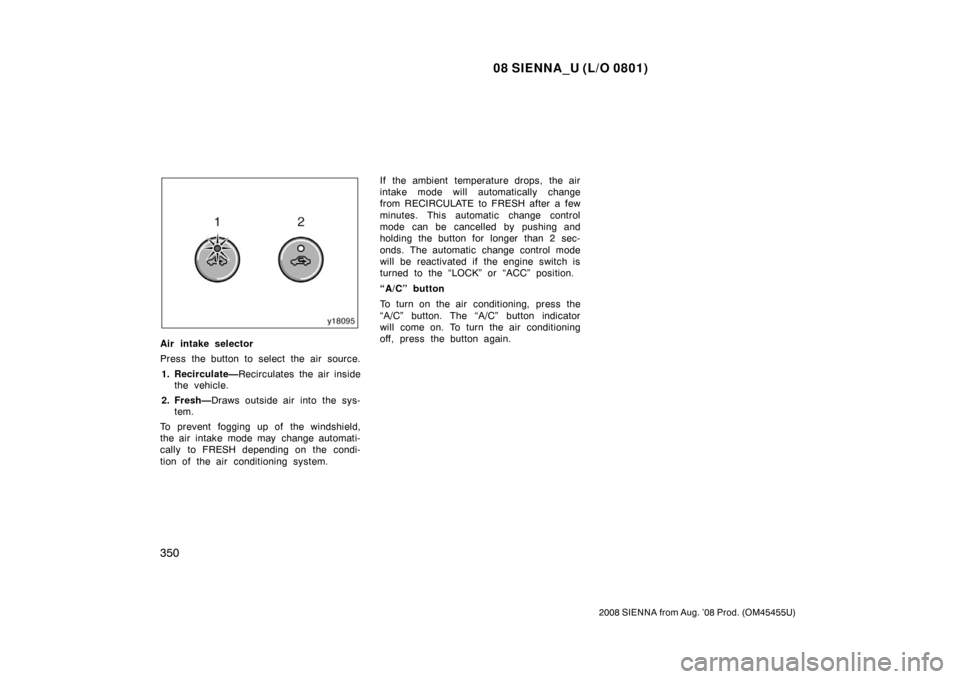
Air intake selector
Press the button to select the air source.1. Recirculate— Recirculates the air inside
the vehicle.
2. Fresh— Draws outside air into the sys-
tem.
To prevent fogging up of the windshield,
the air intake mode may change automati-
cally to FRESH depending on the condi-
tion of the air conditioning system. If the ambient temperature drops, the air
intake mode will automatically change
from RECIRCULATE to FRESH after a few
minutes. This automatic change control
mode can be cancelled by pushing and
holding the button for longer than 2 sec-
onds. The automatic change control mode
will be reactivated if the engine switch is
turned to the “LOCK” or “ACC” position.
“A/C” button
To turn on the air conditioning, press the
“A/C” button. The “A/C” button indicator
will come on. To turn the air conditioning
off, press the button again.
Page 359 of 572
08 SIENNA_U (L/O 0801)
351
2008 SIENNA from Aug. ’08 Prod. (OM45455U)
�To cool off your Toyota after it has
been parked in the hot sun, drive with
the windows open for a few minutes.
This vents the hot air, allowing the air
conditioning to cool the interior more
quickly.
�Make sure the air intake grilles in front
of the windshield are not blocked (by
leaves or snow, for example).
�On humid days, do not blow cold air
on the windshield. The windshield could
fog up because of the difference in air
temperature on the inside and outside
of the windshield.
�Keep the area under the front seats
clear to allow air to circulate through-
out the vehicle.
�On cold days, set the fan speed to
high for a minute to help clear the
intake ducts of snow or moisture. This
can reduce the amount of fogging on
the windows.
�When driving on dusty roads, close all
windows. If dust thrown up by the ve-
hicle is still drawn into the vehicle after
closing the windows, it is recommended
that the air intake selector be set to
FRESH and the fan speed selector to
any setting except “OFF”.
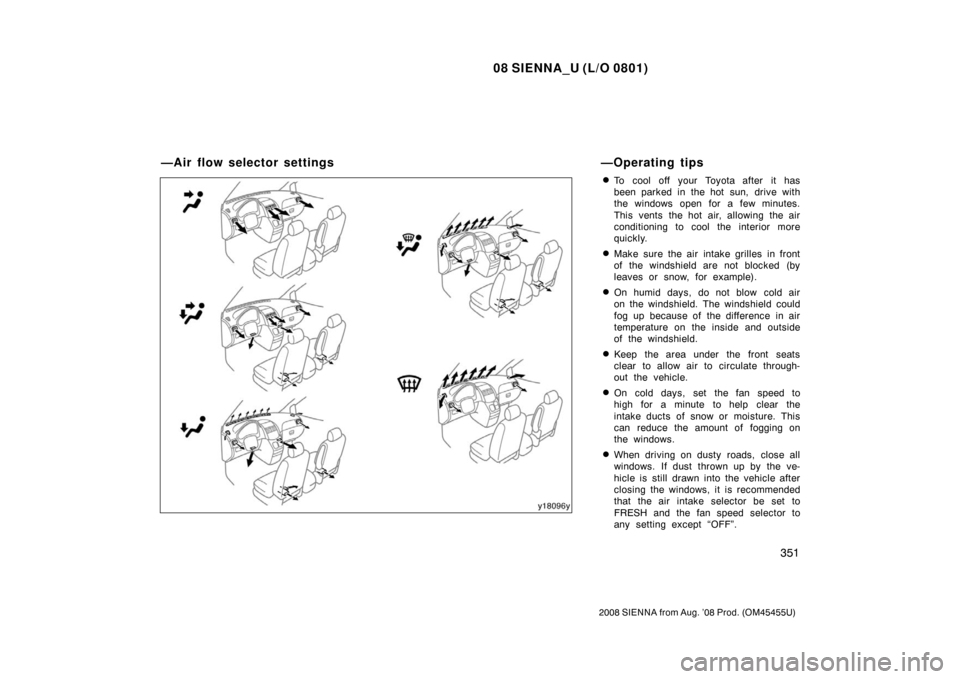
—Air flow selector settings—Operating tips
Page 360 of 572
08 SIENNA_U (L/O 0801)
352
2008 SIENNA from Aug. ’08 Prod. (OM45455U)
�If following another vehicle on a dusty
road, or driving in windy and dusty
conditions, it is recommended that the
air intake selector be temporarily set to
RECIRCULATE, which will close off the
outside passage and prevent outside
air and dust from entering the vehicle
interior.Heating
For best results, set controls to:
Fan speed— Any setting except “OFF”
Temperature— To w a r d s WARM
(red zone)
Air intake—FRESH (outside air)
Air flow—FLOOR
Air conditioning—OFF
�For quick heating, select recirculated
air for a few minutes. To keep the
windows from fogging, select fresh af-
ter the vehicle interior has been
warmed.
�Press the “A/C” button on for dehumidi-
fied heating.
�Choose floor/windshield air flow to heat
the vehicle interior while defrosting or
defogging the windshield.
Air conditioning
For best results, set controls to:
Fan speed— Any setting except “OFF”
Temperature— To w a r d s COLD
(blue zone)
Air intake—FRESH (outside air)
Air flow—PANEL
Air conditioning—ON
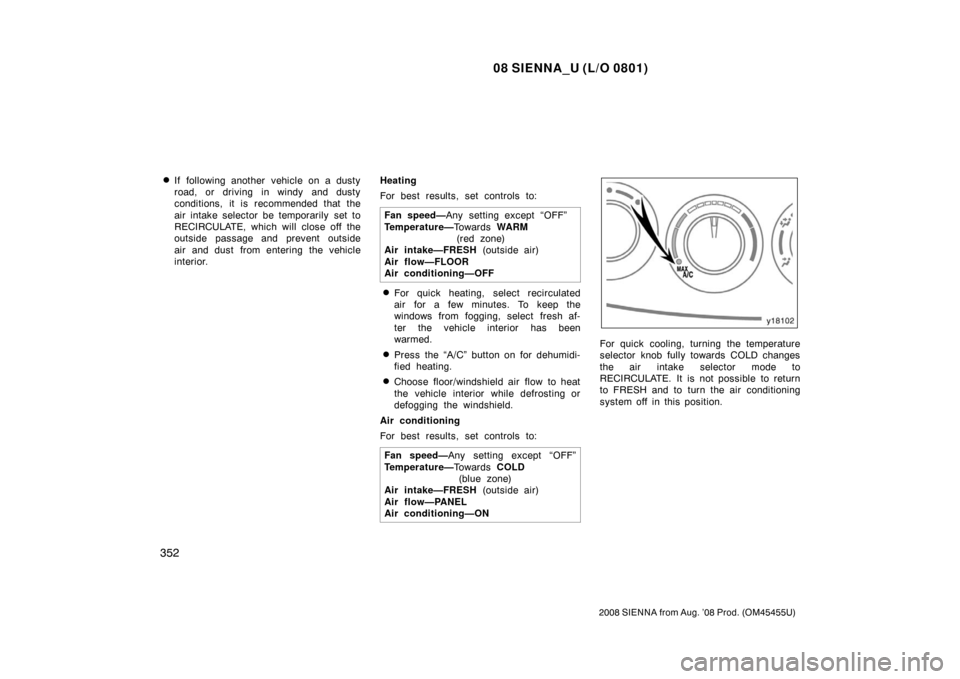
For quick cooling, turning the temperature
selector knob fully towards COLD changes
the air intake selector mode to
RECIRCULATE. It is not possible to return
to FRESH and to turn the air conditioning
system off in this position.
Page 361 of 572

08 SIENNA_U (L/O 0801)
353
2008 SIENNA from Aug. ’08 Prod. (OM45455U)
Ventilation
For best results, set controls to:Fan speed— Any setting except “OFF”
Temperature— To w a r d s COLD
(blue zone)
Air intake—FRESH (outside air)
Air flow—PANEL
Air conditioning—OFF
Defogging
—The inside of the windshield
For best results, set controls to:
Fan speed— Any setting except “OFF”
Temperature— To w a r d s WARM
(red zone) to heat;
COLD (blue zone) to
cool
Air flow—WINDSHIELD
Turning the air flow selector to the wind-
shield or floor/windshield position turns on
the defogging function with the purpose of
clearing the front view.
When turning the air flow selector to the
windshield or floor/windshield position, the
air intake selects FRESH automatically.
This is to clean up the front view more
quickly. It is not possible to return to
RECIRCULATE in windshield position.
�On humid days, do not blow cold air
on the windshield—the difference be-
tween the outside and inside tempera-
tures could make the fogging worse.
Defrosting
—The outside of the windshield
For best results, set controls to:
Fan speed— Any setting except “OFF”
Temperature— To w a r d s WARM
(red zone)
Air flow—WINDSHIELD
Turning the air flow selector to the wind-
shield or floor/windshield position turns on
the defrosting function with the purpose of
clearing the front view.
When turning the air flow selector to the
windshield or floor/windshield position, the
air intake selects FRESH automatically.
This is to clean up the front view more
quickly. It is not possible to return to
RECIRCULATE in windshield position.
�To heat the vehicle interior while de-
frosting the windshield, choose
floor/windshield air flow.
Page 362 of 572
08 SIENNA_U (L/O 0801)
354
2008 SIENNA from Aug. ’08 Prod. (OM45455U)
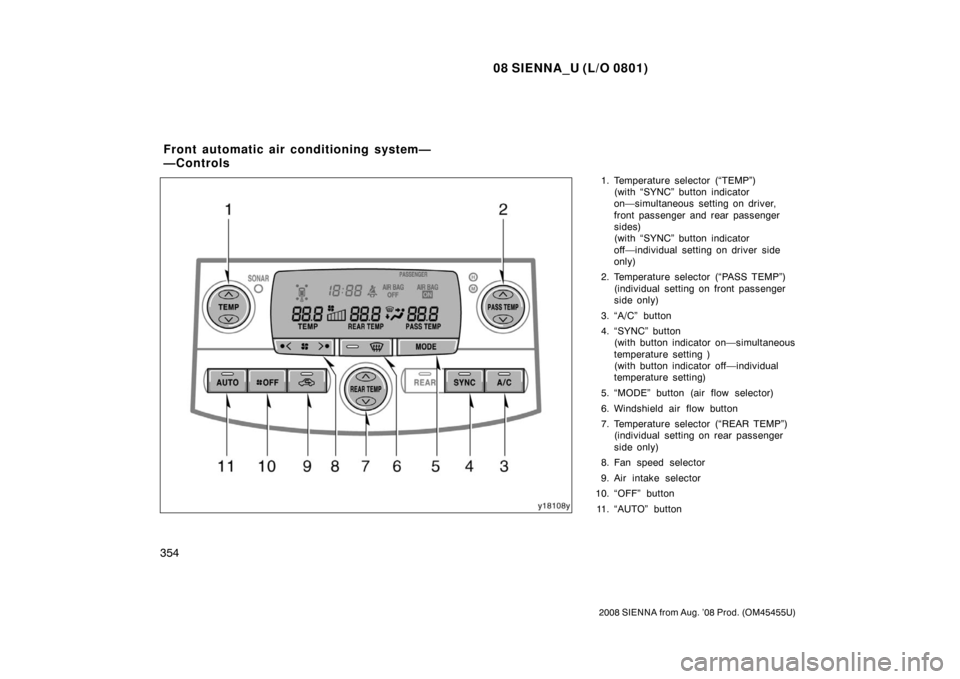
1. Temperature selector (“TEMP”)(with “SYNC” button indicator
on—simultaneous setting on driver,
front passenger and rear passenger
sides)
(with “SYNC” button indicator
off—individual setting on driver side
only)
2. Temperature selector (“PASS TEMP”) (individual setting on front passenger
side only)
3. “A/C” button
4. “SYNC” button (with button indicator on—simultaneous
temperature setting )
(with button indicator off—individual
temperature setting)
5. “MODE” button (air flow selector)
6. Windshield air flow button
7. Temperature selector (“REAR TEMP”) (individual setting on rear passenger
side only)
8. Fan speed selector
9. Air intake selector
10. “OFF” button
11. “AUTO” button
Front automatic air conditioning system—
—Controls
Page 363 of 572

08 SIENNA_U (L/O 0801)
355
2008 SIENNA from Aug. ’08 Prod. (OM45455U)
“AUTO” button
For automatic operation of the air condi-
tioning, press the “AUTO” button. An indi-
cator light will illuminate to show that the
automatic operation mode has been se-
lected.
In the automatic operation mode, the air
conditioning selects the most suitable fan
speed, air flow, air intake and on−off of
the air conditioning according to the tem-
perature.
When you adjust the temperature selector
button to maximum cooling, “LO” will ap-
pear on the display and the air intake
mode will be automatically changed to RE-
CIRCULATE.
You may use manual controls if you want
to select your own settings.
Fan speed selector
Push the “
” (increase) or “” (de-
crease) side of the button to adjust the
fan speed.
In the automatic operation mode, the fan
speed is adjusted automatically unless you
desire another fan speed mode. “SYNC” button
Push the button to change the mode of
the temperature setting.
With the indicator on—
Simultaneous tem-
perature setting
With the indicator off— Individual temper-
ature setting
With the indicator on, the rear air condi-
tioning is turned on. However, controls on
the rear control panel cannot be used. To
cancel this function, push the “SYNC” but-
ton.
For details about the rear air conditioning,
see “Rear automatic air conditioning sys-
tem” on page 362 in this Section.
Temperature selectors
To increase the temperature, press the
“
” side. To decrease it, press the “”
side.
“LO” appears when you adjust to maxi-
mum cooling, and “HI” appears when you
adjust to maximum warming.
—“TEMP” button
With the “SYNC” button indicator on—
This button changes the temperature on
the driver side, front passenger side and
rear passenger side simultaneously. This function will be cancelled when the
“PASS TEMP” or “REAR TEMP” button is
pushed.
With the “SYNC” button indicator
off—
This button changes the temperature
on the driver side only.
—“PASS TEMP” button
This button changes the temperature on
the front passenger side only.
—“REAR TEMP” button
This button changes the temperature on
the rear passenger side only when the
rear air conditioning is turned on.
For details about the rear air conditioning,
see “Rear automatic air conditioning sys-
tem” on page 362 in this Section.
The temperature display changes between
“ � C” and “� F” when the unit of the outside
temperature display is changed. (For de-
tails, see “Multi −information display” on
page 370 in Section 1 −10.)
“OFF” button
Push the button to turn off the air condi-
tioning system.