Page 384 of 572
08 SIENNA_U (L/O 0801)
376
2008 SIENNA from Aug. ’08 Prod. (OM45455U)
This device complies with Part 15 of the
FCC Rules and with RSS−210 of the IC
Rules. Operation is subject to the fol-
lowing two conditions: (1) This device
may not cause harmful interference, and
(2) this device must accept any interfer-
ence received, including interference
that may cause undesired operation.
WARNING: This transmitter has been
tested and complies with FCC and IC
rules. Changes or modifications not
expressly approved by the party re-
sponsible for compliance could void
the user’s authority to operate the
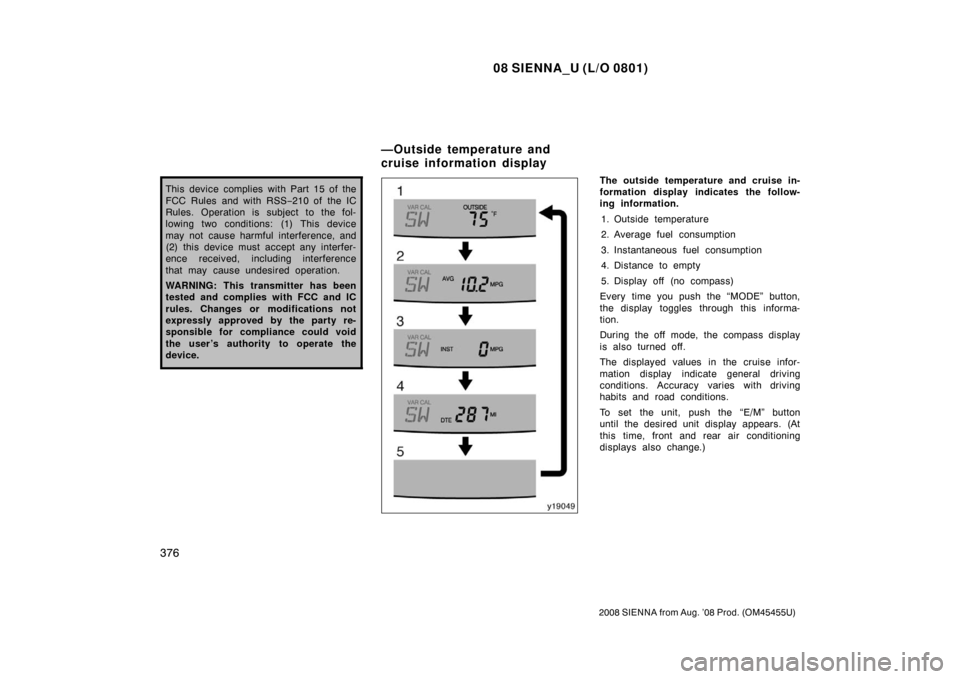
device.The outside temperature and cruise in-
formation display indicates the follow-
ing information.
1. Outside temperature
2. Average fuel consumption
3. Instantaneous fuel consumption
4. Distance to empty
5. Display off (no compass)
Every time you push the “MODE” button,
the display toggles through this informa-
tion.
During the off mode, the compass display
is also turned off.
The displayed values in the cruise infor-
mation display indicate general driving
conditions. Accuracy varies with driving
habits and road conditions.
To set the unit, push the “E/M” button
until the desired unit display appears. (At
this time, front and rear air conditioning
displays also change.)
—Outside temperature and
cruise information display
Page 385 of 572

08 SIENNA_U (L/O 0801)
377
2008 SIENNA from Aug. ’08 Prod. (OM45455U)
1. Outside temperature (“OUTSIDE �C”
or “OUTSIDE �F”)
The outside temperature display indi-
cates the outside air temperature.
The displayed value is updated every 1
second.
The displayed temperature ranges from
− 30 �C ( −22 �F) up to 50 �C (122 �F).
If an abnormality exists in the connection
of the outside air temperature sensor,
“ −− �C” (“ −−�F”) will appear on the display.
If “ −−�C” (“ −−�F”) appears on the display,
contact your Toyota dealer.
There may be a case that “−− �C” (“ −−�F”)
appears momentarily when the engine
switch is quickly turned to “ON”. It is
normal if it goes out soon.
2. Average fuel consumption (“AVG MPG” or “AVG L/100 km”)
Average fuel consumption is calculated
and displayed based on total driving
distance and total fuel consumption
with the engine running.
The displayed value is updated every 1
seconds.
To reset the calculations, return the mode
to “AVG” and push and hold the “MODE”
and “E/M” button simultaneously for 2 sec-
onds. 3. Instantaneous fuel consumption
(“INST MPG” or “INST L/100 km”)
The instantaneous fuel consumption is
calculated and displayed based on dis-
tance and fuel consumption for 1 sec-
onds with the engine running.
The displayed value is updated every 2
seconds.
Note that an accurate figure may not be
shown in the following cases.
�The vehicle is stopped with the engine
running. (The display will indicate the
extremely high fuel consumption.)
�The vehicle is driving down a long
slope applying the engine brake. (The
display will indicate the extremely low
fuel consumption.)
The calculation is reset when the engine
switch is turned off. 4. Distance to empty (“DTE MI” or “DTE km”)
The distance the vehicle can travel with
the remaining fuel is calculated and
displayed based on the quantity of re-
maining fuel and past fuel consumption.
The displayed value is updated every 1
second. Every time you refuel the vehicle, the cal-
culation is reset. However, when only a
small amount of fuel is added to the tank,
the display may not be reset.
The actual driving range varies with driv-
ing habits and road conditions. If fuel con-
sumption is good, the driving range will be
longer. If fuel consumption is poor, the
driving range will be shorter.
Page 386 of 572

08 SIENNA_U (L/O 0801)
378
2008 SIENNA from Aug. ’08 Prod. (OM45455U)
The compass indicates the direction
that the vehicle is heading. In the
above case, it shows that the vehicle is
heading south.
The direction display is updated every 2
seconds.Displays
Directions
N
NE E
SE
S
SW W
NWNorth
Northeast East
Southeast
South
Southwest West
Northwest
The compass may not show the correct
direction in the following conditions:
�The vehicle is stopped immediately af-
ter turning.
The compass does not adjust while the
vehicle is stopped.
�The engine switch is turned off immedi-
ately after turning.
�The vehicle is on an inclined surface.
�The vehicle is in a place where the
earth’s magnetic field is subject to in-
terference by artificial magnetic fields
(underground parking, under a steel
tower, between buildings, roof parking,
near a crossing, near a large vehicle,
etc.).
�The vehicle is magnetized. (There is a
magnet or a metal object on or near
the roof.)
�The battery has been disconnected.
The compass works to calibrate the direc-
tion automatically while the vehicle is in
motion, if deviation is small.
For additional precision or for complete
calibrating, see “CALIBRATING THE
COMPASS” below. If the direction is not indicated or the
system does not operate pr
operly, contact
your Toyota dealer.
—Compass
Page 387 of 572
08 SIENNA_U (L/O 0801)
379
2008 SIENNA from Aug. ’08 Prod. (OM45455U)
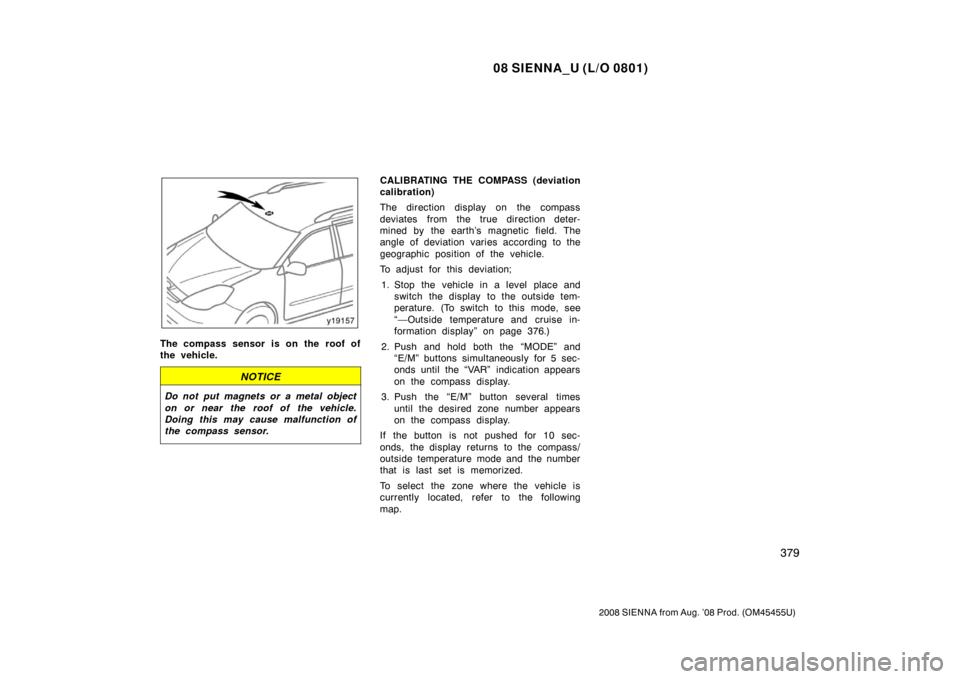
The compass sensor is on the roof of
the vehicle.
NOTICE
Do not put magnets or a metal object
on or near the roof of the vehicle.
Doing this may cause malfunction of
the compass sensor.
CALIBRATING THE COMPASS (deviation
calibration)
The direction display on the compass
deviates from the true direction deter-
mined by the earth’s magnetic field. The
angle of deviation varies according to the
geographic position of the vehicle.
To adjust for this deviation;1. Stop the vehicle in a level place and switch the display to the outside tem-
perature. (To switch to this mode, see
“—Outside temperature and cruise in-
formation display” on page 376.)
2. Push and hold both the “MODE” and “E/M” buttons simultaneously for 5 sec-
onds until the “VAR” indication appears
on the compass display.
3. Push the “E/M” button several times until the desired zone number appears
on the compass display.
If the button is not pushed for 10 sec-
onds, the display returns to the compass/
outside temperature mode and the number
that is last set is memorized.
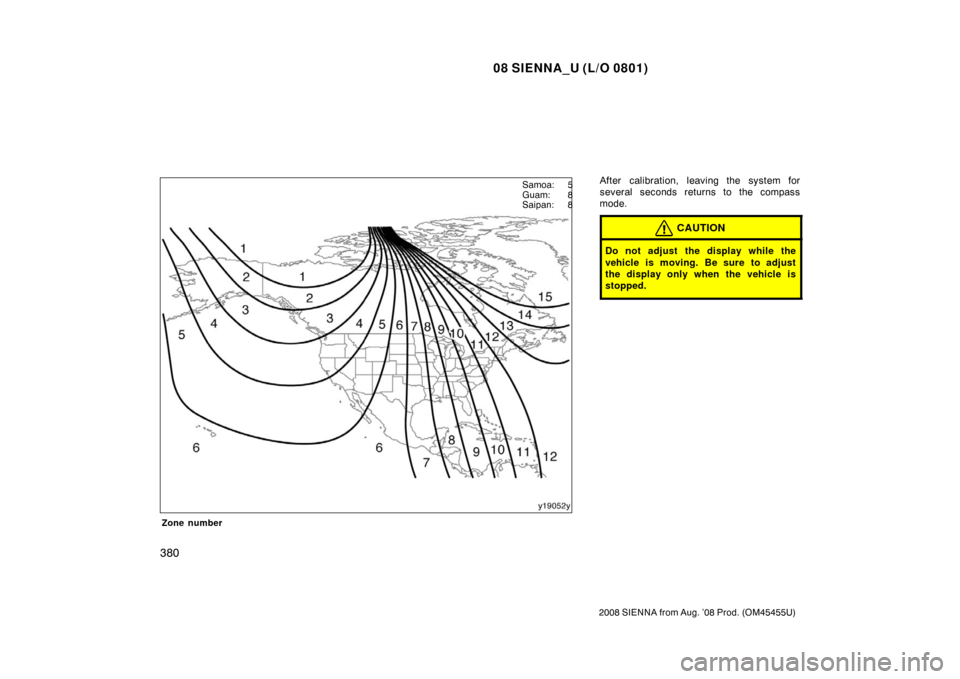
To select the zone where the vehicle is
currently located, refer to the following
map.
Page 388 of 572
08 SIENNA_U (L/O 0801)
380
2008 SIENNA from Aug. ’08 Prod. (OM45455U)
Zone number
After calibration, leaving the system for
several seconds returns to the compass
mode.
CAUTION
Do not adjust the display while the
vehicle is moving. Be sure to adjust
the display only when the vehicle is
stopped.
Samoa: 5
Guam: 8
Saipan: 8
Page 389 of 572
08 SIENNA_U (L/O 0801)
381
2008 SIENNA from Aug. ’08 Prod. (OM45455U)
CALIBRATING THE COMPASS (circling
calibration)
Sometimes the direction display on the
compass may not change after a turn. In
this case, the compass needs to be cali-
brated.
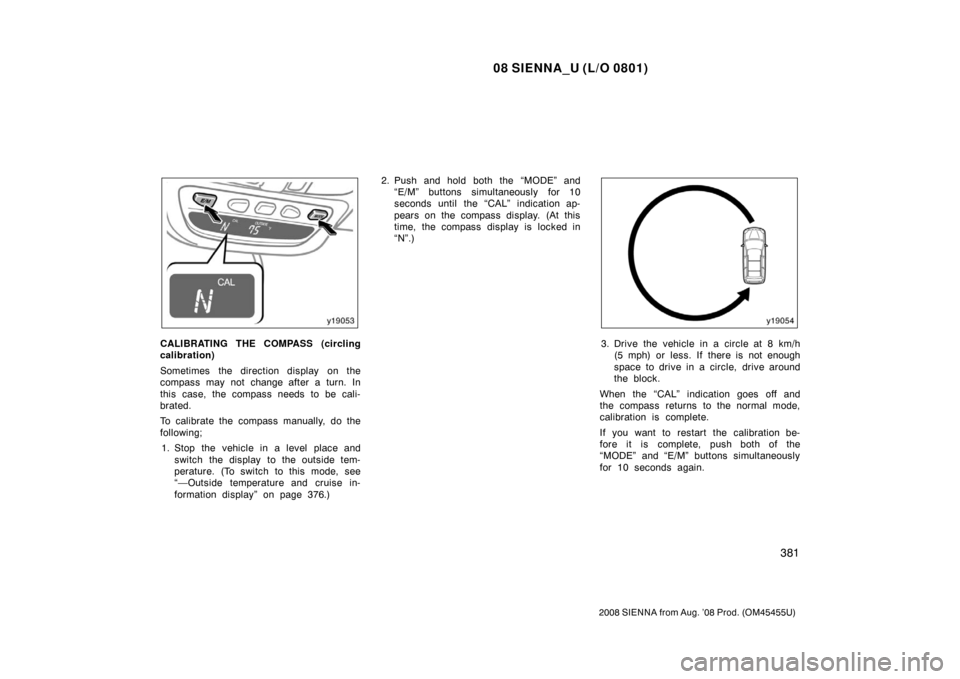
To calibrate the compass manually, do the
following;1. Stop the vehicle in a level place and switch the display to the outside tem-
perature. (To switch to this mode, see
“—Outside temperature and cruise in-
formation display” on page 376.) 2. Push and hold both the “MODE” and
“E/M” buttons simultaneously for 10
seconds until the “CAL” indication ap-
pears on the compass display. (At this
time, the compass display is locked in
“N”.)3. Drive the vehicle in a circle at 8 km/h(5 mph) or less. If there is not enough
space to drive in a circle, drive around
the block.
When the “CAL” indication goes off and
the compass returns to the normal mode,
calibration is complete.
If you want to restart the calibration be-
fore it is complete, push both of the
“MODE” and “E/M” buttons simultaneously
for 10 seconds again.
Page 390 of 572
08 SIENNA_U (L/O 0801)
382
2008 SIENNA from Aug. ’08 Prod. (OM45455U)
Perform circling calibration just after
you have purchased your Toyota. And
then always perform circling calibration
after the battery has been removed, re-
placed or disconnected.
�Do not perform circling calibration of
the compass in a place where the
earth’s magnetic field is subject to in-
terference by artificial magnetic fields
(underground parking, under a steel
tower, between buildings, roof parking,
near a crossing, near a large vehicle,
etc.).
�During calibration, do not operate elec-
tric systems (moon roof, power win-
dows, etc.) as they may interfere with
the calibration.
CAUTION
�When doing the circling calibration,
be sure to secure a wide space,
and watch out for people and ve-
hicles in the neighborhood. Do not
violate any local traffic rules while
performing circling calibration.
�Do not adjust the display while the
vehicle is moving. Be sure to adjust
the display only when the vehicle is
stopped.
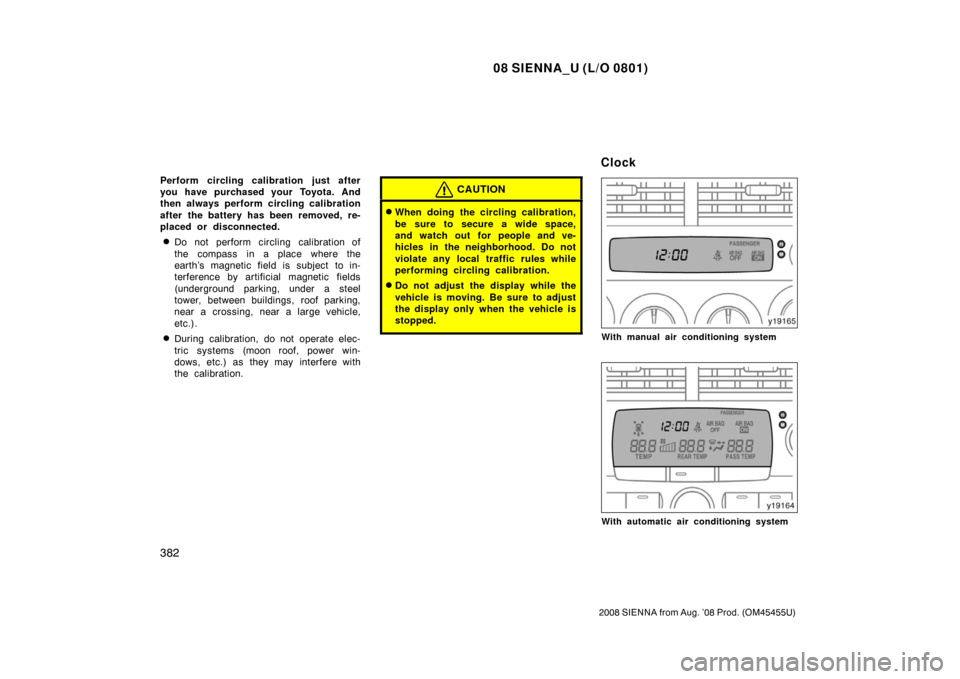
With manual air conditioning system
With automatic air conditioning system
Clock
Page 401 of 572
08 SIENNA_U (L/O 0801)
393
2008 SIENNA from Aug. ’08 Prod. (OM45455U)
The rear view monitor system assists
the driver by displaying an image of
the view behind the vehicle while back-
ing up. The image is displayed in re-
verse on the screen. This allows the
image to appear in the same manner as
that of the rear view mirror.
To display the rear view image on the
screen, place the selector lever in the
“R” position when the engine switch is
in the “ON” position.
If you move the selector lever out of the
“R” position, the screen returns to the
previous screen. Operating another func-
tion of the navigation system will display
another screen.
The rear view monitor system is a supple-
ment device intended to assist back up.
When backing up, be sure to check be-
hind and all around the vehicle visually.CAUTION
�Never depend on the rear view
monitor system entirely when back-
ing up. Always make sure your in-
tended path is clear.
Use caution just as you would when
backing up any vehicle.
�Never back up while looking only at
the screen. The image on the
screen is different from actual con-
ditions. Depicted distances between
objects and flat surfaces will differ
from actual distances. If you back
up while looking only at the screen,
you may hit a vehicle, a person or
an object. When backing up, be
sure to check behind and all around
the vehicle visually and with mir-
rors before proceeding.
�Do not use the system when the
back door is not completely closed.
�If the back of the vehicle is hit, the
position and mounting angle of the
camera may change. Be sure to
have the camera’s position and
mounting angle checked at your
Toyota dealer.
�If the temperature changes rapidly,
such as when hot water is poured
on the vehicle in cold weather, the
system may not operate normally.
�If the camera lens becomes dirty, it
cannot transmit a clear image. If
water droplets, snow, or mud ad-
here to the lens, rinse with water
and wipe with a soft cloth. If the
lens is extremely dirty, wash it with
a mild cleanser and rinse.
�Use your own eyes to confirm the
vehicle’s surroundings, as the dis-
played image may become faint or
dark, and moving images will be
distorted, or not entirely visible
when the outside temperature is
low. When backing up, be sure to
check behind and all around the ve-
hicle visually and with mirror before
proceeding.
Rear view monitor system