Page 181 of 596
181
2-3. Operating the lights and wipers
2
When driving
Rear window wiper and washer
■The rear window wiper and washer can be operated when
●The engine switch must be in the ON position.
● The back window is fully closed.
■ Customization that can be co nfigured at Toyota dealer
Settings (e.g. washer linkage wiper control) can be changed.
(Customizable features P. 569)
NOTICE
■When the rear window is dry
Do not use the wipers, as they may damage the rear window.
Intermittent window wiper operation.
Normal window wiper operation
Washer/wiper dual operation
Washer/wiper dual operation
The rear window wiper operates while the washer squirts.
Page 182 of 596
182
2-3. Operating the lights and wipers
Headlight cleaner switch (if equipped)
■The headlight cleaner can be operated when
The engine switch is in the ON position and the headlights are turned on.
NOTICE
■When the washer fluid tank is empty
Do not use this function when the washer fluid tank is empty. This may
cause the washer fluid pump to overheat.
Washer fluid can be sprayed on the headlights.
Press the switch to clean the
headlights.
Page 183 of 596
183
2
When driving
2-4. Using other driving systems
Cruise control
Use cruise control to maintain a set speed without using the acceler-
ator.
■ Set the vehicle speed
Press the ON-OFF button to
turn the cruise control on.
At this time, the cruise control
indicator will come on.
Press the button once more to
deactivate the cruise control.
Accelerate or decelerate to
the desired speed and push
the lever down to set the
cruise control speed.
■ Adjusting the speed setting
Increase speed
Decrease speed
Hold the lever until the desired
speed setting is obtained.
Fine adjustment of the set
speed (approximately 1.0 mph
[1.6 km/h]) can be made by
lightly pushing the lever up or
down and releasing it.
Page 190 of 596

190 2-4. Using other driving systems
Example of follow-up cruising (when following a vehicle driving
slower than the set speed):
When the speed is set to 62 mph (100 km/h) and the vehicle ahead
is driving at 50 mph (80 km/h)
The system continues follow-up cruising while adjusting for changes in the
speed of the vehicle ahead in order to maintain the vehicle-to-vehicle dis-
tance set by the driver.
Example of acceleration (when there are no longer vehicles driving
slower than the set speed in the lane ahead):
When the speed is set to 62 mph (100 km/h) and the vehicle ahead
driving at 50 mph (80 km/h) is out of the lane
When the vehicle ahead of you executes a lane change, the system
slowly accelerates until the set vehicle speed is reached. The system then
returns to fixed speed cruising.
■Fine adjustment of the set speed
Adjustment of the set speed by the following speed can be made by lightly
pressing the lever up or down and releasing it.
In the constant speed control mode: Approximately 1.0 mph (1.6 km/h)
In the vehicle-to-vehicle distance control mode:U.S.A.: Approximately 5 mph (8 km/h)
Canada: Approximately 3 mph (5 km/h)
■ Dynamic laser cruise control warning lights, display and buzzers
Warning lights, display and buzzers are used to indicate a system malfunc-
tion or to alert you to the need for caution while driving. ( P. 514)
■ The dynamic laser cruise can be set when
●The shift lever is in D or the shift range position must be in 4 or 5 in S
mode (5-speed models).
● The shift lever is in D or the shift range position must be in between 4 and
6 in S mode (6-speed models).
● Vehicle speed is between approximately 27 mph (45 km/h) and 85 mph
(135 km/h).
■ Accelerating
The vehicle can be accelerated normally.
Page 195 of 596
195
2-4. Using other
driving systems
2
When driving
NOTICE
■Handling the laser radar sensor
Observe the following to ensure the cruise control system can function effec-
tively.
●Keep the sensor clean at all times.
Clean the sensor with a soft cloth so you do not mark or damage them.
● Do not subject the sensor or surrounding area to a strong impact.
If the sensor moves even slightly off position, the system may malfunction.
If the sensor or surrounding area is subject to a strong impact, always
have the area inspected and adjusted by a Toyota dealer.
● Do not disassemble the sensor.
● Do not attach accessories or stickers to the sensor, surrounding area.
Page 200 of 596

200 2-4. Using other driving systems
■Sensor detection information
●Certain vehicle conditions and the surrounding environment may affect
the ability of a sensor to correctly detect an obstacle. Particular instances
where this may occur are listed below.
• There is dirt, snow or ice on a sensor.
• A sensor is frozen.
• A sensor is covered in any way.
• The vehicle is leaning considerably to one side.
• On an extremely bumpy road, on an incline, on gravel, or on grass.
• The vicinity of the vehicle is noisy due to vehicle horns, motorcycle
engines, air brakes of large vehicles, or other loud noises producing
ultrasonic waves.
• There is another vehicle equipped with parking assist sensors in the vicinity.
• A sensor is coated with a sheet of spray or heavy rain.
• The vehicle is equipped with a fender pole or radio antenna.
• A bumper or sensor receives a strong impact.
• The vehicle is approaching a tall or right-angled curb.
• In harsh sunlight or intense cold weather.
• The area directly under the bumpers is not detected. Objects lower than the sensors or thin stakes etc. may be detected ini-
tially, but as they draw closer, they may cease to be detected.
• A towing hitch is mounted to the vehicle.
• A non-genuine Toyota suspension (lowered suspension etc.) is installed.
• When attaching a two-way radio antenna.
• When a towing eyelet is mounted on your vehicle.
• When the bumper is damaged.
In addition to the examples above, there are instances in which, because of
their shapes, signs and other objects may be judged by a sensor to be closer
than they are.
● The shape of the obstacle may prevent a sensor from detecting it. Pay
particular attention to the following obstacles:
• Wires, fences, ropes, etc.
• Cotton, snow and other materials that absorb radio waves
• Sharply-angled objects
Page 217 of 596

217
2-4. Using other
driving systems
2
When driving
■Sounds and vibrations caused by the ABS, TRAC, VSC and brake
assist system
●A sound may be heard from the engine compartment when the engine is
started and just after the vehicle begins to move. This sound does not
indicate that a malfunction has occurred in any of these systems.
● Any of the following conditions may occur when the above systems are
operating. None of these indicates that a malfunction has occurred.
• Vibrations may be felt through the vehicle body and steering.
• A motor sound may be heard after the vehicle comes to a stop.
• The brake pedal may pulsate slightly after the ABS is activated.
• The brake pedal may move down slightly after the ABS is activated.
■ If the brake system overheats
TRAC will cease operation and a buzzer will sound to alert the driver. Stop
the vehicle in a safe place. (There is no problem with continuing normal driv-
ing.)
■ Power steering system operation sound
When you turn the engine switch to ON after the battery has been discon-
nected and reconnected, a sound may be heard from the engine compart-
ment.
This does not indicate a malfunction.
CAUTION
Any of the following conditions may result in an accident which could cause
death or serious injury.
■ The ABS does not opera te effectively when
● The limits of the gripping performance have been exceeded.
● The vehicle hydroplanes while driving at high speed on the wet or slick
road.
Page 239 of 596
239
2-5. Driving information
2
When driving
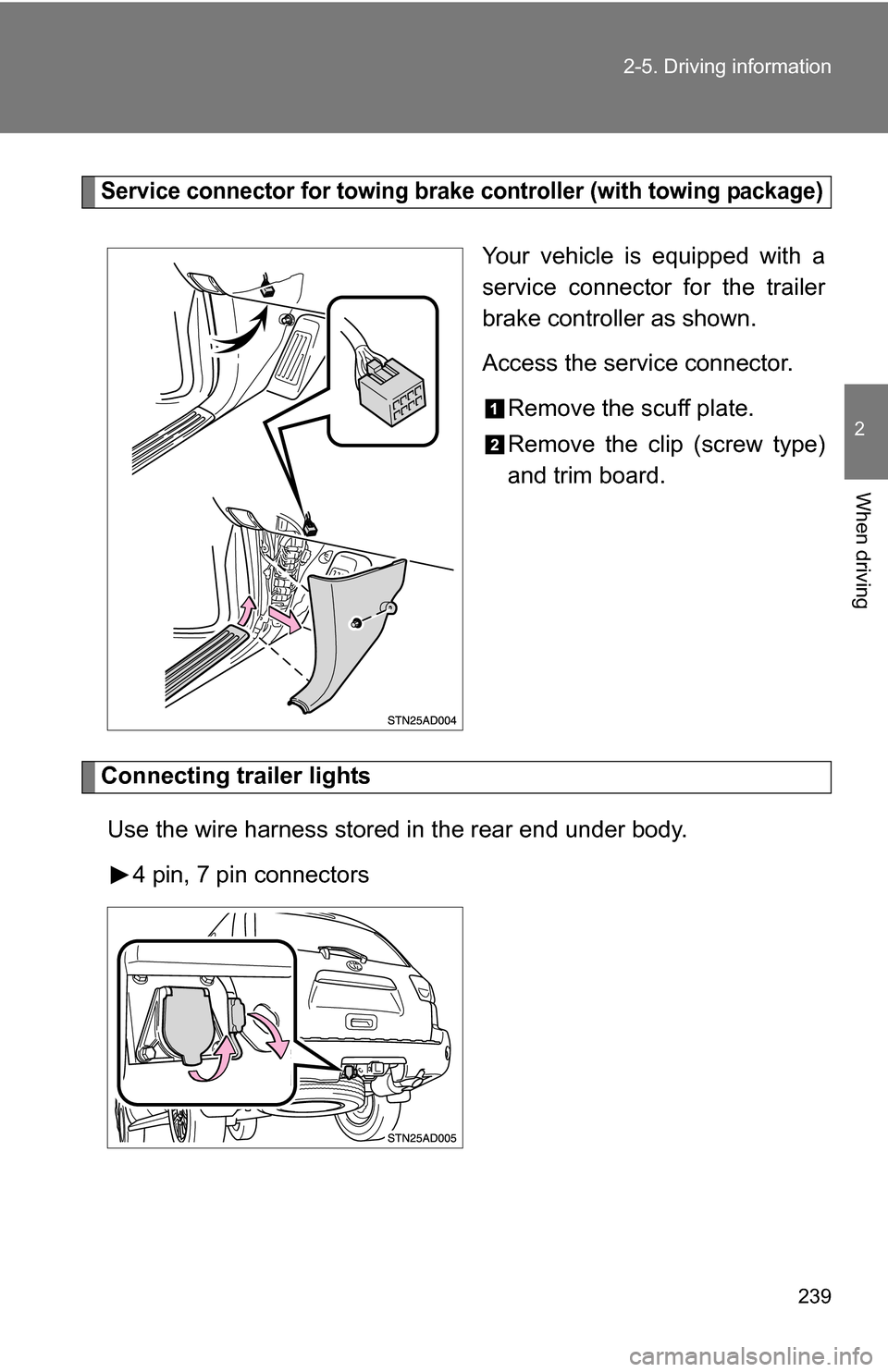
Service connector for towing brake controller (with towing package)
Your vehicle is equipped with a
service connector for the trailer
brake controller as shown.
Access the service connector.
Remove the scuff plate.
Remove the clip (screw type)
and trim board.
Connecting trailer lights
Use the wire harness stored in the rear end under body. 4 pin, 7 pin connectors