Page 335 of 596
335
3-4. Using the hand
s-free phone system (for cellular phone)
3
Interior features
Ty p e B
Vo l u m e
The voice guidance volume
cannot be adjusted by using
this switch.
Hands-free phone system
off/ends a call/refuses a call
Hands-free phone system
on/starts a call
Press: Voice command sys-
tem on
Press and hold: Voice com-
mand system off
■ Microphone
Page 336 of 596

336 3-4. Using the hands-free phone system (for cellular phone)
Operating the system by using a voice command
By following voice guidance instruct ions output from the speaker, you
can speak voice commands aloud to control the hands-free phone
system without looking at the display or operating .
■ Operation procedure when using voice commands
Press or and say a voice command for a desired
function. ( P. 337)
■ Auxiliary commands when using a voice command
The following auxiliary voice commands can be used at any time
when operating the system using voice commands:
“Repeat”: Repeats the previous voice guidance instruction
“Go back”: Returns to the previous procedure
“Cancel”: Exits the hands-free phone system
“Help”: Reads aloud the function summary if a help comment is
registered for the selected function
Using the hands-free phone system for the first time
Before using the hands-free phone system, it is necessary to register
a cellular phone in the system. Th e phone registration mode will be
entered automatically when starting the system with no cellular
phone registered. Follow the procedure below to register a cellular
phone:
Press , or .
The introductory guidance and phone name registration instructions
are heard.
Page 337 of 596
337
3-4. Using the hand
s-free phone system (for cellular phone)
3
Interior features
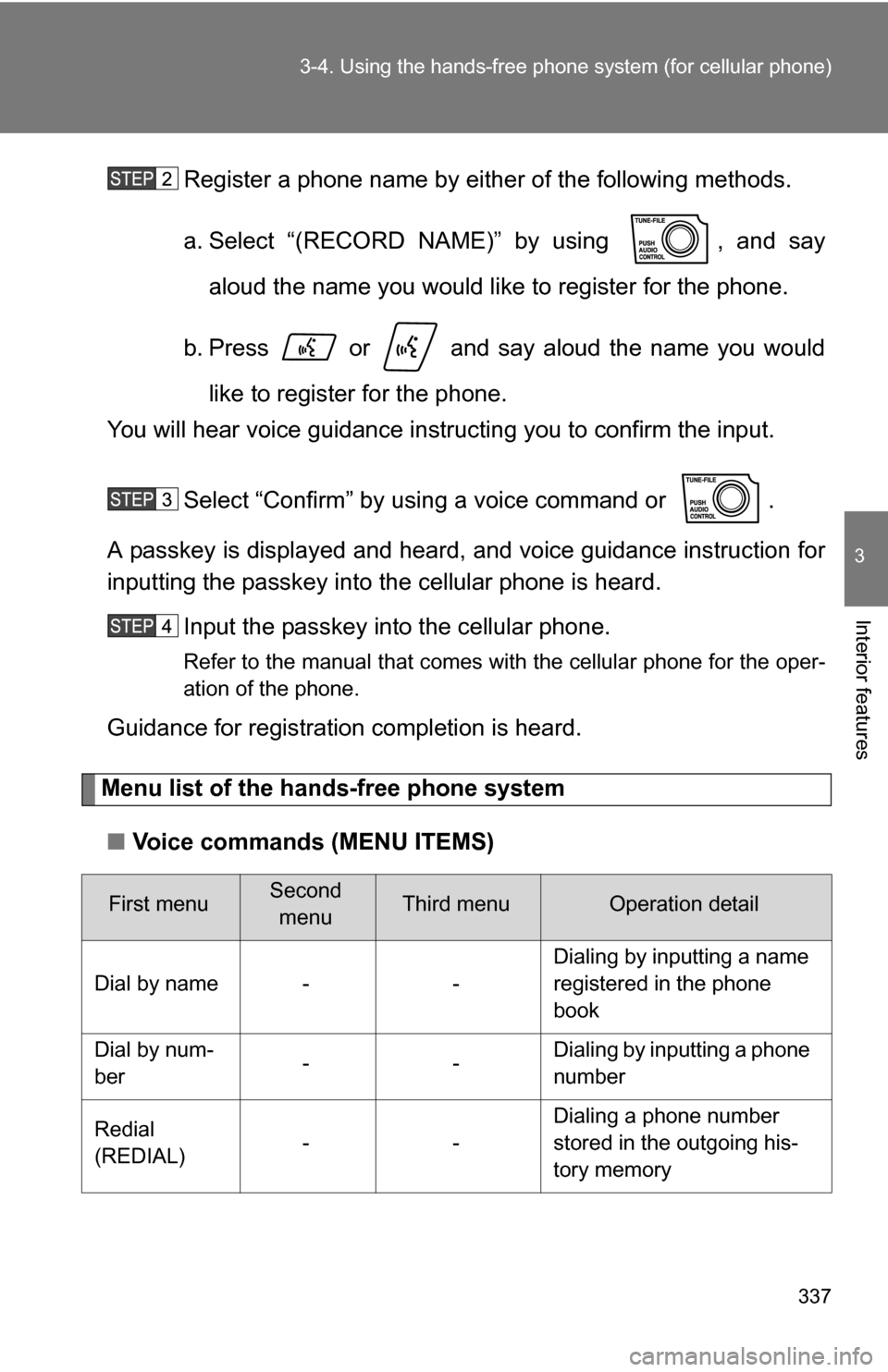
Register a phone name by either of the following methods.
a. Select “(RECORD NAME)” by using , and say
aloud the name you would like to register for the phone.
b. Press or and say aloud the name you would like to register for the phone.
You will hear voice guidance instru cting you to confirm the input.
Select “Confirm” by using a voice command or .
A passkey is displayed and heard, and voice guidance instruction for
inputting the passkey into the cellular phone is heard.
Input the passkey into the cellular phone.
Refer to the manual that comes with the cellular phone for the oper-
ation of the phone.
Guidance for registration completion is heard.
Menu list of the hands-free phone system
■ Voice commands (MENU ITEMS)
First menuSecond
menuThird menuOperation detail
Dial by name - - Dialing by inputting a name
registered in the phone
book
Dial by num-
ber -- Dialing by inputting a phone
number
Redial
(REDIAL) -- Dialing a phone number
stored in the outgoing his-
tory memory
Page 338 of 596
338 3-4. Using the hands-free phone system (for cellular phone)
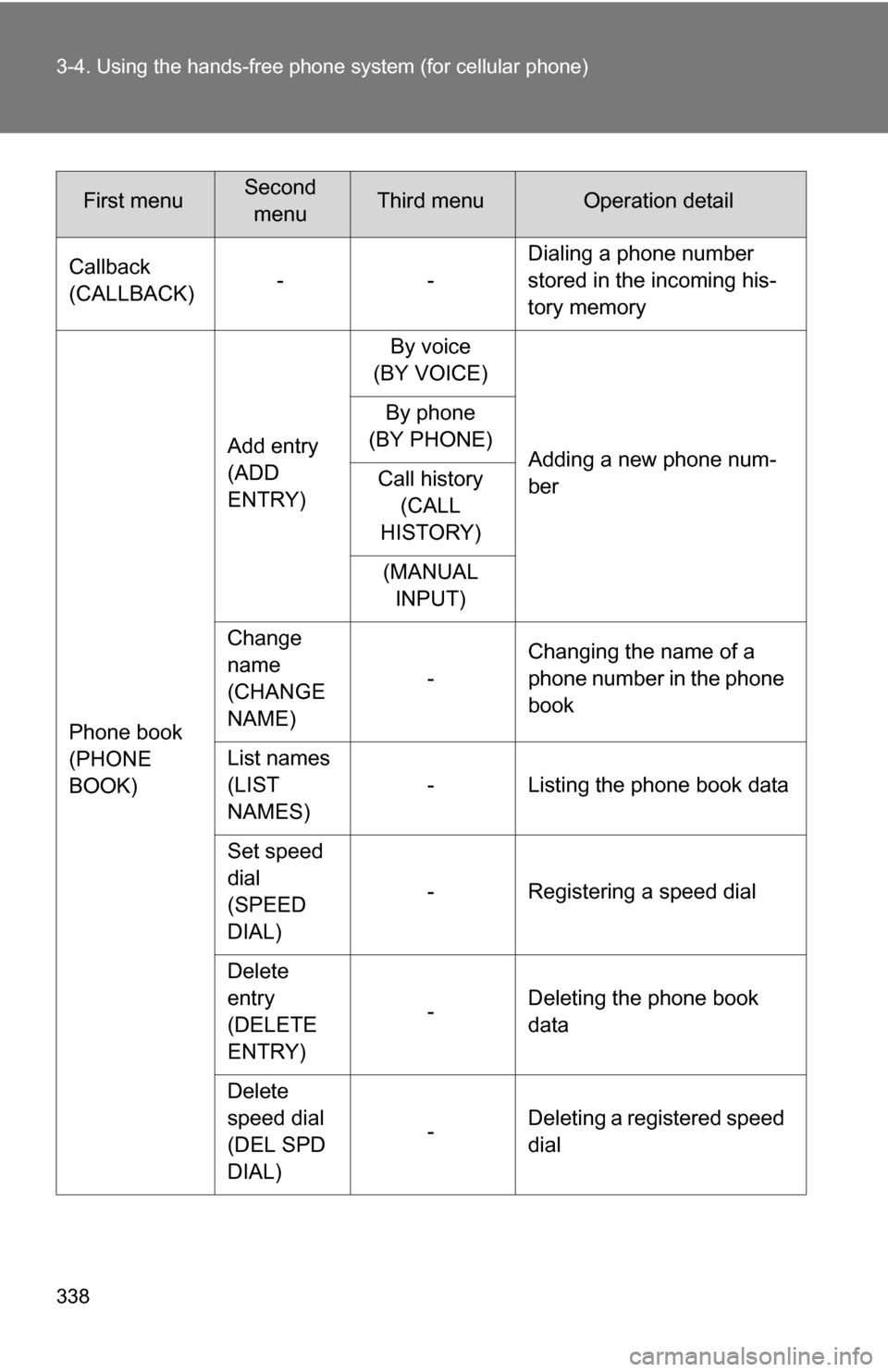
Callback
(CALLBACK)-- Dialing a phone number
stored in the incoming his-
tory memory
Phone book
(PHONE
BOOK) Add entry
(ADD
ENTRY)
By voice
(BY VOICE)
Adding a new phone num-
ber
By phone
(BY PHONE)
Call history (CALL
HISTORY)
(MANUAL INPUT)
Change
name
(CHANGE
NAME) -
Changing the name of a
phone number in the phone
book
List names
(LIST
NAMES) - Listing the phone book data
Set speed
dial
(SPEED
DIAL) - Registering a speed dial
Delete
entry
(DELETE
ENTRY) -
Deleting the phone book
data
Delete
speed dial
(DEL SPD
DIAL) -
Deleting a registered speed
dial
First menuSecond
menuThird menuOperation detail
Page 339 of 596
339
3-4. Using the hand
s-free phone system (for cellular phone)
3
Interior features
Setup
(SETUP)Security
(SECU-
RITY)
Set PIN
(SET PIN)
Setting a PIN
Phone book
lock
(PHBK
LOCK) Locking the phone book
Phone book
unlock
(PHBK
UNLOCK) Unlocking the phone book
Phone
setup
(PHONE
SETUP) Pair phone
(PAIR
PHONE)
Registering a cellular
phone to be used
Select phone
(SELECT
PHONE) Selecting a cellular phone
to be used
Change name
(CHANGE
NAME) Changing a registered
name of a cellular phone
List phones
(LIST
PHONES) Listing the registered cellu-
lar phones
Set passkey
(SET
PASSKEY) Changing the passkey
Delete
(DELETE) Deleting a registered cellu-
lar phone
(SYSTEM
SETUP) (GUIDANCE
VOL)
Setting voice guidance vol-
ume
(INITIALIZE) Initialization
First menuSecond menuThird menuOperation detail
Page 340 of 596
340 3-4. Using the hands-free phone system (for cellular phone)
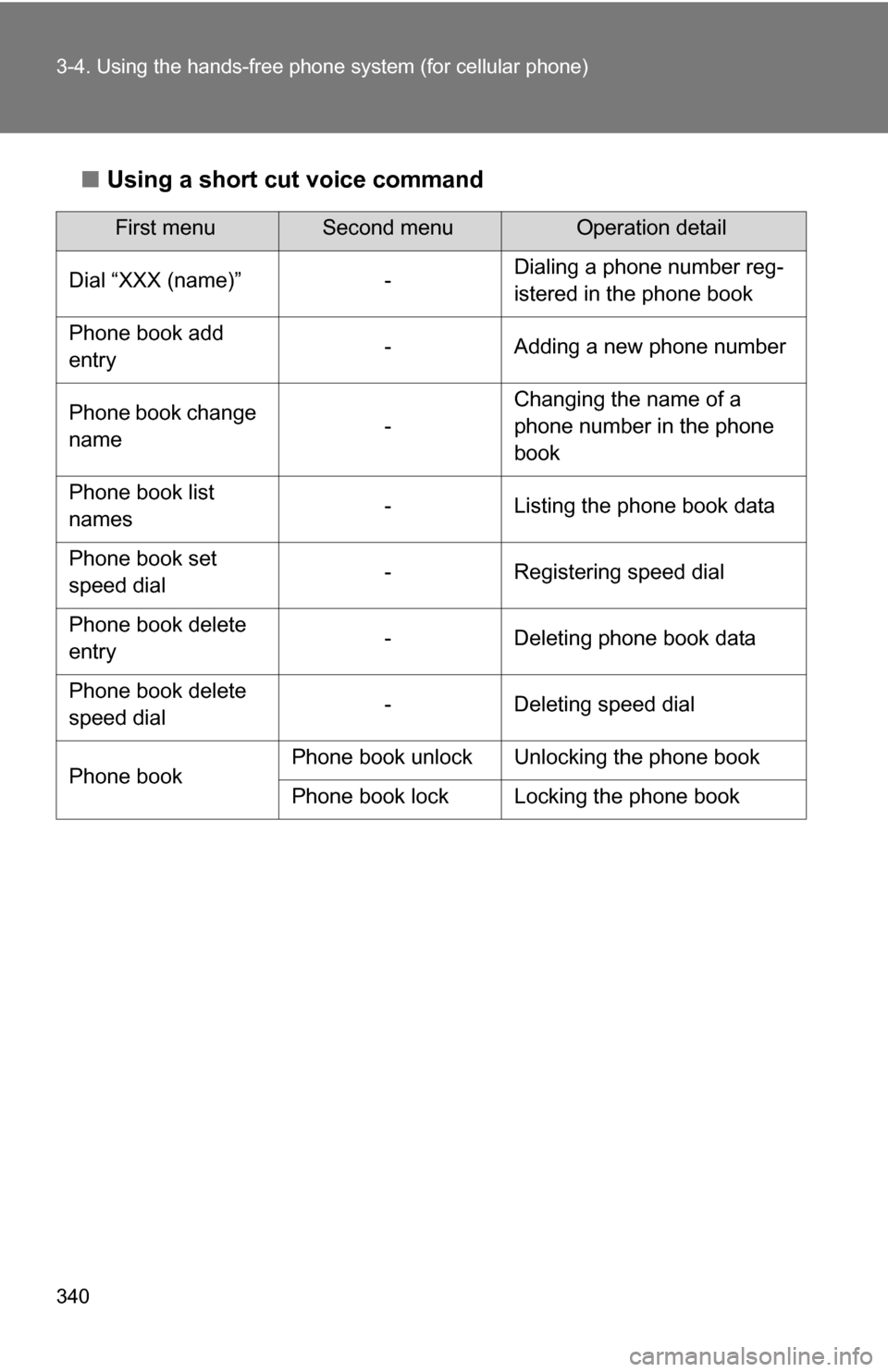
■Using a short cut voice command
First menuSecond menuOperation detail
Dial “XXX (name)” - Dialing a phone number reg-
istered in the phone book
Phone book add
entry - Adding a new phone number
Phone book change
name -Changing the name of a
phone number in the phone
book
Phone book list
names - Listing the phone book data
Phone book set
speed dial - Registering speed dial
Phone book delete
entry - Deleting phone book data
Phone book delete
speed dial - Deleting speed dial
Phone book Phone book unlock Unlocking the phone book
Phone book lock Locking the phone book
Page 341 of 596
341
3-4. Using the hand
s-free phone system (for cellular phone)
3
Interior features
■Automatic adjustment of volume
When vehicle speed is 50 mph (80 km/h) or more, the volume automatically
increases. The volume returns to the previous volume setting when vehicle
speed drops to 43 mph (70 km/h) or less.
■ When using a voice command
●For numbers, speak a combination of single digits from zero to nine, #
(pound), (star), and + (plus).
● Speak the command correctly and clearly.
■ The system may not recognize your voice in the following situations:
●When driving on a rough road
● When driving at high speeds
● When air is blowing out of the vents onto the microphone
● When the air conditioning fan emits a loud noise
■ The following cannot be performed while driving:
●Operating the system with
● Registering a cellular phone to the system
■ Changing the passkey
P. 350
Page 342 of 596
342
3-4. Using the hands-free phone system (for cellular phone)
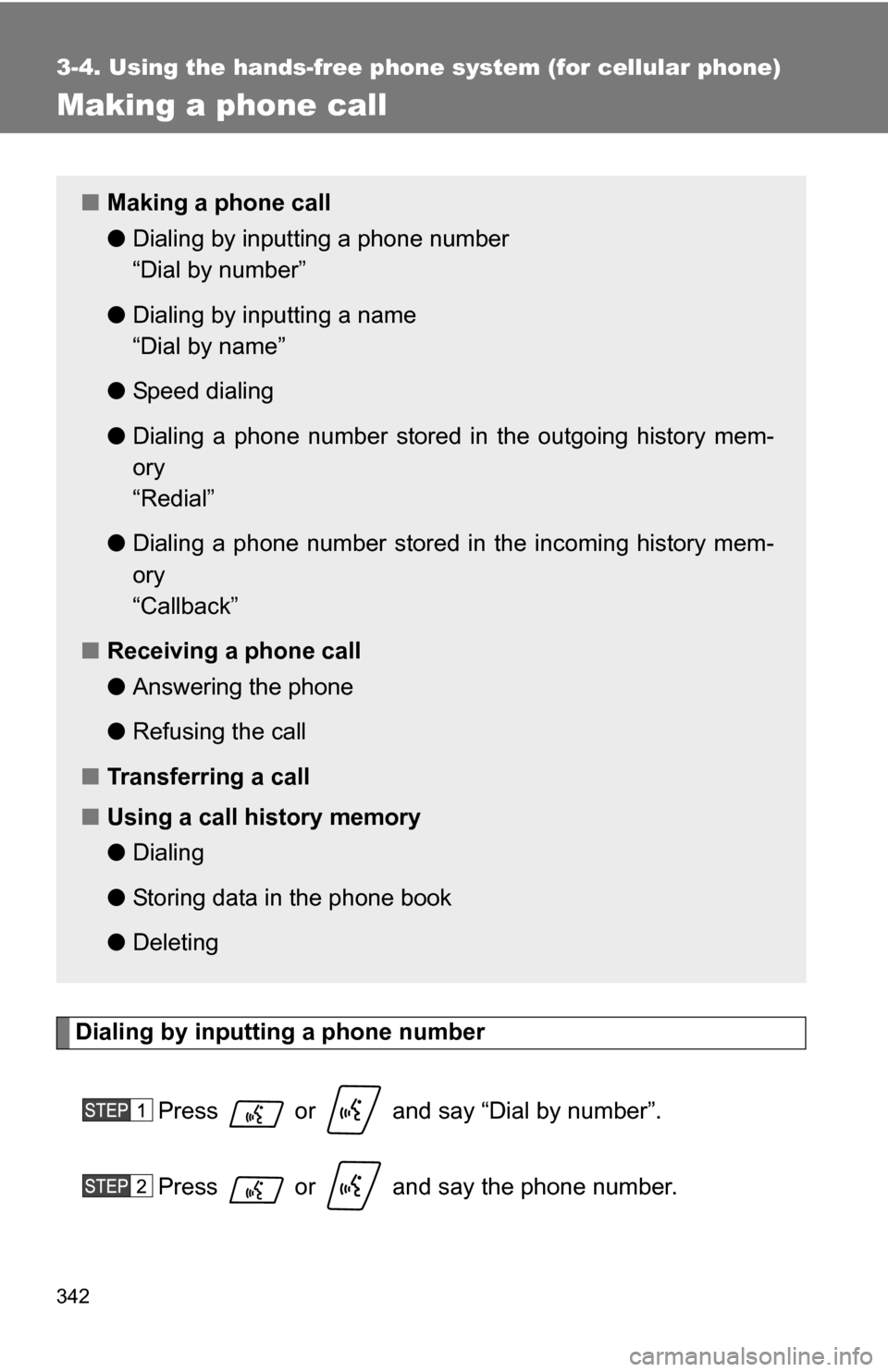
Making a phone call
Dialing by inputting a phone numberPress or and say “Dial by number”.
Press or and say the phone number.
■Making a phone call
●Dialing by inputting a phone number
“Dial by number”
● Dialing by inputting a name
“Dial by name”
● Speed dialing
● Dialing a phone number stored in the outgoing history mem-
ory
“Redial”
● Dialing a phone number stored in the incoming history mem-
ory
“Callback”
■ Receiving a phone call
●Answering the phone
● Refusing the call
■ Transferring a call
■ Using a call history memory
●Dialing
● Storing data in the phone book
● Deleting