Page 171 of 596
171
2-2. Instrument cluster
2
When driving
After customize is complete, press the SETUP US/M button to
set the selected item.
If the customization fails, the previously setting will be displayed.
If no button is pressed for 10 seconds, the display change to normal
display.
■
Feature customization error
• If SYSTEM ERROR message is indicated, turn the engine switch off and
then on again.
• If SYSTEM ERROR message is indicated again, contact your Toyota dealer.
CAUTION
■Caution while driving
Do not adjust the display.
Doing so may cause the driver to mishandle the vehicle and an accident,
resulting in death or serious injury.
NOTICE
■The multi-information disp lay at low temperatures
Allow the interior of the vehicle to warm up before using the liquid crystal
information display. At extremely low temperatures, the information display
monitor may respond slowly, and display changes may be delayed.
Page 172 of 596
172
2-2. Instrument cluster
Accessor y meter
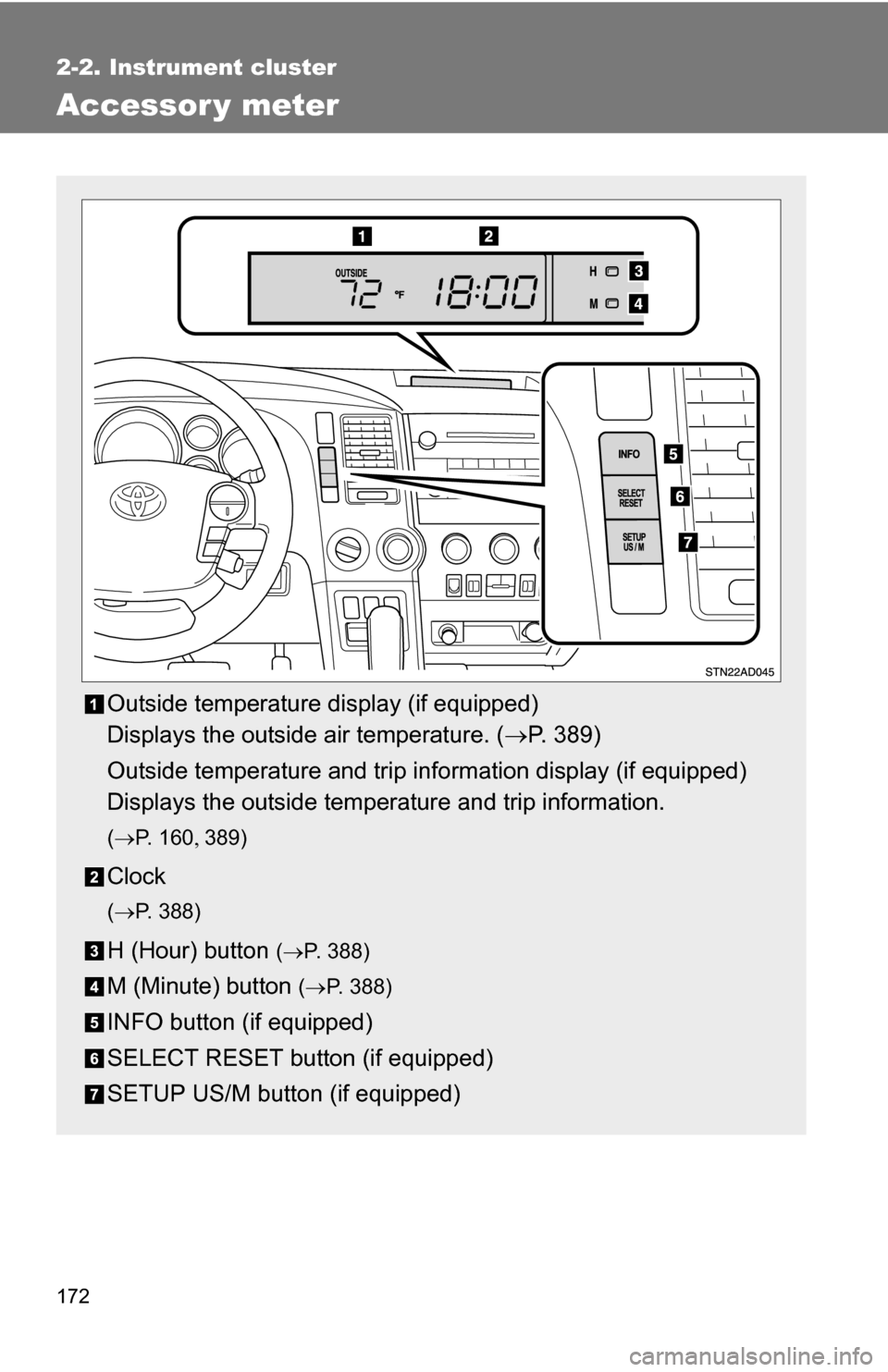
Outside temperature display (if equipped)
Displays the outside air temperature. (P. 389)
Outside temperature and trip information display (if equipped)
Displays the outside temperature and trip information.
( P. 1 6 0 389)
Clock
(P. 388)
H (Hour) button (P. 388)
M (Minute) button ( P. 388)
INFO button (if equipped)
SELECT RESET button (if equipped)
SETUP US/M button (if equipped)
Page 173 of 596
173
2-2. Instrument cluster
2
When driving
Outside temperature and trip in
formation display (if equipped)
Every time the INFO button is pushed, the display toggles through
these information.
● OUTSIDE (outside temperature display)
● RANGE (driving range)
● AVG (average fuel consumption after refueling)
● INST (current fu el consumption)
● Display off
Displays the outside air temperature.
Displays the estimated maximum distance that can be
driven with the quantity of fuel remaining.
• This distance is computed based on your aver-age fuel consumption. As a result, the actual dis-
tance that can be driven may differ from that
displayed.
• When only a small amount of fuel is added to the tank, the display may not be updated.
Displays the average fuel consumption since the vehi-
cle was last refueled.
Displays the current rate of fuel consumption.
Page 174 of 596
174 2-2. Instrument cluster
■To select the unit A (English/U.S. customary system) or unit B (metric
unit)
Vehicles without multi-information display
Press the SETUP US/M button to change the units. Vehicles with multi-information display
Press the SETUP US/M button to display UNITS on the multi-information
display. And then press the SELECT RESET button to change the units.
CAUTION
■ Caution while driving
Do not adjust the display.
Doing so may cause the driver to mishandle the vehicle and an accident,
resulting in death or serious injury.
Information Unit AUnit B
Average fuel consumption and
current fuel consumption MPG
L/100 Km
Driving range MILESKm
Outside temperature °F°C
Page 507 of 596
5
When trouble arises
507
5-2. Steps to take in an emergency
Follow the correction procedures.
After taking the specified steps to correct the suspected problem,
check that the warning light turns off.
Automatic transmission fluid temperature warn-
ing light Indicates that the automatic transmission fluid tem-
perature is too high.
Power steering warning light Indicates a malfunction in the variable flow control
power steering system.
Warning lightWarning light/DetailsCorrection procedure
Open door warning light
(warning buzzer)
*1
Indicates that a door or
back door is not fully
closed. Check that all doors
are closed.
(On the instrument cluster) Driver’s seat belt
reminder light
(warning buzzer)
*2
Warns the driver to fas-
ten his/her seat belt.
Fasten the seat belt.
(On the center panel) Front passenger’s seat
belt reminder light
(warning buzzer)
*3
Warns the front passen-
ger to fasten his/her seat
belt.
Fasten the seat belt.
Warning lightWarning light/Details
Page 536 of 596
536
5-2. Steps to take in an emergency
If your vehicle overheats
If your engine overheats:
Stop the vehicle in a safe place and turn off the air condi-
tioning system.
Check to see if steam is coming out from under the hood.
If you see steam: Stop the engine and carefully lift the hood.
If you do not see steam: Leave the engine running and carefully lift the hood.
Check to see if the cooling fan is operating.
If the fan is operating: Wait until the temperature of the engine (shown on the
instrument cluster) begins to fall and then stop the
engine.
If the fan is not operating: Stop the engine immediately and call your local Toyota
dealer.
Page 556 of 596

556 6-1. Specifications
■Toyota recommends the use of cleaner burning gasoline
Cleaner burning gasoline, including reformulated gasoline that contains
oxygenates such as ethanol or MTBE (Methyl Tertiary Butyl Ether) is
available in many areas.
Toyota recommends the use of cleaner burning gasoline and appropriately
blended reformulated gasoline. These types of gasoline provide excellent
vehicle performance, reduce vehicle emissions and improve air quality.
■ Toyota does not recomm end blended gasoline
● Toyota allows the use of oxygenate blended gasoline where the
oxygenate content is up to 10% ethanol or 15% MTBE.
● If you use gasohol in your Toyota, be sure that it has an octane rating no
lower than 87.
● Toyota does not recommend the use of gasoline containing methanol.
■ Toyota does not recommen d gasoline containing MMT
Some gasoline contains octane enhancing additive called MMT
(Methylcyclopentadienyl Manganese Tricarbonyl).
Toyota does not recommend the use of gasoline that contains MMT. If fuel
containing MMT is used, your emission control system may be adversely
affected.
The malfunction indicator lamp on the instrument cluster may come on. If
this happens, contact your Toyota dealer for service.
Page 593 of 596
593
What to do if...
■
Instrument cluster
■ Center panel
The warning light or indicator
light comes onP. 505If a warning light turns on
Vehicles with multi-information display
Vehicles without multi-information display
Page:
< prev 1-8 9-16 17-24