Page 241 of 596

241
2-5. Driving information
2
When driving
●
Avoid sudden braking as you may skid, resulting in jackknifing and
loss of control. This is especiall y true on wet or slippery surfaces.
● Avoid jerky starts or sudden acceleration.
● Avoid jerky steering and sharp turns, and slow down before mak-
ing a turn.
● Note that when making a turn, th e trailer wheels will be closer than
the vehicle wheels to the inside of the turn. Compensate by making
a larger than normal turning radius.
● Crosswinds and rough roads will adversely affect handling of your
vehicle and trailer, causing sway . Periodically check the rear to
prepare for being passed by large trucks or buses, which may
cause your vehicle and trailer to sway. If swaying occurs, firmly grip
the steering wheel, reduce speed immediately but gradually, and
steer straight ahead. Never increase speed. If you make no
extreme correction with the stee ring or brakes, your vehicle and
trailer will stabilize.
● Take care when passing other vehicles. Passing requires consider-
able distance. After passing a vehicle, do not forget the length of
your trailer, and be sure you hav e plenty of room before changing
lanes.
● In order to maintain engine braking efficiency when driving on a
long steep downgrade, do not use the transmission in D.
Transmission shift range position must be in 5 in the S mode (6-
speed models) or in 4 in the S mode (5-speed models).
● Due to the added load of the trailer, your vehicle’s engine may
overheat on hot days (at temperatures over 85°F [30°C]) when
driving up a long or steep grade. If the engine coolant temperature
gauge indicates overheating, immedi ately turn off the air condition-
ing (if in use), pull your vehicle off the road and stop in a safe spot.
( P. 536)
Page 243 of 596

243
2-5. Driving information
2
When driving
■
Before towing
Check that the following conditions are met:
●Ensure that your vehicle’s tires are properly inflated. ( P. 553)
● Trailer tires should be inflated according to the trailer manufacturer’s rec-
ommendation.
● All trailer lights work to be legal.
● All lights work each time you connect them.
● The trailer ball is set up at the proper height for the coupler on the t\
railer.
● The vehicle remains level when a loaded or unloaded trailer is hitched.
Do not drive if the vehicle is not level, and check for improper tongue
load, overloading, worn suspension, or other possible causes.
● The trailer cargo is securely loaded.
● The rear view mirrors conform to all applicable federal, state/provincial or
local regulations. If they do not, instal l rear view mirrors appropriate for
towing purposes.
● Depress TOW/HAUL button (if equipped)
■ When connecting and disconnecting a trailer
Set the electronically modulated air suspension system to MAN., or turn off
the engine, when the system is in N mode. (if equipped)
■ AVS (adaptive variable suspension system) (if equipped)
The suspension can be switched for improvement in driveability. ( P. 207)
■ Break-in schedule
●Toyota recommends that you do not use a new vehicle or a vehicle with
any new power train components (engine, transmission, differential,
wheel bearings, etc.) to tow a trailer for the first 500 miles (800 km) of
driving.
● Drive the vehicle at a speed of less than 50 mph (80 km/h) when towing a
trailer for another 500 miles (800 km/h).
● Avoid full throttle acceleration.
■ Maintenance
●If you tow a trailer, your vehicle will require more frequent maintenance
due to the additional load. (See “Scheduled Maintenance Guide” or
“Owner’s Manual Supplement”.)
Page 248 of 596

248
3-1. Using the air conditioning system and defogger... 250
Front air conditioning system ........................... 250
Rear air conditioning system ........................... 258
Rear window and outside rear view mirror
defoggers ....................... 262
Windshield wiper de-icer ............................ 263
Using the steering wheel climate remote control
switches ......................... 264
3-2. Using the audio system .......................... 266
Audio system (without navigation system)
.......... 266
Using the radio ................. 269
Using the CD player ......... 275
Playing back MP3 and WMA discs ..................... 283
Optimal use of the audio system ........................... 292
Using the AUX adapter .... 294
Using the steering wheel audio switches ............... 296 3-3. Using the rear audio/video
system .......................... 298
Rear seat entertainment system ........................... 298
Using the DVD player (DVD video) ................... 305
Using the DVD player (video CD)...................... 314
Using the DVD player (audio CD/CD text) ........ 316
Using the DVD player (MP3 discs) .................... 317
Using the video mode ...... 319
Changing the Setup Menu settings .......................... 321
3-4. Using the hands-free phone system (for
cellular phone) ............. 329
Hands-free phone system (for cellular phone) ......... 329
Using the hands-free phone system ........................... 333
Making a phone call ......... 342
Setting a cellular phone ... 347
Security and system setup .............................. 352
Using the phone book ...... 355
Interior features3
Page 250 of 596
250
3-1. Using the air conditioning system and defogger
Front air conditioning system
Airflow and outlets are automatically adjusted according to the tem-
perature setting.
Control panel
Fan speed
control dial
Outside air or
recirculated air mode Front passenger’s
side temperature
control dial
Air conditioning ON/OFF switch
Simultaneous
mode
Rear air conditioning ON/OFF switch
Temperature control for rear
passengers Air outlet
selection dial
Driver's side temperature
control dial
Automatic mode Windshield defogger
Fan OFF switch
Page 251 of 596
251
3-1. Using the air conditioning system
and defogger
3
Interior features
Using the automatic mode
Press .
The air conditioning system will begin to operate. Air outlets and fan
speed are automatically adjusted according to the temperature set-
ting.
Turn the temperature control dial clockwise (warm) or coun-
terclockwise (cool).
The temperature for the driver and passenger seat can be set sepa-
rately.
Display
Front passenger’s side
temperature display
Fan speed display
Airflow display
Driver’s side temperature
setting display Temperature setting
display for rear passengers
Page 252 of 596
252 3-1. Using the air conditioning system and defogger
Adjusting the settings
■ Adjusting the temperature setting
Turn the temperature control dial clockwise (warm) or counter-
clockwise (cool).
The air conditioning system sw itches between individual and
simultaneous modes each time is pressed.
● Simultaneous mode (the indicator on is on)
The driver’s side temperature control dial can be used to adjust
the temperature for all seats.
● Individual mode (the indicator on is off)
The temperature for the driver’s, front passenger’s and rear
seats ( P. 258) can be adjusted separately. Operate the pas-
senger’s side or rear temperature controls to enter individual
mode.
■ Adjusting the fan speed
Turn the fan speed control dial clockwise (increase) or counter-
clockwise (decrease).
The fan speed is shown on the display. (7 levels)
Press to turn the fan off.
Page 253 of 596
253
3-1. Using the air conditioning system
and defogger
3
Interior features
■Changing the air outlets
Turn the air outlet selection dial.
The air outlets switch each time either side of air outlet selection dial is
turned. The air flow shown on the display indicates the following.
When the dial is set to , air
flows to the upper body.
When the dial is set to , air
flows to the upper body and feet.
When the dial is set to , air
flows to the feet.
Page 254 of 596
254 3-1. Using the air conditioning system and defogger
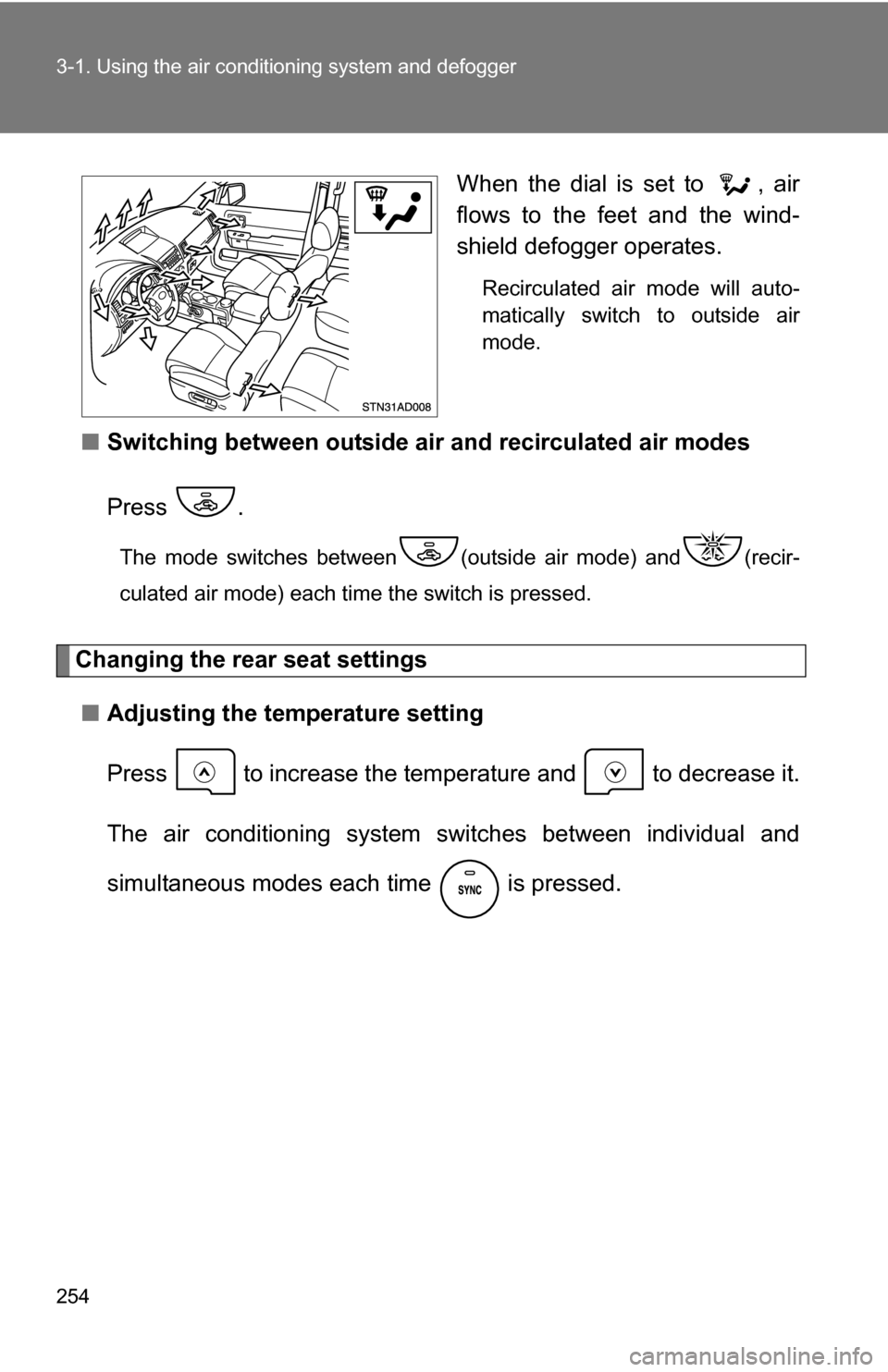
When the dial is set to , air
flows to the feet and the wind-
shield defogger operates.
Recirculated air mode will auto-
matically switch to outside air
mode.
■Switching between outside air and recirculated air modes
Press .
The mode switches between (outside air mode) and (recir-
culated air mode) each time the switch is pressed.
Changing the rear seat settings ■ Adjusting the temperature setting
Press to increase the tem perature and to decrease it.
The air conditioning system sw itches between individual and
simultaneous modes each time is pressed.