Page 84 of 512
84
1-7. Theft deterrent system
PRIUS_U_(L/O_0802)
Alarm (if equipped)
The system sounds the alarm and flashes the vehicle lights when an
attempt to steal the vehicle is detected.
■ Triggering the alarm
The alarm is triggered in the following situations.
●A locked door or back door is unlocked or opened in any way
other than using the entry function, wireless remote door lock
function or using the mechani cal key. (The doors will lock
again automatically)
● The hood is opened while t he vehicle is locked.
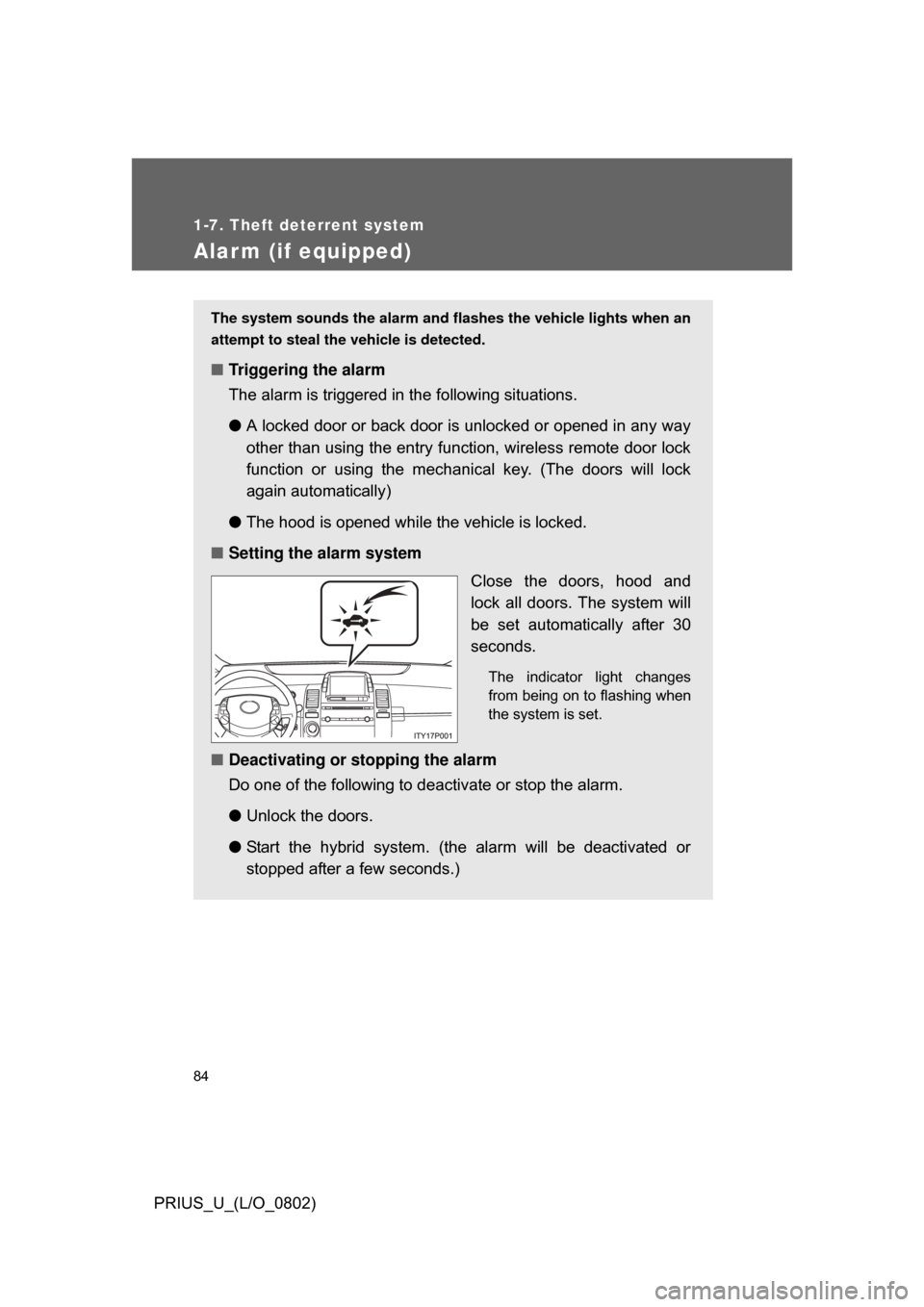
■ Setting the alarm system
Close the doors, hood and
lock all doors. The system will
be set automatically after 30
seconds.
The indicator light changes
from being on to flashing when
the system is set.
■Deactivating or stopping the alarm
Do one of the following to deactivate or stop the alarm.
●Unlock the doors.
● Start the hybrid system. (the alarm will be deactivated or
stopped after a few seconds.)
Page 120 of 512

120
PRIUS_U_(L/O_0802)
2-1. Driving procedures
Driving the vehicle
Starting on a steep inclineFirmly set the parking brake and shift the shift lever to “D”.
Gently depress the accelerator pedal.
Release the parking brake.
The following procedures should be observed to ensure safe driv-
ing.
■ Starting the hybrid system ( P. 131)
■ Driving
With the brake pedal depressed, shift the shift lever to “D”. ( P. 136)
Release the parking brake. ( P. 142)
Gradually release the brake pedal and gently depress the
accelerator pedal to accelerate the vehicle.
■ Stopping
With the shift lever in “D”, depress the brake pedal.
If necessary, set the parking brake.
When the vehicle is stopped for an extended period of time, push
the “P” position switch. (
P. 137)
■Parking the vehicle
With the shift lever in “D”, depress the brake pedal.
Set the parking brake. ( P. 142)
Push the “P” position switch. ( P. 137)
When parking on hill, if necessary, block the wheels.
Press the “POWER” switch and stop the hybrid system.
Lock the door, making sure that you have the electronic key
on your person.
STEP1
STEP2
STEP3
STEP1
STEP2
STEP1
STEP2
STEP3
STEP4
STEP5
STEP1
STEP2
STEP3
Page 130 of 512
130
2-1. Driving procedures
PRIUS_U_(L/O_0802)
Power (ignition) switch
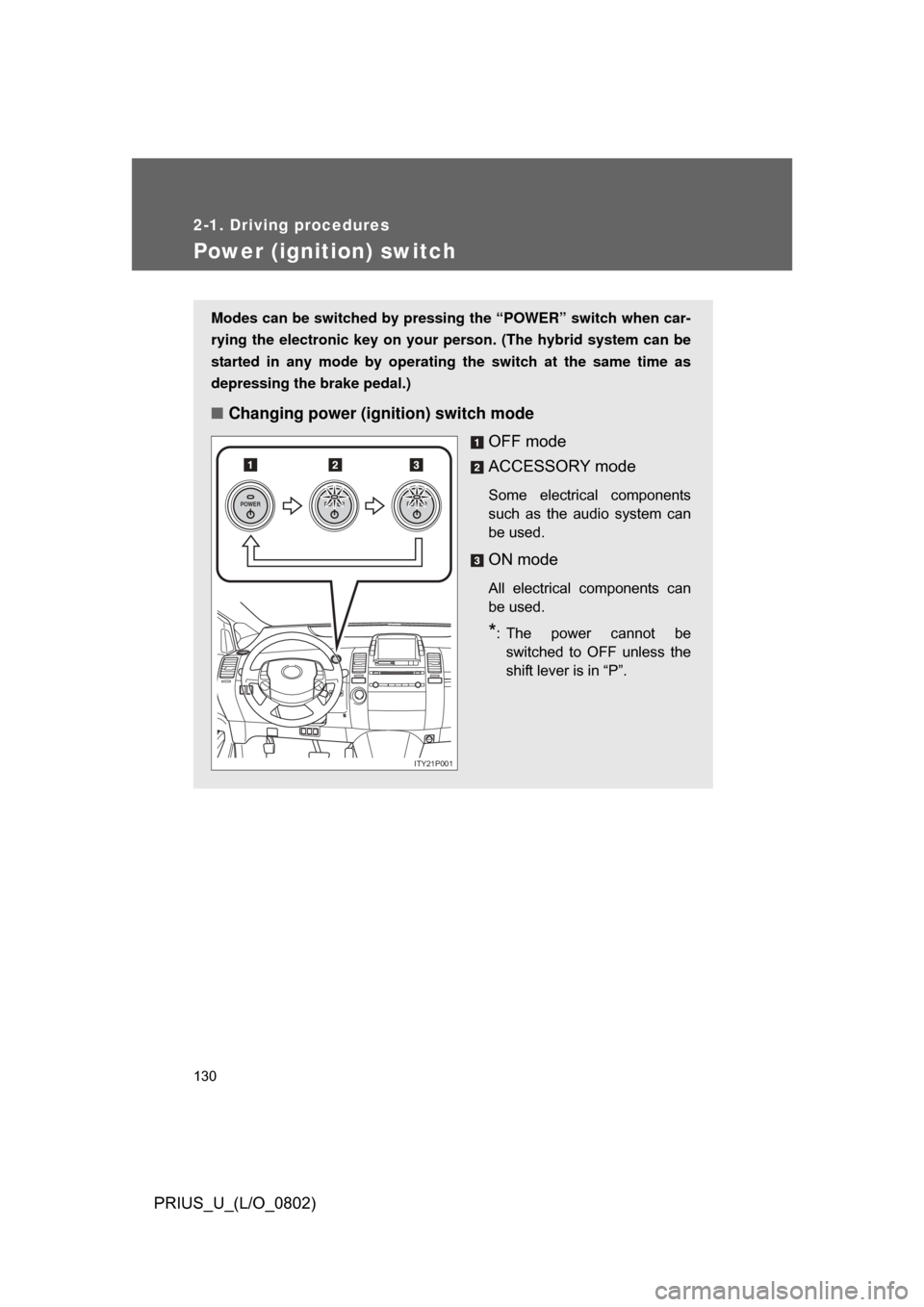
Modes can be switched by pressing the “POWER” switch when car-
rying the electronic key on your person. (The hybrid system can be
started in any mode by operating the switch at the same time as
depressing the brake pedal.)
■ Changing power (ignition) switch mode
OFF mode
ACCESSORY mode
Some electrical components
such as the audio system can
be used.
ON mode
All electrical components can
be used.
*: The power cannot beswitched to OFF unless the
shift lever is in “P”.
POWERPOWERPOWER
ITY21P001
Page 131 of 512
131
2-1. Driving procedures
2
When driving
PRIUS_U_(L/O_0802)
■
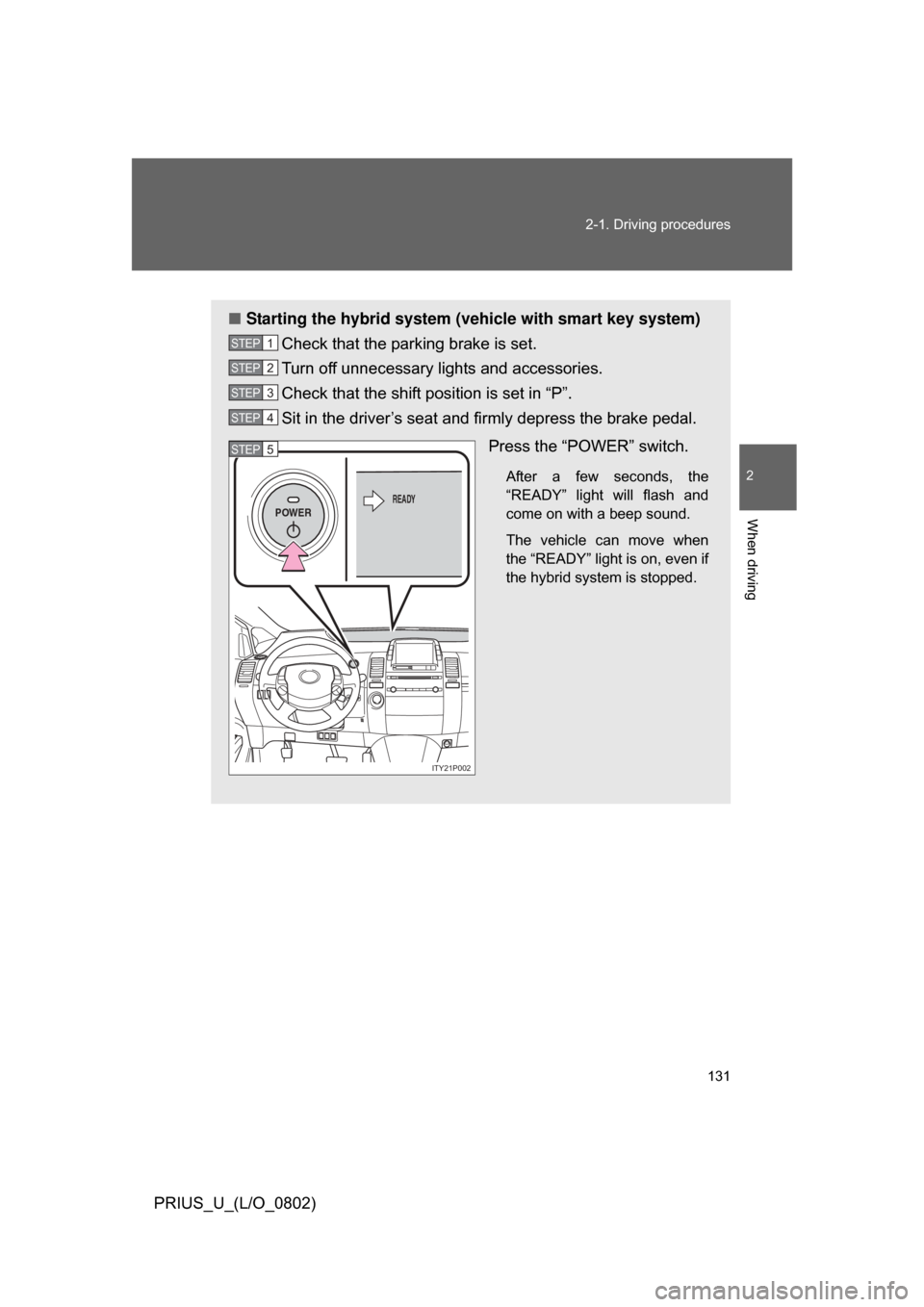
Starting the hybrid system (vehicle with smart key system)
Check that the parking brake is set.
Turn off unnecessary lights and accessories.
Check that the shift position is set in “P”.
Sit in the driver’s seat and firmly depress the brake pedal.
Press the “POWER” switch.
After a few seconds, the
“READY” light will flash and
come on with a beep sound.
The vehicle can move when
the “READY” light is on, even if
the hybrid system is stopped.
STEP1
STEP2
STEP3
STEP4
POWERREADY
ITY21P002
STEP5
Page 132 of 512
132 2-1. Driving procedures
PRIUS_U_(L/O_0802)
■Starting the hybrid system (v ehicle without smart key sys-
tem)
Check that the parking brake is set.
Turn off unnecessary lights and accessories.
Check that the shift position is set in “P”.
Insert the key into the key slot
and firmly with the brake pedal
depressed.
STEP1
STEP2
STEP3
ITY21P009
STEP4
Page 134 of 512

134 2-1. Driving procedures
PRIUS_U_(L/O_0802)
■If the hybrid system does not start
The hybrid system immobilizer system may not have been deactivated.
(P. 81)
■ If the “READY” light does not come on
If the “READY” light does not come on when you press the power switch with
the shift lever in “P” and the brake pedal pressed, contact your Toyota dealer
immediately.
■ When the “POWER” switch in dicator flashes in amber
The system may be malfunctioning. Have the vehicle inspected by your Toy-
ota dealer immediately.
■ Auto power OFF function
The “POWER” switch will automatically turn OFF when left in ACCESSORY
mode for 1 hour or more.
■ Electronic key battery depletion
P. 4 4
■ When the electronic key battery is discharged
P. 396
■ Conditions affecting operation
P. 4 2
■ Leak detection pump
Several hours after the engine is turned off, you may hear a sound coming
from underneath the luggage compartment for several minutes.
This is normal operation and does not indicate a malfunction.
Page 278 of 512
278 3-4. Using the hands-free system
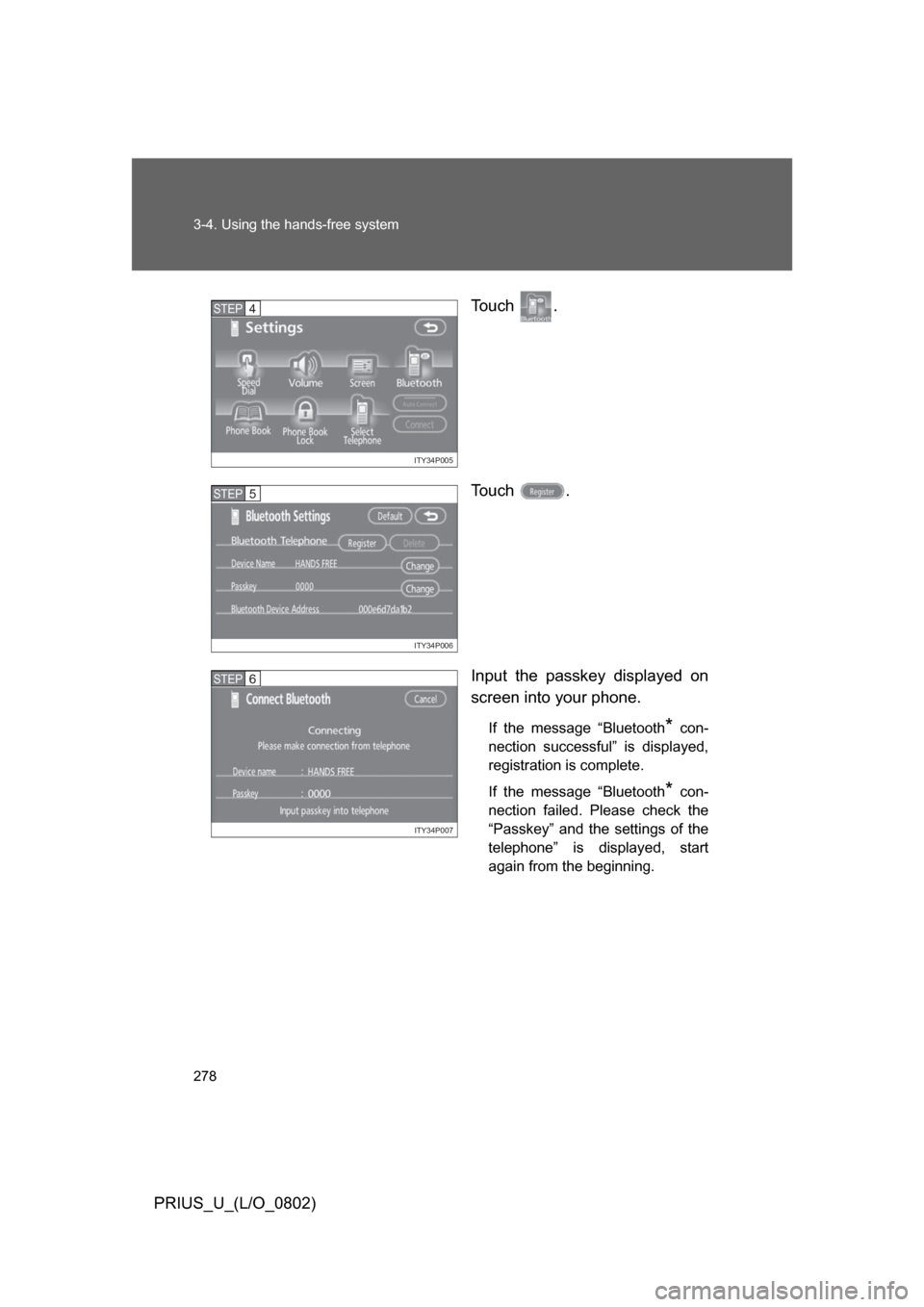
PRIUS_U_(L/O_0802)To u c h .
To u c h .
Input the passkey displayed on
screen into your phone.
If the message “Bluetooth* con-
nection successful” is displayed,
registration is complete.
If the message “Bluetooth
* con-
nection failed. Please check the
“Passkey” and the settings of the
telephone” is displayed, start
again from the beginning.
ITY34P005
STEP4
ITY34P006
STEP5
ITY34P007
STEP6
Page 289 of 512
289
3-4. Using the hands-free system
3
Interior features
PRIUS_U_(L/O_0802)
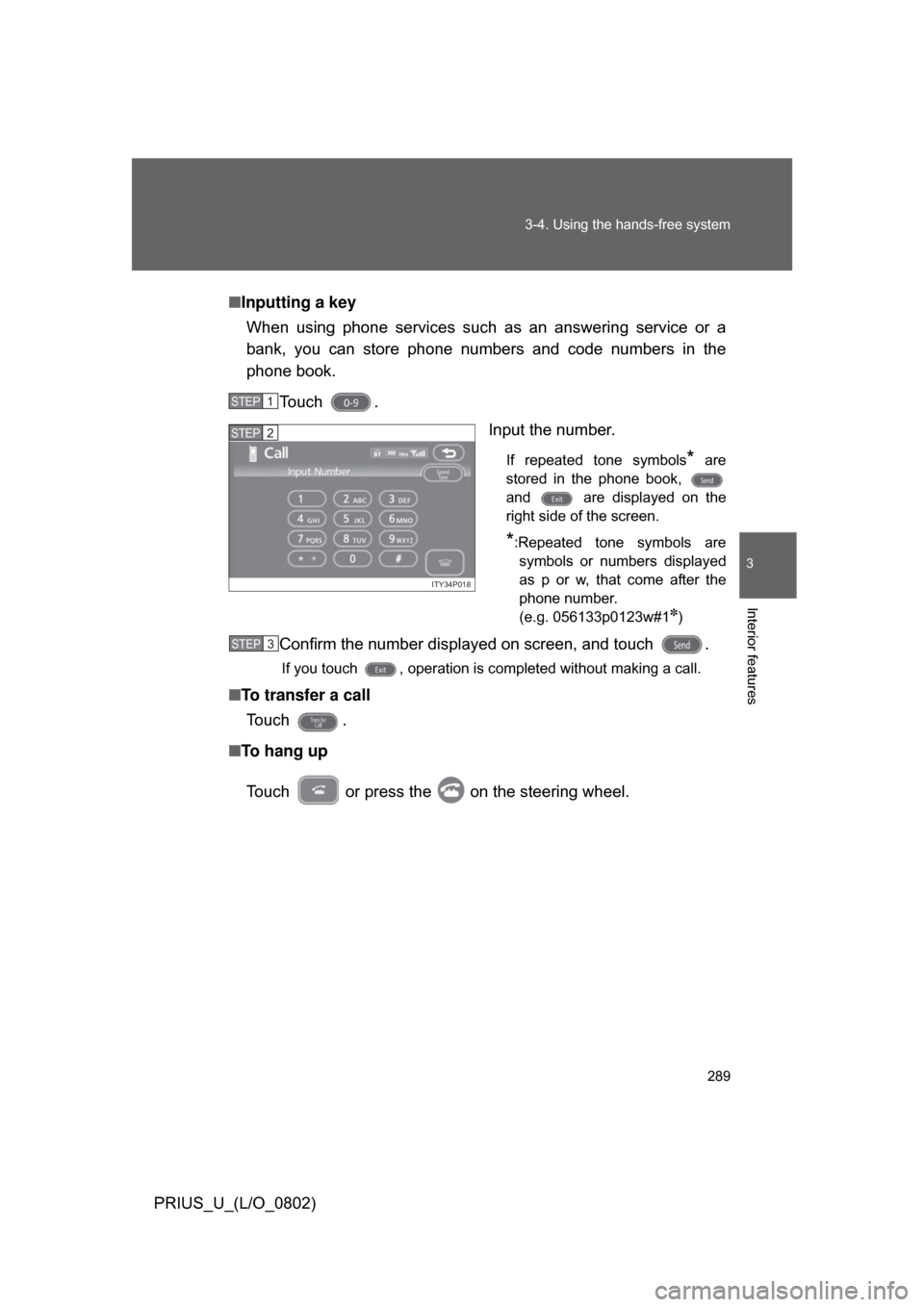
■
Inputting a key
When using phone services such as an answering service or a
bank, you can store phone numbers and code numbers in the
phone book.
Touch . Input the number.
If repeated tone symbols* are
stored in the phone book,
and are displayed on the
right side of the screen.
*:Repeated tone symbols are symbols or numbers displayed
as p or w, that come after the
phone number.
(e.g. 056133p0123w#1
✽)
Confirm the number displayed on screen, and touch .
If you touch , operation is completed without making a call.
■ To transfer a call
To u c h .
■ To hang up
Touch or press the on the steering wheel.
STEP1
ITY34P018
STEP2
STEP3