Page 14 of 138
BASIC FUNCTIONS
32
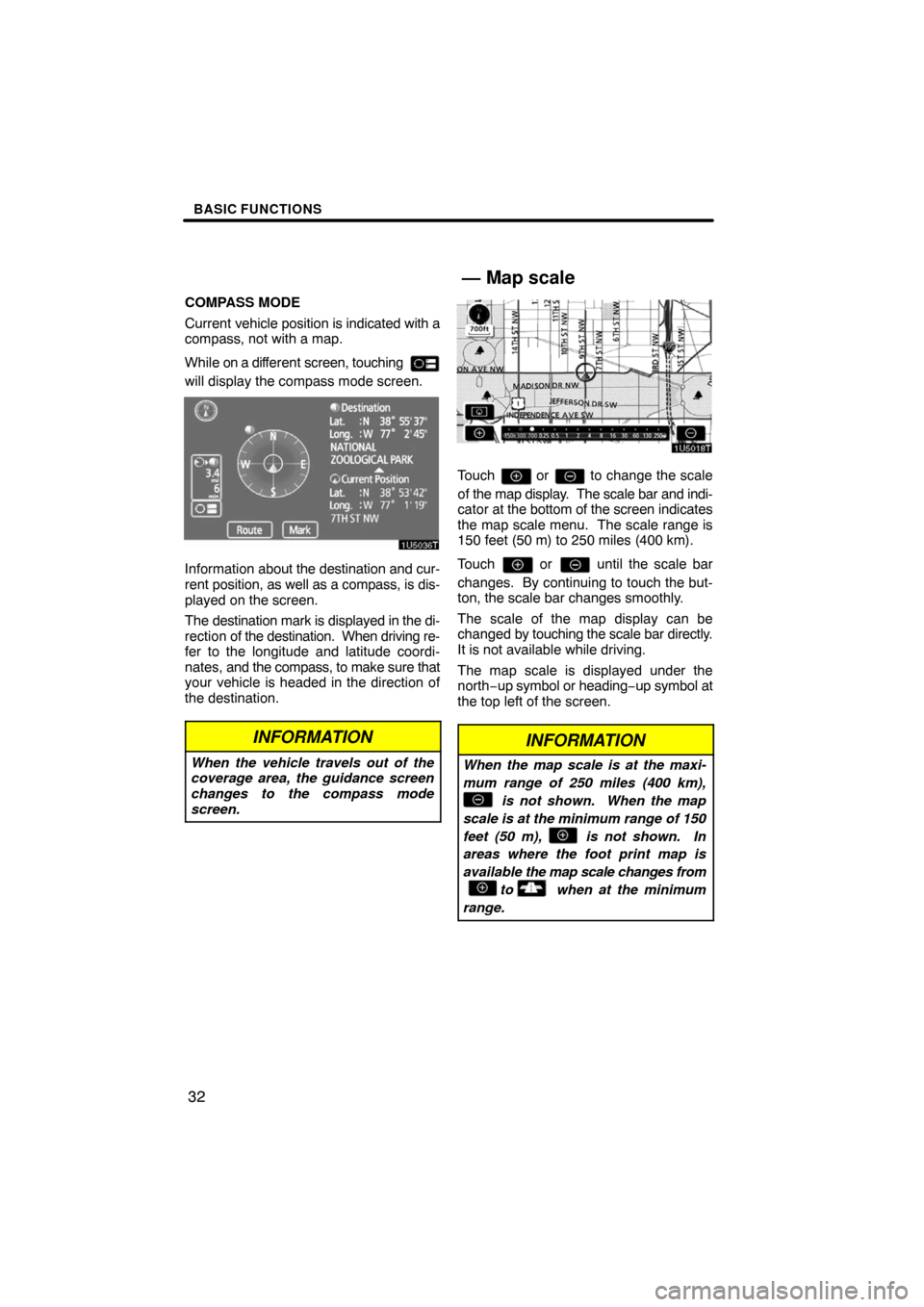
COMPASS MODE
Current vehicle position is indicated with a
compass, not with a map.
While on a different screen, touching
will display the compass mode screen.
Information about the destination and cur-
rent position, as well as a compass, is dis-
played on the screen.
The destination mark is displayed in the di-
rection of the destination. When driving re-
fer to the longitude and latitude coordi-
nates, and the compass, to make sure that
your vehicle is headed in the direction of
the destination.
INFORMATION
When the vehicle travels out of the
coverage area, the guidance screen
changes to the compass mode
screen.
Touch or to change the scale
of the map display. The scale bar and indi-
cator at the bottom of the screen indicates
the map scale menu. The scale range is
150 feet (50 m) to 250 miles (400 km).
Touch
or until the scale bar
changes. By continuing to touch the but-
ton, the scale bar changes smoothly.
The scale of the map display can be
changed by touching the scale bar directly.
It is not available while driving.
The map scale is displayed under the
north−up symbol or heading−up symbol at
the top left of the screen.
INFORMATION
When the map scale is at the maxi-
mum range of 250 miles (400 km),
is not shown. When the map
scale is at the minimum range of 150
feet (50 m), is not shown. In
areas where the foot print map is
available the map scale changes from
to when at the minimum
range.
— Map scale
Page 15 of 138
BASIC FUNCTIONS
33
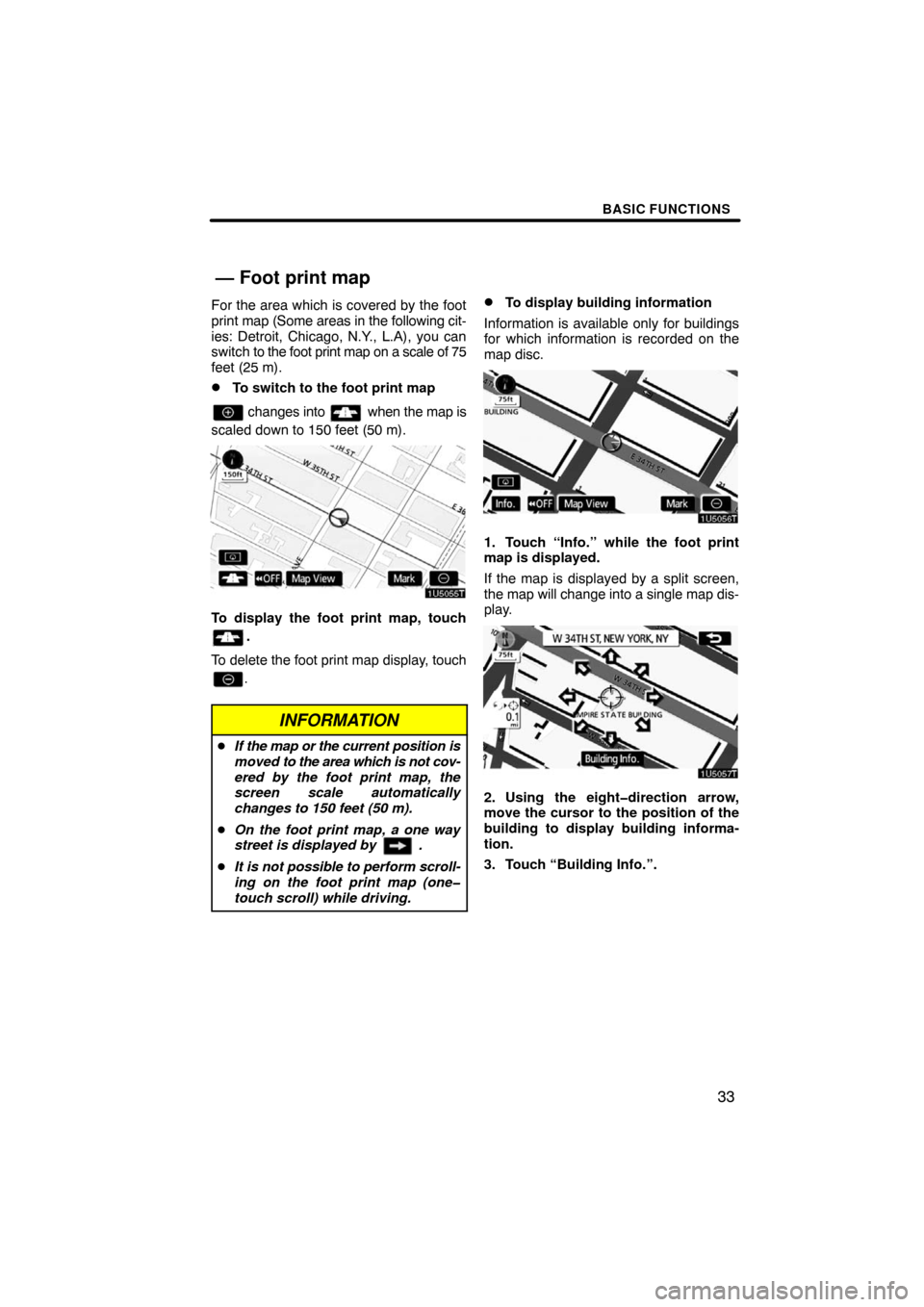
For the area which is covered by the foot
print map (Some areas in the following cit-
ies: Detroit, Chicago, N.Y., L.A), you can
switch to the foot print map on a scale of 75
feet (25 m).
�To switch to the foot print map
changes into when the map is
scaled down to 150 feet (50 m).
To display the foot print map, touch
.
To delete the foot print map display, touch
.
INFORMATION
�If the map or the current position is
moved to the area which is not cov-
ered by the foot print map, the
screen scale automatically
changes to 150 feet (50 m).
�On the foot print map, a one way
street is displayed by .
�It is not possible to perform scroll-
ing on the foot print map (one
touch scroll) while driving.
�To display building information
Information is available only for buildings
for which information is recorded on the
map disc.
1. Touch “Info.” while the foot print
map is displayed.
If the map is displayed by a split screen,
the map will change into a single map dis-
play.
2. Using the eightdirection arrow,
move the cursor to the position of the
building to display building informa-
tion.
3. Touch “Building Info.”.
— Foot print map
Page 16 of 138
BASIC FUNCTIONS
34
Details of POIs in some buildings may be
displayed.
For detailed POI information, touch the
building name. You can see details of the
selected POIs.�Northup screen
�Headingup screen
The orientation of the map can be changed
from North−up to Heading−up by touching
the orientation symbol at the top left of the
screen.
Northup symbol
Regardless of the direction of vehicle trav-
el, North is always up.
Headingup symbol
The direction of vehicle travel is always up.
A red arrow indicates North.
— Orientation of the map
Page 17 of 138

SECTION 2
DESTINATION SEARCH
35
DESTINATION SEARCH
Destination search
�Quick reference (“Destination” screen) 36. . . . . . . . . . . . . . . . . . . .
�Destination search 37. . . . . . . . . . . . . . . . . . . . . . . . . . . . . . . . . . . . .
Selecting the search area38 . . . . . . . . . . . . . . . . . . . . . . . . . . . . .
Destination search by Home40 . . . . . . . . . . . . . . . . . . . . . . . . . . .
Destination search by Quick access40 . . . . . . . . . . . . . . . . . . . .
Destination search by “Address”41 . . . . . . . . . . . . . . . . . . . . . . .
Destination search by “POI* Name” 44. . . . . . . . . . . . . . . . . . . . .
Destination search by “POI* Category” 47. . . . . . . . . . . . . . . . . .
Destination search by “Emergency”50 . . . . . . . . . . . . . . . . . . . . .
Destination search by “Memory”51 . . . . . . . . . . . . . . . . . . . . . . . .
Destination search by “Previous”51 . . . . . . . . . . . . . . . . . . . . . . .
Destination search by “Map”52 . . . . . . . . . . . . . . . . . . . . . . . . . . .
Destination search by “Intersection”52 . . . . . . . . . . . . . . . . . . . .
Destination search by “Freeway Ent./Exit”53 . . . . . . . . . . . . . . .
Destination search by “Coordinates”54 . . . . . . . . . . . . . . . . . . . .
Destination search by “Phone #”55 . . . . . . . . . . . . . . . . . . . . . . .
�Starting route guidance 55. . . . . . . . . . . . . . . . . . . . . . . . . . . . . . . . .
*: Point of Interest
Page 18 of 138

DESTINATION SEARCH
36
The “Destination” screen allows you to search for a destination. To display the “Destina-
tion” screen, push the “DEST” button.
1“Address”
A house number and the street address
can be input by using the input keys.
41 . . . . . . . . . . . . . . . . . . . . . . . . . . . . . . . . . .
2“POI Name”
Select one of the many POIs (Points of In-
terest) that have already been stored in the
system’s database. 44. . . . . . . . . . . . . . . .
3“POI Category”
A destination can be selected from the POI
category. 47. . . . . . . . . . . . . . . . . . . . . . . . .
4“Previous”
A destination can be selected from any of
the last 100 previously set destinations
and from the previous starting point.
51 . . . . . . . . . . . . . . . . . . . . . . . . . . . . . . . . . .
5“Memory”
The location can be selected from the reg-
istered “Memory points”. (To register
memory points, see “ — Registering
memory points” on page 88.) 51. . . . . . . .
6“Emergency”
One of the four categories of emergency
service points that are already stored in the
system’s database can be selected.
50 . . . . . . . . . . . . . . . . . . . . . . . . . . . . . . . . . .
7“Map”
A destination can be selected simply by
touching the location on the displayed
map. 52. . . . . . . . . . . . . . . . . . . . . . . . . . . . .
Quick reference (“Destination” screen)
Page 20 of 138

DESTINATION SEARCH
38
SELECTING THE SEARCH AREA ON
THE DESTINATION SCREEN
1. Push the “DEST” button.
2. Touch “Change” on the “Destina-
tion” screen to display a map of the
United States and Canada divided into
11 areas. (For map database information
and updates, see “Map database informa-
tion and updates” on page 134.)
3. Touch one of “US1” through “CAN”
to select a search area.
4. Touch “OK” and the “Destination”
screen returns.SELECTING THE SEARCH AREA ON
THE INPUT SCREEN
Change the search area in order to set a
destination from a different area by using
“Address”, “POI Name”, “Freeway Ent./
Exit” or “Intersection”.
1. Touch the search area button like
“US9” on the input screen to display a
map of the United States and Canada
divided into 11 areas. (For map data-
base information and updates, see “Map
database information and updates” on
page 134.)
2. Touch one of “US1” through “CAN”
to select a search area.
3. Touch “OK” and the previous
screen returns.
— Selecting the search area
Page 22 of 138

DESTINATION SEARCH
40
1. Push the “DEST” button.
2. Touch the home touchscreen but-
ton on the “Destination” screen.
The screen changes and displays the map
location for home and the route prefer-
ence. (See “Starting route guidance” on
page 55.)
To use this function, it is necessary to set
“Home” for the memory point. (To register
“Home”, see page 7.)
INFORMATION
Guidance starts from the current ve-
hicle position to your home if “Enter”
is touched even while driving.
1. Push the “DEST” button.
2. Touch any of the quick access
touchscreen buttons on the “Destina-
tion” screen.
The screen changes and displays the map
location of the quick access point and the
route preference. (See “Starting route
guidance” on page 55.)
To use this function, it is necessary to set
“Quick Access” for each memory point.
(To register “Quick Access”, see page 9.)
INFORMATION
Guidance starts from the current ve-
hicle position to the quick access
point if “Enter” is touched even while
driving.
— Destination search by
Home
— Destination search by
Quick access
Page 24 of 138
DESTINATION SEARCH
42
3. When the desired street name is
found, touch the corresponding but-
ton.
The screen changes and displays the map
location of the selected destination and the
route preference. (See “Starting route
guidance” on page 55.)
If the same address exists in more than
one city, the current screen changes to the
city list screen.
4. Select or enter the desired city.
“Input Name”: To narrow down the listed
items by inputting the city name.
If inputting a street name first, the screen
changes. The house number can then be
input.
If the above screen appears, an address
range on the screen can be selected.
If the same address exists in more than
one city, the current screen changes to the
city list screen.

