2008 TOYOTA CAMRY ice
[x] Cancel search: icePage 4 of 476

TABLE OF CONTENTSIndex
4
3-5. Using the storage features ........................... 267
List of storage features....... 267
• Glove box ......................... 268
• Console box ..................... 268
• Cup holders ...................... 270
• Auxiliary boxes ................. 272
3-6. Other interior features ..... 275 Sun visors .......................... 275
Vanity mirrors ..................... 276
Clock .................................. 277
Ashtrays ............................. 278
Power outlet ....................... 279
Seat heaters ....................... 281
Armrest............................... 283
Rear sunshade ................... 284
Trunk storage extension (vehicles with reclining
rear seat) .......................... 285
Floor mat ............................ 286
Trunk features .................... 287
Garage door opener ........... 288
Compass ............................ 293 4-1. Maintenance and care ...... 298
Cleaning and protecting the vehicle exterior ........... 298
Cleaning and protecting the vehicle interior ............ 300
4-2. Maintenance ...................... 303 Maintenance requirements .................... 303
General maintenance ......... 305
Emission inspection and maintenance (I/M)
programs .......................... 308
4-3. Do-it-yourself maintenance ................... 309
Do-it-yourself service precautions ....................... 309
Hood ................................... 313
Positioning the jack............. 314
Engine compartment .......... 316
Tires.................................... 334
Tire inflation pressure ......... 344
Wheels................................ 348
Air conditioning filter ........... 350
Key battery ......................... 353
Checking and replacing fuses ................................. 357
Light bulbs .......................... 368
4Maintenance and care
Page 18 of 476

18
For your information
Main Owners Manual
Please note that this manual covers all models and all equipment, including
options. Therefore, you may find some explanations for equipment not
installed on your vehicle.
All specifications provided in this manual are current at the time of printing.
However, because of the Toyota policy of continual product improvement, we
reserve the right to make changes at any time without notice.
Depending on specifications, the vehicle shown in the illustrations may differ
from your vehicle in terms of equipment.
Accessories, spare parts and modification of your Toyota
A wide variety of non-genuine spare parts and accessories for Toyota
vehicles are currently available on the market. You should know that these
parts are not covered by Toyota warranty and that Toyota is not responsible
for their performance, repair, or replacement, or for any damage they may
cause to, or adverse effect they may have on, your Toyota vehicle.
This vehicle should not be modified with non-genuine Toyota products.
Modification with non-genuine Toyota products could affect its performance,
safety or durability, and may even violate governmental regulations. In
addition, damage or performance problems resulting from the modification
may not be covered under warranty.
Installation of a mobile two-way radio system
As the installation of a mobile two-way radio system in your vehicle may
affect electronic systems such as the multi-port fuel injection system/sequen-
tial multi-port fuel injection system, cruise control system, anti-lock brake
system, SRS airbag system or seat belt pretensioner system, be sure to
check with your Toyota dealer for precautionary measures or special instruc-
tions regarding installation.
Page 19 of 476

19
Scrapping of your Toyota
The SRS airbag and seat belt pretensioner devices in your Toyota contain
explosive chemicals. If the vehicle is scrapped with the airbags and seat belt
pretensioners left as they are, this may cause an accident such as fire. Be
sure to have the systems of the SRS airbag and seat belt pretensioner
removed and disposed of by a qualified service shop or by your Toyota
dealer before you scrap your vehicle.
Perchlorate Material
Special handling may apply, See www.dtsc.ca.gov/hazardouswaste/perchlor-
ate.
Your vehicle has components that may contain perchlorate. These compo-
nents may include airbags, seat belt pretensioners, and wireless remote con-
trol batteries.
Page 22 of 476

22
Symbols used throughout this manual
Cautions & Notices
Safety symbol
CAUTION
This is a warning against anything which may cause death or injury to people if
the warning is ignored. You are informed about what you must or must not do
in order to reduce the risk of injury to yourself and others.
NOTICE
This is a warning against anything which may cause damage to the vehicle or
its equipment if the warning is ignored. You are informed about what you must
or must not do in order to avoid or reduce the risk of damage to your Toyota
and its equipment.Throughout this manual, you will also see the symbol of a circle with
a slash through it. This means “Do not”, “Do not do this”, or “Do not
let this happen”.
Page 25 of 476
25
1-1. Key information
1
Before driving
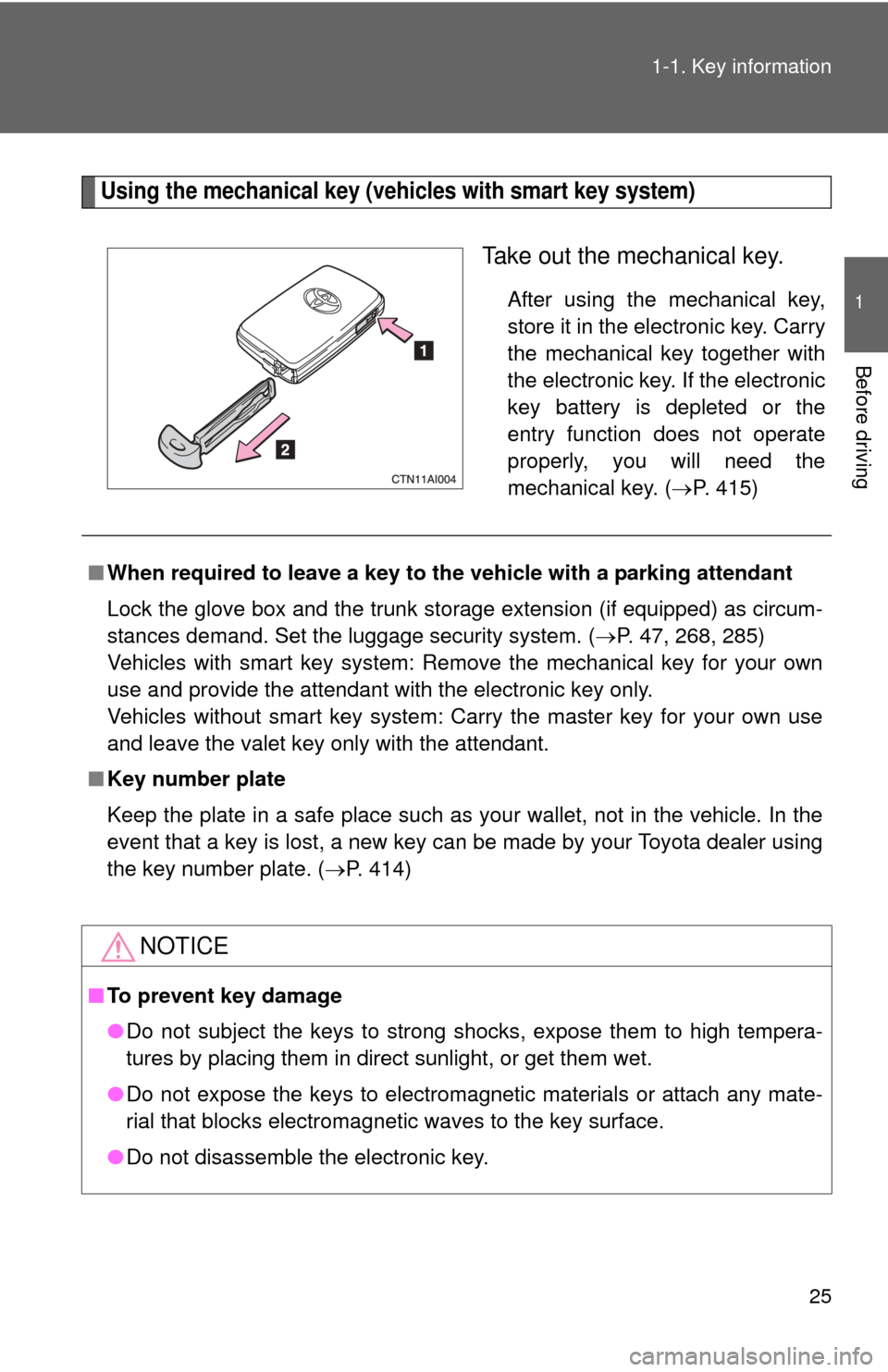
Using the mechanical key (vehicles with smart key system)
Take out the mechanical key.
After using the mechanical key,
store it in the electronic key. Carry
the mechanical key together with
the electronic key. If the electronic
key battery is depleted or the
entry function does not operate
properly, you will need the
mechanical key. (
P. 415)
■When required to leave a key to th e vehicle with a parking attendant
Lock the glove box and the trunk storage extension (if equipped) as circum-
stances demand. Set the luggage security system. (P. 47, 268, 285)
Vehicles with smart key system: Remove the mechanical key for your own
use and provide the attendant with the electronic key only.
Vehicles without smart key system: Carry the master key for your own use
and leave the valet key only with the attendant.
■ Key number plate
Keep the plate in a safe place such as your wallet, not in the vehicle. In the
event that a key is lost, a new key can be made by your Toyota dealer using
the key number plate. ( P. 414)
NOTICE
■To prevent key damage
●Do not subject the keys to strong shocks, expose them to high tempera-
tures by placing them in direct sunlight, or get them wet.
● Do not expose the keys to electromagnetic materials or attach any mate-
rial that blocks electromagnetic waves to the key surface.
● Do not disassemble the electronic key.
Page 30 of 476

30 1-2. Opening, closing and locking the doors and trunk
■Operation signals
A buzzer sounds and the emergency flashers flash to indicate that the doors
have been locked/unlocked. (Locked: Once; Unlocked: Twice)
■ Conditions affecting operation
The smart key system uses weak radio waves. In the following situations,
the communication between the electronic key and the vehicle may be
affected, preventing the smart key system and wireless remote control from
operating properly. (Ways of coping: P. 415)
● When the electronic key battery is depleted
● Near a TV tower, electric power plant, gas station, radio station, large dis-
play, airport or other facility that generates strong radio waves or electri-
cal noise
● When carrying a portable radio, ce llular phone, cordless phone or other
wireless communication devices
● When the electronic key has come into contact with, or is covered by, a
metallic object
● When multiple electronic keys are in the vicinity
● When carrying or using the electronic key together with the following
devices that emit radio waves
• Another vehicle’s electronic key
• A wireless key that emits radio waves
• Personal computer
● If window tint with a metallic content or metallic objects are attached to
the rear window
Page 31 of 476

31
1-2. Opening, closing and locking the doors and trunk
1
Before driving
■
Switching the door unlock function
It is possible to set which doors the entry function unlocks.
Turn the “ENGINE START STOP” switch OFF.
When the indicator on the key surface is off, press and
hold , , or for approximately 5 seconds while
pressing the button on the key.
The setting changes each time an operation is performed, as shown below.
(When changing the setting continuously, release the buttons, wait for at
least 5 seconds, and repeat step 2.)
Unlock the doors using the electronic key and open one of the
doors.
If a door is not opened within 60 seconds after is pressed, the
doors will be locked again and the alarm will automatically be set.
In case that the alarm is triggered, immediately stop the alarm.
(P. 79)
STEP1
STEP2
Multi-information
displayUnlocking doorsBeep
Hold the driver's door han-
dle to unlock only the
driver's door. Exterior: Beeps three
times
Interior: Pings once
Hold the front passenger's
door handle except the
driver’s door handle to
unlock all doors
Hold the front passenger's
door handle to unlock all
doors Exterior: Beeps twice
Interior: Pings once
STEP3
Page 35 of 476

35
1-2. Opening, closing and locking the doors and trunk
1
Before driving
■
If the smart key system does not operate properly
● Locking and unlocking the doors and trunk: Use the mechanical key.
( P. 415)
● Starting the engine: P. 416
■ When the electronic key battery is fully depleted
P. 353
■ Customization that can be co nfigured at Toyota dealer
It is possible to deactivate the smart key system, etc.
(Customizable features P. 454)
■ Certification for the smart key system
For vehicles sold in the U.S.A.
NOTE:
This device complies with Part 15 of the FCC Rules. Operation is subject to
the following two conditions: (1) This device may not cause harmful interfer-
ence, and (2) this device must accept any interference received, including
interference that may cause undesired operation.
NOTICE:
This equipment has been tested and found to comply with the limits for a
Class B digital device, pursuant to Part 15 of the FCC Rules. These limits
are designed to provide reasonable protection against harmful interference
in a residential installation. This equipment generates, uses and can radiate
radio frequency energy and, if not installed and used in accordance with the
instructions, may cause harmful interference to radio communications. How-
ever, there is no guarantee that interference will not occur in a particular
installation. If this equipment does cause harmful interference to radio or
television reception, which can be determined by turning the equipment off
and on, the user is encouraged to try to correct the interference by one or
more of the following measures:
FCC ID: NI4TMLF-3