Page 185 of 476

Interior features3
185
3-3. Using the hands-free phone system
(for cellular phone) ...... 232
Hands-free phone system (for cellular phone) features
(CD player with changer
only) ............................... 232
Using the hands-free phone system
(for cellular phone) ......... 235
Making a phone call ......... 244
Setting a cellular phone ... 248
Security and system setup .............................. 253
Using the phone book ...... 257
3-4. Using the interior lights ............................. 264
Interior lights list ............... 264
• Interior light .................... 265
• Personal lights ............... 266 3-5. Using the storage
features ......................... 267
List of storage features .... 267
• Glove box....................... 268
• Console box ................... 268
• Cup holders ................... 270
• Auxiliary boxes ............... 272
3-6. Other interior features ......................... 275
Sun visors ........................ 275
Vanity mirrors ................... 276
Clock ................................ 277
Ashtrays ........................... 278
Power outlet ..................... 279
Seat heaters..................... 281
Armrest ............................ 283
Rear sunshade................. 284
Trunk storage extension (vehicles with reclining
rear seat) ....................... 285
Floor mat .......................... 286
Trunk features .................. 287
Garage door opener......... 288
Compass .......................... 293
Page 192 of 476

192 3-1. Using the air conditioning system and defogger
■Using the automatic mode
Fan speed is adjusted automatically in accordance with the temperature set-
ting and ambient conditions. As a result, the following may occur.
●The system may switch automatically to recirculated air mode when the
coolest temperature setting is selected in summer.
● Immediately after
is pressed, the fan may stop for a while until
warm or cool air is ready to flow.
● Cool air may flow to the area around the upper body when the heater is
on.
■ Using the system in recirculated air mode
The windows will fog up more easily if the recirculated air mode is used for
an extended period.
■ Window defogger feature
Recirculated air mode may automatically switch to outside air mode in situa-
tions where the windows need to be defogged.
■ When outside air temperat ure approaches 32°F (0°C)
The air conditioning system may not operate even when
is pressed.
■ When the indicator light on
flashes
Press
and turn off the air conditioning system before turning it on
once more. There may be a problem in the air conditioning system if the indi-
cator light continues to flash. Turn the air conditioning system off and have it
inspected by your Toyota dealer.
■ Windshield air flow button
When any of the following conditions occurs, the indicator light on the button
may flash and a motor sound may be heard. This does not indicate a mal-
function.
●The “ENGINE START STOP” switch is in ON mode (vehicles with smart
key system) or engine switch is in “ON” position (vehicles without smart
key system) after the battery is reconnected.
● Engine starting and stopping is repeated at short intervals.
● The engine is started with the low voltage battery.
Page 193 of 476
193
3-1. Using the air conditioning system
and defogger
3
Interior features
■Plasmacluster *
This air conditioning system adopts plasmacluster technology, which helps
to keep good air quality in the cabin by emitting positive and negative ions
through the driver's side vent.
A slight noise may be heard during operation. This is not a malfunction.
Also, static electricity may be discharged near the driver's side vent due to
the high voltage used to operate the system.
To clean the drive's side vent, turn the system off and wipe the vent using a
soft cloth.
*: Plasmacluster technology is manufactured under license from SHARP Corporation. “Plasmacluster ” is a trademark of the SHARP Corporation.
CAUTION
■ To prevent the windshield from fogging up
Do not use during cool air operation in extremely humid weather.
The difference between the temperature of the outside air and that of the
windshield can cause the outer surface of the windshield to fog up, blocking
your vision.
■ Plasmacluster
Do not disassemble or repair the system because it contains high voltage
parts. Call your Toyota dealer if the system needs repair.
NOTICE
■ To prevent battery discharge
Do not leave the automatic air conditioning system on longer than necessary
when the engine is stopped.
■ To prevent damage to the Plasmacluster
Do not insert anything into the driver's side vent, attach anything to it, or use
sprays around the drive's side vent. These things may cause the system not
to work properly.
Page 198 of 476
198 3-1. Using the air conditioning system and defogger
■Using the system in recirculated air mode
The windows will fog up more easily if the recirculated air mode is used for
an extended period.
■ Window defogger feature
In order to prevent the windows from fogging up, recirculated air mode may
automatically switch to outside air mode if the ambient temperature drops.
This feature can be cancelled by pushing and holding the air intake mode
switch for longer than 2 seconds. The feature will be reactivated when the
engine switch is turned to “ACC” or “LOCK” position.
■ When outside air temperat ure approaches 32°F (0°C)
The air conditioning system may not operate even when
is pressed.
■ When the indicator light on
flashes
Press
and turn off the air conditioning system before turning it on
once more. There may be a problem in the air conditioning system if the indi-
cator light continues to flash. Turn the air conditioning system off and have it
inspected by your Toyota dealer.
CAUTION
■ To prevent the windshield from fogging up
Do not set the air outlet selection dial to during cool air operation in
extremely humid weather. The difference between the temperature of the
outside air and that of the windshield can cause the outer surface of the
windshield to fog up, blocking your vision.
NOTICE
■To prevent battery discharge
Do not leave the air conditioning system on longer than necessary when the
engine is stopped.
Page 199 of 476

199
3-1. Using the air conditioning system and defogger
3
Interior features
Rear window and outside rear view mirror defoggers
■Outside rear view mirror defoggers (if equipped)
Turning the rear window defogger on will turn the outside rear view mirror
defoggers on.
■ With manual air conditioning controls only
When any of the following conditions occurs, the indicator light on the switch
may flash and a motor sound may be heard. This does not indicate a mal-
function.
●The engine switch is in “ON” position after the battery is reconnected.
● Engine starting and stopping is repeated at short intervals.
● The engine is started with the low voltage battery.
Clear the rear window using the defogger.
Vehicles with automatic air conditioning system
On/off
The defoggers will automati-
cally turn off the operation
time. The operation time is
between 15 minutes and 1
hour depending on the ambient
temperature and vehicle
speed.
Vehicles with manual air conditioning systemOn/off
The defoggers will automati-
cally turn off the operation
time. The operation time is
between 15 minutes and 1
hour depending on the ambient
temperature and vehicle
speed.
Page 216 of 476
216 3-2. Using the audio system
NOTICE
■CD player precautions
Failure to follow the precautions below may result in serious damage to the
CDs or the player itself.
●Do not insert anything other than CDs into the CD slot.
● Do not apply oil to the CD player.
● Store CDs away from direct sunlight.
● Never try to disassemble any part of the CD player.
●CDs with a transparent or translucent
recording area
● CDs that have had tape, stickers or CD-
R labels attached to them, or that have
had the label peeled off
●Do not insert more than one CD at a
time.
Page 264 of 476
264
3-4. Using the interior lights
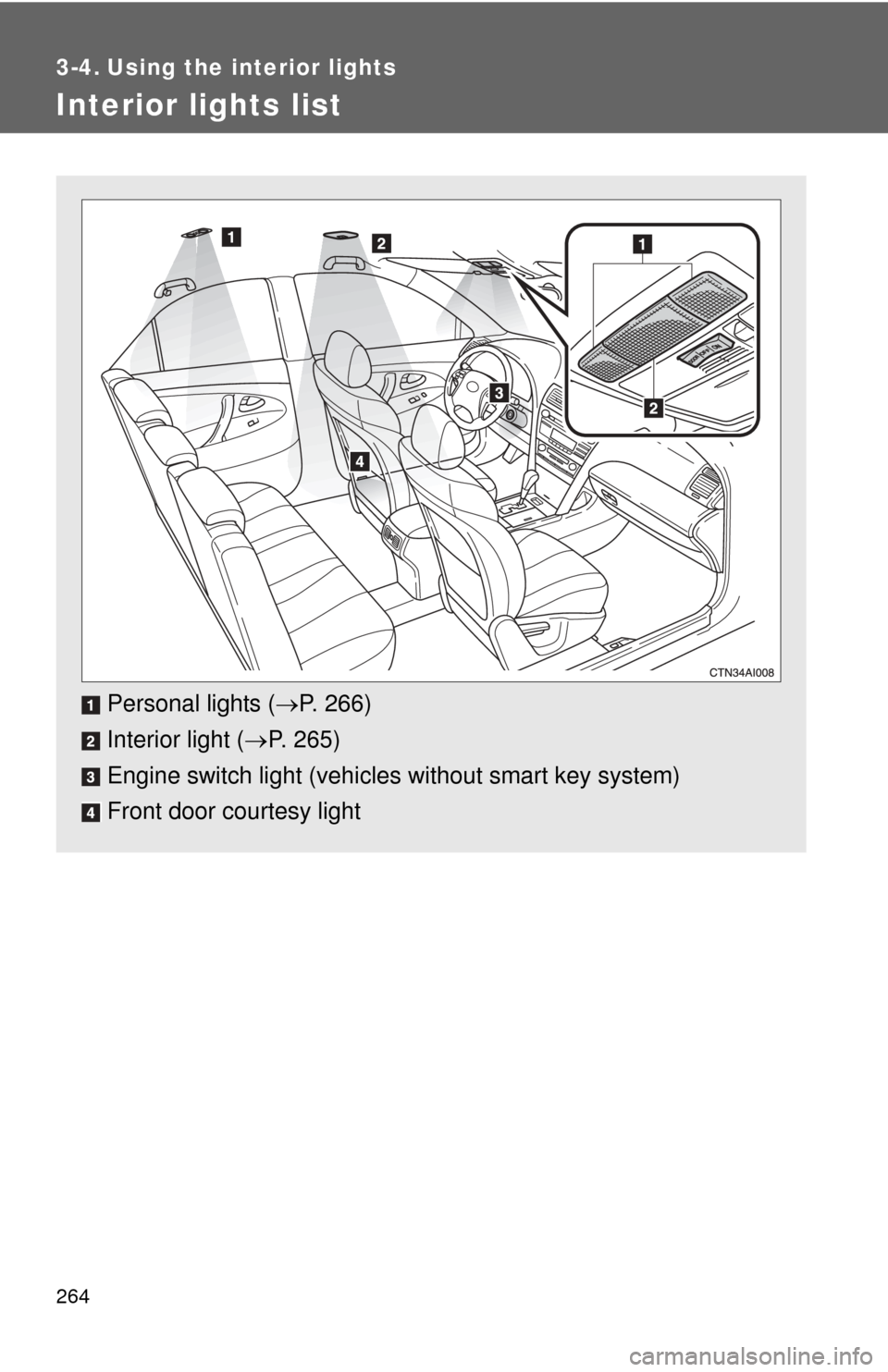
Interior lights list
Personal lights (P. 266)
Interior light ( P. 265)
Engine switch light (vehicle s without smart key system)
Front door courtesy light
Page 265 of 476

265
3-4. Using the interior lights
3
Interior features
Interior light
Vehicles without moon roof Door position
Off
On
■Illuminated entry system
The interior light (with the switch in the “DOOR” position) and engine switch
light (vehicles without smart key system) automatically turn on/off according
to “ENGINE START STOP” switch m ode (vehicles with smart key system) or
engine switch position (vehicles without smart key system), the presence of
the electronic key (vehicles with smart key system), whether the doors are
locked/unlocked and whether the doors are open/closed.
■ To prevent the battery from being discharged
If the interior light and engine switch light (vehicles without smart key sys-
tem) remain on when the door is not fully closed and the interior light switch
is in the “DOOR” position, the lights will go off automatically after 20 minutes.
■ Customization that can be co nfigured at Toyota dealer
Settings (e.g. The time elapsed before lights turn off) can be changed.
(Customizable features P. 454)
Interior light