Page 79 of 476
79
1
1-6. Theft deterrent system
Before driving
Alarm (if equipped)
The system sounds the alarm and flashes lights when forcible entry
is detected.
■ Triggering of the alarm
The alarm is triggered in the following situations.
●A locked door or trunk is unlocked or opened without the key,
wireless remote control or entry function of the smart key sys-
tem.
● The hood is opened while t he vehicle is locked.
● The battery is reconnected.
■ Setting the alarm system
Close the doors, trunk and
hood, and lock all doors. The
system will be set automati-
cally after 30 seconds.
The indicator light changes
from being on to flashing when
the system is set.
■Deactivating or stopping the alarm
Do one of the following to deactivate or stop the alarm.
●Unlock the doors or trunk.
● Start the engine.
Page 80 of 476
80 1-6. Theft deterrent system
■Items to check before locking the vehicle
To prevent unexpected triggering of the alarm and vehicle theft, make sure
of the following.
●Nobody is in the vehicle.
● The windows and moon roof are closed before the alarm is set.
● No valuables or other personal items are left in the vehicle.
■ Triggering of the alarm
The alarm may be triggered in the following situations.
(Stopping the alarm deactivates the system.)
●A person inside the vehicle opens a door, the trunk or hood.
● The battery is recharged or replaced when the vehicle is locked.
■ When the battery is disconnected
Be sure to deactivate the alarm system.
If the battery is discharged before deactivating the alarm system, the alarm
may be triggered when the battery is reconnected.
Page 117 of 476
117
2-1. Driving procedures
2
When driving
■
Parking the vehicle
Automatic transmission
With the shift lever in D, depress the brake pedal.
Set the parking brake. ( P. 139)
Shift the shift lever to P. ( P. 133)
When parking on a hill, if necessary, block the wheels.
Vehicles with smart key system:
Turn the “ENGINE START STOP” switch OFF and stop the
engine.
Vehicles without smart key system:
Turn the engine switch to “LOCK” position and stop the
engine.
Lock the door, making sure that you have the key on your
person.
Manual transmission
With the clutch pedal fully depressed, depress the brake
pedal.
Set the parking brake. ( P. 139)
Shift the shift lever to N. ( P. 137)
When parking on a hill, shift the shift lever to 1 or R. If necessary,
block the wheels.
Turn the engine switch to “LOCK” position and stop the
engine.
Lock the door, making sure that you have the key on your
person.
STEP1
STEP2
STEP3
STEP4
STEP5
STEP1
STEP2
STEP3
STEP4
STEP5
Page 131 of 476
131
2-1. Driving procedures
2
When driving
■
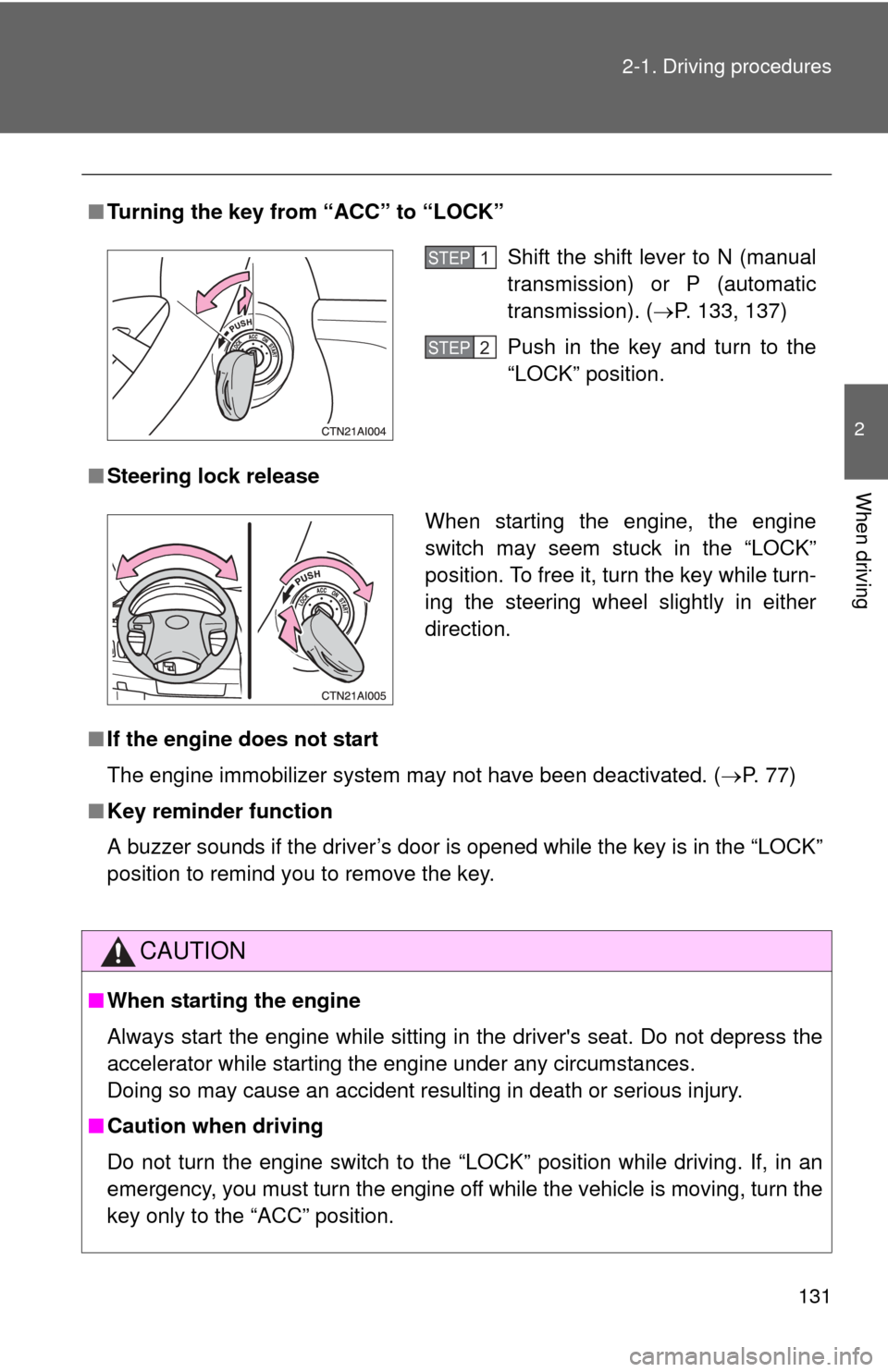
Turning the key from “ACC” to “LOCK”
■ Steering lock release
■ If the engine does not start
The engine immobilizer system may not have been deactivated. ( P. 77)
■ Key reminder function
A buzzer sounds if the driver’s door is opened while the key is in the “LOCK”
position to remind you to remove the key.
CAUTION
■When starting the engine
Always start the engine while sitting in the driver's seat. Do not depress the
accelerator while starting the engine under any circumstances.
Doing so may cause an accident resulting in death or serious injury.
■ Caution when driving
Do not turn the engine switch to the “LOCK” position while driving. If, in an
emergency, you must turn the engine off while the vehicle is moving, turn the
key only to the “ACC” position.
Shift the shift lever to N (manual
transmission) or P (automatic
transmission). ( P. 133, 137)
Push in the key and turn to the
“LOCK” position.STEP1
STEP2
When starting the engine, the engine
switch may seem stuck in the “LOCK”
position. To free it, turn the key while turn-
ing the steering wheel slightly in either
direction.
Page 155 of 476

155
2-3. Operating the lights and wipers
2
When driving
■
Automatic light off system
Vehicles with smart key system
● When the headlights are on: The headlights and tail lights turn off 30 sec-
onds after all doors are closed with the “ENGINE START STOP” switch
OFF. (The lights turn off immediately if the on the key is pressed
after all doors are locked.)
● When only the tail lights are on: The tail lights turn off automatically if the
“ENGINE START STOP” switch is turned OFF and the driver’s door is
opened.
To turn the lights on again, turn the “ENGINE START STOP” switch to IGNI-
TION ON mode, or turn the headlight switch off and then back to the
or position.
If any of the doors or trunk lid is kept open, the lights automatically turn off
after 20 minutes. Vehicles without smart key system
● When the headlights are on: The headlights and tail lights turn off 30 sec-
onds after all doors are closed with the engine switch OFF. (The lights
turn off immediately if the on the key is pressed after all doors are
locked.)
● When only the tail lights are on: The tail lights turn off automatically if the
engine switch is turned OFF and the driver’s door is opened.
To turn the lights on again, turn the engine switch to “ON” position, or turn
the headlight switch off and then back to the or position.
If any of the doors or trunk lid is kept open, the lights automatically turn off
after 20 minutes.
■ Customization that can be co nfigured at Toyota dealer
Settings (e.g. Light sensor sensitivity) can be changed. (Customizable fea-
tures P. 454)
NOTICE
■To prevent battery discharge
Do not leave the lights on longer than necessary when the engine is not run-
ning.
Page 185 of 476

Interior features3
185
3-3. Using the hands-free phone system
(for cellular phone) ...... 232
Hands-free phone system (for cellular phone) features
(CD player with changer
only) ............................... 232
Using the hands-free phone system
(for cellular phone) ......... 235
Making a phone call ......... 244
Setting a cellular phone ... 248
Security and system setup .............................. 253
Using the phone book ...... 257
3-4. Using the interior lights ............................. 264
Interior lights list ............... 264
• Interior light .................... 265
• Personal lights ............... 266 3-5. Using the storage
features ......................... 267
List of storage features .... 267
• Glove box....................... 268
• Console box ................... 268
• Cup holders ................... 270
• Auxiliary boxes ............... 272
3-6. Other interior features ......................... 275
Sun visors ........................ 275
Vanity mirrors ................... 276
Clock ................................ 277
Ashtrays ........................... 278
Power outlet ..................... 279
Seat heaters..................... 281
Armrest ............................ 283
Rear sunshade................. 284
Trunk storage extension (vehicles with reclining
rear seat) ....................... 285
Floor mat .......................... 286
Trunk features .................. 287
Garage door opener......... 288
Compass .......................... 293
Page 265 of 476

265
3-4. Using the interior lights
3
Interior features
Interior light
Vehicles without moon roof Door position
Off
On
■Illuminated entry system
The interior light (with the switch in the “DOOR” position) and engine switch
light (vehicles without smart key system) automatically turn on/off according
to “ENGINE START STOP” switch m ode (vehicles with smart key system) or
engine switch position (vehicles without smart key system), the presence of
the electronic key (vehicles with smart key system), whether the doors are
locked/unlocked and whether the doors are open/closed.
■ To prevent the battery from being discharged
If the interior light and engine switch light (vehicles without smart key sys-
tem) remain on when the door is not fully closed and the interior light switch
is in the “DOOR” position, the lights will go off automatically after 20 minutes.
■ Customization that can be co nfigured at Toyota dealer
Settings (e.g. The time elapsed before lights turn off) can be changed.
(Customizable features P. 454)
Interior light
Page 285 of 476
285
3-6. Other interior features
3
Interior features
Trunk storage extension (vehicles with reclining rear seat)
CAUTION
■When not in use
Ensure that the armrest door is closed.
In the event of sudden braking, items stored in the trunk may be thrown for-
ward into the cabin, resulting in injury.
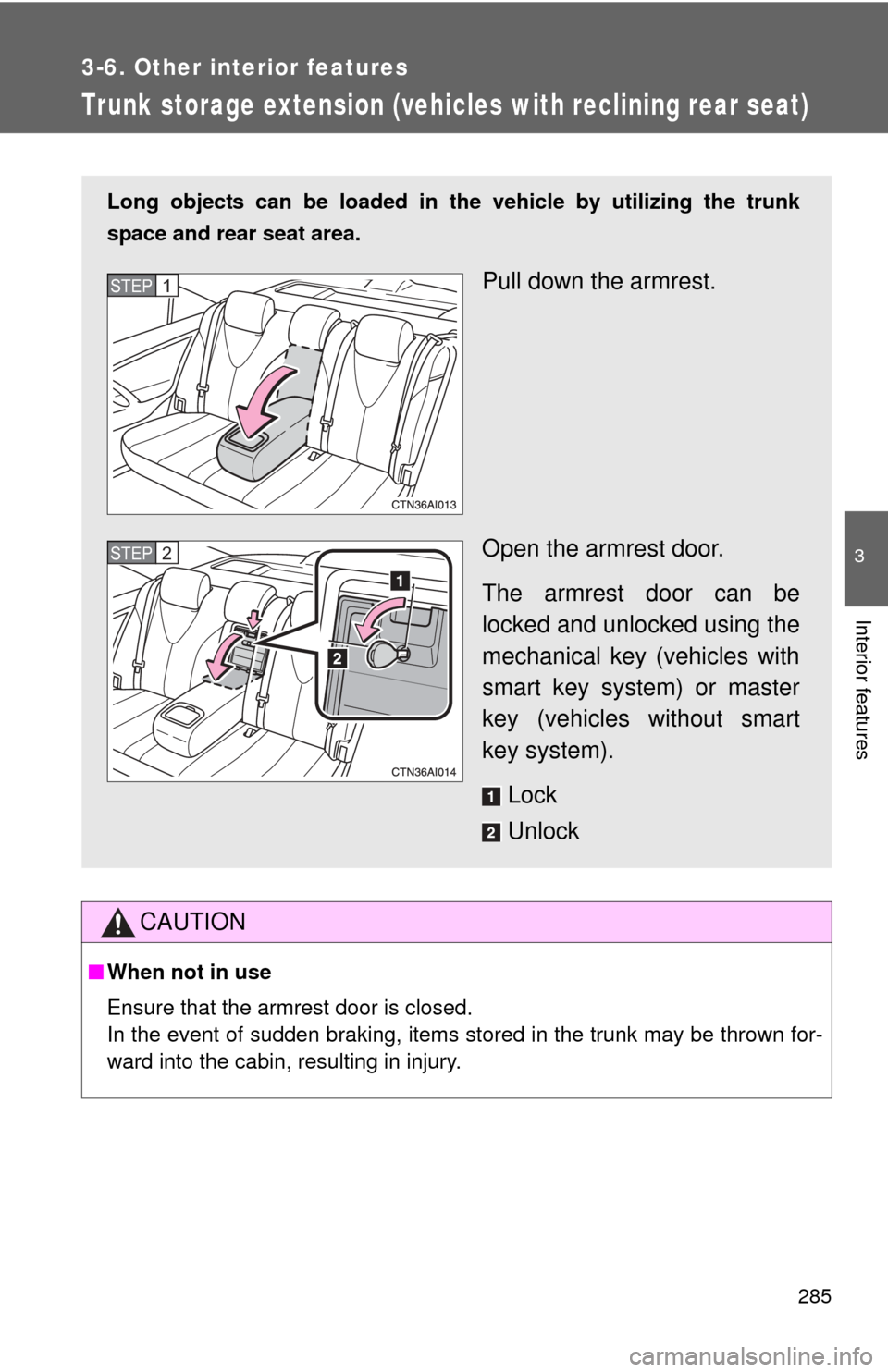
Long objects can be loaded in the vehicle by utilizing the trunk
space and rear seat area.
Pull down the armrest.
Open the armrest door.
The armrest door can be
locked and unlocked using the
mechanical key (vehicles with
smart key system) or master
key (vehicles without smart
key system).
Lock
UnlockSTEP1
STEP2