Page 70 of 476
70
1-4. Opening and closing the windows
Moon roof (if equipped)
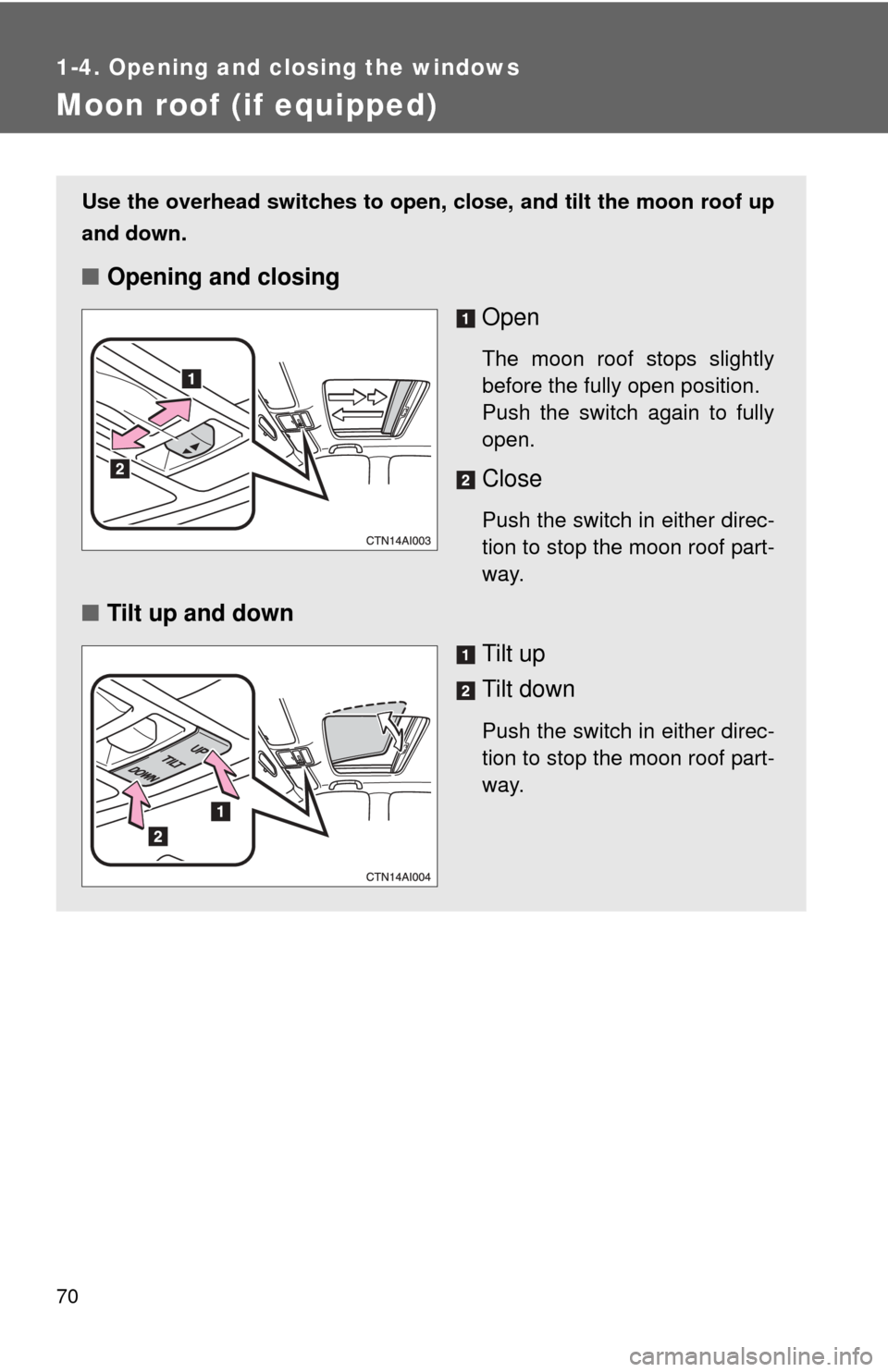
Use the overhead switches to open, close, and tilt the moon roof up
and down.
■Opening and closing
Open
The moon roof stops slightly
before the fully open position.
Push the switch again to fully
open.
Close
Push the switch in either direc-
tion to stop the moon roof part-
way.
■Tilt up and down
Tilt up
Tilt down
Push the switch in either direc-
tion to stop the moon roof part-
way.
Page 71 of 476

71
1-4. Opening and closing the windows
1
Before driving
■
The moon roof can be operated when
Vehicles with smart key system
The “ENGINE START STOP” switch is in IGNITION ON mode.
Vehicles without smart key system
The engine switch is in “ON” position.
■ Operating the moon roof af ter turning the engine OFF
Vehicles with smart key system
The moon roof can be operated for approximately 45 seconds after the
“ENGINE START STOP” switch is turned to ACCESSORY mode or turned
OFF. They cannot, however, be operated once either front door is opened.
Vehicles without smart key system
The moon roof can be operated for approximately 45 seconds after the
engine switch is turned to “ACC” or “LOCK” position. It cannot, however, be
operated once either front door is opened.
■ Jam protection function
If an object is detected between the moon roof and the frame while closing
or tilting down, travel is stopped and the moon roof opens slightly.
■ To reduce wind noise
Drive with the moon roof opened to slightly before the fully open position as
driving with the moon roof opened fully will cause wind noise.
■ Sunshade
The sunshade can be opened and closed manually. However, the sunshade
will open automatically when the moon roof is opened.
■ Moon roof open reminder function
Vehicles with smart key system
An alarm will sound when the driver’s door is opened with the moon roof not
fully closed and the “ENGINE START STOP” switch OFF.
Vehicles without smart key system
An alarm will sound when the driver’s door is opened with the moon roof not
fully closed and the engine switch OFF.
Page 74 of 476
74 1-5. Refueling
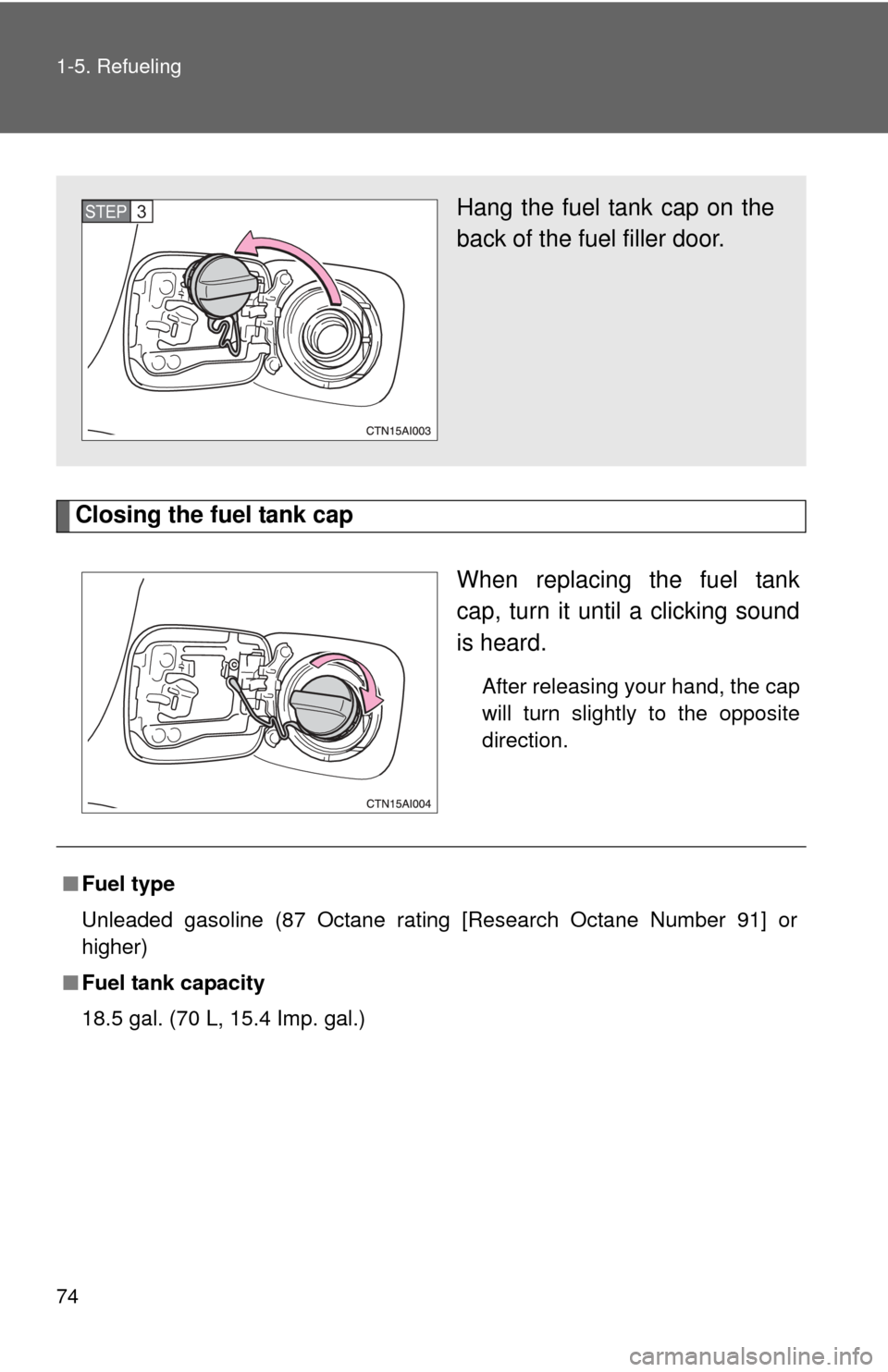
Closing the fuel tank capWhen replacing the fuel tank
cap, turn it until a clicking sound
is heard.
After releasing your hand, the cap
will turn slightly to the opposite
direction.
Hang the fuel tank cap on the
back of the fuel filler door.STEP3
■Fuel type
Unleaded gasoline (87 Octane rating [Research Octane Number 91] or
higher)
■ Fuel tank capacity
18.5 gal. (70 L, 15.4 Imp. gal.)
Page 77 of 476
77
1
Before driving
1-6. Theft deterrent system
Engine immobilizer system
■System maintenance
The vehicle has a maintenance-free type of engine immobilizer system.
■ Conditions that may cause the system to malfunction
● If the key is in contact with a metallic object
● If the key is in close proximity to or touching a key to the security system
(key with a built-in transponder chip) of another vehicle
The vehicle's keys have built-in tr ansponder chips that prevent the
engine from starting if the key has not been previously registered in
the vehicle's on-board computer.
Never leave the keys inside the vehicle when you leave the vehicle.
Vehicles with smart key sys-
tem: The indicator light flashes
after the “ENGINE START
STOP” switch has been turned
OFF to indicate that the sys-
tem is operating.
Vehicles without smart key
system: The indicator light
flashes after the key has been
removed from the engine
switch to indicate that the sys-
tem is operating.
Page 79 of 476
79
1
1-6. Theft deterrent system
Before driving
Alarm (if equipped)
The system sounds the alarm and flashes lights when forcible entry
is detected.
■ Triggering of the alarm
The alarm is triggered in the following situations.
●A locked door or trunk is unlocked or opened without the key,
wireless remote control or entry function of the smart key sys-
tem.
● The hood is opened while t he vehicle is locked.
● The battery is reconnected.
■ Setting the alarm system
Close the doors, trunk and
hood, and lock all doors. The
system will be set automati-
cally after 30 seconds.
The indicator light changes
from being on to flashing when
the system is set.
■Deactivating or stopping the alarm
Do one of the following to deactivate or stop the alarm.
●Unlock the doors or trunk.
● Start the engine.
Page 85 of 476
85
1-7. Safety information
1
Before driving
Airbag system components
Your vehicle is equipped with ADVANCED AIRBAGS designed based
on US motor vehicle safety standards (FMVSS208). The airbag sys-
tem controls airbag deployment po wer for the driver and front pas-
senger. The driver airbag system cons ists of the driver seat's position
sensor etc. The front passenger's ai rbag system consists of the front
passenger occupant classification sensor etc. Front airbag sensors
Occupant detection system
(ECU and sensors)
Side and curtain shield air-
bag sensors
Front passenger airbag
Side airbags
Curtain shield airbags
“AIR BAG ON” and “AIR
BAG OFF” indicator lights
SRS warning light
Front passenger’s seat belt
buckle switch
Airbag sensor assembly
Curtain shield airbag sen-
sors
Driver airbag
Driver’s seat position sen-
sor (with power seat)
Driver’s seat belt buckle
switch
Driver’s seat position sen-
sor (with manual seat)
Knee airbag
Page 87 of 476

87
1-7. Safety information
1
Before driving
■
SRS warning light
This warning light system monitors the airbag sensor assembly, front airbag
sensors, side and curtain shield airbag sensors, curtain shield airbag sen-
sors, driver's seat position sensor, driver's seat belt buckle switch, front pas-
senger occupant classification system, “AIR BAG ON” indicator light, “AIR
BAG OFF” indicator light, front passenger's seat belt buckle switch, seat belt
pretensioner assemblies, inflators, interconnecting wiring and power
sources. ( P. 382)
■ If the SRS airbags deploy (inflate)
●Bruising and slight abrasions may result from contact with a deploying
(inflating) SRS airbag.
● A loud noise and white powder will be emitted.
● Parts of the airbag module (steering wheel hub, airbag cover and inflator)
as well as the front seats, and parts of the front and rear pillars and roof
side rail, may be hot for several minutes. The airbag itself may also be
hot.
● The front windshield may crack.
■ Operating conditions (front airbags)
●The SRS front airbags will deploy if the severity of the frontal impact is
above the designed threshold level, comparable to an approximate 15
mph (25 km/h) collision when the vehicle impacts straight into a fixed bar-
rier that does not move or deform.
However, this threshold velocity will be considerably higher if the vehicle
strikes an object, such as a parked vehicle or sign pole, which can move or
deform on impact, or if the vehicle is involved in an underride collision (e.g.
a collision in which the front of the vehicle “underrides”, or goes under, the
bed of a truck, etc.).
● It is possible that in some collisions where the forward deceleration of the
vehicle is very close to the designed threshold level, the SRS front air-
bags and the seat belt pretensioners may not activate together.
● The SRS front passenger airbag will not activate if there is no passenger
sitting in the front passenger seat. However, the front passenger airbag
may deploy if luggage is put in the seat, or the seat belt is fastened, even
if the seat is unoccupied. ( P. 9 6 )
Page 91 of 476

91
1-7. Safety information
1
Before driving
CAUTION
■
SRS airbag precautions
Observe the following precautions regarding the airbags.
Failure to do so may cause death or serious injury.
●The driver and all passengers in the vehicle must wear their seat belts
properly.
The SRS airbags are supplemental devices to be used with the seat belts.
● The SRS driver airbag deploys with considerable force, and can cause
death or serious injury especially if the driver is very close to the airbag.
The National Highway Traffic Safety Administration (“NHTSA”) advises:
Since the risk zone for the driver’s airbag is the first 2 - 3 in. (50 - 75 mm)
of inflation, placing yourself 10 in. (250 mm) from your driver airbag pro-
vides you with a clear margin of safety. This distance is measured from the
center of the steering wheel to your breastbone. If you sit less than 10 in.
(250 mm) away now, you can change your driving position in several
ways:
• Move your seat to the rear as far as you can while still reaching the pedals comfortably.
• Slightly recline the back of the seat. Although vehicle designs vary, many drivers can achieve the 10 in.
(250 mm) distance, even with the driver seat all the way forward, sim-
ply by reclining the back of the seat somewhat. If reclining the back of
your seat makes it hard to see the road, raise yourself by using a firm,
non-slippery cushion, or raise the seat if your vehicle has that feature\
.
• If your steering wheel is adjustable, tilt it downward. This points the air- bag toward your chest instead of your head and neck.
The seat should be adjusted as recommended by NHTSA above, while
still maintaining control of the foot pedals, steering wheel, and your view of
the instrument panel controls.