2008 TOYOTA AVALON AUX
[x] Cancel search: AUXPage 3 of 452

1
2
3
4
5
6
7
3
AVALON_U_(L/O_0802)
2-3. Operating the lights and
windshield wipers ........... 143
Headlight switch .................. 143
Fog light switch ................... 145
Windshield wipers and
washer .............................. 146
2-4. Using other driving
systems ........................... 149
Cruise control ...................... 149
Dynamic laser cruise
control ............................... 152
Driving assist systems ........ 163
2-5. Driving information ........... 166 Cargo and luggage ............. 166
Vehicle load limits ............... 169
Winter driving tips ............... 170
Trailer towing ...................... 175
Dinghy towing ..................... 176
3-1. Using the air conditioning
system and defogger...... 178
Automatic air conditioning
system .............................. 178
Using the steering wheel climate control switches .... 185
Rear window and outside
rear view mirror
defoggers .......................... 187 3-2. Using the audio system ... 188
Audio system type .............. 188
Audio cover ........................ 190
Using the radio ................... 191
Using the CD player ........... 198
Playing MP3 and WMA
discs ................................. 206
Optimal use of the audio
system .............................. 214
Using the AUX adapter....... 216
Using the steering wheel
audio switches.................. 217
3-3. Using the hands-free
system ............................. 220
Hands-free system
(for cellular phone) ........... 220
Using the hands-free
system .............................. 223
Making a phone call ........... 231
Setting a cellular phone ...... 236
Security and system
setup ................................ 241
Using the phone book ........ 244
3-4. Using the interior lights ... 252 Interior lights list ................. 252
3-5. Using the storage
features ........................... 255
List of storage features ....... 255
3Interior features
Page 8 of 452

8
AVALON_U_(L/O_0802)
A
Power window
switch
P. 66
Pictorial indexInterior
Seat belt P. 54
Front passenger
airbag
P. 82
SRS knee airbag
P. 82
SRS driver airbag P. 82
Floor mat P. 275
Door pocket P. 262
Front seat P. 46
SRS side airbag P. 82
Console box P. 257
Power outlets P. 268
Ashtray P. 267Cup holders P. 261
Armrest P. 272
AUX adapter P. 216
Head restraint P. 53
Storage compartment
P. 260
Page 177 of 452

Interior features3
177
AVALON_U_(L/O_0802)
3-1. Using the air conditioning
system and defogger... 178
Automatic air conditioning
system ........................... 178
Using the steering wheel climate control
switches ......................... 185
Rear window and outside
rear view mirror
defoggers ....................... 187
3-2. Using the audio
system .......................... 188
Audio system type............ 188
Audio cover ...................... 190
Using the radio ................. 191
Using the CD player ......... 198
Playing MP3 and WMA
discs............................... 206
Optimal use of the audio
system ........................... 214
Using the AUX adapter .... 216
Using the steering wheel audio switches ............... 217
3-3. Using the hands-free
system .......................... 220
Hands-free system
(for cellular phone) ........ 220
Using the hands-free
system ........................... 223 Making a phone call ......... 231
Setting a cellular phone ... 236
Security and system
setup .............................. 241
Using the phone book ...... 244
3-4. Using the interior
lights ............................. 252
Interior lights list ............... 252
3-5. Using the storage
features ......................... 255
List of storage features .... 255
3-6. Other interior features ... 263 Sun visors ........................ 263
Vanity mirrors ................... 264
Clock ................................ 265
Outside temperature
display............................ 266
Ashtrays .......................... 267
Power outlets ................... 268
Climate control seats/seat
heaters .......................... 270
Armrest ............................ 272
Rear sunshade ................ 273
Floor mats ........................ 275
Trunk features .................. 276
Garage door opener ........ 278
Compass .......................... 283
Page 188 of 452

188
AVALON_U_(L/O_0802)
3-2. Using the audio system
Audio system type
CD player with changer and AM/FM radio
The audio system appearance may differ slightly for vehicles not
equipped with JBL brand audio system.
TitlePage
Using the radioP. 191
Using the CD playerP. 198
Playing MP3 and WMA discsP. 206
Optimal use of the audio systemP. 214
Using the AUX adapterP. 216
Using the steering wheel audio switchesP. 217
Page 216 of 452
216
3-2. Using the audio system
AVALON_U_(L/O_0802)
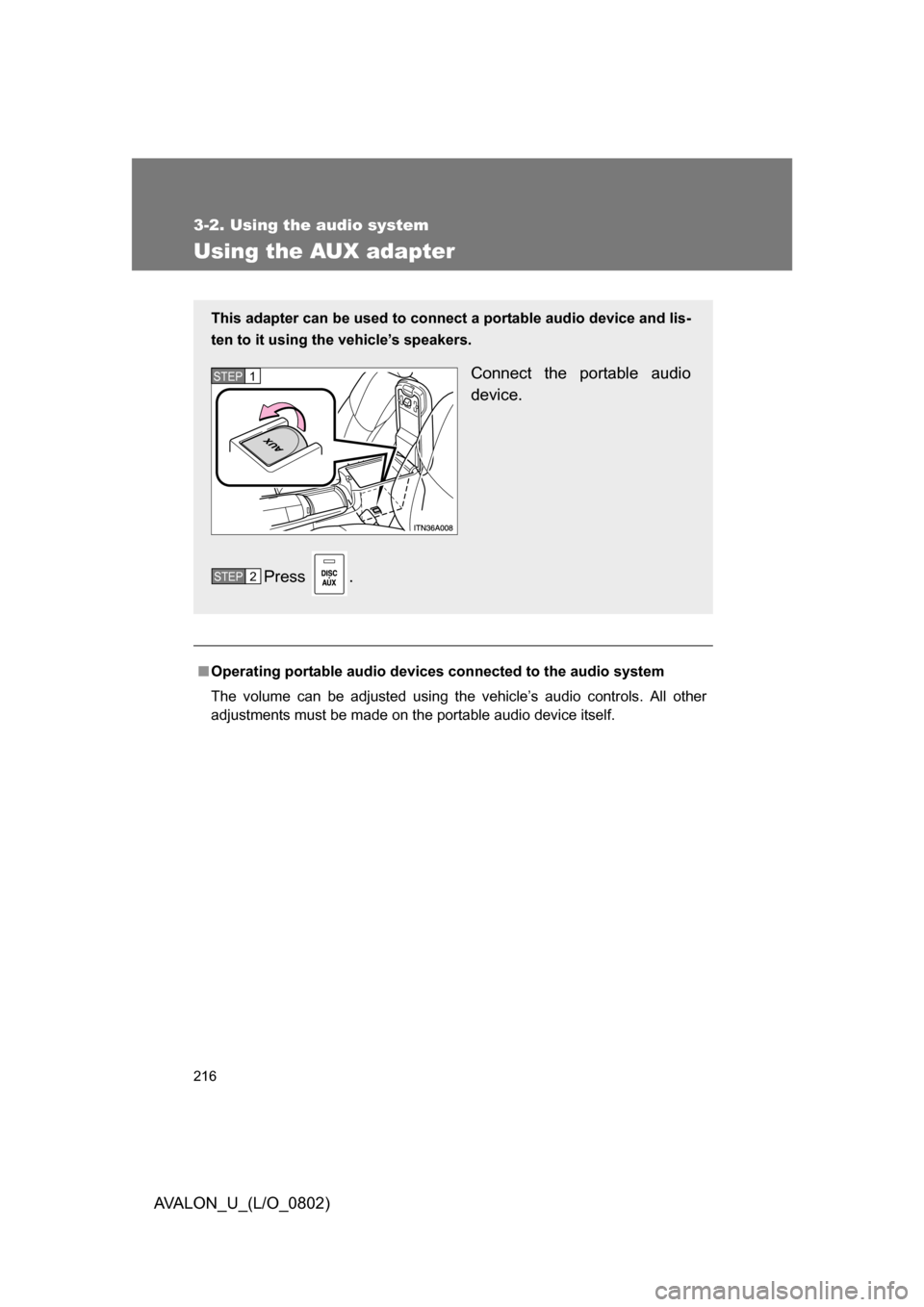
Using the AUX adapter
■Operating portable audio devices connected to the audio system
The volume can be adjusted using the vehicle’s audio controls. All other
adjustments must be made on the portable audio device itself.
This adapter can be used to connect a portable audio device and lis-
ten to it using the vehicle’s speakers.
Connect the portable audio
device.
Press .STEP1
STEP2
Page 217 of 452

217
3-2. Using the audio system
3
Interior features
AVALON_U_(L/O_0802)
Using the steering wheel audio switches
Turning on the powerPress when the audio system is turned off.
The audio system can be turned off by holding the switch down for 1 sec-
ond or more.
Changing the audio sourcePress when the audio system is turned on. The audio source
changes as follows each time the bu tton is pressed. If a CD is not
inserted, that mode will be skipped.
“FM1” “FM2” “CD player” “AUX” “AM” “SAT1”
“SAT2” “SAT3”
Some audio features can be cont rolled using the switches on the
steering wheel.
Vo l u m e
Radio: Select radio stations
CD: Select tracks, files (MP3 and WMA) and
discs
Power on, select audio
source
Page 225 of 452

225
3-3. Using the hands-free
system (for cellular phone)
3
Interior features
AVALON_U_(L/O_0802)
Operating the system by using a voice command
By following voice guidance instructions output from the speaker,
voice commands can be given to allow for operation of the hands-
free system without checking the display or operating .
■ Operation procedure
Press and say a command for a desired function.
( P. 227)
■ Auxiliary commands
The following auxiliary commands can be used:
Cancel: Exits the hands-free system
Go back: Returns to the previous procedure
Page 443 of 452

443
AVALON_U_(L/O_0802)
Alphabetical index
Alphabetical index
A/C ............................................ 178
ABS........................................... 163
Air conditioning systemAir conditioning filter ............. 337
Automatic air conditioning
system................................ 178
Steering switches ................. 185
Airbags
Airbag operating conditions .... 85
Airbag precautions for your
child...................................... 88
Airbag warning light .............. 371
Curtain shield airbag
precautions .......................... 91
Front passenger occupant
classification system ............ 93
General airbag precautions .... 88
Locations of airbags ............... 82
Modification and disposal of
airbags ................................. 92
Side airbag precautions.......... 88
Side and curtain shield airbags
operating conditions ............. 85
SRS airbags ........................... 82
Alarm .......................................... 77
Antenna .................................... 195
Anti-lock brake system ........... 163
Armrest .................................... 272
Ashtrays ................................... 267
Audio input .............................. 216
Audio system Antenna ................................ 195
Audio input ........................... 216
AUX adapter ......................... 216
CD player/changer ............... 198
MP3/WMA disc ..................... 206
Optimal use .......................... 214
Portable music player ........... 216
Radio .................................... 191
Steering switches ................. 217
Automatic headlight leveling
system ................................... 143 Automatic light control
system ....................................143
Automatic transmission Automatic transmission .........129
If the shift lever cannot be
shifted from P......................393
S mode ..................................131
AUX adapter .............................216
Back-up lights Wattage .................................413
Battery Checking ...............................318
If the vehicle battery is
discharged ..........................397
Preparing and checking
before winter .......................170
Bluetooth
®................................220
Brake Fluid ......................................315
Parking brake ........................134
Brake assist ..............................163
Break-in tips .............................115
Care Exterior ..................................288
Interior ...................................291
Seat belts ..............................292
Cargo capacity .........................166
CD player/changer ...................198
Center display ..........................141
Chains .......................................172
Child-protectors .........................41
Child restraint system Definition .................................99
Installation .............................102
Installing CRS with lower
anchorages .........................107
Installing CRS with seat
belts ....................................103
Installing CRS with top
straps ..................................108
A
B
C