Page 139 of 452
139
2-2. Instrument cluster
2
When driving
AVALON_U_(L/O_0802)
■
Indicators
The indicators inform the driver of the operating state of the
vehicle’s various systems.
Turn signal indicator
( P. 133)Cruise control indicator
(P. 149)
Headlight high beam
indicator ( P. 143)Cruise control indicator
( P. 149, 152)
(U.S.A.)
Headlight indicator
( P. 143)
(if equipped)
Ready mode indicator
( P. 152)
(Canada)
Tail light indicator
( P. 143)
(if equipped)
Conventional cruise
indicator ( P. 152)
Security indicator
( P. 75, 77)
(if equipped)
Slip indicator ( P. 163)
Shift position and shift
range indicators
( P. 129)
SRS airbag on-off
indicator ( P. 93)
*
*
*
Page 156 of 452
156 2-4. Using other driving systems
AVALON_U_(L/O_0802)Example of follow-up cruising
When following a vehicle drivi ng slower than the set speed
The system continues follow-up cruising while adjusting for changes in the
speed of the vehicle ahead in order to maintain the vehicle-to-vehicle dis-
tance set by the driver.
Example of acceleration
When there are no longer vehicles driving slower than the set
speed in the lane ahead
When the vehicle ahead of you executes a lane change, the system
slowly accelerates until the set vehicle speed is reached. The system then
returns to fixed speed cruising.
Approach warning
When your vehicle is too close to a vehicle ahead, and sufficient
automatic deceleration via the cruise control is not possible, the dis-
play will flash and buzzer will sound to alert the driver. An example of
this would be if another driver cuts in front of you while you are follow-
ing a vehicle. Apply the brake to ensure an appropriate vehicle-to-
vehicle distance.
Page 166 of 452
166
AVALON_U_(L/O_0802)
2-5. Driving information
Cargo and luggage
Capacity and distributionCargo capacity depends on the total weight of the occupants.
(Cargo capacity) = (Total load capacity) – (Total weight of occupants)
Steps for Determining Correct Load Limit—
(1) Locate the statement “The comb ined weight of occupants and
cargo should never exceed XXX kg or XXX lbs.” on your vehi-
cle’s placard.
(2) Determine the combined weight of the driver and passengers that will be riding in your vehicle.
(3) Subtract the combined weight of the driver and passengers from
XXX kg or XXX lbs.
(4) The resulting figure equals the available amount of cargo and luggage load capacity.
For example, if the “XXX” amount equals 1400 lbs. and there will
be five 150 lb passengers in your vehicle, the amount of avail-
able cargo and luggage load capacity is 650 lbs. (1400 – 750 (5
150) = 650 lbs.)
(5) Determine the combined weight of luggage and cargo being loaded on the vehicle.
That weight may not safely exceed the available cargo and lug-
gage load capacity calculated in Step 4.
Take notice of the following information about storage precau-
tions, cargo capacity and load.
●Stow cargo and luggage in the trunk whenever possible. Be
sure all items are secured in place.
● Be careful to keep the vehicle le vel. Placing the weight as far
forward as possible helps maintain vehicle balance.
● For better fuel economy, do no t carry unnecessary weight.
Page 168 of 452
168 2-5. Driving information
AVALON_U_(L/O_0802)
CAUTION
■Storage precautions
●Do not place anything on the package tray behind the rear seatback.
Such items may be thrown about and possibly injure people in the
vehicle during sudden braking or in an accident.
●Do not drive with objects on top of the instrument panel.
They may interfere with the driver’s field of view or move during sharp
acceleration or turning, thus impairing the driver’s control of the vehi-
cle. In an accident they may injure the vehicle occupants.
●Secure all items in the occupant compartment, as they may shift and
injure someone during an accident or sudden braking.
■Weight of the load
●Improper loading may cause deterioration of steering or braking con-
trol resulting in an accident which may cause death or serious injury.
●Do not exceed the maximum axle weight rating or the total vehicle
weight rating.
●Even if the total load of occupant’s weight and the cargo load is less
than the total load capacity, do not apply the load unevenly. Improper
loading may cause deterioration of steering or braking control which
may cause death or serious injury.
Page 177 of 452

Interior features3
177
AVALON_U_(L/O_0802)
3-1. Using the air conditioning
system and defogger... 178
Automatic air conditioning
system ........................... 178
Using the steering wheel climate control
switches ......................... 185
Rear window and outside
rear view mirror
defoggers ....................... 187
3-2. Using the audio
system .......................... 188
Audio system type............ 188
Audio cover ...................... 190
Using the radio ................. 191
Using the CD player ......... 198
Playing MP3 and WMA
discs............................... 206
Optimal use of the audio
system ........................... 214
Using the AUX adapter .... 216
Using the steering wheel audio switches ............... 217
3-3. Using the hands-free
system .......................... 220
Hands-free system
(for cellular phone) ........ 220
Using the hands-free
system ........................... 223 Making a phone call ......... 231
Setting a cellular phone ... 236
Security and system
setup .............................. 241
Using the phone book ...... 244
3-4. Using the interior
lights ............................. 252
Interior lights list ............... 252
3-5. Using the storage
features ......................... 255
List of storage features .... 255
3-6. Other interior features ... 263 Sun visors ........................ 263
Vanity mirrors ................... 264
Clock ................................ 265
Outside temperature
display............................ 266
Ashtrays .......................... 267
Power outlets ................... 268
Climate control seats/seat
heaters .......................... 270
Armrest ............................ 272
Rear sunshade ................ 273
Floor mats ........................ 275
Trunk features .................. 276
Garage door opener ........ 278
Compass .......................... 283
Page 196 of 452

196 3-2. Using the audio system
AVALON_U_(L/O_0802)
■If the satellite radio does not operate normally
If a problem occurs with the XM
® tuner, a message will appear on the dis-
play. Refer to the table below to identify the problem, and take the suggested
corrective action.
ANTENNA
The XM® antenna is not connected. Check
whether the XM® antenna cable is attached
securely.
There is a short-circuit in the antenna or the sur-
rounding antenna cable. See a Toyota certified
dealer.
UPDATING You have not subscribed to XM
® Satellite Radio.
The radio is being updated with the latest encryp-
tion code. Contact XM
® Satellite Radio for sub-
scription information. When a contract is canceled,
you can choose “CH000” and all free-to-air chan-
nels.
The premium channel you selected is not autho-
rized. Wait for about 2 seconds until the radio
returns to the previous channel or “CH001”. If it
does not change automatically, select another
channel. If you want to listen to the premium chan-
nel, contact XM
® Satellite Radio.
NO SIGNAL The XM
® signal is too weak at the current location.
Wait until your vehicle reaches a location with a
stronger signal.
LOADING The unit is acquiring audio or program information.
Wait until the unit has received the information.
OFF AIRThe channel you selected is not broadcasting any
programming. Select another channel.
-----There is no song/program title or artist name/fea-
ture associated with the channel at that time. No
action needed.
Page 220 of 452
220
AVALON_U_(L/O_0802)
3-3. Using the hands-free system (for cellular phone)
Hands-free system (for cellular phone) (if equipped)
■Conditions under which th e system will not operate
● If using a cellular phone that does not support Bluetooth
®.
● If the cellular phone is switched off.
● If you are outside service range.
● If the cellular phone is not connected.
● If the cellular phone’s battery is low.
■ When transferring ownership of the vehicle
Be sure to initialize the system to prevent the personal data from being
improperly accessed.
■ About Bluetooth
®
This system supports Bluetooth®, which allows you to make or
receive calls without using cables to connect a cellular phone and
the system, and without oper ating the cellular phone.
TitlePage
Using the hands-free systemP. 223
Making a phone callP. 231
Setting a cellular phoneP. 236
Security and system setupP. 241
Using the phone bookP. 244
Bluetooth is a registered trademark of
Bluetooth SIG. Inc.
Page 228 of 452
228 3-3. Using the hands-free system (for cellular phone)
AVALON_U_(L/O_0802)
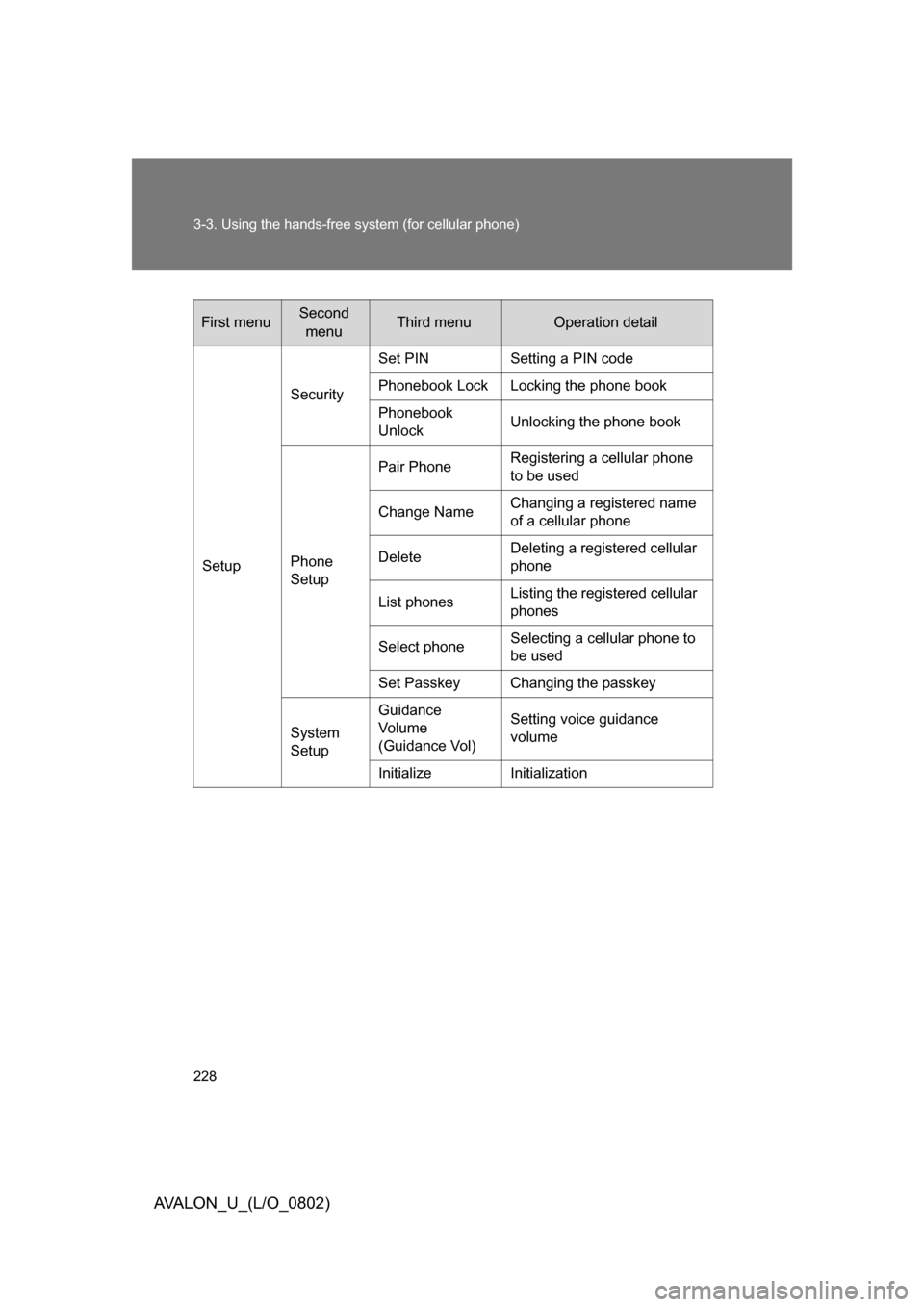
First menuSecond menuThird menuOperation detail
Setup Security
Set PIN Setting a PIN code
Phonebook Lock Locking the phone book
Phonebook
Unlock
Unlocking the phone book
Phone
Setup Pair Phone
Registering a cellular phone
to be used
Change Name Changing a registered name
of a cellular phone
Delete Deleting a registered cellular
phone
List phones Listing the registered cellular
phones
Select phone Selecting a cellular phone to
be used
Set Passkey Changing the passkey
System
Setup Guidance
Vo l u m e
(Guidance Vol) Setting voice guidance
volume
Initialize Initialization