2008 SUZUKI SX4 keyless
[x] Cancel search: keylessPage 28 of 278
2-15BEFORE DRIVING
80J21-03E
Trunk Lid (SX4 SEDAN)
55KS005
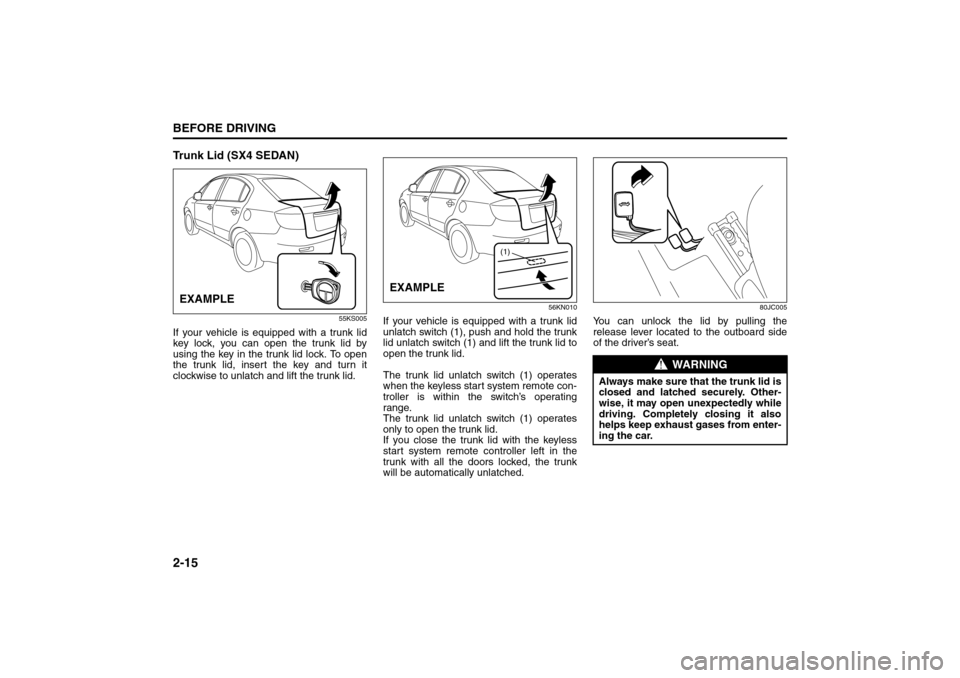
If your vehicle is equipped with a trunk lid
key lock, you can open the trunk lid by
using the key in the trunk lid lock. To open
the trunk lid, insert the key and turn it
clockwise to unlatch and lift the trunk lid.
56KN010
If your vehicle is equipped with a trunk lid
unlatch switch (1), push and hold the trunk
lid unlatch switch (1) and lift the trunk lid to
open the trunk lid.
The trunk lid unlatch switch (1) operates
when the keyless start system remote con-
troller is within the switch’s operating
range.
The trunk lid unlatch switch (1) operates
only to open the trunk lid.
If you close the trunk lid with the keyless
start system remote controller left in the
trunk with all the doors locked, the trunk
will be automatically unlatched.
80JC005
You can unlock the lid by pulling the
release lever located to the outboard side
of the driver’s seat.
EXAMPLE
(1)
EXAMPLE
WARNING
Always make sure that the trunk lid is
closed and latched securely. Other-
wise, it may open unexpectedly while
driving. Completely closing it also
helps keep exhaust gases from enter-
ing the car.
Seat Belts and Child Restraint Systems: 3
Page 67 of 278
3-2
STEERING COLUMN CONTROLS
80J21-03E
60A300S
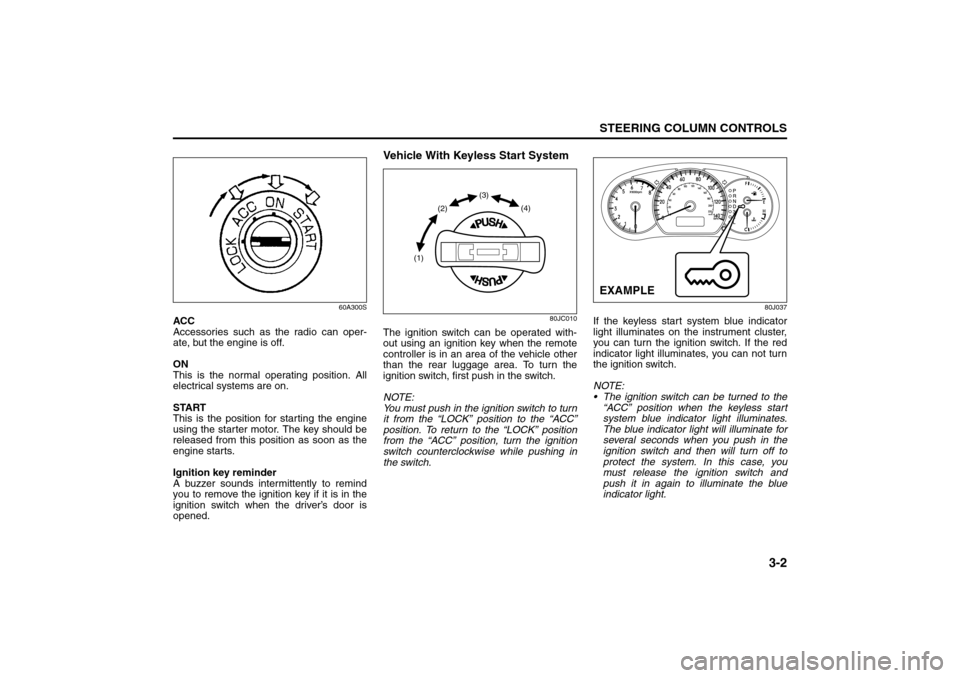
ACC
Accessories such as the radio can oper-
ate, but the engine is off.
ON
This is the normal operating position. All
electrical systems are on.
START
This is the position for starting the engine
using the starter motor. The key should be
released from this position as soon as the
engine starts.
Ignition key reminder
A buzzer sounds intermittently to remind
you to remove the ignition key if it is in the
ignition switch when the driver’s door is
opened.
Vehicle With Keyless Start System
80JC010
The ignition switch can be operated with-
out using an ignition key when the remote
controller is in an area of the vehicle other
than the rear luggage area. To turn the
ignition switch, first push in the switch.
NOTE:
You must push in the ignition switch to turn
it from the “LOCK” position to the “ACC”
position. To return to the “LOCK” position
from the “ACC” position, turn the ignition
switch counterclockwise while pushing in
the switch.
80J037
If the keyless start system blue indicator
light illuminates on the instrument cluster,
you can turn the ignition switch. If the red
indicator light illuminates, you can not turn
the ignition switch.
NOTE:
The ignition switch can be turned to the
“ACC” position when the keyless start
system blue indicator light illuminates.
The blue indicator light will illuminate for
several seconds when you push in the
ignition switch and then will turn off to
protect the system. In this case, you
must release the ignition switch and
push it in again to illuminate the blue
indicator light.
(1)(2)(3)
(4)
EXAMPLE
Ignition Switch: 8
Page 68 of 278

3-3STEERING COLUMN CONTROLS
80J21-03E
If the keyless start system red indicator
light illuminates, the remote controller
may not be in the vehicle or the battery
of the remote controller may be unreli-
able.
NOTE:
If the battery of the remote controller
runs down or there are strong radio
waves or noise, the operating range may
be narrower or the remote controller may
be inoperative.
If the remote controller is too close to the
door glass, it may not operate.
The ignition switch may not turn when
the remote controller is on the instru-
ment panel, in the glove box, in the door
pocket, in the sun visor or on the floor.
You can also turn the ignition switch by
inserting the ignition key into the slot.The ignition switch has the following four
positions:
LOCK (1)
This is the normal parking position. It is the
only position in which the key can be
removed. It locks the ignition, and prevents
normal use of the steering wheel.
For vehicles with an automatic transaxle,
the gearshift lever must be in the “P” (Park)
position to turn the key to the “LOCK” posi-
tion.
To release the steering lock, turn the igni-
tion switch clockwise to one of the other
positions. If you have trouble turning the
ignition switch to unlock the steering, try
turning the steering wheel slightly to the
right or left while turning the switch.
NOTE:
You must push the ignition switch in to turn
it to the “ACC” position. Also you must
push the ignition switch in to return it to the
“LOCK” position.
ACC (2)
Accessories such as the radio can oper-
ate, but the engine is off.
ON (3)
This is the normal operating position. All
electrical systems are on.START (4)
This is the position for starting the engine
using the starter motor. The switch should
be released from this position as soon as
the engine starts.
Ignition switch reminder
(When using the keyless start system)
A buzzer sounds intermittently to remind
you to return the ignition switch to the
“LOCK” position if it is in the “ACC” position
when the driver’s door is opened.
Ignition key reminder
(When using the ignition key)
A buzzer sounds intermittently to remind
you to remove the ignition key if it is in the
ignition switch when the driver’s door is
opened.
CAUTION
The remote controller is a sensitive
electronic instrument. To avoid dam-
aging the remote controller:
Do not expose it to impacts, mois-
ture or high temperature such as by
leaving it on the dashboard under
direct sunlight.
Keep the remote controller away
from magnetic objects such as a
television.
Lighting/Turn Signal Control Lever: 8
Page 69 of 278

3-4
STEERING COLUMN CONTROLS
80J21-03E
62J083
If the gearshift lever can not be shifted out
of “P” (Park) in the normal way, removing
the cover (1) and pushing the release but-
ton using a key or some other flat end
object with the key in the “ON” or “ACC”
position will permit movement of the gear-
shift lever out of “P” (see “If You Can Not
Shift Automatic Transaxle Gearshift Lever
Out of “P” (PARK)” in the INDEX). The
gearshift lever can be moved back to “P”
without pushing the release button.
To release the steering lock, insert the key
or use the keyless start system and turn
the ignition switch clockwise to one of the
other positions. If you have trouble turning
the key to unlock the steering, try turning
the steering wheel slightly to the right or
left while turning the key.
81A297S
(1)
WARNING
For manual transaxle vehicles,
never remove the ignition key while
the vehicle is moving. The steering
wheel will lock and you will not be
able to steer the vehicle.
Always remove the ignition key
when leaving the vehicle even if a
short time. Also do not leave chil-
dren or pets alone in a parked vehi-
cle. Unattended children could
cause accidental movement of the
vehicle or could tamper with power
windows. Children or pets could
suffer from heatstroke in warm or
hot weather, which could result in
severe injury or even death.
CAUTION
Do not turn the starter motor for
more than 15 seconds at a time. If
the engine does not start, wait 15
seconds before trying again. If the
engine does not start after several
attempts, check the fuel and igni-
tion systems or consult your
SUZUKI dealer.
Do not leave the ignition switch in
the “ON” position if the engine is
not running or the battery will dis-
charge.
Lighting/Turn Signal Control Lever: 8
Windshield Wiper and Washer Lever: 8
Page 85 of 278
4-8
INSTRUMENT PANEL
80J21-03E
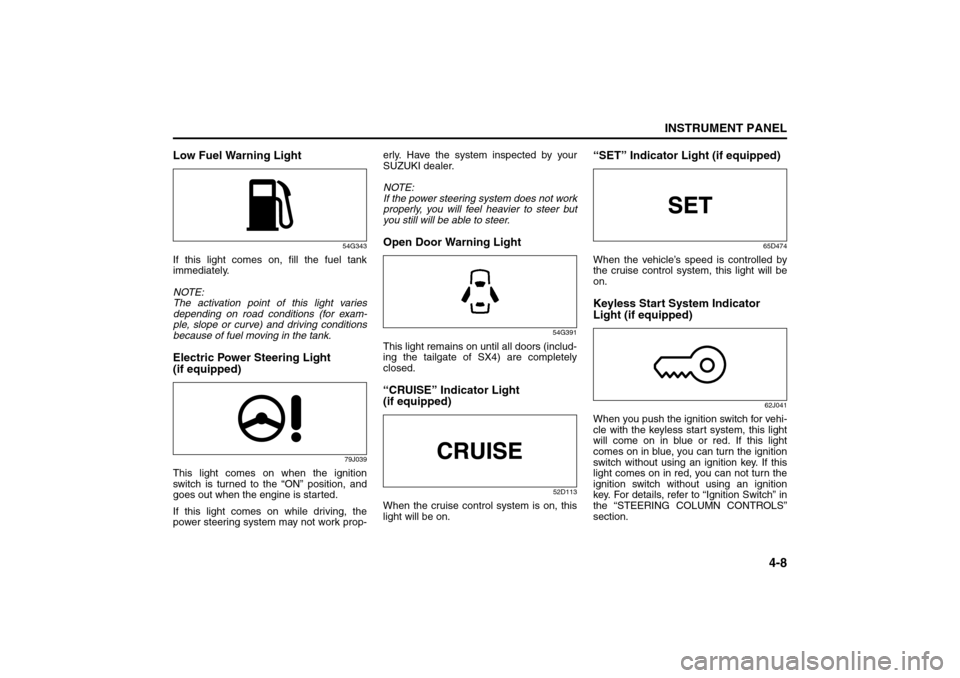
Low Fuel Warning Light
54G343
If this light comes on, fill the fuel tank
immediately.
NOTE:
The activation point of this light varies
depending on road conditions (for exam-
ple, slope or curve) and driving conditions
because of fuel moving in the tank.Electric Power Steering Light
(if equipped)
79J039
This light comes on when the ignition
switch is turned to the “ON” position, and
goes out when the engine is started.
If this light comes on while driving, the
power steering system may not work prop-erly. Have the system inspected by your
SUZUKI dealer.
NOTE:
If the power steering system does not work
properly, you will feel heavier to steer but
you still will be able to steer.
Open Door Warning Light
54G391
This light remains on until all doors (includ-
ing the tailgate of SX4) are completely
closed.“CRUISE” Indicator Light
(if equipped)
52D113
When the cruise control system is on, this
light will be on.
“SET” Indicator Light (if equipped)
65D474
When the vehicle’s speed is controlled by
the cruise control system, this light will be
on.Keyless Start System Indicator
Light (if equipped)
62J041
When you push the ignition switch for vehi-
cle with the keyless start system, this light
will come on in blue or red. If this light
comes on in blue, you can turn the ignition
switch without using an ignition key. If this
light comes on in red, you can not turn the
ignition switch without using an ignition
key. For details, refer to “Ignition Switch” in
the “STEERING COLUMN CONTROLS”
section.
Speedometer/Odometer/Trip meter: 8
Meter Illumination Control:
Page 86 of 278
4-9INSTRUMENT PANEL
80J21-03E
If this light blinks in red, it reminds you that
the remote controller is not in the vehicle.
For details, refer to “Keyless Start System
Remote Controller/Keyless Entry System
Transmitter” in the “BEFORE DRIVING”
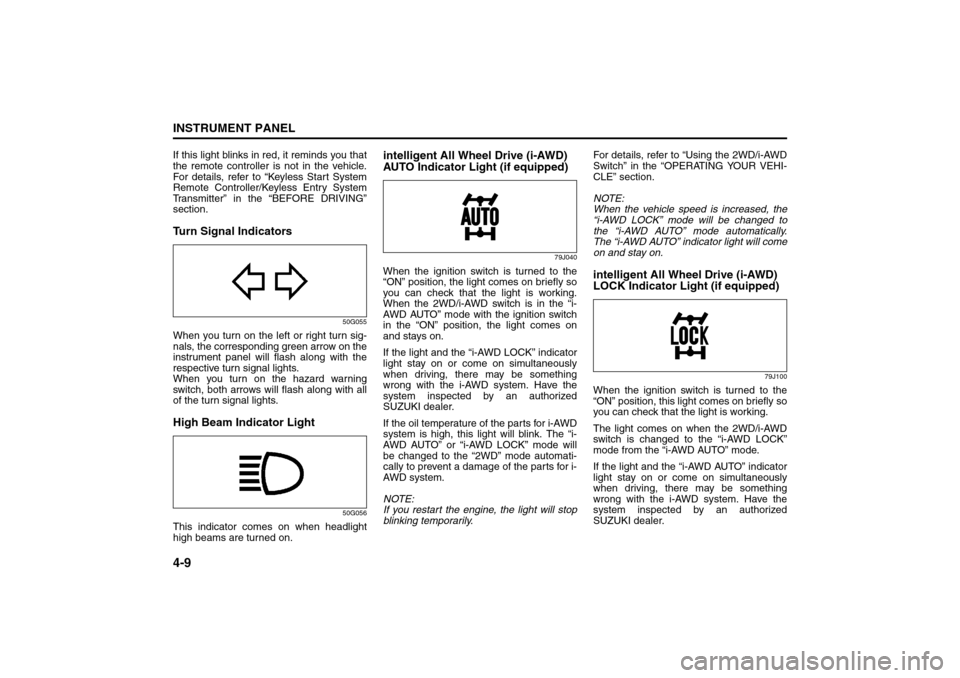
section.Turn Signal Indicators
50G055
When you turn on the left or right turn sig-
nals, the corresponding green arrow on the
instrument panel will flash along with the
respective turn signal lights.
When you turn on the hazard warning
switch, both arrows will flash along with all
of the turn signal lights.High Beam Indicator Light
50G056
This indicator comes on when headlight
high beams are turned on.
intelligent All Wheel Drive (i-AWD)
AUTO Indicator Light (if equipped)
79J040
When the ignition switch is turned to the
“ON” position, the light comes on briefly so
you can check that the light is working.
When the 2WD/i-AWD switch is in the “i-
AWD AUTO” mode with the ignition switch
in the “ON” position, the light comes on
and stays on.
If the light and the “i-AWD LOCK” indicator
light stay on or come on simultaneously
when driving, there may be something
wrong with the i-AWD system. Have the
system inspected by an authorized
SUZUKI dealer.
If the oil temperature of the parts for i-AWD
system is high, this light will blink. The “i-
AWD AUTO” or “i-AWD LOCK” mode will
be changed to the “2WD” mode automati-
cally to prevent a damage of the parts for i-
AWD system.
NOTE:
If you restart the engine, the light will stop
blinking temporarily.For details, refer to “Using the 2WD/i-AWD
Switch” in the “OPERATING YOUR VEHI-
CLE” section.
NOTE:
When the vehicle speed is increased, the
“i-AWD LOCK” mode will be changed to
the “i-AWD AUTO” mode automatically.
The “i-AWD AUTO” indicator light will come
on and stay on.
intelligent All Wheel Drive (i-AWD)
LOCK Indicator Light (if equipped)
79J100
When the ignition switch is turned to the
“ON” position, this light comes on briefly so
you can check that the light is working.
The light comes on when the 2WD/i-AWD
switch is changed to the “i-AWD LOCK”
mode from the “i-AWD AUTO” mode.
If the light and the “i-AWD AUTO” indicator
light stay on or come on simultaneously
when driving, there may be something
wrong with the i-AWD system. Have the
system inspected by an authorized
SUZUKI dealer.
Tachometer:
Fuel Gauge:
Page 158 of 278
6-3OPERATING YOUR VEHICLE
80J21-03E
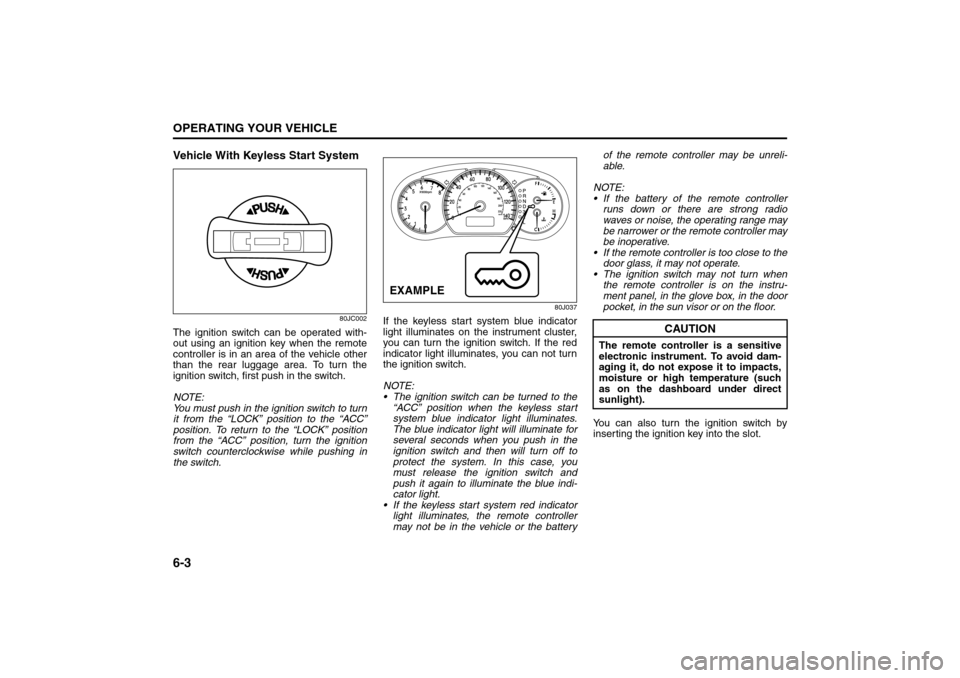
Vehicle With Keyless Start System
80JC002
The ignition switch can be operated with-
out using an ignition key when the remote
controller is in an area of the vehicle other
than the rear luggage area. To turn the
ignition switch, first push in the switch.
NOTE:
You must push in the ignition switch to turn
it from the “LOCK” position to the “ACC”
position. To return to the “LOCK” position
from the “ACC” position, turn the ignition
switch counterclockwise while pushing in
the switch.
80J037
If the keyless start system blue indicator
light illuminates on the instrument cluster,
you can turn the ignition switch. If the red
indicator light illuminates, you can not turn
the ignition switch.
NOTE:
The ignition switch can be turned to the
“ACC” position when the keyless start
system blue indicator light illuminates.
The blue indicator light will illuminate for
several seconds when you push in the
ignition switch and then will turn off to
protect the system. In this case, you
must release the ignition switch and
push it again to illuminate the blue indi-
cator light.
If the keyless start system red indicator
light illuminates, the remote controller
may not be in the vehicle or the batteryof the remote controller may be unreli-
able.
NOTE:
If the battery of the remote controller
runs down or there are strong radio
waves or noise, the operating range may
be narrower or the remote controller may
be inoperative.
If the remote controller is too close to the
door glass, it may not operate.
The ignition switch may not turn when
the remote controller is on the instru-
ment panel, in the glove box, in the door
pocket, in the sun visor or on the floor.
You can also turn the ignition switch by
inserting the ignition key into the slot.EXAMPLE
CAUTION
The remote controller is a sensitive
electronic instrument. To avoid dam-
aging it, do not expose it to impacts,
moisture or high temperature (such
as on the dashboard under direct
sunlight).
Engine Block Heater: 1
Page 273 of 278
15-3
INDEX80J21-03E
If You Can Not Shift Automatic Transaxle Gearshift
Lever Out of “P” (PARK)..................................................... 10-6
If Your Vehicle Gets Stuck .................................................... 7-2
Ignition Key Reminder........................................................... 2-1
Ignition Switch ....................................................................... 3-1
Improving Fuel Economy .................................................... 6-20
Information Display ............................................................. 4-17
Inside Rearview Mirror ........................................................ 2-18
Installation of Child Restraint with Top Strap ................... 2-37
Installation with Lap-Shoulder Seat Belts
(child restraint with no top strap)....................................... 2-31
Installation with the LATCH System .................................. 2-34
Instrument Cluster ................................................................. 4-2
Instrument Light Brightness Control ................................. 4-14
Instrument Panel.................................................................... 4-1
intelligent All Wheel Drive (i-AWD) AUTO Indicator
Light ........................................................................................ 4-9
intelligent All Wheel Drive (i-AWD) LOCK Indicator
Light ........................................................................................ 4-9
Interior Light Switch .............................................................. 5-8JJacking Instructions ............................................................ 10-1
Jump Starting Instructions ................................................. 10-3KKeyless Entry System Transmitter .................................... 2-10
Keyless Start System Indicator Light .................................. 4-8
Keyless Start System Remote Controller ............................ 2-3
Keys ........................................................................................ 2-1LLap-Shoulder Belt ................................................................ 2-24
Lighting Operation................................................................. 3-5Lighting/Turn Signal Control Lever ...................................... 3-5
Lights “On” reminder ............................................................ 3-5
Listening to a CD.................................................................. 4-39
Listening to a CD from an External CD Changer
(Option) ................................................................................. 4-50
Listening to a XM Satellite Radio (Option)......................... 4-47
Listening to Audio for AUX (Option) .................................. 4-49
Listening to the Radio ......................................................... 4-37
Low Fuel Warning Light ........................................................ 4-8
Low Tire Pressure Warning Light ................................ 4-3, 6-15
Luggage Compartment Cover............................................. 5-14
Luggage Compartment Light .............................................. 5-15
MMaintenance Recommended under Severe Driving
Conditions .............................................................................. 9-7
Maintenance Schedule .......................................................... 9-2
Malfunction Indicator Light ................................................... 4-7
Manual Heating and Air Conditioning System .................. 4-25
Manual Transaxle ................................................................... 6-6
Mirrors ................................................................................... 2-18OOdometer .............................................................................. 4-11
Oil Level Check .................................................................... 9-11
Oil Pressure Light.................................................................. 4-6
On-Board Vehicle Computers and Event Data
Recorders ............................................................................. 12-3
Open Door Warning Light ..................................................... 4-8
Outside Rearview Mirrors.................................................... 2-19PParking Brake Lever ..................................................... 5-1, 9-23
Pedals...................................................................................... 5-1