Page 139 of 314

Instrument cluster
138
>> Controls.
Selecting display for status
indicatorYou can select the information to be displayed
in the status indicator:
• Trip odometer display (
�page 139)
• Maintenance service interval display
(
�page 139)
• Reserve fuel indicator (
�page 140)
1
Selecting display for status indicator/
setting the clock/activating maintenance
service interval display
2
Setting the clock/adjusting instrument
cluster illuminationDigital clock
> Activating time setting: Press right
button
2 (�page 138) for approximately
five seconds.
The colon in the digital clock starts
flashing.
> Setting the time in 1 minute increments:
Press left button
1 or right button
2
(
�page 138) repeatedly until the desired
time is set.>Setting the time quickly: Press left
button
1 or right button
2 (�page 138)
for longer than one second.
The setting speed accelerates.
> Setting the time in 10 minute increments:
Press left button
1 or right button
2
(
�page 138) for longer than five seconds.
The time is set in 10 minute increments.
>Confirm time setting: Refrain from pressing
either left button
1 or right button
2
(
�page 138) for more than five seconds.
The colon in the digital clock stops flashing.
The time is set.
i
The digital clock in the multifunction
display is not synchronized with the cockpit
clock*.
P54.32�5178�31
Page 140 of 314

Instrument cluster
>> Controls.
139
Trip odometer display
> Selecting trip odometer display: Press left
button
1 (�page 138) repeatedly until the
trip odometer display appears in the status
indicator.
> Resetting trip odometer display: Press and
hold left button
1 (�page 138) until the
value is set to
.Maintenance service interval display
The maintenance service interval display will
notify you approximately one month before
the next maintenance service is due.
The maintenance service interval display also
shows the type of maintenance service that is
due.
After starting the engine, the maintenance
service interval display shows this informa�
tion in miles (km) or in days for approximately
ten seconds.>Start the engine.
> Selecting maintenance service interval
display: Press left button
1 (�page 138)
repeatedly until the maintenance service
interval display appears in the status
indicator.
Depending on the type of maintenance
service that is due, symbol¬ or}
is dis�
played.
> Clearing maintenance service interval
display: Press the left button on the
instrument cluster (
�page 138).
The maintenance service interval display is
cleared.
> Activating maintenance service interval
display: Press the left button on the instru�
ment cluster (
�page 138) twice in quick
succession. P54.32�5177�31
P54.32�5179�31
Page 177 of 314

Front compartment
176
>> Operation
Service flapYou can remove the service flap and hang it on
the front of the vehicle so that it does not get
damaged or dirty.
!
Check the fill levels at regular intervals.
!
Carefully remove ice, snow, and any other
deposits from the air intake grilles above the
service flap to ensure air intake at all times.>Park the vehicle on level ground.
>Turn off the engine.
>Set the parking brake.
1
Lever
2
Service flap
>Removing: Fold both levers
1 outwards in
the direction of the arrows.
Service flap
2 is unlocked.
>Lift service flap2 at the front.
>Remove service flap2.
G
Warning!
Always turn key in starter switch to
position0 and remove the key from the
starter switch before opening the ser�
vice flap.
If the windshield wipers should inadvert�
ently be switched on, you could be seri�
ously injured by the wiper washer drive,
which is located just below the service
flap.
G
Warning!
Make sure that the service flap is locked
while driving. Otherwise, the service flap
could become detached and pose a haz�
ard to you or others.G
Warning!
To help prevent personal injury, stay
clear of moving parts when the service
flap is open.
The radiator fan may continue to run for
approximately 30 seconds or may even
restart after the engine has been turned
off. Stay clear of fan blades.
Page 178 of 314
Front compartment
>> Operation
177
1
Opening above front bumper
2
Service flap
> Threading: Thread service flap
2 with the
hooks on the back into both openings
1
above the front bumper.
1
Opening in front of windshield
2
Service flap
> Inserting: Insert service flap
2 into both
openings
1 in front of the windshield.
1
Lever
2
Service flap
>Closing: Close service flap
2.
>Fold both levers
1 inwards in the direction
of the arrows.
Service flap
2 is locked. P88.40�2634�31
P88.40�2635�31
Page 179 of 314
Front compartment
178
>> Operation
Coolant
The engine coolant is a mixture of water and
anticorrosion/antifreeze.
To check the coolant level the vehicle must be
parked on level ground and the engine must
have cooled down. For more information, see
"Coolants" (
�page 309).Checking coolant level
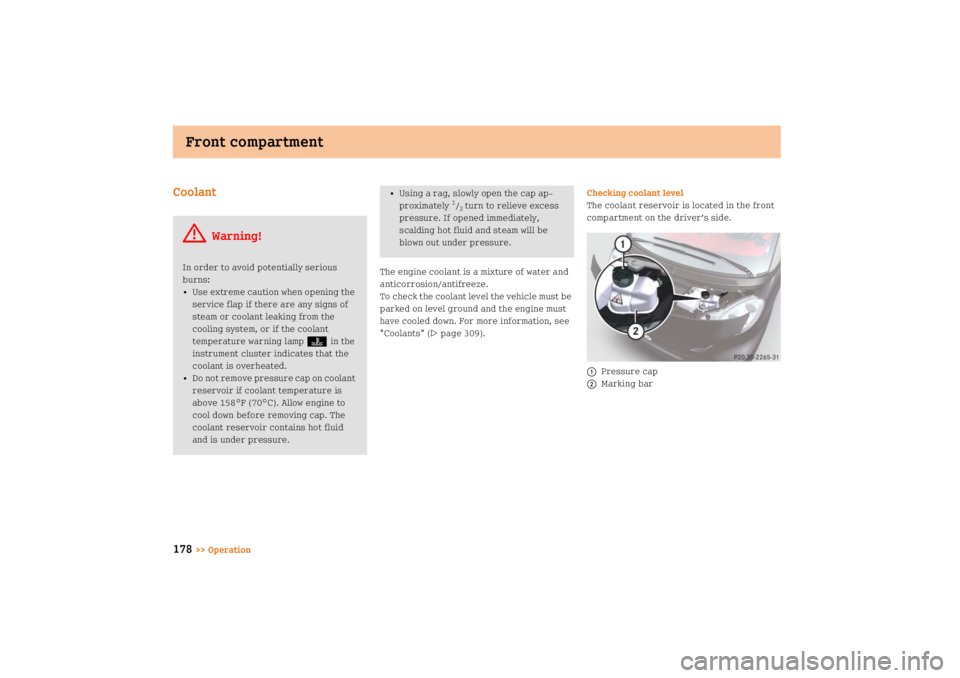
The coolant reservoir is located in the front
compartment on the driver’s side.
1
Pressure cap
2
Marking bar
G
Warning!
In order to avoid potentially serious
burns:
• Use extreme caution when opening the
service flap if there are any signs of
steam or coolant leaking from the
cooling system, or if the coolant
temperature warning lampD in the
instrument cluster indicates that the
coolant is overheated.
• Do not remove pressure cap on coolant
reservoir if coolant temperature is
above 158°F (70°C). Allow engine to
cool down before removing cap. The
coolant reservoir contains hot fluid
and is under pressure.
• Using a rag, slowly open the cap ap�
proximately
1/2 turn to relieve excess
pressure. If opened immediately,
scalding hot fluid and steam will be
blown out under pressure.
P20.30�2265�31
Page 183 of 314

Tires and wheels
182
>> Operation Contact an authorized smart center for infor�
mation on tested and recommended rims and
tires for summer and winter operation. They
can also offer advice concerning tire service
and purchase.
Modifications to the brake system and wheels
and the use of spacer and brake dust rings
are not permissible.
Important guidelines• Only use sets of tires and rims of the same
type and make.
• Tires must be of the correct size for the
rim.
• Break in new tires for approximately
60 miles (100 km) at moderate speeds.
• Regularly check the tires and rims for
damage. Dented or bent rims can cause tire
inflation pressure loss and damage to the
tire beads.
• If vehicle is heavily loaded, check tire infla�
tion pressure and correct as required.
• Do not allow your tires to wear down too far.
Adhesion properties on wet roads are
sharply reduced at tread depths of less
than
1/8in (3 mm).
G
Warning!
Replace rims or tires with the same des�
ignation, manufacturer and type as shown
on the original part. Contact an autho�
rized smart center for further informa�
tion. If incorrectly sized rims and tires
are mounted:
• The wheel brakes or suspension
components can be damaged.
• The operating clearance of the wheels
and the tires may no longer be correct.
G
Warning!
Worn, old tires can cause accidents. If the
tire tread is badly worn, or if the tires
have sustained damage, replace them.
When replacing rims, only use genuine
smart wheel bolts specified for the
particular rim type. Failure to do so can
result in the bolts loosening and possibly
an accident.
Retreaded tires are not tested or recom�
mended by smart, since previous damage
cannot always be recognized on retreads.
The operating safety of the vehicle can�
not be assured when such tires are used.
Page 184 of 314

Tires and wheels
>> Operation
183 Tire care and maintenance
Regularly check your tire inflation pressure
at least once a month. For more information on
checking tire inflation pressure, see
"Recommended tire inflation pressure"
(�page 189)
.
Tire inspection
Every time you check the tire inflation pres�
sure, you should also inspect your tires for
the following:
• excessive treadwear (
�page 183)
• cord or fabric showing through the tire’s
rubber
• bumps, bulges, cuts, cracks or splits in the
tread or side of the tire
Replace the tire if you find any of the above
conditions.
Life of tire
The service life of a tire is dependent upon
varying factors including but not limited to:
•Driving style
• Tire inflation pressure
•Distance drivenTread depth
Do not allow your tires to wear down too far.
Adhesion properties on wet roads are sharply
reduced at tread depths of less than
1/8in
(3 mm)
.
Treadwear indicators (TWI) are required by
law. These indicators are located in six places
on the tread circumference and become visi�
ble at a tread depth of approximately
1/16in
(1.6 mm), at which point the tire is considered
worn and should be replaced.
Recommended minimum tire tread depth:
Summer tires
1/8in (3 mm)
Winter tires
1/6in (4 mm)
G
Warning!
Regularly check the tires for damage.
Damaged tires can cause tire inflation
pressure loss. As a result, you could lose
control of your vehicle.
Worn, old tires can cause accidents. If the
tire tread is badly worn, or if the tires
have sustained damage, replace them.
G
Warning!
Tires should be replaced after 6 years,
regardless of the remaining tread.
Page 199 of 314

Tires and wheels
198
>> Operation
i
Tire load rating5 (
�page 196) and
Tire speed rating6 (
�page 196) are also
referred to as "service description".
For additional information on tire load rating,
see "Load identification" (�page 200).Tire speed rating
Tire speed rating6 (
�page 196) indicates
the approved maximum speed for the tire.
i
Tire load rating5 (
�page 196) and
Tire speed rating6 (
�page 196) are also
referred to as "service description".Summer tires
G
Warning!
Do not overload the tires by exceeding
the specified load limit as indicated on
the Tire and Loading Information placard
located on the driver’s door B�pillar.
Overloading the tires can overheat them,
possibly causing a blowout. Overloading
the tires can also result in handling or
steering problems, or brake failure.
G
Warning!
Even when permitted by law, never oper�
ate a vehicle at speeds greater than the
maximum speed rating of the tires.
Exceeding the maximum speed for which
tires are rated can lead to sudden tire
failure, causing loss of vehicle control
and possibly resulting in an accident
and/or personal injury and possible
death, for you and for others.
Index
Speed rating
Q
up to 100 mph (160 km/h)
R
up to 106 mph (170 km/h)
S
up to 112 mph (180 km/h)
T
up to 118 mph (190 km/h)
H
up to 130 mph (210 km/h)
V
up to 149 mph (240 km/h)
W
up to 168 mph (270 km/h)
Y
up to 186 mph (300 km/h)
(Y)
above 186 mph (300 km/h)
ZR
above 149 mph (240 km/h)
