2008 SKODA OCTAVIA Media
[x] Cancel search: MediaPage 128 of 304
Starting-off and Driving127
Using the systemSafetyDriving TipsGeneral MaintenanceBreakdown assistanceTechnical Data
You should not switch on any major electrical components during the heating
period otherwise the vehicle battery will be drained unnecessarily.
•You should start the engine immediately after the glow plug warning light
has gone out.
•The glow plug warning light will come on for about one second if the engine is
at a normal operating temperature or if th e outside temperature is above +5°C. This
means that you can start the engine right away.
•Interrupt the attempt at starting after 10 seconds if the engine does not start
right awayand wait for about 30 seconds before repeating the attempt.
•It is possible that the fuse on the diesel preglow system is defect if the engine
still does not start. Check the fuse and replace it if necessary ⇒page 257.
•Contact the nearest specialist garage to obtain professional assistance.
Starting the engine after the fuel tank has run dry
It may take longer than normal to start the engine after refuelling if the fuel tank has
run completely dry - up to one minute. This is because the fuel system must first of
all be filled while the attempting to start the engine.
Switching off the engine
– The engine can be switched off by turning the ignition key from posi- tion into ⇒page 125, fig. 146 .
WARNING
•Never switch off the engine before the vehicle is stationary - risk of acci-
dent!
•The brake booster only operates when the engine is running. Greater
physical effort for braking is required when engine is switched off. Because
if you do not stop as normal, this can cause an accident and severe injuries.
Caution
you should not switch the engine off right away at the end of your journey after the
engine has been operated for a lengthy peri od at high loads but should be allowed
it to run at idling speed for about 2 minutes . This prevents any accumulation of heat
when the engine is switched off.
Note
•The radiator fan may continue running fo r a further 10 minutes or so after the
engine and the ignition have been switched off. The coolant fan may, however, also
switch on again after some time if the coolant temperature rises because of an
accumulation of heat in the engine or if the engine is warm and the engine
compartment is additionally heated by strong sunlight.
•This is why particular care is required when carrying out any work in the engine
compartment ⇒page 225, “Working in the engine compartment”.
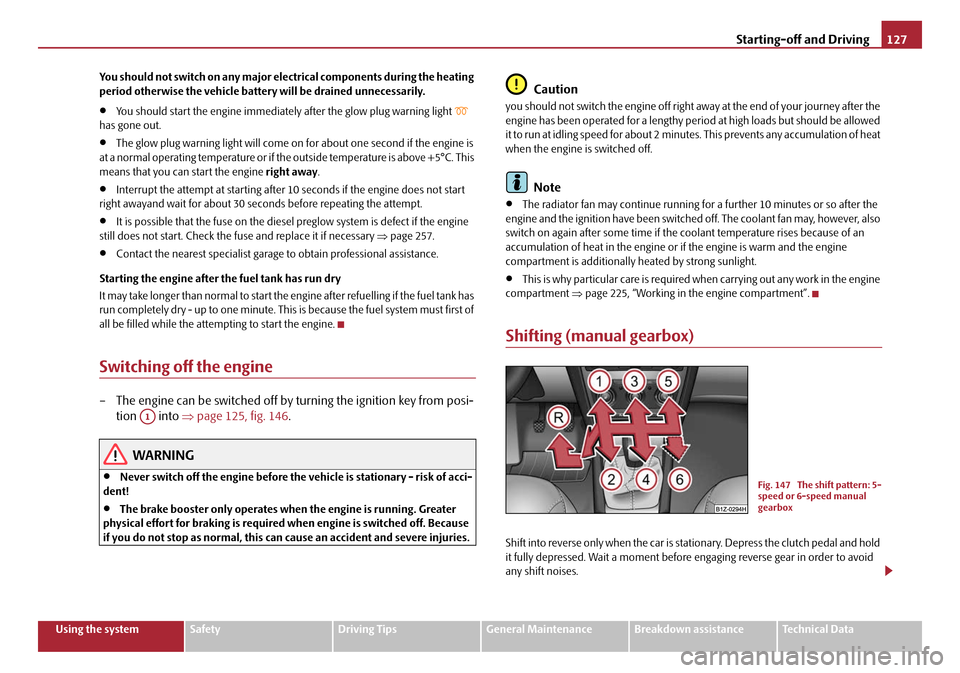
Shifting (manual gearbox)
Shift into reverse only when the car is stationary. Depress the clutch pedal and hold
it fully depressed. Wait a moment before engaging reverse gear in order to avoid
any shift noises.
A1
Fig. 147 The shift pattern: 5-
speed or 6-speed manual
gearbox
20A5Facelift.book Page 127 Saturday, September 6, 2008 2:13 PM
Page 138 of 304

Automatic gearbox137
Using the systemSafetyDriving TipsGeneral MaintenanceBreakdown assistanceTechnical Data
The gearbox does not shift into the 6th gear in the position
S, because the
maximum speed is reached with the 5th gear
12).
The Shiftlock on the selector lever grip must be pressed when moving the selector
lever out of the position D into the position S.
WARNING
•Never move the selector lever into position R or P when driving - risk of
an accident!
•When the engine is running and the vehicle is stationary, it is necessary
to hold the car with the brake pedal in all the positions of the selector lever
(except P and N) since the power transmission is never completely inter-
rupted, also not when the engine is idling - the vehicle "creeps".
•You must on no account unintentionally operate the throttle (e.g. by
hand from the engine compartment) if a drive position is engaged when the
car is stationary. The vehicle would ot herwise immediately start off - also
when the handbrake is firmly applied - risk of an accident!
•You must move the selector lever into position P and firmly apply the
handbrake first before you or any other person opens the bonnet and starts
working on the engine when it is running - risk of accident! It is also essential
to observe all warnings ⇒page 225, “Working in the engine
compartment”.
Selector lever lock
Automatic selector lever lock
With the ignition on, the selector lever is locked when it is in the positions P and N.
You must first of all depress the brake peda l in order to move the selector lever out
of this position. The warning light
⇒ page 38 lights up in the instrument cluster
as a reminder for the driver when the selector lever is in position P and N:
A time delay element ensures that the selector lever is not blocked when rapidly
switching over the position N (e.g. from R to D). This does, for example, allow one to seesaw out a stuck vehicle. The selector
lever lock will click into place if the lever
is in the N position for more than 2 seconds without the brake pedal being pressed.
The selector lever lock is only active if th e vehicle is stationary or moving at speed
of less than 5 km/hour. The lock is switched off automatically into position N when
the car is travelling at a higher speed.
Shiftlock button
The Shiftlock button in the handle of selector lever prevents certain selector lever
positions being engaged inadvertently. The selector lever lock is cancelled when
you press the Shiftlock button.
Keylock - Ignition key withdrawal lock
You can only withdraw the ignition key after switching off the ignition if the selector
lever is in position P. If the ignition key is withdrawn, the selector lever is blocked in
position P.
Kickdown function
The kickdown function provides you with maximum acceleration
power.
Depressing the accelerator pedal allows the kickdown function to be activated in
the desired driving program. This function has precedence over the driving
programme and serves for maximum accelera tion of the vehicle when exploiting
the maximum power potential of the engine without taking into account the
current selector lever position ( D, S or Tiptronic ). The gearbox shifts down to one
or several gears in line with the driving state and the vehicle accelerates. The
gearbox does not shift up into the highes t gear until the engine has reached its
maximum revolutions for this gear range.
WARNING
Please note that using the kickdown f unction can result in the driven wheels
spinning on a smooth or slippery road surface - risk of skidding!
12)Not valid for vehicles with automatic gearbox DSG.
20A5Facelift.book Page 137 Saturday, September 6, 2008 2:13 PM
Page 144 of 304

Communication143
Using the systemSafetyDriving TipsGeneral MaintenanceBreakdown assistanceTechnical Data
Universal telephone preinstallation GSM II*
Introduction
This enables you to make full use of the advantages of a normal carphone (“hands-
free system - Hands Free” using a micropho ne integrated in the vehicle, optimal
transmission of signals using an external aerial
15) etc.). The equipment includes
also the voice control. The telephone is connected by means of the Bluetooth®
technology ⇒page 144, “Bluetooth®”. On vehicles fitted with a telephone
mount*, it is also possible to establish the connection via the interface of the
adapter
16) ⇒ page 145, “Operating telephone calls with the aid of the adapter*.”.
A phone phonebook is part of the mobile ph one preinstallation with voice control.
In the phone phonebook there are 1500 free memory locations available. This
phone phonebook is independent of the appliance used for the mobile phone.
Furthermore the volume can be changed individually during the call at any time
with the button for setting the radio* or on vehicles fitted with multifunction
steering wheel* with function buttons on the steering wheel.
If the system answers with the voice response “ Telephone is not ready”, please
check the operating state of the telephone as follows:
•Is the telephone switched on?
•Is the PIN code entered?
Dialogue
The period, in which the telephone system is ready to receive voice commands and
carry out the voice commands, is called DIALOGUE. The system gives audible feed-
back and guides you if necessary through the relevant functions. You can start or
end the dialogue at any time by pres sing the PTT button on the adapter*
⇒ page 145 or on the multifunction steering wheel* ⇒page 146.
The dialogue is always automatically ended after carrying out an operation, e.g.
after erasing the name from the phonebook. When receiving an incoming call, the dialogue is immediately interrupted and you
can accept the call by pressing the button
on the multifunction steering wheel*
⇒ page 146 or by pressing the button for receiving a call directly on your tele-
phone.
If a voice command is not detected, the system answers with “ Sorry?” and a new
entry can be performed. After the 2nd error the system repeats the aid. After the 3rd
error the answer “ Cancel” is given and the dialogue is ended.
Optimum understanding of the voice commands depends on the following
factors:
•Speak with a normal tone of voice without intonation and excessive voice
pauses.
•Avoid insufficient articulation.
•Close the doors, windows and sliding roof, in order to reduce or stop disturbing
exterior noise.
•It is recommended to speak louder at higher speeds, so that the tone of your
voice is louder than the increased surrounding noise.
•During the dialogue avoid additional noise in the vehicle, e.g. simultaneously
talking occupants.
•Do not speak, if the system makes an announcement.
•The microphone for voice control is direct ed to the driver and front passenger.
Therefore the driver and the front passenger can operate the equipment.
WARNING
Pay attention primarily to the traffic situation! As the driver you are fully
responsible for road safety. Use the tele phone system only to such an extent,
so that you are in full contro l of your vehicle at any time.
Caution
Taking the mobile phone out of the adapter during the call can lead to interruption
of the connection. When taking out the mobile phone, the connection to the
factory-fitted antenna is interrupted, this reduces the quality of the transmitting
and receiving signal. This might result a dditionally in harmful radiation from the
15)Valid for telephone used with adapter* in the telephone mount.16)Not valid for adapter “Bluetooth only” ⇒page 146.
20A5Facelift.book Page 143 Saturday, September 6, 2008 2:13 PM
Page 154 of 304

Communication153
Using the systemSafetyDriving TipsGeneral MaintenanceBreakdown assistanceTechnical Data
The dialogue is always automatically ended after carrying out an operation, e.g.
after erasing the name from the phonebook.
The dialogue of the incoming call is i
mmediately interrupted and you can accept
the call by pressing the button
.
If a voice command is not detected, the system answers with “ Sorry?” and a new
entry can be performed. After the 2nd error the system repeats the aid. After the 3rd
error the answer “ Cancel” is given and the dialogue is ended.
Optimum understanding of the voice commands depends on the following
factors:
•Speak with a normal tone of voice wi thout intonation and excessive voice
pauses.
•Avoid insufficient articulation.
•Close the doors, windows and sliding roof, in order to reduce or stop disturbing
exterior noise.
•It is recommended to speak louder at hi gher speeds, so that the tone of your
voice is louder than the increased surrounding noise.
•During the dialogue avoid additional nois e in the vehicle, e.g. simultaneously
talking occupants.
•Do not speak, if the system makes an announcement.
•The microphone for voice control is in serted in the moulded headliner and
directed to the driver and front passenger. Therefore the driver and the front
passenger can operate the equipment.
WARNING
Pay attention primarily to the traffic situation! As the driver you are fully
responsible for road safety. Use the telephone system only to such an extent,
so that you are in full control of your vehicle at any time.
Note
•Please contact your Škoda Service Partner if there are any points which are not
clear.
•Please also refer to the additional instructions ⇒page 160.
Bluetooth®
The equipment enables the wireless connection to the control unit of a
telephone with Bluetooth® function which supports the rSAP profile.
Process of connection
– Switch on the ignition.
– If you have not switched on Bluetooth
® on your telephone, switch it
on.
– For certain mobile phones it is necessary to switch on first the rSAP
function.
–Press the button
on the multifunction st eering wheel and select
device search . The system searches mobile devices and shows these
in the information display*.
– Select your telephone in the information display by turning the hand- wheel and select it by pressing the handwheel.
– Within 30 seconds enter in your telephone the 16 digit PIN of your
control unit, which is indicated in your information display* and
confirm it according to the instructions on the display of your tele-
phone.
– If your SIM card is blocked by a PIN code, enter the PIN of the SIM card of your telephone. The telephone connects to the control unit (during
the first connection you can only se lect in the information display*
and when the vehicle is stationary, if the PIN should be stored).
– For the first storage of a new user follow the instructions in the infor- mation display.
– To download the telephone book and the indentification data of the SIM card into the new control unit, confirm again the command rSAP
in your mobile phone. The sy stem reads the telephone book.
20A5Facelift.book Page 153 Saturday, September 6, 2008 2:13 PM
Page 162 of 304

Communication161
Using the systemSafetyDriving TipsGeneral MaintenanceBreakdown assistanceTechnical Data
Operation of mobile phones or two-way radio systems may interfere with func-
tioning of the electronic systems of your
vehicle. The reasons for this may be:
•no external aerial
•external aerial incorrectly installed
•transmission power greater than 10 watts.
You should also be aware of the fact that only an external aerial makes it possible
to achieve the optimal range of such equipment.
WARNING
•If a mobile phone or two-way radio sy stem is operated inside the vehicle
without using an external aerial, or wi th an external aerial which has been
incorrectly installed, the result can be excessive electromagnetic fields
which may cause harm to your health.
•Please concentrate fully at all times on your driving!
•You must not install two-way radio systems, mobile phones or mounts
on the covers of the airbags or within the immediate deployment range of
airbags. This might result in injuries to the occupants in the event of an acci-
dent.
Note
Please also refer to the operating instru ctions of the mobile phones and two-way
radio systems.
Input AUX-IN*
The input AUX-IN is located below the armrest* of the front seats and is marked
with . The equipment AUX-IN can only be us ed in combination with a radio or
navigation system installed in the factory.
The input AUX-IN connects the external audio sources (e. g. iPod or mp3 player)
and records music from these devices via your radio* or your navigation*. The description of the operation can be
found in the relevant Owner's Manual of
your radio* or your navigation*.
Note
•If an external audio source is conne cted via AUX-IN, which has a separate
power supply, this can lead to an interfer ence of the audio signals. It depends on
the properties of the adapter.
•The loudspeakers in the vehicle are matched to a power output of 30 W.
MDI input*
The MDI input ⇒fig. 166 is located in the storage compartment on the front
passenger side.
The MDI input connects the external audio sources (e. g. iPod or mp3 player) and
records music from these devices via your radio* or your navigation*.
Music data from the connected devices ar e shown on the information display* or
on the display of your radio* or your navigation*.
These devices can be used after connectin g them via the multifunction steering
wheel* or directly to the ra dio* or to the navigation*.
The description of the operation can be found in the relevant Owner's Manual of
your radio* or your navigation*.
Fig. 166 MDI input
20A5Facelift.book Page 161 Saturday, September 6, 2008 2:13 PM
Page 178 of 304

Airbag system177
Using the systemSafetyDriving TipsGeneral MaintenanceBreakdown assistanceTechnical Data
Important safety information regarding the front airbag system
Correct use of the airbag system considerably reduces the risk of
injury!
WARNING
•Never transport children on the front seat of a vehicle without using a
proper restraint system. If airbags are deployed in the event of an accident,
the child might suffer severe or even fatal injuries!
•For the driver and front passenger it is important to maintain a distance
of at least 25 cm from the steering wheel or dash panel ⇒fig. 180 . Not main-
taining this minimum distance will mean that the airbag system will not be
able to properly protect you - hazard! The front seats and the head restraints
must always also be correctly adjusted to match the body size of the occu-
pant.
•It is essential to always switch off ⇒page 181, “Deactivating an airbag”
the front passenger airbag when attach ing a child safety seat on the front
passenger seat where the child is seated with its back facing in direction of
travel (in some countries also when the ch ild is facing the direction of travel).
If this is not done, there is a risk of the child suffering severe or even fatal
injuries if the front passenger airbag is deployed. In certain countries
national legal provisions also requir e that the side or head passenger
airbags be deactivated. When transporting a child on the front passenger seat, please comply with the appropriate national regulations regarding the
use of child safety seats.
•There must not by any further persons, animals or objects positioned
between the front seated occupants and the deployment area of the airbag.
•The steering wheel and the surface of the airbag module in the dash
panel on the passenger side must not be stuck onto, covered or modified in
any other way. These parts should only be cleaned with a dry cloth or a cloth
moistened with water. No objects such as cup holders, mobile phone
mounts, etc. may be attached to the covers of the airbag modules or be
located within the immediate area.
•No modifications of any kind may be made to parts of the airbag system.
Any work on the airbag system includ ing installing and removing system
components because of other repair work (e.g. removing the steering
wheel) must only be carried out by a specialist garage.
•Never carry out changes on the front bumper or on the body.
•Never place any objects on the surface of the front passenger airbag in
the dash panel.
Fig. 180 Safe distance to
steering wheel
WARNING (continued)
20A5Facelift.book Page 177 Saturday, September 6, 2008 2:13 PM
Page 184 of 304

Airbag system183
Using the systemSafetyDriving TipsGeneral MaintenanceBreakdown assistanceTechnical Data
Switching on an airbag
– Switch off the ignition.
– Turn the slot of the airbag switch using the key in the position ( ON)
⇒ page 182, fig. 185 .
– Check whether the airbag indicator light
in the middle of
the dash panel lights up ⇒page 182, fig. 186 when the ignition is
turned on.
The airbags should only be switched off under exceptional circumstances
⇒ page 181.
Indicator light
(airbag switched off)
The airbag indicator light is located in the middle of the dash panel ⇒page 182,
fig. 186 .
If the front passenger airbag is switched off, the airbag warning light comes on
about 4 seconds after the ig nition is switched on.
There is a system fault present in the airbag switch off ⇒ if the indicator light
flashes. Please have the car inspected i mmediately by a specialist garage.
WARNING
•The driver is responsible for whether the airbag is switched on or
switched off.
•Only switch off the airbag when the ig nition is switched off! Otherwise a
fault can occur in the system for the airbag deactivation.
•If the warning light (airbag switched off) flashes:
− Front passenger airbag is not deploy ed in the event of an accident!
− It is also important to have the system inspected without delay by a
specialist garage.
A1
20A5Facelift.book Page 183 Saturday, September 6, 2008 2:13 PM
Page 198 of 304

Intelligent Technology197
Using the systemSafetyDriving TipsGeneral MaintenanceBreakdown assistanceTechnical Data
vehicle and reduces the strain on the brakes
. Any additional braking should be done
intermittently, no t continuously.
Note
The hazard warning light system is switched on automatically in case of an emer-
gency braking at speeds greater than 60 km /h. The hazard warning light system is
switched off automatically after a ccelerating or driving off again.
Brake booster
The brake booster boosts the pressure which you generate with the brake pedal.
The necessary pressure is only gene rated when the engine is running.
WARNING
•Never switch off the engine before the vehicle is stationary.
•The brake booster only operates when the engine is running. Greater
physical effort for braking is required when engine is switched off. Because
if you do not stop as normal, this can cause an accident and severe injuries.
Antilock brake system (ABS)
ABS prevents the wheels locking when braking.
General
The ABS contributes significan tly to enhancing the active safety of your vehicle.
Compared to a car not fitted with the ABS brake system, you are able to retain
optimal steering ability even during a fu ll brake application on a slippery road
surface because the wheels do not lock up.
You must not expect, however, that the br aking distance will be shorter under all
circumstances as a result of the ABS. Th e braking distance for example on gravel
and fresh snow, when you should anyway be driving slowly and cautiously, will be
longer. Operating principle
The brake pressure will be reduced on a wheel which is rotating at a speed which is
too low for the speed of the vehicle and tend
ing to lock. This control cycle is notice-
able from a pulsating movement of the brake pedal which is accompanied by
noises. This is consciously intended to provide the driver with the information that
the wheels are tending to lock (ABS control range). You must always keep the brake
pedal depressed to enable the ABS to optima lly control the brake application in this
braking range. Never interrupt the application of the brakes!
WARNING
•The ABS can also not overcome the physic al limits of your vehicle. Please
do not forget this, particularly when driv ing on icy or wet road surfaces. If the
ABS is operating within the control ra nge, adapt your speed immediately to
the conditions of the road surface and the traffic situation. The increased
safety offered by the ABS must not tempt you to take greater risks than
otherwise - risk of an accident!
•The normal braking system is still fully functional if there is an ABS fault.
Visit a specialist garage as quickly as po ssible and adjust your style of driving
to take account of the ABS fault in the meantime since you will not know how
great the damage is.
Note
•A warning light comes on if a fault occurs in the ABS system ⇒ page 38.
•Changes to vehicle (e.g. on engine, on the brakes, on chassis or other assign-
ment of tyres and wheels) can in fluence the function of the ABS ⇒ page 243,
“Accessories, changes and replacement of parts”.
Brake Assist*
During a severe brake application (e.g. if a hazard exists), the Brake Assist increases
the braking force and thus makes it possible to rapidly produce the pressure
required in the brake system.
20A5Facelift.book Page 197 Saturday, September 6, 2008 2:13 PM