2008 SAAB 9-7X ignition
[x] Cancel search: ignitionPage 202 of 426

DVD Player
The DVD player is located in the overhead console.
The DVD player can be controlled by the buttons on
the DVD player and/or by the buttons on the remote
control. See “Remote Control” later in this section
for more information.
The DVD player power may be turned on when the
ignition is in ON/RUN, ACC/ACCESSORY, or when
Retained Accessory Power (RAP) is active.
The RSE system DVD player is only compatible with
DVDs of the appropriate region code for the country
that the vehicle was sold in. The DVD region code
is printed on the jacket of most DVDs.
Standard audio CDs, CD-R, CD-RW, Video CD and
Photo CD/CD-R media are fully supported by this
DVD player. DVD-R and DVD-RW media is supported
if formatted as DVD-Video. DVD+R and DVD+RW
media may or may not be supported by the DVD player.The DVD player does not support DVD-RAM,
DVD-ROM, and DVD Audio media. An error message
will appear on the display if this type of media is
inserted into the DVD player.
When using the wired headphones, not included,
if the front seat passengers play a CD in the Radio
with Six-Disc CD (if equipped) or use XM™ Satellite
Radio Service (if equipped), you will hear the audio
for these sources, instead of the DVD or CD that
is currently playing through the RSE.
If an error message appears on the video screen,
see “DVD Messages” later in this section.
3-80
ProCarManuals.com
Page 208 of 426
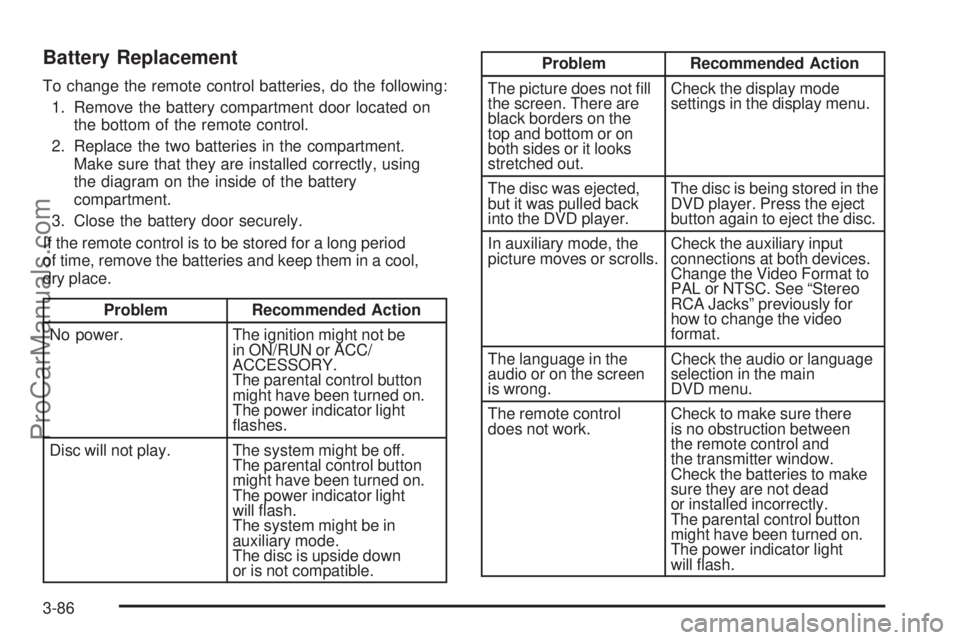
Battery Replacement
To change the remote control batteries, do the following:
1. Remove the battery compartment door located on
the bottom of the remote control.
2. Replace the two batteries in the compartment.
Make sure that they are installed correctly, using
the diagram on the inside of the battery
compartment.
3. Close the battery door securely.
If the remote control is to be stored for a long period
of time, remove the batteries and keep them in a cool,
dry place.
Problem Recommended Action
No power. The ignition might not be
in ON/RUN or ACC/
ACCESSORY.
The parental control button
might have been turned on.
The power indicator light
ashes.
Disc will not play. The system might be off.
The parental control button
might have been turned on.
The power indicator light
will ash.
The system might be in
auxiliary mode.
The disc is upside down
or is not compatible.
Problem Recommended Action
The picture does not ll
the screen. There are
black borders on the
top and bottom or on
both sides or it looks
stretched out.Check the display mode
settings in the display menu.
The disc was ejected,
but it was pulled back
into the DVD player.The disc is being stored in the
DVD player. Press the eject
button again to eject the disc.
In auxiliary mode, the
picture moves or scrolls.Check the auxiliary input
connections at both devices.
Change the Video Format to
PAL or NTSC. See “Stereo
RCA Jacks” previously for
how to change the video
format.
The language in the
audio or on the screen
is wrong.Check the audio or language
selection in the main
DVD menu.
The remote control
does not work.Check to make sure there
is no obstruction between
the remote control and
the transmitter window.
Check the batteries to make
sure they are not dead
or installed incorrectly.
The parental control button
might have been turned on.
The power indicator light
will ash.
3-86
ProCarManuals.com
Page 211 of 426

Rear Seat Audio (RSA)
This feature allows rear seat passengers to select and
listen to any of the available radio sources: AM/FM,
XM, CD, or DVD. However, a rear seat passenger
cannot control a source selected on the radio by
someone in the front of the vehicle. For example,
the RSA cannot be used to change CD tracks if the
radio is set to CD. Also, if the radio is switched to
a source the RSA has control of, sound will not be
lost, but the RSA will lose control of that source.
Rear seat passengers always have control of the volume
for each set of headphones.
The RSA will run when the radio is off if the ignition
key is positioned in the power mode, see XXX in
this manual.
P(Power):Press this button to turn the RSA on
or off. The rear speakers are muted when the power
is turned on.
u(Volume):The left-hand knob controls the
headphone outlet on the left and the right-hand knob
controls the headphone outlet on the right. Turn
either knob clockwise to increase the volume and
counterclockwise to decrease the volume.
3-89
ProCarManuals.com
Page 218 of 426

And, of course, actual stopping distances vary greatly
with the surface of the road, whether it is pavement
or gravel; the condition of the road, whether it is
wet, dry, or icy; tire tread; the condition of the brakes;
the weight of the vehicle; and the amount of brake force
applied.
Avoid needless heavy braking. Some people drive
in spurts — heavy acceleration followed by heavy
braking — rather than keeping pace with traffic. This is
a mistake. The brakes might not have time to cool
between hard stops. The brakes will wear out much
faster if you do a lot of heavy braking. If you keep pace
with the traffic and allow realistic following distances,
you will eliminate a lot of unnecessary braking.
That means better braking and longer brake life.
If your vehicle’s engine ever stops while you are driving,
brake normally but do not pump the brakes. If you do,
the pedal could get harder to push down. If the
engine stops, you will still have some power brake
assist. But you will use it when you brake. Once the
power assist is used up, it can take longer to stop and
the brake pedal will be harder to push.
Adding non-dealer/non-retailer accessories can affect
your vehicle’s performance. SeeAccessories and
Modifications on page 5-3.Antilock Brake System (ABS)
Your vehicle has the Antilock Brake System (ABS),
an advanced electronic braking system that will
help prevent a braking skid.
When you start the engine and begin to drive away,
ABS will check itself. You might hear a momentary
motor or clicking noise while this test is going on.
This is normal.
If there is a problem with
ABS, this warning light will
stay on. SeeAntilock
Brake System Warning
Light on page 3-35.
Along with ABS, your vehicle has a Dynamic Rear
Proportioning (DRP) system. If there is a DRP problem,
both the brake and ABS warning lights come on
accompanied by a 10-second chime. The lights and
chime will come on each time the ignition is turned on
until the problem is repaired. See your dealer/retailer
for service.
4-4
ProCarManuals.com
Page 231 of 426

{CAUTION:
Coasting downhill in NEUTRAL (N) or with the
ignition off is dangerous. The brakes will have
to do all the work of slowing down and they
could get so hot that they would not work well.
You would then have poor braking or even
none going down a hill. You could crash.
Always have the engine running and your
vehicle in gear when you go downhill.
Stay in your own lane. Do not swing wide or cut
across the center of the road. Drive at speeds
that let you stay in your own lane.
Top of hills: Be alert — something could be in your
lane (stalled car, accident).
Pay attention to special road signs (falling rocks
area, winding roads, long grades, passing or
no-passing zones) and take appropriate action.
Winter Driving
Here are some tips for winter driving:
Have your vehicle in good shape for winter.
You might want to put winter emergency
supplies in your vehicle.
Include an ice scraper, a small brush or broom,
a supply of windshield washer uid, a rag, some
winter outer clothing, a small shovel, a ashlight,
a red cloth, and reective warning triangles. And,
if you will be driving under severe conditions,
include a small bag of sand, a piece of old carpet,
or a couple of burlap bags to help provide traction.
Be sure you properly secure these items in
your vehicle.
Also seeTires on page 5-60.
4-17
ProCarManuals.com
Page 243 of 426

The ignition has to be on for the system to inate, in order
to raise the vehicle to the standard ride height after
loading. The system can lower the vehicle to the standard
ride height after unloading with the ignition on and also for
up to 30 minutes after the ignition has been turned off.
You may hear the compressor operating when you load
your vehicle, and periodically as the system adjusts
the vehicle to the standard ride height.
Load leveling will not function normally with the inator
hose attached to the inator outlet. Remove the inator
hose from the outlet during loading and unloading.
If the vehicle is parked for an extended period of time,
some bleed down of the suspension is normal. Upon
starting the vehicle, proper height will be achieved.
Overload Protection
The air suspension system is equipped with overload
protection. Overload protection is designed to protect the
air suspension system, and it is an indicator to the
driver that the vehicle is overloaded. When the overload
protection mode is on, it will not allow damage to the
air compressor. However, do not overload the vehicle.
SeeLoading Your Vehicle on page 4-22.If the suspension remains at a low height, the rear
axle load has exceeded GAWR (Gross Axle Weight
Rating). When the overload protection mode is activated,
the compressor operates for about 30 seconds to
one minute without raising the vehicle depending on the
amount of overload. This will continue each time the
ignition is turned on until the rear axle load is reduced
below GAWR.
Indicator Light
The indicator light on the inator switch in the rear
passenger compartment also serves as an indicator for
internal system error. If the indicator light is ashing
without the load leveling function or the inator being
active, turn off the ignition. The next day turn on
the ignition and check the indicator light. The vehicle
can be driven with the light ashing, but if it is you
should have the vehicle serviced as soon as possible.
4-29
ProCarManuals.com
Page 299 of 426

Notice:If you leave your radio or other accessories
on during the jump starting procedure, they could
be damaged. The repairs would not be covered
by your warranty. Always turn off your radio and
other accessories when jump starting your vehicle.
3. Turn off the ignition on both vehicles. Unplug
unnecessary accessories plugged into the cigarette
lighter or the accessory power outlets, if equipped.
Turn off the radio and all lamps that are not
needed. This will avoid sparks and help to save
both batteries. And it could save the radio!
4. Open both hoods and locate the batteries. Find
the positive (+) and negative (−) terminals on each
battery. Your vehicle has a remote negative (−) jump
starting terminal. You should always use this remote
terminal instead of the terminal on the battery.
The remote negative (−) terminal is located on
the front engine lift bracket on vehicles with the
4.2L L6 engine or the engine accessory drive bracket
for vehicles with the 5.3L or 6.0L V8 engines, and is
marked GND (Ground). SeeEngine Compartment
Overview on page 5-12for more information on
location.
{CAUTION:
Using a match near a battery can cause battery
gas to explode. People have been hurt doing
this, and some have been blinded. Use a
ashlight if you need more light.
Be sure the battery has enough water. You do
not need to add water to the battery installed
in your new vehicle. But if a battery has ller
caps, be sure the right amount of uid is there.
If it is low, add water to take care of that rst.
If you do not, explosive gas could be present.
Battery uid contains acid that can burn you.
Do not get it on you. If you accidentally get it
in your eyes or on your skin, ush the place
with water and get medical help immediately.
5-45
ProCarManuals.com
Page 326 of 426

At the same time a message to check the pressure
in a specic tire appears on the Driver Information
Center (DIC) display. The low tire pressure warning light
and the DIC warning message come on at each ignition
cycle until the tires are inated to the correct ination
pressure. For additional information and details about
the DIC operation and displays seeDIC Operation and
Displays on page 3-45andDIC Warnings and Messages
on page 3-48.
The low tire pressure warning light may come on in
cool weather when the vehicle is rst started, and then
turn off as you start to drive. This could be an early
indicator that the air pressure in the tire(s) are getting
low and need to be inated to the proper pressure.
A Tire and Loading Information label, attached to
your vehicle, shows the size of your vehicle’s original
equipment tires and the correct ination pressure for yourvehicle’s tires when they are cold. SeeInflation - Tire
Pressure on page 5-67. For the location of the Tire and
Loading Information label, seeLoading Your Vehicle
on page 4-22. Also seeInflation - Tire Pressure on
page 5-67.
Your vehicle’s TPMS can alert you about a low tire
pressure condition but it does not replace normal tire
maintenance. SeeTire Inspection and Rotation on
page 5-75andTires on page 5-60.
Notice:Using non-approved tire sealants could
damage the Tire Pressure Monitor System (TPMS)
sensors. TPMS sensor damage caused by using
an incorrect tire sealant is not covered by the
vehicle warranty. Always use the GM approved
tire sealant available through your dealer/retailer.
5-72
ProCarManuals.com