Page 204 of 426
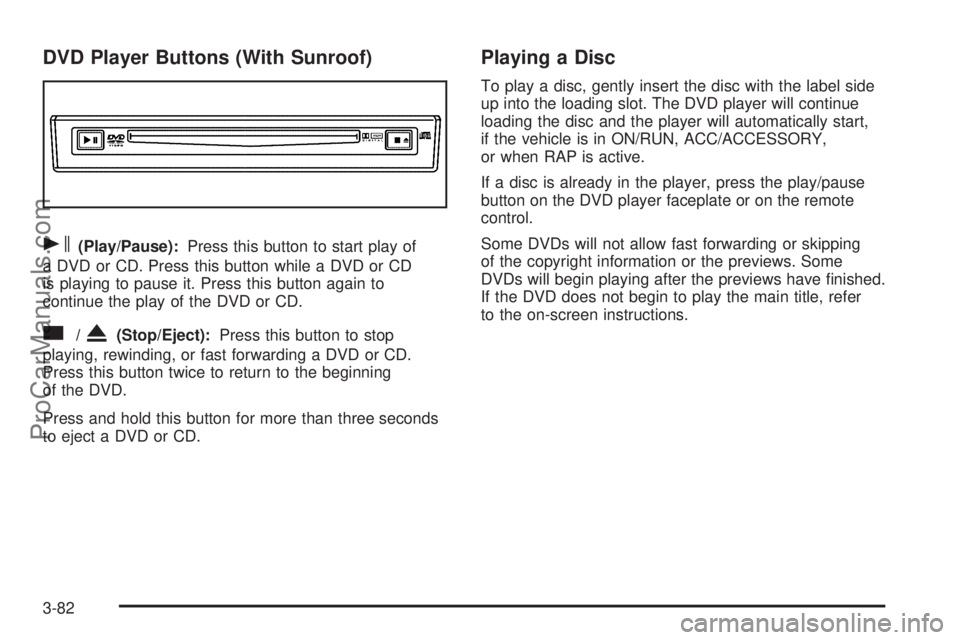
DVD Player Buttons (With Sunroof)
s(Play/Pause):Press this button to start play of
a DVD or CD. Press this button while a DVD or CD
is playing to pause it. Press this button again to
continue the play of the DVD or CD.
c/X(Stop/Eject):Press this button to stop
playing, rewinding, or fast forwarding a DVD or CD.
Press this button twice to return to the beginning
of the DVD.
Press and hold this button for more than three seconds
to eject a DVD or CD.
Playing a Disc
To play a disc, gently insert the disc with the label side
up into the loading slot. The DVD player will continue
loading the disc and the player will automatically start,
if the vehicle is in ON/RUN, ACC/ACCESSORY,
or when RAP is active.
If a disc is already in the player, press the play/pause
button on the DVD player faceplate or on the remote
control.
Some DVDs will not allow fast forwarding or skipping
of the copyright information or the previews. Some
DVDs will begin playing after the previews have nished.
If the DVD does not begin to play the main title, refer
to the on-screen instructions.
3-82
ProCarManuals.com
Page 214 of 426

AM
The range for most AM stations is greater than for FM,
especially at night. The longer range can cause station
frequencies to interfere with each other. For better radio
reception, most AM radio stations boost the power levels
during the day, and then reduce these levels during the
night. Static can also occur when things like storms and
power lines interfere with radio reception. When this
happens, try reducing the treble on your radio.
FM Stereo
FM stereo gives the best sound, but FM signals reach
only about 10 to 40 miles (16 to 65 km). Tall buildings or
hills can interfere with FM signals, causing the sound
to fade in and out.
XM™ Satellite Radio Service
XM™ Satellite Radio Service gives digital radio reception
from coast-to-coast in the 48 contiguous United States,
and in Canada. Just as with FM, tall buildings or hills can
interfere with satellite radio signals, causing the sound to
fade in and out. In addition, traveling or standing under
heavy foliage, bridges, garages, or tunnels may cause
loss of the XM™ signal for a period of time. The radio
may display NO SIGNAL to indicate interference.
Fixed Mast Antenna
The xed mast antenna can withstand most car
washes without being damaged. If the mast should
ever become slightly bent, straighten it out by hand.
If the mast is badly bent, replace it.
Check occasionally to make sure the mast is still
tightened to the antenna base. If tightening is required,
tighten by hand.
XM™ Satellite Radio Antenna
System
The XM™ Satellite Radio antenna is located on the
roof of your vehicle. Keep this antenna clear of snow
and ice build up for clear radio reception.
If your vehicle has a sunroof, the performance of the
XM™ system may be affected if the sunroof is open.
Loading items onto the roof of your vehicle can interfere
with the performance of the XM™ system. Make sure
the XM™ Satellite Radio antenna is not obstructed.
3-92
ProCarManuals.com
Page 375 of 426
Fuses Usage
20 Blank
21 Locks
23 Blank
24 Unlock
25 Ignition 0
26 Overhead Battery/OnStar
®System
27 Rainsense™ Wipers
28 Sunroof
29 Accessory
30 Parking Lamps
31 Truck Body Controller Accessory
32 Truck Body Controller 5
33 Front Wipers
34 Ignition 3
35 Vehicle Stop
36 Transmission Control Module
37 Heat Ventilation Air Conditioning B
Fuses Usage
38 Front Parking Lamps
39 Rear Left Turn Signal
40 Heat, Ventilation, Air Conditioning 1
41 Front Right Turn Signal
42 Radio
43 Trailer Park
44 Rear Right Turn Signal
45 Blank
46 Auxiliary Power 1
47 Blank
48 Ignition 0
49 Not Used
50 Blank
51 Front Left Turn Signal
52 Brakes
53 Truck Body Controller 4
5-121
ProCarManuals.com
Page 420 of 426

Limited-Slip Rear Axle....................................... 4-5
Loading Your Vehicle.......................................4-22
Lockout Protection..........................................2-11
Locks
Delayed Locking........................................... 2-8
Door........................................................... 2-7
Lockout Protection.......................................2-11
Power Door.................................................. 2-8
Programmable Automatic Door Locks............... 2-9
Rear Door Security Locks.............................2-11
Loss of Control...............................................4-12
Low Fuel Warning Light...................................3-44
Luggage Carrier..............................................2-46
Lumbar
Power Controls............................................. 1-2
M
Maintenance Schedule
Additional Required Services........................... 6-6
At Each Fuel Fill........................................... 6-9
At Least Once a Month.................................. 6-9
At Least Once a Year..................................6-10
Introduction.................................................. 6-2
Maintenance Footnotes.................................. 6-7
Maintenance Record....................................6-16
Maintenance Replacement Parts....................6-14
Maintenance Requirements............................. 6-2Maintenance Schedule (cont.)
Owner Checks and Services........................... 6-8
Recommended Fluids and Lubricants.............6-12
Scheduled Maintenance................................. 6-3
Using.......................................................... 6-2
Your Vehicle and the Environment................... 6-2
Malfunction Indicator Light................................3-38
Manual, Using.................................................... iii
Memory Seat, Mirrors, and Pedals...................... 1-3
Message
DIC Warnings and Messages........................3-48
Mirrors
Automatic Dimming Rearview with
OnStar
®and Compass..............................2-33
Outside Convex Mirror.................................2-36
Outside Curb View Assist Mirror....................2-35
Outside Heated Mirrors................................2-36
Outside Power Mirror...................................2-35
Moonroof.......................................................2-48
MP3 .............................................................3-71
MyGMLink.com................................................ 7-3
N
Navigation System, Privacy..............................7-15
Navigation/Radio System,
see Navigation Manual.................................3-76
New Vehicle Break-In......................................2-19
8
ProCarManuals.com
Page:
< prev 1-8 9-16 17-24
