Page 114 of 388

OnStar Steering Wheel Controls
Your vehicle may have a Talk/Mute button that can be
used to interact with OnStar Hands-Free Calling.
SeeAudio Steering Wheel Controls on page 3-76for
more information.
On some vehicles, you may have to hold the button for
a few seconds and give the command “ONSTAR” to
activate the OnStar Hands-Free Calling.
On some vehicles, the mute button can be used to dial
numbers into voicemail systems, or to dial phone
extensions. See the OnStar Owner’s Guide for more
information.
How OnStar Service Works
Your vehicle’s OnStar system has the capability of
recording and transmitting vehicle information.
This information is automatically sent to an OnStar
Call Center at the time of an OnStar button press,
Emergency button press or if your airbags or AACN
system deploys. The vehicle information usually includes
your GPS location and, in the event of a crash,
additional information regarding the accident that your
vehicle has been involved in (e.g. the direction from
which your vehicle was hit). When you use the Virtual
Advisor feature of OnStar Hands-Free Calling, your
vehicle also sends OnStar your GPS location so that we
can provide you with location-based services.OnStar service cannot work unless your vehicle is in a
place where OnStar has an agreement with a wireless
service provider for service in that area. OnStar
service also cannot work unless you are in a place
where the wireless service provider OnStar has hired for
that area has coverage, network capacity and reception
when the service is needed, and technology that is
compatible with the OnStar service. Not all services
are available everywhere, particularly in remote
or enclosed areas, or at all times.
Location information about your vehicle is only available
if the GPS satellite signals are unobstructed and
available.
Your vehicle must have a working electrical system
(including adequate battery power) for the OnStar
equipment to operate. There are other problems OnStar
cannot control that may prevent OnStar from providing
OnStar service to you at any particular time or place.
Some examples are damage to important parts of your
vehicle in an accident, hills, tall buildings, tunnels,
weather or wireless phone network congestion.
2-42
Page 115 of 388

Your Responsibility
Increase the radio volume if you cannot hear the OnStar
advisor. If the light next to the OnStar buttons is red,
this means that your system is not functioning properly
and should be checked by your dealer/retailer. If the
light appears clear (no light is appearing), your OnStar
subscription has expired. You can always press the
OnStar button to conrm that your OnStar equipment
is active.
Storage Areas
Glove Box
To open the glove box, lift up on the lever.
Cupholder(s)
There are two cupholders located at the front of the
center console, in front of the shift lever. There are also
cupholders for the rear seat passengers located at
the rear of the center console.
Center Console Storage
Your vehicle may have a center console armrest with
storage area. Use the lever on the front of the console
to open it.
Driver’s Storage Compartment
The driver’s storage compartment is located near the
left side of the steering column on the bottom of
the instrument panel. Pull the cover down to open.
Convenience Net
Your vehicle may have a convenience net in the rear of
the vehicle. Store small loads as far forward as possible.
The net should not be used to store heavy loads.
2-43
Page 118 of 388
Driver Information Center (DIC).......................3-42
DIC Operation and Displays...........................3-42
DIC Warnings and Messages.........................3-44
DIC Vehicle Personalization............................3-50
Audio System(s).............................................3-55
Setting the Clock..........................................3-56
Radio(s)......................................................3-59Using an MP3..............................................3-69
XM Radio Messages.....................................3-74
Theft-Deterrent Feature..................................3-75
Audio Steering Wheel Controls.......................3-76
Radio Reception...........................................3-76
Fixed Mast Antenna......................................3-77
XM™ Satellite Radio Antenna System.............3-77
Section 3 Instrument Panel
3-2
Page 121 of 388

The main components of the instrument panel are the following:
A. Side Window Outlets. SeeClimate Control System
on page 3-19.
B. Air Outlets. SeeOutlet Adjustment on page 3-22.
C. Turn Signal/Multifunction Lever. SeeTurn
Signal/Multifunction Lever on page 3-7.
D. Cruise Control Buttons (If Equipped). SeeCruise
Control on page 3-10.
E. Instrument Panel Cluster. SeeInstrument Panel
Cluster on page 3-26.
F. Audio Steering Wheel Controls (If Equipped).
SeeAudio Steering Wheel Controls on page 3-76.
G. Hazard Warning Flashers Button. SeeHazard
Warning Flashers on page 3-6.
H. Windshield Wiper/Washer Controls. SeeWindshield
Wipers on page 3-9andWindshield Washer on
page 3-10.
I. Audio System. SeeAudio System(s) on page 3-55.
J. Fog Lamp Button (If Equipped). SeeFog Lamps
on page 3-16.
K. Trunk Release. SeeTrunk on page 2-12.L. Instrument Panel Brightness Control. SeeInstrument
Panel Brightness on page 3-16.
M. Driver Information Control Buttons. SeeDriver
Information Center (DIC) on page 3-42.
N. Horn. SeeHorn on page 3-6.
O. Traction Control System Button (If Equipped).
SeeTraction Control System (TCS) on page 4-6.
Electronic Stability Control Button (If Equipped).
SeeElectronic Stability Control (ESC) on page 4-10.
P. Cigarette Lighter (If Equipped). Accessory Power
Outlet (If Equipped). SeeAshtray(s) and Cigarette
Lighter on page 3-19andAccessory Power Outlet(s)
on page 3-18.
Q. Shift Lever (Manual Shown). SeeManual
Transmission Operation on page 2-30andAutomatic
Transmission Operation on page 2-27.
R. Climate Controls. SeeClimate Control System on
page 3-19.
S. Heated Seats Button (If Equipped). SeeHeated
Seats on page 1-4.
T. Glove Box. SeeGlove Box on page 2-43.
3-5
Page 122 of 388
Hazard Warning Flashers
The hazard warning ashers let you warn the police and
others that you have a problem. The front and rear
turn signal lamps will ash on and off.
The hazard warning
asher button is on the
instrument panel.
Press the button to make the front and rear turn signal
lamps ash on and off. Press again to turn the
ashers completely off.
The hazard warning ashers work even if the key is not
in the ignition switch.
Other Warning Devices
If you carry reective triangles, you can set them up at
the side of the road about 300 feet (100 m) behind
your vehicle.
Horn
To sound the horn, press the center pad on the
steering wheel.
3-6
Page 123 of 388
Tilt Wheel
A tilt wheel allows you to adjust the steering wheel
before you drive. You can raise the steering wheel to
the highest level to give your legs more room when you
enter and exit the vehicle.
The lever that allows you to tilt the steering wheel is
located on the left side of the steering column.
To tilt the wheel, pull down the lever. Then move the
wheel to a comfortable position, pull up the lever to lock
the wheel in place.
Turn Signal/Multifunction Lever
The lever on the left side of the steering column
includes the following:
GTurn and Lane-Change Signals. SeeTurn and
Lane-Change Signals on page 3-8.
53Headlamp High/Low-Beam Changer. See
Headlamp High/Low-Beam Changer on page 3-8.
Flash-to-Pass. SeeFlash-to-Pass on page 3-8.
OExterior Lamp Control. SeeHeadlamps
on page 3-14.
3-7
Page 125 of 388
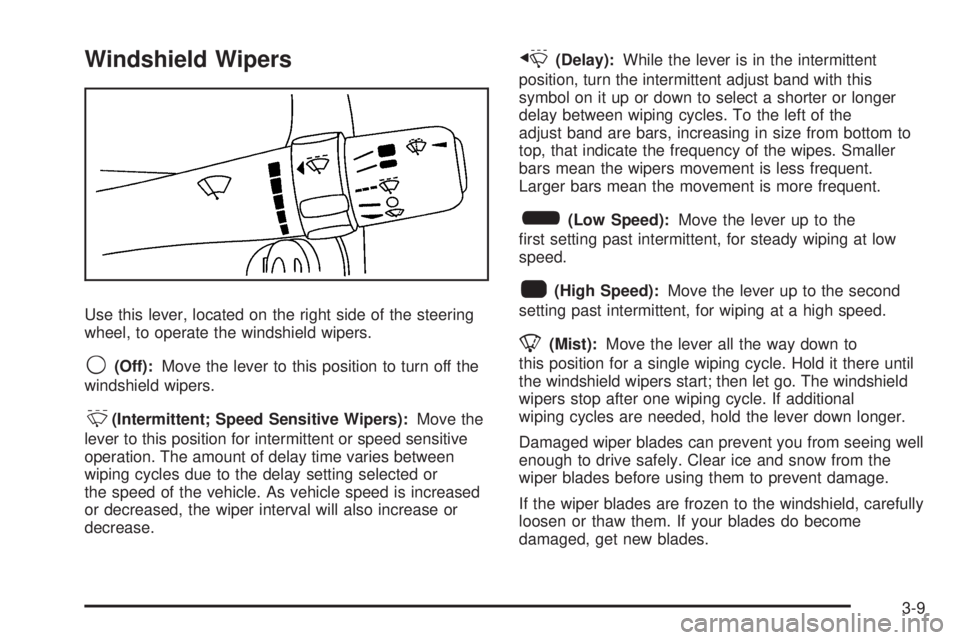
Windshield Wipers
Use this lever, located on the right side of the steering
wheel, to operate the windshield wipers.
9(Off):Move the lever to this position to turn off the
windshield wipers.
&(Intermittent; Speed Sensitive Wipers):Move the
lever to this position for intermittent or speed sensitive
operation. The amount of delay time varies between
wiping cycles due to the delay setting selected or
the speed of the vehicle. As vehicle speed is increased
or decreased, the wiper interval will also increase or
decrease.
x(Delay):While the lever is in the intermittent
position, turn the intermittent adjust band with this
symbol on it up or down to select a shorter or longer
delay between wiping cycles. To the left of the
adjust band are bars, increasing in size from bottom to
top, that indicate the frequency of the wipes. Smaller
bars mean the wipers movement is less frequent.
Larger bars mean the movement is more frequent.
6(Low Speed):Move the lever up to the
rst setting past intermittent, for steady wiping at low
speed.
1(High Speed):Move the lever up to the second
setting past intermittent, for wiping at a high speed.
8(Mist):Move the lever all the way down to
this position for a single wiping cycle. Hold it there until
the windshield wipers start; then let go. The windshield
wipers stop after one wiping cycle. If additional
wiping cycles are needed, hold the lever down longer.
Damaged wiper blades can prevent you from seeing well
enough to drive safely. Clear ice and snow from the
wiper blades before using them to prevent damage.
If the wiper blades are frozen to the windshield, carefully
loosen or thaw them. If your blades do become
damaged, get new blades.
3-9
Page 127 of 388
Setting Cruise Control
{CAUTION:
If you leave your cruise control on when you
are not using cruise, you might hit a button
and go into cruise when you do not want to.
You could be startled and even lose control.
Keep the cruise control switch off until you
want to use cruise control.
The cruise control buttons
are located on the
outboard side of the
steering wheel.
J(On/Off):Press this button to turn the cruise
control system on and off.RES+ (Resume):Press this button to resume a set
speed and to accelerate the speed.
SET– (Set):Press this button to set a speed and to
decrease the speed.
To set a speed do the following:
1. Press the
Jbutton to turn cruise control on.
The indicator light on the button will come on.
2. Get to the speed desired.
3. Press the SET– part of the control button and
release it. The CRUISE ENGAGED message
will appear on the Driver Information Center (DIC)
to show the system is engaged.
4. Take your foot off the accelerator pedal.
3-11


