Page 165 of 189
11
SOU R CE
22
S
O S SOU R CE
MODE B AND TP T
A
Y
DARKSOU R CE
2
abc
5
jkl
8
tuv 3
def
6
mno
9
wxyz
1 4
ghi
7
pqrs
0 #
D
2
abc
5
jkl
8
tuv
3
def
6
mno
9
wxyz
1 4
ghi
r
7
pq s0 #
S
O S SOU R CE
MODE B AND TP T
A
Y
DARKSOU R CESOU R CE
ESC
MENU LIST
1
33
22
158
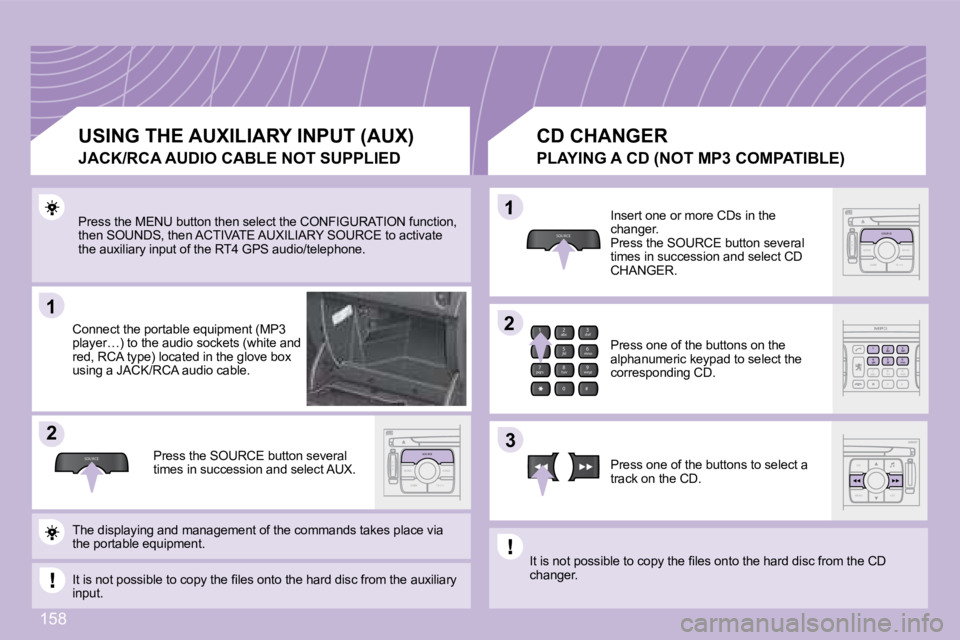
Press the MENU button then select the CONFIGURATIO N function,
then SOUNDS, then ACTIVATE AUXILIARY SOURCE to acti vate
the auxiliary input of the RT4 GPS audio/telephone.
Connect the portable equipment (MP3
player…) to the audio sockets (white and
red, RCA type) located in the glove box
using a JACK/RCA audio cable.
Press the SOURCE button several
times in succession and select AUX. CD CHANGER
Insert one or more CDs in the
changer.
Press the SOURCE button several
times in succession and select CD
CHANGER.
Press one of the buttons on the
alphanumeric keypad to select the
corresponding CD.
Press one of the buttons to select a
track on the CD.
The displaying and management of the commands take s place via
the portable equipment.
It is not possible to copy the fi les onto the hard disc from the auxiliary
input. It is not possible to copy the fi les onto the hard
disc from the CD
changer.
USING THE AUXILIARY INPUT (AUX)
JACK/RCA AUDIO CABLE NOT SUPPLIED PLAYING A CD (NOT MP3 C
OMPATIBLE)
Page 166 of 189
2
abc
5
jkl
8
tuv 3
def
6
mno
9
wxyz
1 4
ghi
7
pqrs
0 #
ESC
MENU LIST
ESC
MENU LIST
ESC
MENU LIST
2
abc
5
jkl
8
tuv 3
def
6
mno
9
wxyz
1 4
ghi
7
pqrs
0 #
2
abc
5
jkl
8
tuv 3
def
6
mno
9
wxyz
1 4
ghi
r
7
pq s
0
#
D
2
abc
5
jkl
8
tuv 3
def
6
mno
9
wxyz
1 4
ghi
r
7
pq s
0#
11
22
33
11
22
06
159
TELEPHONE
INSTALLING YOUR SIM CARD ENTERING THE PIN CODE
Access the slot by pressing the button
using the tip of a pen.
Install the SIM card
in the holder and
then insert it in the
slot.
To remove the SIM card, repeat step 1.
Your SIM card must be installed and removed with t he RT4 GPS
audio/telephone switched off and the ignition off. Enter the PIN code on the keypad.
Confi rm the PIN code by pressing
button #.
PIN CODE
When entering your PIN code, tick the STORE PIN ta
b to gain
access to the telephone without having to enter thi s code when it is
used subsequently.
Page 167 of 189
2
abc
5
jkl
8
tuv 3
def
6
mno
9
wxyz
1 4
ghi
7
pqrs
0 #
ESC
MENU LIST
ESC
MENU LIST
2
abc
5
jkl
8
tuv 3
def
6
mno
9
wxyz
1 4
ghi
r
7
pq s
0
#
D
2
abc
5
jkl
8
tuv 3
def
6
mno
9
wxyz
1 4
ghi
r
7
pq s
0 #
D
2
abc
5
jkl
8
tuv 3
def
6
mno
9
wxyz
1 4
ghi
r
7
pq s
0 #
11
22
33
44
55
66
D
2
abc
5
jkl
8
tuv 3
def
6
mno
9
wxyz
1 4
ghi
r
7
pq s
0 #D
2
abc
5
jkl
8
tuv 3
def
6
mno
9
wxyz
1 4
ghi
r
7
pq s
0 #
D
2
abc
5
jkl
8
tuv 3
def
6
mno
9
wxyz
1 4
ghi
r
7
pq s
0 #
06
160
TELEPHONE
CALLING A CONTACT
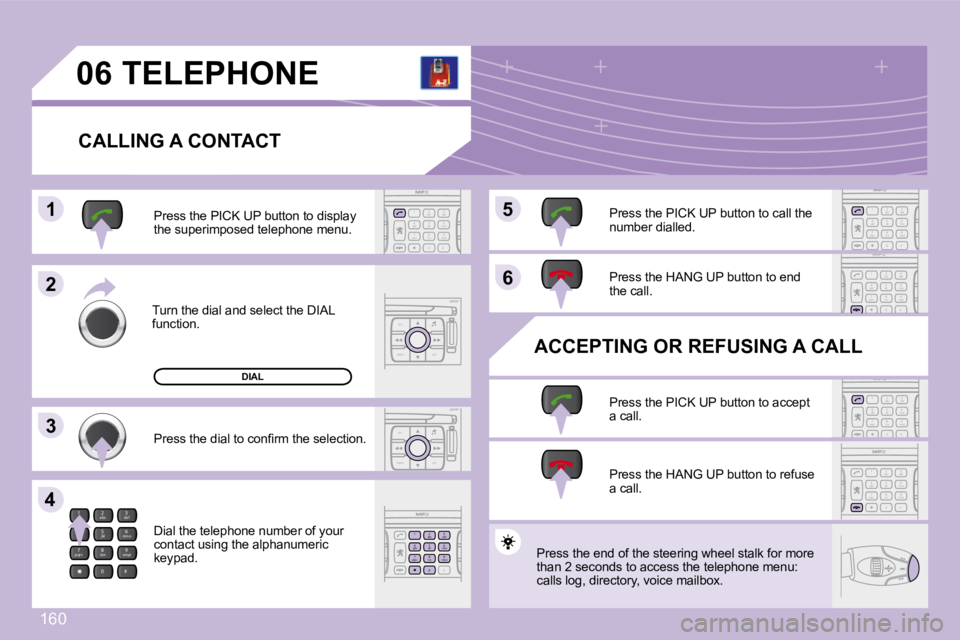
Turn the dial and select the DIAL
function. Press the PICK UP button to display
the superimposed telephone menu.
Press the dial to confi rm the selection.
Dial the telephone number of your
contact using the alphanumeric
keypad. Press the PICK UP button to call the
number dialled.
Press the HANG UP button to end
the call.
ACCEPTING OR REFUSING A CALL Press the PICK UP button to accept
a call.
Press the HANG UP button to refuse
a call.
DIAL
Press the end of the steering wheel stalk for more
than 2 seconds to access the telephone menu:
calls log, directory, voice mailbox.
Page 184 of 189

11
22
11
22
33
174
Insert an MP3 compilation in the player.
The audio equipment searches for all of the music
tracks, which may take anything between a few
seconds and several tens of seconds, before play
begins.
On a single disc, the CD player can read up to 255 MP3 fi les spread
over 8 directory levels. However, it is advisable t o keep to a limit of
two levels to reduce the access time before the CD is played.
CD
To play a disc which has already been
inserted, press the SOURCE button
several times in succession and
select CD. Press one of the buttons to select a
track on the CD.
Press the LIST REFRESH button to
display the list of directories of the
MP3 compilation.
PLAYING AN MP3 COMPILATION
CD CHANGER
Insert the CDs in the changer one by one.
Press the SOURCE button several
times in succession and select CD
CHANGER.
Press one of the buttons on the
numeric keypad to select the
corresponding CD.
Press one of the buttons to select a
track on the CD.
Press and hold one of the buttons for
fast forwards or backwards play.
PLAYING A CD (NOT MP3 COMPATIBLE)
Page 185 of 189

11
22
33
11
22
44
11
04
175
HANDS-FREE KIT
MATCHING A TELEPHONE DISPLAY C
Select the accessory which corresponds to the
name of the vehicle, a superimposed confi guration
display appears on the multifunction display. Activate the telephone's Bluetooth function and
carry out a search of the Bluetooth accessories
present for the telephone.
Select the YES tab on the display
using the buttons then confi rm by
pressing OK.
Enter the vehicle's authentication code (=1234).
Depending on the telephone, you may be asked
to enter this code before the superimposed
confi guration display appears.
YES
YES
The services offered by the hands-free kit depend
on the network, the SIM
card and the compatibility of the Bluetooth equipme nt used.
Consult your telephone's manual and your operator to fi nd out which
services are available to you. A list of mobile tel ephones which offer the
best range of services is available from the networ k. Contact a PEUGEOT
dealer.
RECEIVING A CALL
An incoming call is announced by a ring and a supe rimposed display
on the multifunction display.
Select the YES tab on the display
using the buttons and confi rm by
pressing OK.
Press the end of the steering wheel stalk to accep t
the call.
Press the end of the steering wheel stalk for more
than two seconds to access your directory.
To dial a number, use the keypad on your
telephone. MAKING A CALL
For safety reasons and because they require prolon
ged attention
on the part of the driver, the operations for match ing of the
Bluetooth mobile telephone with the RD4 hands-free kit must be
carried out with the vehicle stationary and the ign ition on.
