Page 182 of 189

11
22
33
44
22
44
33
11
03
172
AUDIO
RADIO
Press the SOURCE button several
times in succession and select the
radio.
Press the BAND AST button to select
a waveband: FM1, FM2, FMast, AM.
Briefl y press one of the buttons to
carry out an automatic search of the
radio stations.
Press one of the buttons to carry out a
manual search of the radio stations.
Press the LIST REFRESH button to
display the list of stations received
locally (30 stations maximum).
To update this list, press for more than
two seconds. Select ACTIVATE FREQUENCY
FOLLOWING (RDS) then press OK.
RDS appears on the display.
Select the FM WAVEBAND
PREFERENCES function then press
OK.
Select AUDIO FUNCTIONS then
press OK.
Press the MENU button.
FM WAVEBAND PREFERENCES
ACTIVATE FREQUENCY FOLLOWING (RDS)
The external environment (hills, buildings, tunnel
s, basement car parks) may block reception, includi ng
in RDS mode. This is a normal effect of the way in which radio waves are transmitted and does not
indicate any failure of the audio equipment.
RDS
The RDS, if displayed, enables you to continue l istening to the
same station by means of frequency following. Howev er, in certain
conditions, this RDS station is not followed throug hout the country
as radio stations do not cover 100 % of the territo ry. This explains
the loss of reception of the station during a journ ey.
SELECTING A STATION
Page 183 of 189

11
22
173
Insert circular compact discs only.
Some anti-pirating systems, on original discs or CDs
copied using a personal recorder, may cause faults
which are no refl ection on the quality of the origi nal
player.
Without pressing the EJECT button, insert a CD in the
player, play begins automatically.
Press one of the buttons to select a
track on the CD.
Press the LIST REFRESH button to
display the list of tracks on the CD.
To play a disc which has already been
inserted, press the SOURCE button
several times in succession and select
CD.
CD
PLAYING A CD
MP3 CD
The MP3 format, an abbreviation of MPEG 1.2 & 2.5 Audio Layer 3,
is an audio compression standard which permits the recording of
several tens of music fi les on a single disc.
The playing and displaying of an MP3 compilation m ay depend on
the recording programme and/or the parameters used.
In order to be able to play a recorded CDR or CDRW , when recording
select standards ISO 9660 level 1.2 or Joliet.
If the disc is recorded in another format, it may not be played
correctly.
It is recommended that the same recording standard is always used
for an individual disc, with as low a speed as poss ible for optimum
sound quality.
In the particular case of a multi-session CD, the Joliet standard is
recommended.
The audio equipment will only play fi les with the extension ".mp3". No
other type of fi le (.wma, .mp4...) can be played.
It is advisable to restrict fi le names to 20 chara cters without using
special characters (e.g.: " " ? ; ù) to avoid any p laying or displaying
problems.
INFORMATION AND ADVICE
Page 184 of 189

11
22
11
22
33
174
Insert an MP3 compilation in the player.
The audio equipment searches for all of the music
tracks, which may take anything between a few
seconds and several tens of seconds, before play
begins.
On a single disc, the CD player can read up to 255 MP3 fi les spread
over 8 directory levels. However, it is advisable t o keep to a limit of
two levels to reduce the access time before the CD is played.
CD
To play a disc which has already been
inserted, press the SOURCE button
several times in succession and
select CD. Press one of the buttons to select a
track on the CD.
Press the LIST REFRESH button to
display the list of directories of the
MP3 compilation.
PLAYING AN MP3 COMPILATION
CD CHANGER
Insert the CDs in the changer one by one.
Press the SOURCE button several
times in succession and select CD
CHANGER.
Press one of the buttons on the
numeric keypad to select the
corresponding CD.
Press one of the buttons to select a
track on the CD.
Press and hold one of the buttons for
fast forwards or backwards play.
PLAYING A CD (NOT MP3 COMPATIBLE)
Page 185 of 189

11
22
33
11
22
44
11
04
175
HANDS-FREE KIT
MATCHING A TELEPHONE DISPLAY C
Select the accessory which corresponds to the
name of the vehicle, a superimposed confi guration
display appears on the multifunction display. Activate the telephone's Bluetooth function and
carry out a search of the Bluetooth accessories
present for the telephone.
Select the YES tab on the display
using the buttons then confi rm by
pressing OK.
Enter the vehicle's authentication code (=1234).
Depending on the telephone, you may be asked
to enter this code before the superimposed
confi guration display appears.
YES
YES
The services offered by the hands-free kit depend
on the network, the SIM
card and the compatibility of the Bluetooth equipme nt used.
Consult your telephone's manual and your operator to fi nd out which
services are available to you. A list of mobile tel ephones which offer the
best range of services is available from the networ k. Contact a PEUGEOT
dealer.
RECEIVING A CALL
An incoming call is announced by a ring and a supe rimposed display
on the multifunction display.
Select the YES tab on the display
using the buttons and confi rm by
pressing OK.
Press the end of the steering wheel stalk to accep t
the call.
Press the end of the steering wheel stalk for more
than two seconds to access your directory.
To dial a number, use the keypad on your
telephone. MAKING A CALL
For safety reasons and because they require prolon
ged attention
on the part of the driver, the operations for match ing of the
Bluetooth mobile telephone with the RD4 hands-free kit must be
carried out with the vehicle stationary and the ign ition on.
Page 187 of 189
55
66
77
88
11
22
33
44
06
177
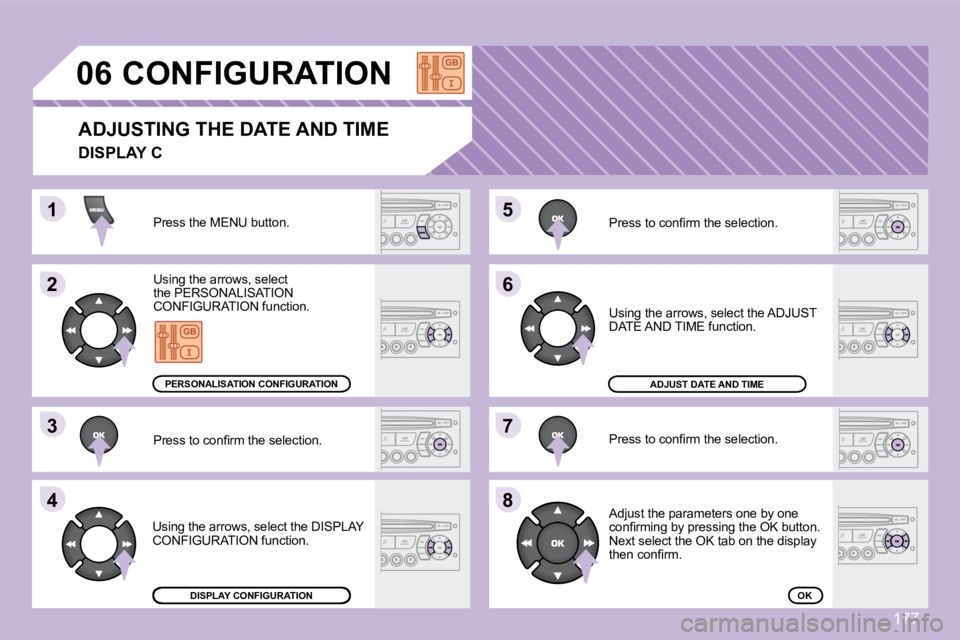
CONFIGURATION
ADJUSTING THE DATE AND TIME
Press the MENU button.
Using the arrows, select
the PERSONALISATION
CONFIGURATION function.
Press to confi rm the selection.
Using the arrows, select the DISPLAY
CONFIGURATION function. Press to confi rm the selection.
Press to confi rm the selection.
Using the arrows, select the ADJUST
DATE AND TIME function.
Adjust the parameters one by one
confi rming by pressing the OK button.
Next select the OK tab on the display
then confi rm.
DISPLAY CONFIGURATION
ADJUST DATE AND TIME
OK
PERSONALISATION CONFIGURATION
DISPLAY C
Page 188 of 189
1
2
3
3
2
3
3
2
3
3
2
3
3
2
3
3
1
2
3
3
2
3
3
1
2
3
3
1
2
2
2
2
2
2
1
2
2
2
2
2
2
2
2
1
2
2
123
23
07
178
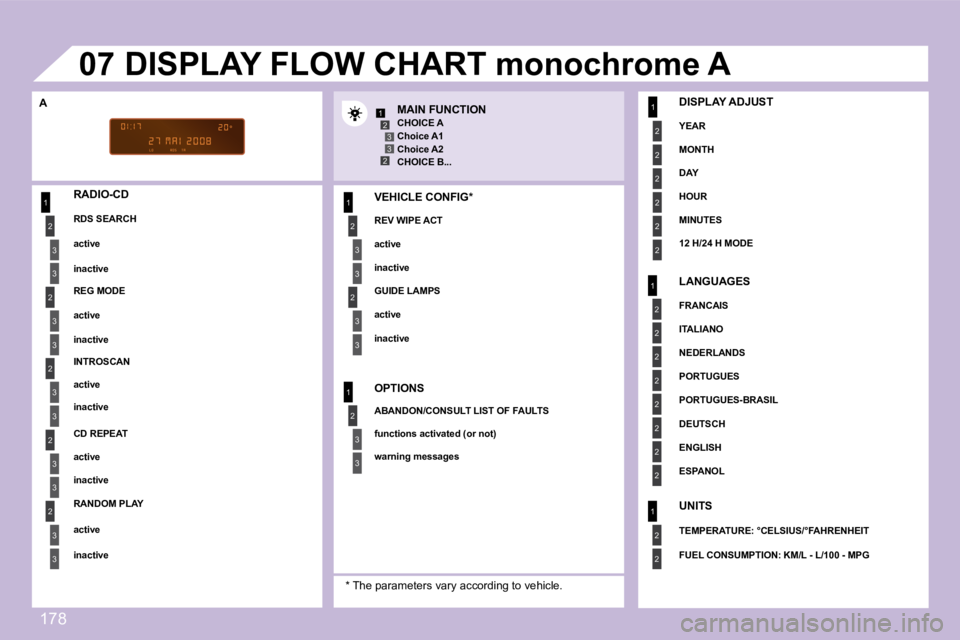
DISPLAY FLOW CHART monochrome A
A MAIN FUNCTION
CHOICE A
Choice A1
Choice A2
CHOICE B...
RADIO-CD
RDS SEARCH
active
inactive
REG MODE
active
inactive
INTROSCAN
active
inactive
CD REPEAT
active
inactive
* The parameters vary according to vehicle.
RANDOM PLAY
active
inactive VEHICLE CONFIG *
REV WIPE ACT
active
inactive
GUIDE LAMPS
active
inactive
OPTIONS
ABANDON/CONSULT LIST OF FAULTS
functions activated (or not)
warning messages
DISPLAY ADJUST
YEAR
MONTH
DAY
HOUR
MINUTES
12 H/24 H MODE
LANGUAGES
FRANCAIS
ITALIANO
NEDERLANDS
PORTUGUES
PORTUGUES-BRASIL
DEUTSCH
ENGLISH
ESPANOL
UNITS
TEMPERATURE: °CELSIUS/°FAHRENHEIT
FUEL CONSUMPTION: KM/L - L/100 - MPG
Page 189 of 189

1
1
2
3
4
3
4
3
4
2
3
4
3
4
2
3
4
2
4
4
3
4
4
4
3
4
4
1
2
3
2
3
2
1
2
3
3
3
4
4
4
2
3
4
3
4
3
4
2
3
3
3
4
3
2
07
179
DISPLAY FLOW CHART monochrome C
AUDIO FUNCTIONS
FM BAND PREFERENCES
alternative frequencies (RDS)
activate/deactivate
regional mode (REG)
activate/deactivate
radio-text information (RDTXT)
activate/deactivate
AUDIO CD PREFERENCES
cd changer repeat (RPT)
activate/deactivate
track random play (RDM)
activate/deactivate
TRIP COMPUTER
ENTER DISTANCE TO DESTINATION
distance: x km
WARNING LOG
diagnostics STATUS OF FUNCTIONS *
functions activated or deactivated
* The parameters vary according to vehicle (refer to the "Multifunction displays" chapter). PERSONALISATION-CONFIGURATION
DEFINE THE VEHICLE PARAMETERS *
DISPLAY CONFIGURATION
video brightness adjustment
normal video
inverse video
brightness (- +) adjustment
date and time adjustment
day/month/year adjustment
hour/minute adjustment
choice of 12 h/24 h mode
choice of units
l/100 km - mpg - km/l
°Celsius/°Fahrenheit
CHOICE OF LANGUAGE TELEPHONE
CONSULTING DIRECTORIES **
telephone directory
call log
services directory
customer contact centre
breakdown call
emergency call
CONFIGURATION
deletion of a match
list of matches
consulting matches
list of matches
choice of a mobile to connect
list of mobiles
MANAGEMENT OF A COMMUNICATION
switch **
terminate the current call
secret mode
activate/deactivate
** According to compatibility of Bluetooth telephone
and service contract.