2008 NISSAN SENTRA ignition
[x] Cancel search: ignitionPage 132 of 328

Releasing the trunk lid
Push thebutton for longer than 0.5 sec-
ond to open the trunk lid. The trunk release button
will not operate when the ignition switch is in the
ON position.
Using the panic alarm
If you are near your vehicle and feel threatened,
you may activate the panic alarm to call attention
by pushing and holding the
button on the
Intelligent Key forlonger than 0.5 second.
The panic alarm and headlights will stay on for 25
seconds.
The panic alarm stops when:
cit has run for 25 seconds, or
cany button is pushed on the Intelligent Key.
Silencing the horn beep feature
If desired, the horn beep feature can be deacti-
vated using the Intelligent Key.
To deactivate:Press and hold the
andbuttonsfor at least 2 seconds.
The hazard warning lights will flash three times to
confirm that the horn beep feature has been
deactivated.
To activate:Press and hold the
andbuttonsfor at least 2 seconds
once more.
WPD0364WPD0361WPD0362
3-18Pre-driving checks and adjustments
ZREVIEW COPYÐ2008 Sentra(sen)
Owners ManualÐUSA_English(nna)
01/22/08Ðdebbie
X
Page 133 of 328
The hazard warning lights will flash once and the
horn will sound once to confirm that the horn
beep feature has been reactivated.
Deactivating the horn beep feature does not si-
lence the horn if the alarm is triggered.
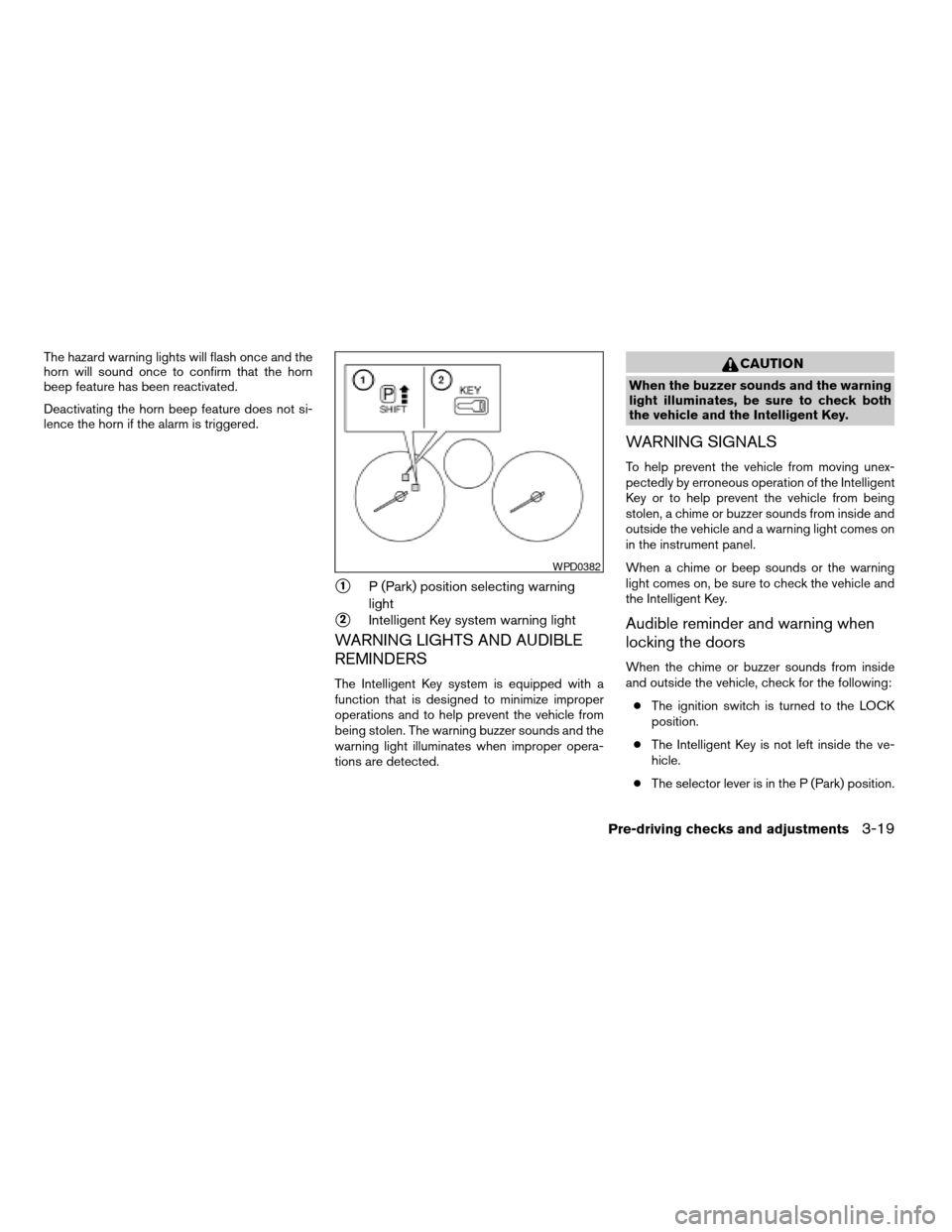
s1P (Park) position selecting warning
light
s2Intelligent Key system warning light
WARNING LIGHTS AND AUDIBLE
REMINDERS
The Intelligent Key system is equipped with a
function that is designed to minimize improper
operations and to help prevent the vehicle from
being stolen. The warning buzzer sounds and the
warning light illuminates when improper opera-
tions are detected.
CAUTION
When the buzzer sounds and the warning
light illuminates, be sure to check both
the vehicle and the Intelligent Key.
WARNING SIGNALS
To help prevent the vehicle from moving unex-
pectedly by erroneous operation of the Intelligent
Key or to help prevent the vehicle from being
stolen, a chime or buzzer sounds from inside and
outside the vehicle and a warning light comes on
in the instrument panel.
When a chime or beep sounds or the warning
light comes on, be sure to check the vehicle and
the Intelligent Key.
Audible reminder and warning when
locking the doors
When the chime or buzzer sounds from inside
and outside the vehicle, check for the following:
cThe ignition switch is turned to the LOCK
position.
cThe Intelligent Key is not left inside the ve-
hicle.
cThe selector lever is in the P (Park) position.
WPD0382
Pre-driving checks and adjustments3-19
ZREVIEW COPYÐ2008 Sentra(sen)
Owners ManualÐUSA_English(nna)
01/22/08Ðdebbie
X
Page 134 of 328

Audible reminder and warning when
the engine stops
When the P position selecting warning light
() in the instrument panel blinks in red:
cMake sure the selector lever is in the P
position.
When the chime sounds intermittently:
cMake sure the selector lever is in the P
position and the ignition switch is turned to
the LOCK position.
If the chime sounds continuously when the driv-
er’s door is opened, check the following:
cThe selector lever is in the P position and the
ignition switch is turned to the LOCK posi-
tion.
cThe mechanical key is not inserted into the
ignition switch.
cThe warning chime may stop when one of
the following is performed:
– Returning the ignition switch to the LOCK
position.
– Removing the mechanical key.
– Closing the doors.
Alarm and warning when the engine
starts
When the Intelligent Key system warning light
() blinks red and the outside buzzer
sounds, make sure the Intelligent Key is inside the
vehicle.
Warning for low battery power
When the Intelligent Key battery is low, the Intel-
ligent Key system warning light () will blink
green for about 30 seconds after the ignition
switch is turned to the ON position. This warning
is to let you know that the battery of the Intelligent
Key will run down soon. Replace it with a new
one. Refer to “Battery replacement” in the “Main-
tenance and do-it-yourself” section.
NISSAN recommends replacing the battery at a
NISSAN dealer.
Preventing the Intelligent Key from
being left in the vehicle
If you lock all doors using the power door lock
switch with the Intelligent Key in the vehicle, all of
the doors unlock immediately and the buzzer will
warn you when the door is closed.
3-20Pre-driving checks and adjustments
ZREVIEW COPYÐ2008 Sentra(sen)
Owners ManualÐUSA_English(nna)
01/22/08Ðdebbie
X
Page 135 of 328

TROUBLESHOOTING GUIDE
Symptom Possible Cause Remedy
When pushing the door handle request
switchThe front door beep sounds for approxi-
mately 2 seconds.The doors cannot be locked.Take out the Intelligent Key from the vehicle
and push the door handle request switch.
When closing the doorsThe front door beep sounds for approxi-
mately 10 seconds.The ignition knob is not turned to LOCK
position.Turn the ignition knob to LOCK.
The key warning light in the instrument
panel blinks in red and the front door warn-
ing beep sounds for approximately 3
seconds.The Intelligent Key is not in the vehicle. Be sure to carry the Intelligent Key with you.
The front door beep sounds for approxi-
mately 3 seconds and all doors unlock.The Intelligent Key is left in the vehicle. Take out the Intelligent Key from the vehicle
and close the door.
When opening the driver’s door A warning chime sounds continuously.The ignition knob is not in LOCK position,
or the mechanical key is inserted into the
ignition knob.Turn the ignition knob to LOCK.
Remove the mechanical key from the igni-
tion knob.
When stopping the engine The P (Park) position warning light in the
instrument panel blinks in red.The selector lever is not in the P (Park)
position.Make sure that the selector lever is in the P
(Park) position and turn the ignition knob to
LOCK.
When starting the engine The key warning light in the instrument
panel blinks in green.The battery charge is low. Replace the battery with a new one. See
“Battery replacement” in the “Maintenance
and do-it-yourself” section.
When turning the ignition switch A warning chime sounds continuously. The ignition switch is not turned to the
LOCK position.Turn the ignition switch to the LOCK
position.
When pushing the ignition switch The Intelligent Key system warning light in
the instrument panel illuminates red.The Intelligent Key is not in the vehicle. If the Intelligent Key system warning light
illuminates red even while you are carrying
the Intelligent Key, the battery is completely
discharged. Replace the battery with a new
one. See “Battery replacement” in the
“Maintenance and do-it-yourself” section.
Pre-driving checks and adjustments3-21
ZREVIEW COPYÐ2008 Sentra(sen)
Owners ManualÐUSA_English(nna)
01/22/08Ðdebbie
X
Page 141 of 328
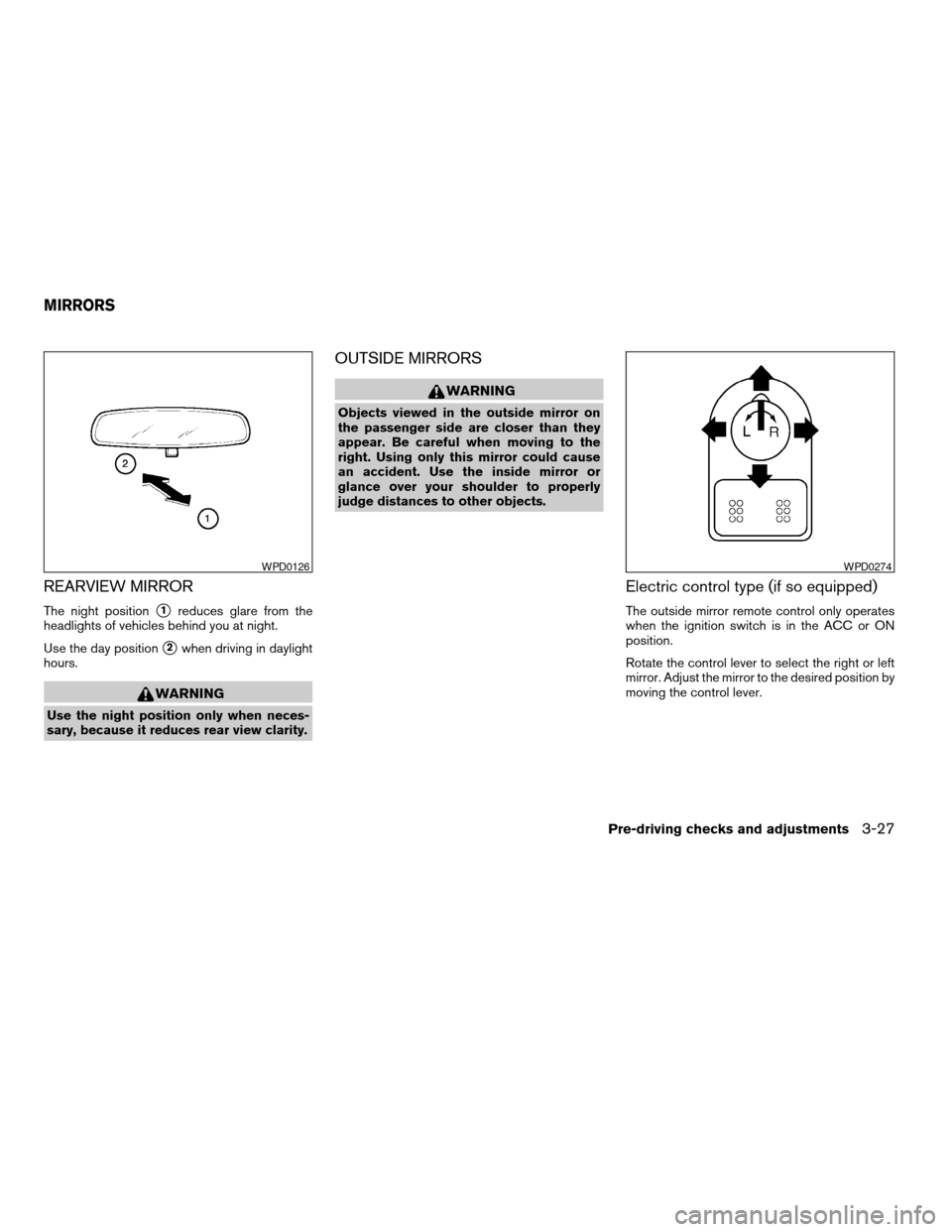
REARVIEW MIRROR
The night positions1reduces glare from the
headlights of vehicles behind you at night.
Use the day position
s2when driving in daylight
hours.
WARNING
Use the night position only when neces-
sary, because it reduces rear view clarity.
OUTSIDE MIRRORS
WARNING
Objects viewed in the outside mirror on
the passenger side are closer than they
appear. Be careful when moving to the
right. Using only this mirror could cause
an accident. Use the inside mirror or
glance over your shoulder to properly
judge distances to other objects.
Electric control type (if so equipped)
The outside mirror remote control only operates
when the ignition switch is in the ACC or ON
position.
Rotate the control lever to select the right or left
mirror. Adjust the mirror to the desired position by
moving the control lever.
WPD0126WPD0274
MIRRORS
Pre-driving checks and adjustments3-27
ZREVIEW COPYÐ2008 Sentra(sen)
Owners ManualÐUSA_English(nna)
01/22/08Ðdebbie
X
Page 145 of 328

1. TRIP INFO button (P. 4-3)
2. CLOCK DISP button (P. 4-5)
3.
AUDIO button (P. 4-5)
When you use this system, make sure the engine
is running.
If you use the system with the engine not
running (ignition ON or ACC) for a long
time, it will use up all the battery power,
and the engine will not start.
Reference symbols:
TRIP INFO button — This is a button on the
control panel. By pressing this button you can
select the item or perform this action.
HOW TO USE THE TRIP INFO
BUTTON
When the TRIP INFO button is pressed, the
following modes will display on the screen.
Dist. to Empty!Average Speed!Fuel
Economy!Trip Time!Audio!Dist. to Empty
Distance to empty (MI or km)
The Distance To Empty (DTE) mode provides you
with an estimation of the distance that can be
driven before refueling. The DTE is constantly
calculated based on the amount of fuel in the fuel
tank and the actual fuel consumption. The display
is updated every 30 seconds. When the fuel level
is low, the DTE display will change to — .NOTE:
cIf the amount of fuel added while the ignition
switch is OFF is small, the display just before
the ignition switch is turned OFF may con-
tinue to be displayed.
cWhen driving uphill or rounding curves, the
fuel in the tank shifts, which may momentarily
change the display.
WHA0701
Display screen, heater, air conditioner, audio and phone systems4-3
ZREVIEW COPYÐ2008 Sentra(sen)
Owners ManualÐUSA_English(nna)
01/22/08Ðdebbie
X
Page 148 of 328

DOOR WARNING
The DOOR OPEN screen will be automatically
displayed any time a door or the trunk is open and
the ignition switch is in the ACC or ON position.
If the door is open for longer than 10 seconds the
screen will no longer display which door is open,
but the DOOR OPEN warning will remain until
the door is closed.Adjust air flow direction for the driver’s and pas-
senger’s sides1, and centers2ventilators by
moving the ventilator slide and/or ventilator as-
semblies.
Open or close the ventilators
s1by using the dial.
Move the dial toward theto open the ven-
tilators or toward theto close them.
WHA0705WHA0772
VENTILATORS
4-6Display screen, heater, air conditioner, audio and phone systems
ZREVIEW COPYÐ2008 Sentra(sen)
Owners ManualÐUSA_English(nna)
01/22/08Ðdebbie
X
Page 157 of 328

RADIO
Turn the ignition key to the ACC or ON position
and press the POWER/VOLUME control knob to
turn the radio on. If you listen to the radio with the
engine not running, the key should be turned to
the ACC position.
Radio reception is affected by station signal
strength, distance from radio transmitter, build-
ings, bridges, mountains and other external influ-
ences. Intermittent changes in reception quality
normally are caused by these external influences.
Using a cellular phone in or near the ve-
hicle may influence radio reception quality.
Radio reception
Your NISSAN radio system is equipped with
state-of-the-art electronic circuits to enhance ra-
dio reception. These circuits are designed to
extend reception range, and to enhance the qual-
ity of that reception.
However there are some general characteristics
of both FM and AM radio signals that can affect
radio reception quality in a moving vehicle, even
when the finest equipment is used. These char-
acteristics are completely normal in a given re-
ception area, and do not indicate any malfunction
in your NISSAN radio system.Reception conditions will constantly change be-
cause of vehicle movement. Buildings, terrain,
signal distance and interference from other ve-
hicles can work against ideal reception. De-
scribed below are some of the factors that can
affect your radio reception.
Some cellular phones or other devices may
cause interference or a buzzing noise to come
from the audio system speakers. Storing the de-
vice in a different location may reduce or elimi-
nate the noise.
FM RADIO RECEPTION
Range: FM range is normally limited to 25 – 30 mi
(40 – 48 km) , with monaural (single channel) FM
having slightly more range than stereo FM. Exter-
nal influences may sometimes interfere with FM
station reception even if the FM station is within
25 mi (40 km) . The strength of the FM signal is
directly related to the distance between the
transmitter and receiver. FM signals follow a line-
of-sight path, exhibiting many of the same char-
acteristics as light. For example, they will reflect
off objects.
Fade and drift: As your vehicle moves away from
a station transmitter, the signals will tend to fade
and/or drift.Static and flutter: During signal interference from
buildings, large hills or due to antenna position
(usually in conjunction with increased distance
from the station transmitter) , static or flutter can
be heard. This can be reduced by adjusting the
treble control to reduce treble response.
Multipath reception: Because of the reflective
characteristics of FM signals, direct and reflected
signals reach the receiver at the same time. The
signals may cancel each other, resulting in mo-
mentary flutter or loss of sound.
AM RADIO RECEPTION
AM signals, because of their low frequency, can
bend around objects and skip along the ground.
In addition, the signals can be bounced off the
ionosphere and bent back to earth. Because of
these characteristics, AM signals are also sub-
ject to interference as they travel from transmitter
to receiver.
Fading: Occurs while the vehicle is passing
through freeway underpasses or in areas with
many tall buildings. It can also occur for several
seconds during ionospheric turbulence even in
areas where no obstacles exist.
Static: Caused by thunderstorms, electrical
power lines, electric signs and even traffic lights.
AUDIO SYSTEM
Display screen, heater, air conditioner, audio and phone systems4-15
ZREVIEW COPYÐ2008 Sentra(sen)
Owners ManualÐUSA_English(nna)
01/22/08Ðdebbie
X