2008 NISSAN ROGUE eco mode
[x] Cancel search: eco modePage 126 of 309
Black plate (128,1)
Model "S35-D" EDITED: 2007/ 12/ 19
SPA2074
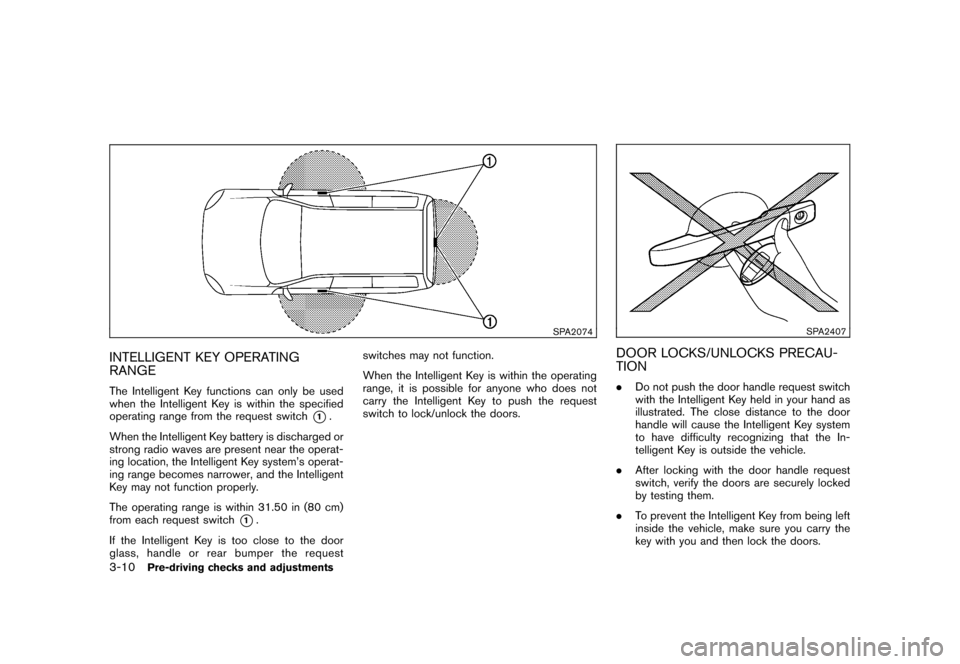
INTELLIGENT KEY OPERATING
RANGEThe Intelligent Key functions can only be used
when the Intelligent Key is within the specified
operating range from the request switch
*1.
When the Intelligent Key battery is discharged or
strong radio waves are present near the operat-
ing location, the Intelligent Key system’s operat-
ing range becomes narrower, and the Intelligent
Key may not function properly.
The operating range is within 31.50 in (80 cm)
from each request switch
*1.
If the Intelligent Key is too close to the door
glass, handle or rear bumper the requestswitches may not function.
When the Intelligent Key is within the operating
range, it is possible for anyone who does not
carry the Intelligent Key to push the request
switch to lock/unlock the doors.
SPA2407
DOOR LOCKS/UNLOCKS PRECAU-
TION.Do not push the door handle request switch
with the Intelligent Key held in your hand as
illustrated. The close distance to the door
handle will cause the Intelligent Key system
to have difficulty recognizing that the In-
telligent Key is outside the vehicle.
.After locking with the door handle request
switch, verify the doors are securely locked
by testing them.
.To prevent the Intelligent Key from being left
inside the vehicle, make sure you carry the
key with you and then lock the doors.
3-10
Pre-driving checks and adjustments
Page 128 of 309
Black plate (130,1)
Model "S35-D" EDITED: 2007/ 12/ 19
When you carry the Intelligent Key with you, you
can lock or unlock all doors by pushing the door
handle request switch (driver’s or front passen-
ger’s)
*A
or lift gate request switch
*B
within
the range of operation.
When you lock or unlock the doors, the hazard
indicator will flash and the horn (or the outside
chime) will sound as a confirmation. For details,
see “Setting hazard indicator and horn mode”
later in this section.
Locking doors1. TurntheignitionswitchtotheLOCK
position.*1
2. Carry the Intelligent Key with you.
3. Close all the doors.*2
4. Push the door handle request switch (dri-
ver’s or front passenger’s)
*A
or the lift
gate request switch
*B
while carrying the
Intelligent Key with you.*3
5. All the doors and the lift gate will lock.
6. The hazard indicator flashes twice and the
outside chime sounds twice.
*1: Doors will lock with the request switch while
the ignition switch is in the ACC or ON
position.
*2: Doors will not lock with the request switchwhile any door is open.
*3: Doors will not lock with the request switch
when the Intelligent Key is left inside the
vehicle. However, when an Intelligent Key is
inside the vehicle, doors can be locked with
another registered Intelligent Key.
Unlocking doors1. Push the door handle request switch
*A
or
the lift gate request switch
*B
while
carrying the Intelligent Key with you.
2. The hazard indicator flashes once and out-
side chime sounds once. The corresponding
door or the lift gate will unlock.
3. Push the request switch again within 5
seconds.
4. The hazard indicator flashes once and out-
side chime sounds once again. All the doors
and the lift gate will unlock.
All doors will be locked automatically unless one
of the following operations is performed within 1
minute after pushing the request switch while
the doors are locked.
.Opening any doors.
.Pushing the ignition switch.
.Inserting the mechanical key into the ignition
switch.During this 1-minute time period, if the UNLOCK
button on the Intelligent Key is pushed, all
doors will be locked automatically after another
1 minute.
3-12
Pre-driving checks and adjustments
Page 130 of 309
Black plate (132,1)
Model "S35-D" EDITED: 2007/ 12/ 19
TROUBLESHOOTING GUIDE
Symptom Possible cause Action to take
When pushing the request switchThe outside buzzer sounds for approximately 2
seconds.The doors cannot be locked.Take out the Intelligent Key from the vehicle
and push the request switch.
Turn the ignition switch to the LOCK
position and push the request switch while
carrying the Intelligent Key with you.
Close all the doors securely and push the
request switch while carrying the Intelligent
Key with you.
When closing the doorsThe outside buzzer sounds for approximately
10 seconds.The ignition switch is not turned to the
LOCK position.Turn the ignition switch to the LOCK
position.
The Intelligent Key system warning light in the
instrument panel blinks in red and the outside
buzzer sounds 3 times.The Intelligent Key is not in the vehicle. Carry the Intelligent Key with you.
The outside buzzer sounds for approximately 3
seconds and all doors unlock.The Intelligent Key has been left in the
vehicle.Carry the Intelligent Key from the vehicle
and close the door.
When opening the driver’s door A warning chime sounds continuously.The ignition switch is not in the LOCK
position, or the mechanical key is
inserted into the ignition switch.Turn the ignition switch to the LOCK
position.
Remove the mechanical key from the igni-
tion switch.
When stopping the engineThe P position selecting warning light in the
instrument panel blinks in red.The selector lever is not in the P (Park)
position.Shift the selector lever to the P (Park)
position.
When turning the ignition switch A warning chime sounds continuously.The ignition switch is not turned to the
LOCK position.Turn the ignition switch to the LOCK
position.
When starting the engineThe Intelligent Key system warning light in the
instrument panel blinks in green.The battery charge is low.Replace the battery with a new one. (See
“BATTERY REPLACEMENT” in the “8.
Maintenance and do-it-yourself” section.)
3-14
Pre-driving checks and adjustments
Page 132 of 309
Black plate (134,1)
Model "S35-D" EDITED: 2007/ 12/ 19
HOW TO USE REMOTE KEYLESS
ENTRY FUNCTIONThe remote keyless entry function can operate
all door locks using the remote keyless entry
function of the Intelligent Key. The remote
keyless entry function can operate at a distance
of approximately 33 ft (10 m) from the vehicle.
(The operating distance depends upon the
conditions around the vehicle.)
The remote keyless entry function will not
operate:
.When the Intelligent Key is not within the
operational range.
.When the doors are open or not closed
securely.
.When the Intelligent Key battery is dis-
charged.
The remote keyless entry function can also
operate the vehicle alarm.
SPA2252
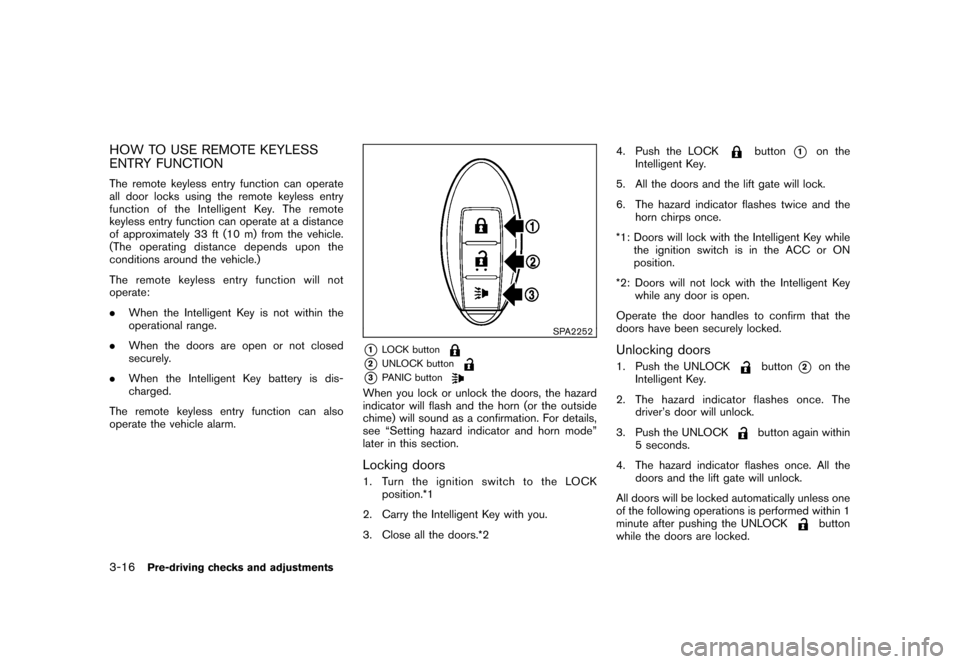
*1
LOCK button
*2
UNLOCK button
*3
PANIC button
When you lock or unlock the doors, the hazard
indicator will flash and the horn (or the outside
chime) will sound as a confirmation. For details,
see “Setting hazard indicator and horn mode”
later in this section.Locking doors1. Turn the ignition switch to the LOCK
position.*1
2. Carry the Intelligent Key with you.
3. Close all the doors.*24. Push the LOCK
button
*1
on the
Intelligent Key.
5. All the doors and the lift gate will lock.
6. The hazard indicator flashes twice and the
horn chirps once.
*1: Doors will lock with the Intelligent Key while
the ignition switch is in the ACC or ON
position.
*2: Doors will not lock with the Intelligent Key
while any door is open.
Operate the door handles to confirm that the
doors have been securely locked.
Unlocking doors1. Push the UNLOCK
button
*2
on the
Intelligent Key.
2. The hazard indicator flashes once. The
driver’s door will unlock.
3. Push the UNLOCK
button again within
5 seconds.
4. The hazard indicator flashes once. All the
doors and the lift gate will unlock.
All doors will be locked automatically unless one
of the following operations is performed within 1
minute after pushing the UNLOCK
button
while the doors are locked.
3-16
Pre-driving checks and adjustments
Page 133 of 309
Black plate (135,1)
Model "S35-D" EDITED: 2007/ 12/ 19
.Opening any doors.
.Pushing the ignition switch.
.Inserting the mechanical key into the ignition
switch.
During this 1-minute time period, if the UNLOCK
button is pushed, all doors will be locked
automatically after another 1 minute.
Using panic alarmIf you are near your vehicle and feel threatened,
you may activate the alarm to call attention as
follows:
1. Push the PANIC
button
*3
on the
Intelligent Key formore than 1 second.
2. The theft warning alarm and headlights will
stay on for 25 seconds.
3. The panic alarm stops when:
.It has run for 25 seconds, or
.Any of the buttons on the Intelligent Key
is pushed. (Note: Panic button must be
pushed for more than 1 second.)
Setting hazard indicator and horn modeThis vehicle is set in hazard indicator and horn
mode when you first receive the vehicle.
In hazard indicator and horn mode, when the
LOCK
button
*1
is pushed, the hazardindicator flashes twice and the horn chirps once.
When the UNLOCK
button
*2
is pushed,
the hazard indicator flashes once.
If horns are not necessary, the system can be
switched to the hazard indicator mode.
In hazard indicator mode, when the LOCK
button is pushed, the hazard indicator flashes
twice. When the UNLOCK
button is
pushed, neither the hazard indicator nor the
horn operates.
Pre-driving checks and adjustments
3-17
Page 134 of 309
Black plate (136,1)
Model "S35-D" EDITED: 2007/ 12/ 19
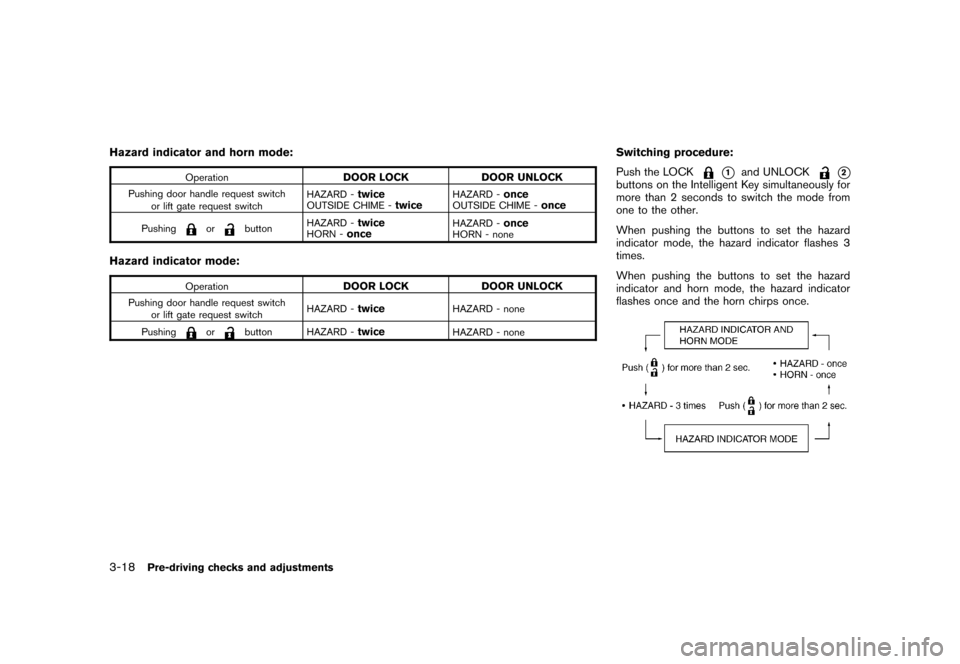
Hazard indicator and horn mode:
Operation
DOOR LOCK DOOR UNLOCK
Pushing door handle request switch
or lift gate request switchHAZARD -
twice
OUTSIDE CHIME -
twice
HAZARD -
once
OUTSIDE CHIME -
once
Pushing
or
buttonHAZARD -
twice
HORN -
once
HAZARD -
once
HORN - none
Hazard indicator mode:
Operation
DOOR LOCK DOOR UNLOCK
Pushing door handle request switch
or lift gate request switchHAZARD -
twice
HAZARD - none
Pushing
or
button HAZARD -
twice
HAZARD - none
Switching procedure:
Push the LOCK
*1
and UNLOCK
*2
buttons on the Intelligent Key simultaneously for
more than 2 seconds to switch the mode from
one to the other.
When pushing the buttons to set the hazard
indicator mode, the hazard indicator flashes 3
times.
When pushing the buttons to set the hazard
indicator and horn mode, the hazard indicator
flashes once and the horn chirps once.
3-18
Pre-driving checks and adjustments
Page 143 of 309
Black plate (13,1)
4 Heater, air conditioner, audio and phonesystems
Model "S35-D" EDITED: 2007/ 12/ 25
Ventilators ........................................................ 4-2
Heater and air conditioner .................................... 4-2
Manual air conditioner ..................................... 4-3
In-cabin microfilter .......................................... 4-5
Servicing air conditioner .................................. 4-5
Audio system .................................................... 4-6
Audio operation precautions ............................. 4-6
FM-AM radio with Compact Disc (CD) player ..... 4-13
FM-AM-SAT radio with Compact Disc (CD)
changer ..................................................... 4-17 CD care and cleaning
................................... 4-22
Steering wheel switch for audio control
(if so equipped) ........................................... 4-23
Antenna ..................................................... 4-24
Car phone or CB radio ...................................... 4-24
Bluetooth
®Hands-Free Phone System with
NISSAN voice recognition (if so equipped) ............ 4-25
Using system .............................................. 4-27
Speaker Adaptation (SA) mode ....................... 4-36
Troubleshooting guide ................................... 4-38
Page 144 of 309
Black plate (146,1)
Model "S35-D" EDITED: 2007/ 12/ 19
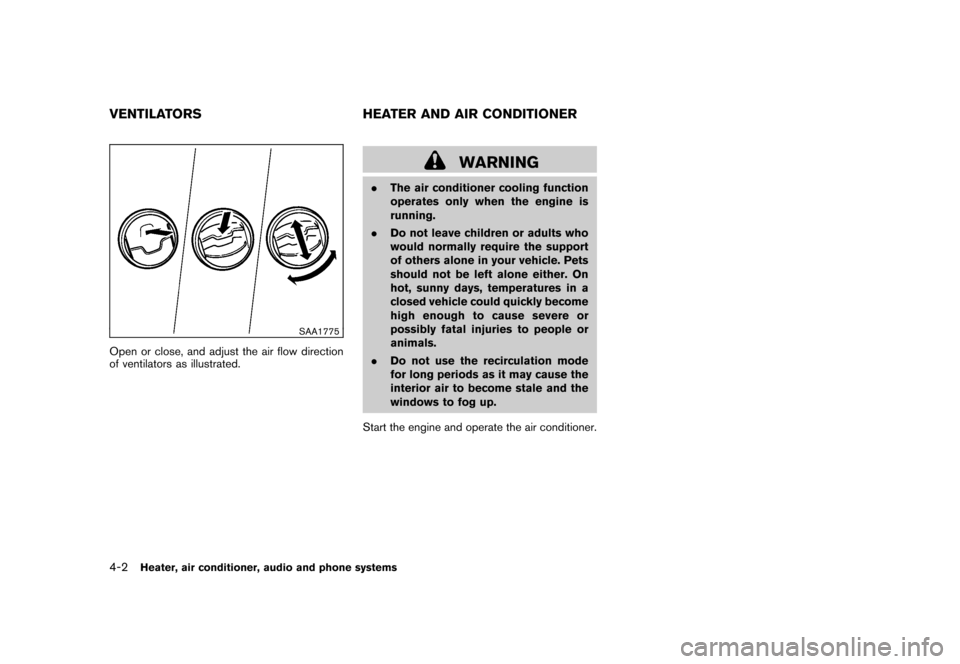
SAA1775
Open or close, and adjust the air flow direction
of ventilators as illustrated.
WARNING
.The air conditioner cooling function
operates only when the engine is
running.
.Do not leave children or adults who
would normally require the support
of others alone in your vehicle. Pets
should not be left alone either. On
hot, sunny days, temperatures in a
closed vehicle could quickly become
high enough to cause severe or
possibly fatal injuries to people or
animals.
.Do not use the recirculation mode
for long periods as it may cause the
interior air to become stale and the
windows to fog up.
Start the engine and operate the air conditioner.
VENTILATORS HEATER AND AIR CONDITIONER4-2
Heater, air conditioner, audio and phone systems