2008 NISSAN ROGUE tow
[x] Cancel search: towPage 83 of 309
Black plate (83,1)
Model "S35-D" EDITED: 2007/ 12/ 19
Cruise set indicator light
This light illuminates while the vehicle speed is
controlled by the cruise control system. If the
light blinks while the engine is running, it may
indicate the cruise control system is not
functioning properly. Have the system checked
by a NISSAN dealer. (See “CRUISE CON-
TROL” in the “5. Starting and driving” section.)
Front passenger air bag status
light
The front passenger air bag status light will be lit
and the passenger front air bag will be OFF
depending on how the front passenger seat is
being used.
For front passenger air bag status light opera-
tion,see“NISSANADVANCEDAIRBAG
SYSTEM (front seats)” in the “1. Safety —
Seats, seat belts and supplemental restraint
system” section of this manual.
High beam indicator light (Blue)
This light illuminates when the headlight high
beam is on and goes out when the low beam is
selected.
Malfunction Indicator Light (MIL)
If the malfunction indicator light illuminates
steady or blinks while the engine is running, it
may indicate a potential emission control and/or
Continuously Variable Transmission (CVT) mal-
function.
The malfunction indicator light may also illumi-
nate steady if the fuel-filler cap is loose or
missing, or if the vehicle runs out of fuel. Check
to make sure the fuel-filler cap is installed and
closed tightly, and that the vehicle has at least 3
US gallons (11.4 liters) of fuel in the fuel tank.
After a few driving trips, the
light should
turn off if no other potential emission control
system malfunction exists.
If this indicator light remains on for 20 seconds
and then blinks for 10 seconds when the engine
is not running, it indicates that the vehicle is not
ready for an emission control system inspection/
maintenance test. (See “READINESS FOR
INSPECTION/MAINTENANCE (I/M) TEST” in
the “9. Technical and consumer information”
section.)
Operation:
The malfunction indicator light will illuminate in
one of two ways:
.Malfunction indicator light illuminated steady— An emission control system and/or CVT
malfunction has been detected. Check the
fuel-filler cap. If the fuel-filler cap is loose or
missing, tighten or install the cap and
continue to drive the vehicle. The
light
should turn off after a few driving trips. If the
light does not turn off after a few
driving trips, have the vehicle inspected by a
NISSAN dealer. You do not need to have
your vehicle towed to the dealer.
.Malfunction indicator light blinking — An
engine misfire has been detected which may
damage the emission control system.
To reduce or avoid emission control system
damage:
a) Do not drive at speeds above 45 MPH
(72 km/h) .
b) Avoid hard acceleration or deceleration.
c) Avoid steep uphill grades.
d) If possible, reduce the amount of cargo
being hauled or towed.
The malfunction indicator light may stop
blinking and remain illuminated.
Have the vehicle inspected by a NISSAN
dealer. You do not need to have your vehicle
towed to the dealer.
Instruments and controls
2-17
Page 89 of 309
Black plate (89,1)
Model "S35-D" EDITED: 2007/ 12/ 19
SIC2821
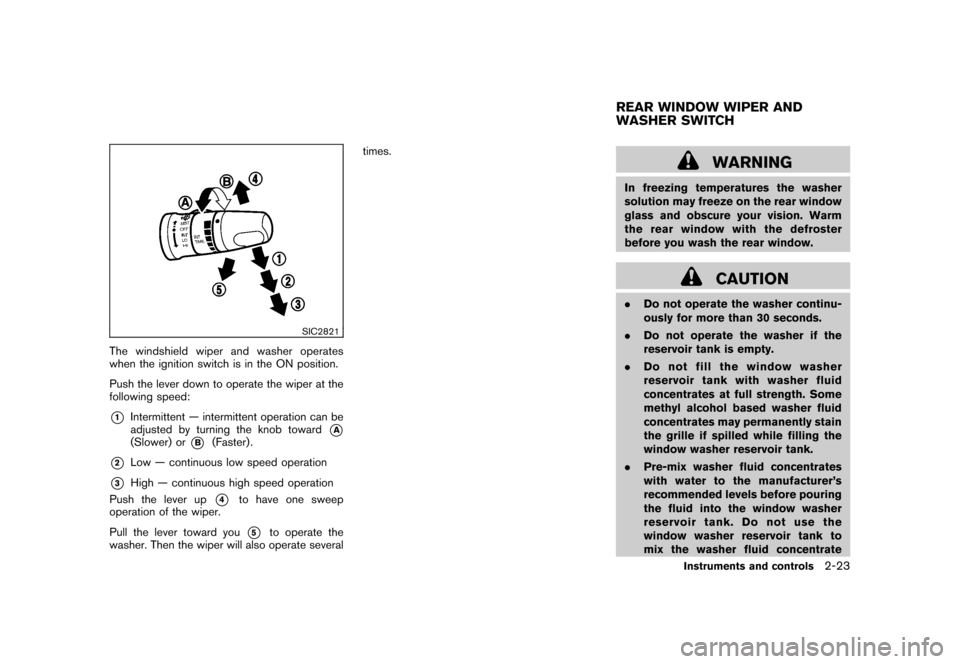
The windshield wiper and washer operates
when the ignition switch is in the ON position.
Push the lever down to operate the wiper at the
following speed:*1
Intermittent — intermittent operation can be
adjusted by turning the knob toward
*A
(Slower) or
*B
(Faster) .
*2
Low — continuous low speed operation
*3
High — continuous high speed operation
Push the lever up
*4
to have one sweep
operation of the wiper.
Pull the lever toward you*5
to operate the
washer. Then the wiper will also operate severaltimes.
WARNING
In freezing temperatures the washer
solution may freeze on the rear window
glass and obscure your vision. Warm
the rear window with the defroster
before you wash the rear window.
CAUTION
.Do not operate the washer continu-
ously for more than 30 seconds.
.Do not operate the washer if the
reservoir tank is empty.
.Do not fill the window washer
reservoir tank with washer fluid
concentrates at full strength. Some
methyl alcohol based washer fluid
concentrates may permanently stain
the grille if spilled while filling the
window washer reservoir tank.
.Pre-mix washer fluid concentrates
with water to the manufacturer’s
recommended levels before pouring
the fluid into the window washer
reservoir tank. Do not use the
window washer reservoir tank to
mix the washer fluid concentrateREAR WINDOW WIPER AND
WASHER SWITCH
Instruments and controls
2-23
Page 92 of 309
Black plate (92,1)
Model "S35-D" EDITED: 2007/ 12/ 19
HEADLIGHT SWITCH
Lighting*1
Turn the switch to the
position:
The front park, side marker, tail, license
plate and instrument lights will come on.
*2
Turn the switch to the
position:
Headlights will come on and all the other
lights remain on.
SIC3484
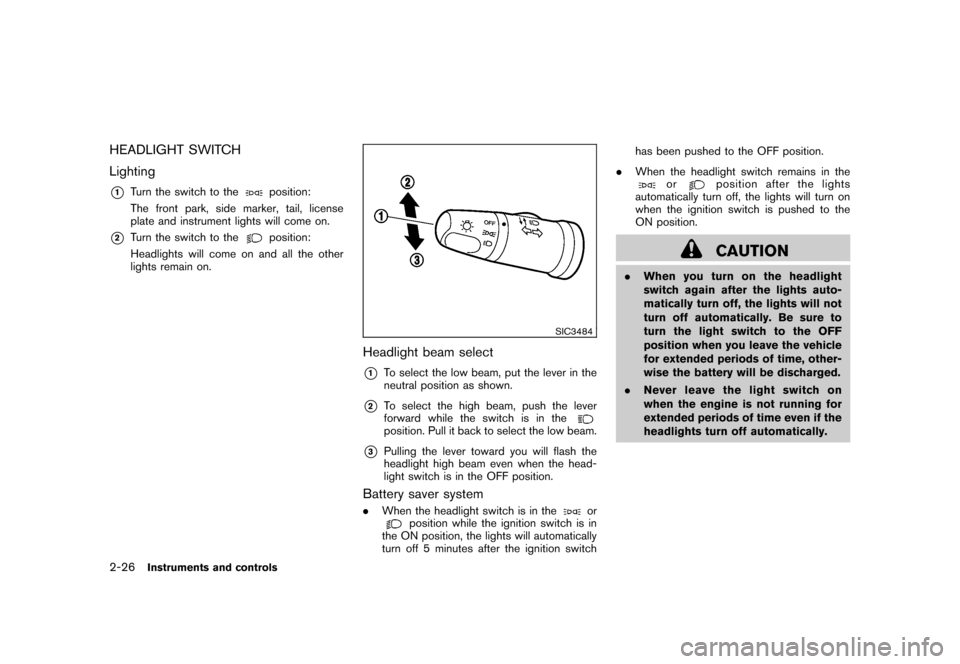
Headlight beam select*1
To select the low beam, put the lever in the
neutral position as shown.
*2
To select the high beam, push the lever
forward while the switch is in theposition. Pull it back to select the low beam.
*3
Pulling the lever toward you will flash the
headlight high beam even when the head-
light switch is in the OFF position.
Battery saver system.When the headlight switch is in the
or
position while the ignition switch is in
the ON position, the lights will automatically
turn off 5 minutes after the ignition switchhas been pushed to the OFF position.
.When the headlight switch remains in the
or
position after the lights
automatically turn off, the lights will turn on
when the ignition switch is pushed to the
ON position.CAUTION
.When you turn on the headlight
switch again after the lights auto-
matically turn off, the lights will not
turn off automatically. Be sure to
turn the light switch to the OFF
position when you leave the vehicle
for extended periods of time, other-
wise the battery will be discharged.
.Never leave the light switch on
when the engine is not running for
extended periods of time even if the
headlights turn off automatically.
2-26
Instruments and controls
Page 103 of 309
Black plate (103,1)
Model "S35-D" EDITED: 2007/ 12/ 19
SIC3503
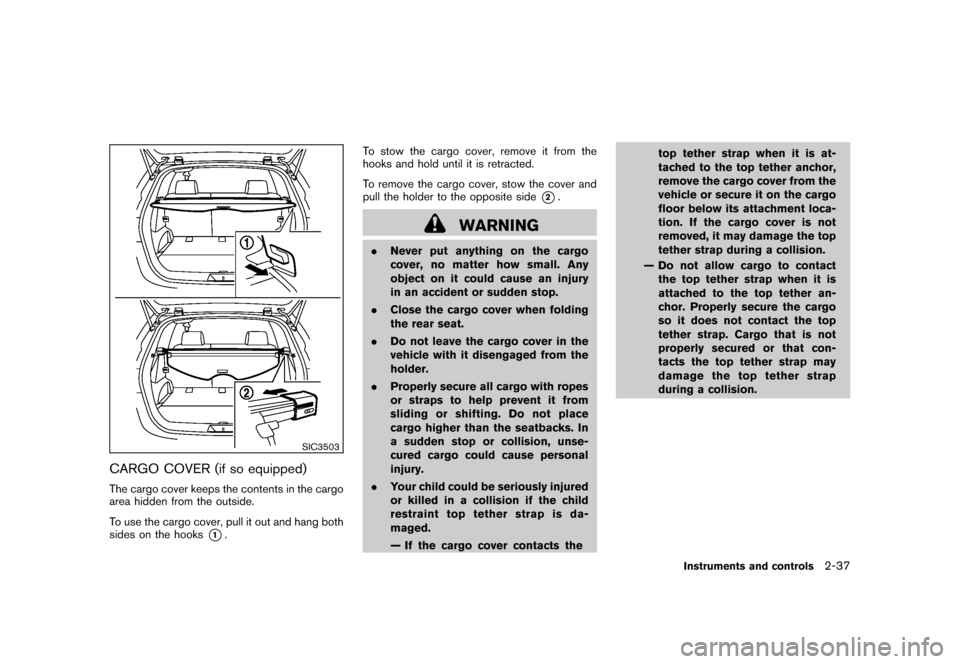
CARGO COVER (if so equipped)The cargo cover keeps the contents in the cargo
area hidden from the outside.
To use the cargo cover, pull it out and hang both
sides on the hooks
*1.To stow the cargo cover, remove it from the
hooks and hold until it is retracted.
To remove the cargo cover, stow the cover and
pull the holder to the opposite side
*2.
WARNING
.Never put anything on the cargo
cover, no matter how small. Any
object on it could cause an injury
in an accident or sudden stop.
.Close the cargo cover when folding
the rear seat.
.Do not leave the cargo cover in the
vehicle with it disengaged from the
holder.
.Properly secure all cargo with ropes
or straps to help prevent it from
sliding or shifting. Do not place
cargo higher than the seatbacks. In
a sudden stop or collision, unse-
cured cargo could cause personal
injury.
.Your child could be seriously injured
or killed in a collision if the child
restraint top tether strap is da-
maged.
— If the cargo cover contacts thetop tether strap when it is at-
tached to the top tether anchor,
remove the cargo cover from the
vehicle or secure it on the cargo
floor below its attachment loca-
tion. If the cargo cover is not
removed, it may damage the top
tether strap during a collision.
— Do not allow cargo to contact
the top tether strap when it is
attached to the top tether an-
chor. Properly secure the cargo
so it does not contact the top
tether strap. Cargo that is not
properly secured or that con-
tacts the top tether strap may
damage the top tether strap
during a collision.
Instruments and controls
2-37
Page 109 of 309
Black plate (109,1)
Model "S35-D" EDITED: 2007/ 12/ 19
about 45 seconds, power to the moonroof is
canceled.SunshadeThe sunshade will open automatically when the
moonroof is opened. However, it must be closed
manually.
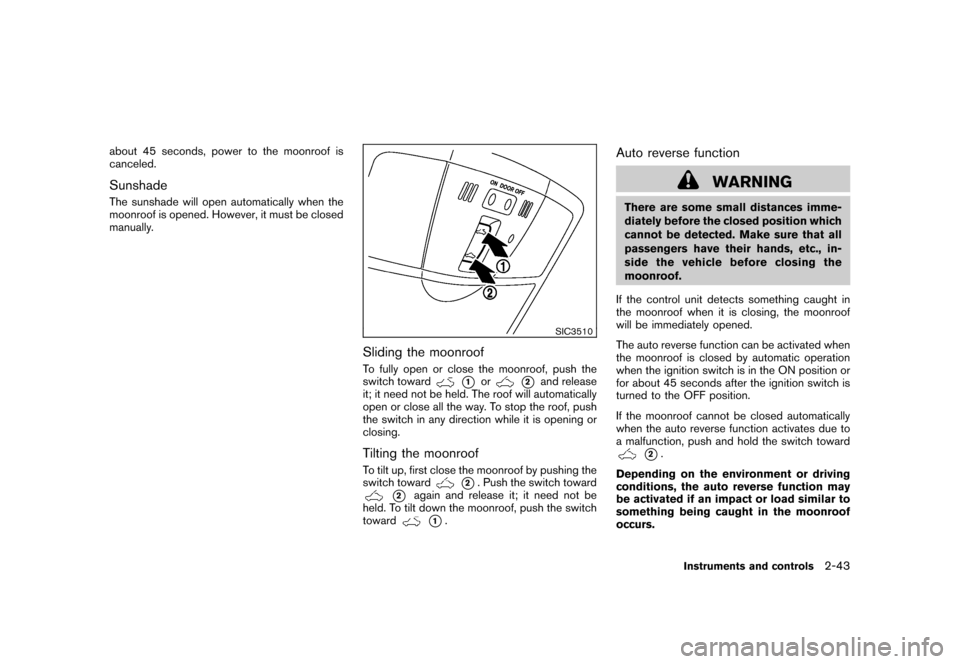
SIC3510
Sliding the moonroofTo fully open or close the moonroof, push the
switch toward
*1
or
*2
and release
it; it need not be held. The roof will automatically
open or close all the way. To stop the roof, push
the switch in any direction while it is opening or
closing.
Tilting the moonroofTo tilt up, first close the moonroof by pushing the
switch toward
*2. Push the switch toward
*2
again and release it; it need not be
held. To tilt down the moonroof, push the switch
toward*1.
Auto reverse function
WARNING
There are some small distances imme-
diately before the closed position which
cannot be detected. Make sure that all
passengers have their hands, etc., in-
side the vehicle before closing the
moonroof.
If the control unit detects something caught in
the moonroof when it is closing, the moonroof
will be immediately opened.
The auto reverse function can be activated when
the moonroof is closed by automatic operation
when the ignition switch is in the ON position or
for about 45 seconds after the ignition switch is
turned to the OFF position.
If the moonroof cannot be closed automatically
when the auto reverse function activates due to
a malfunction, push and hold the switch toward
*2.
Depending on the environment or driving
conditions, the auto reverse function may
be activated if an impact or load similar to
something being caught in the moonroof
occurs.
Instruments and controls
2-43
Page 110 of 309
Black plate (110,1)
Model "S35-D" EDITED: 2007/ 12/ 19
If the moonroof does not operateIf the moonroof does not operate properly,
perform the following procedure to initialize the
moonroof operation system.
1. If the moonroof is open, close it fully by
repeatedly pushing the switch toward
*2.
2. Push and hold the switch toward
*2
to tilt the moonroof up.
3. Release the moonroof switch after the
moonroof moves slightly up and down.
4. Push and hold the switch toward
*1
to fully tilt the moonroof down.
5. Check if the moonroof switch operates
normally.
If the moonroof does not operate properly after
performing the procedure above, have your
vehicle checked by a NISSAN dealer.
CAUTION
Do not use for extended periods of time
with the engine stopped. This could
result in a discharged battery.
SIC3511
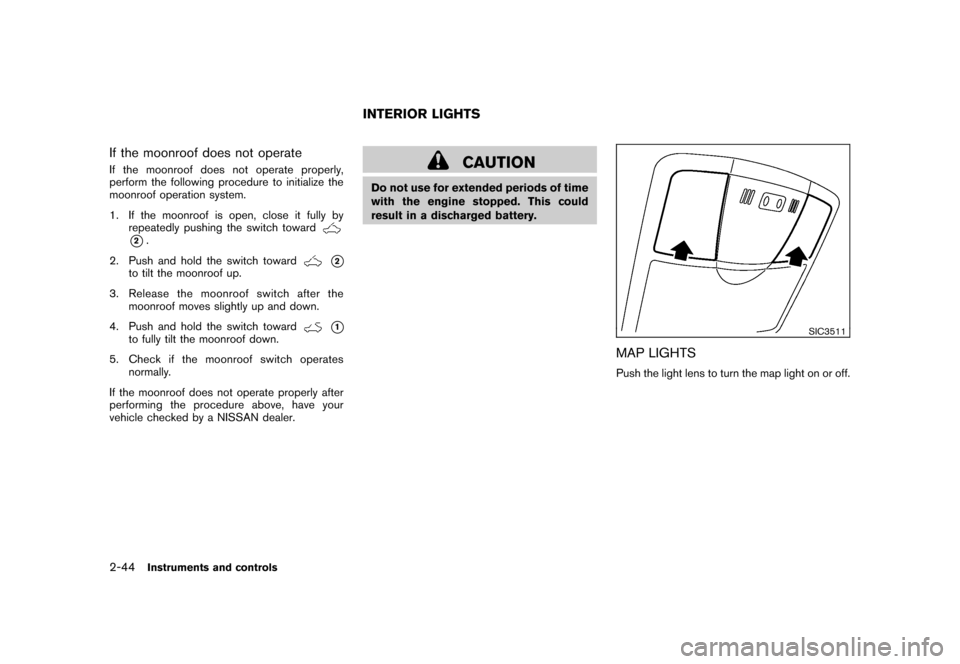
MAP LIGHTSPush the light lens to turn the map light on or off.
INTERIOR LIGHTS
2-44
Instruments and controls
Page 125 of 309
Black plate (127,1)
Model "S35-D" EDITED: 2007/ 12/ 19
the vehicle as it receives radio waves. The
Intelligent Key system transmits weak radio
waves. Environmental conditions may interfere
with the operation of the Intelligent Key system
under the following operating conditions.
.When operating near a location where
strong radio waves are transmitted, such
as a TV tower, power station and broad-
casting station.
.When in possession of wireless equipment,
such as a cellular telephone, transceiver,
and CB radio.
.When the Intelligent Key is in contact with or
covered by metallic materials.
.When any type of radio wave remote control
is used nearby.
.When the Intelligent Key is placed near an
electric appliance such as a personal
computer.
.When the vehicle is parked near a parking
meter.
In such cases, correct the operating conditions
before using the Intelligent Key function or use
the mechanical key.
Although the life of the battery varies depending
on the operating conditions, the battery’s life is
approximately 2 years. If the battery is dis-charged, replace it with a new one.
Since the Intelligent Key is continuously receiv-
ing radio waves, if the key is left near equipment
which transmits strong radio waves, such as
signals from a TV and personal computer, the
battery life may become shorter.
For information regarding replacement of a
battery, see “BATTERY REPLACEMENT” in
the “8. Maintenance and do-it-yourself” section.
As many as 4 Intelligent Keys can be registered
and used with one vehicle. For information about
the purchase and use of additional Intelligent
Keys, contact a NISSAN dealer.
CAUTION
.Do not allow the Intelligent Key,
which contains electrical compo-
nents, to come into contact with
water or salt water. This could affect
the system function.
.Do not drop the Intelligent Key.
.Do not strike the Intelligent Key
sharply against another object.
.Do not change or modify the Intel-
ligent Key.
.Wetting may damage the Intelligent
Key. If the Intelligent Key gets wet,immediately wipe until it is comple-
tely dry.
.Do not place the Intelligent Key for
an extended period in an area where
temperatures exceed 1408F (608C) .
.Do not attach the Intelligent Key
with a key holder that contains a
magnet.
.Do not place the Intelligent Key near
equipment that produces a mag-
netic field, such as a TV, audio
equipment and personal computers.
If an Intelligent Key is lost or stolen, NISSAN
recommends erasing the ID code of that
Intelligent Key from the vehicle. This may prevent
the unauthorized use of the Intelligent Key to
operate the vehicle. For information regarding
the erasing procedure, contact a NISSAN deal-
er.
Pre-driving checks and adjustments
3-9
Page 137 of 309
Black plate (139,1)
Model "S35-D" EDITED: 2007/ 12/ 19
SPA2414
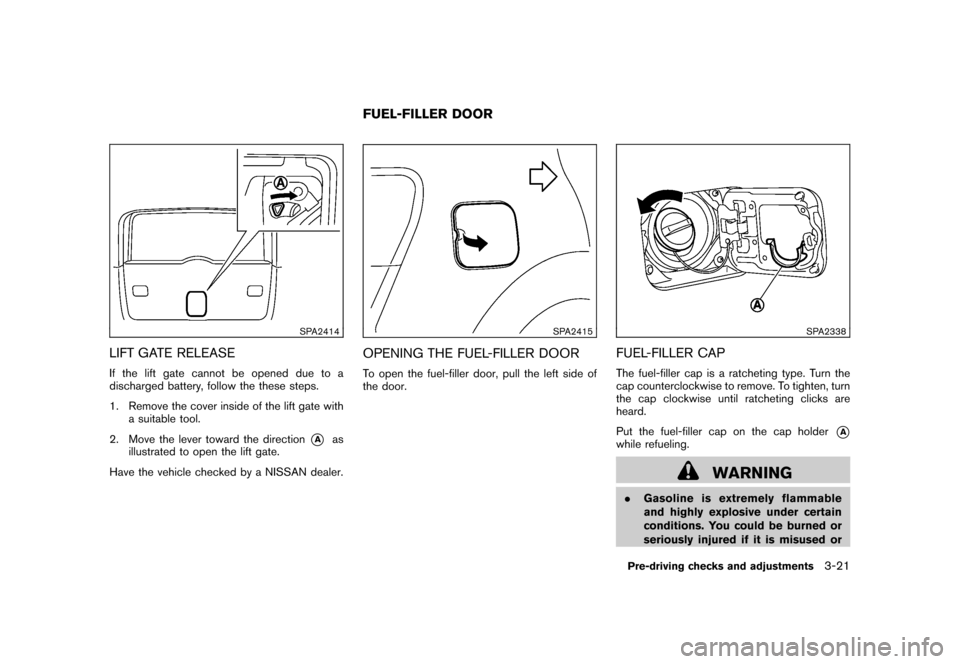
LIFT GATE RELEASEIf the lift gate cannot be opened due to a
discharged battery, follow the these steps.
1. Remove the cover inside of the lift gate with
a suitable tool.
2. Move the lever toward the direction
*A
as
illustrated to open the lift gate.
Have the vehicle checked by a NISSAN dealer.
SPA2415
OPENING THE FUEL-FILLER DOORTo open the fuel-filler door, pull the left side of
the door.
SPA2338
FUEL-FILLER CAPThe fuel-filler cap is a ratcheting type. Turn the
cap counterclockwise to remove. To tighten, turn
the cap clockwise until ratcheting clicks are
heard.
Put the fuel-filler cap on the cap holder
*A
while refueling.
WARNING
.Gasoline is extremely flammable
and highly explosive under certain
conditions. You could be burned or
seriously injured if it is misused or
FUEL-FILLER DOOR
Pre-driving checks and adjustments
3-21