2008 NISSAN QUEST phone
[x] Cancel search: phonePage 251 of 376
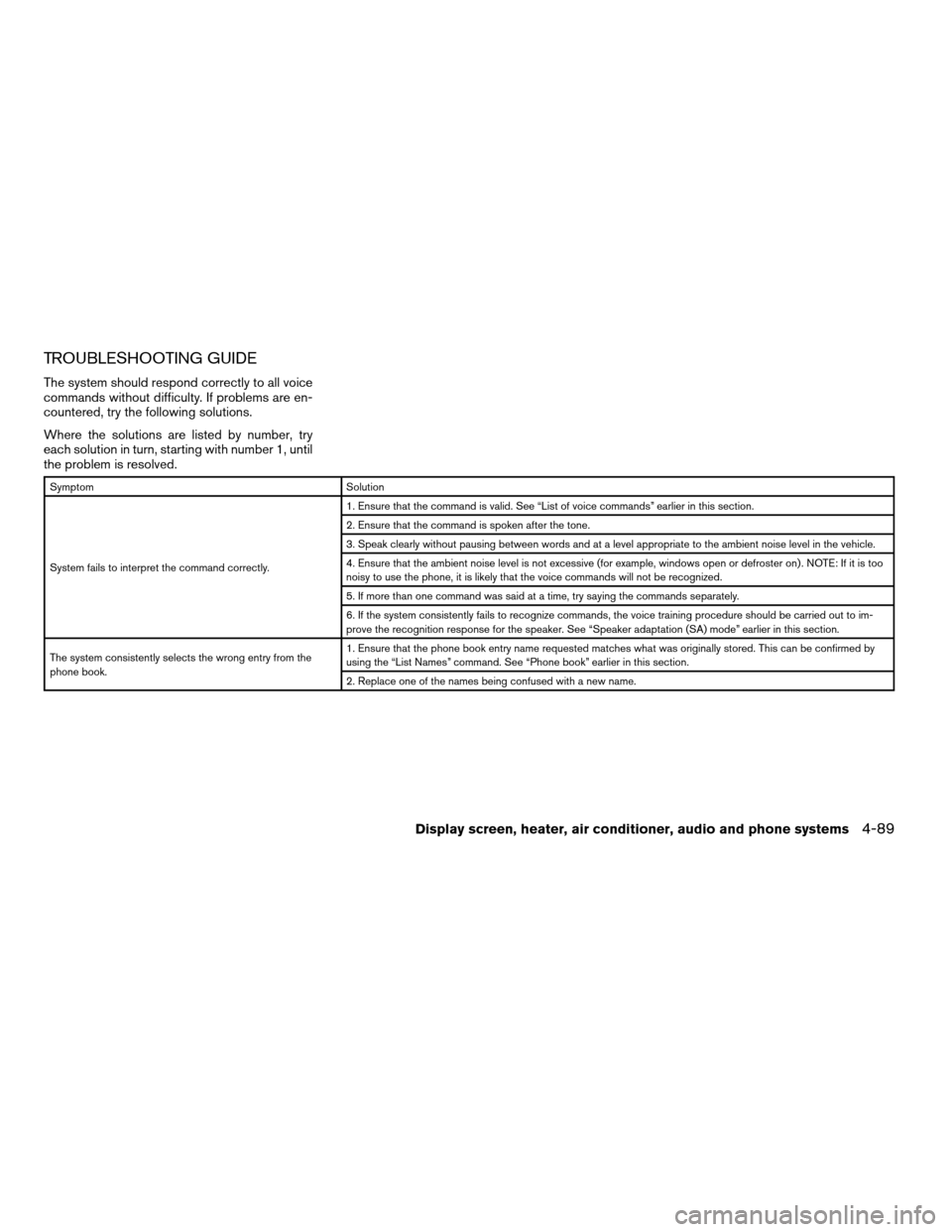
TROUBLESHOOTING GUIDE
The system should respond correctly to all voice
commands without difficulty. If problems are en-
countered, try the following solutions.
Where the solutions are listed by number, try
each solution in turn, starting with number 1, until
the problem is resolved.
Symptom Solution
System fails to interpret the command correctly.1. Ensure that the command is valid. See “List of voice commands” earlier in this section.
2. Ensure that the command is spoken after the tone.
3. Speak clearly without pausing between words and at a level appropriate to the ambient noise level in the vehicle.
4. Ensure that the ambient noise level is not excessive (for example, windows open or defroster on) . NOTE: If it is too
noisy to use the phone, it is likely that the voice commands will not be recognized.
5. If more than one command was said at a time, try saying the commands separately.
6. If the system consistently fails to recognize commands, the voice training procedure should be carried out to im-
prove the recognition response for the speaker. See “Speaker adaptation (SA) mode” earlier in this section.
The system consistently selects the wrong entry from the
phone book.1. Ensure that the phone book entry name requested matches what was originally stored. This can be confirmed by
using the “List Names” command. See “Phone book” earlier in this section.
2. Replace one of the names being confused with a new name.
Display screen, heater, air conditioner, audio and phone systems4-89
ZREVIEW COPYÐ2008 Quest(van)
Owners ManualÐUSA_English(nna)
06/29/07Ðdebbie
X
Page 252 of 376

4-90Display screen, heater, air conditioner, audio and phone systems
MEMO
Page 256 of 376
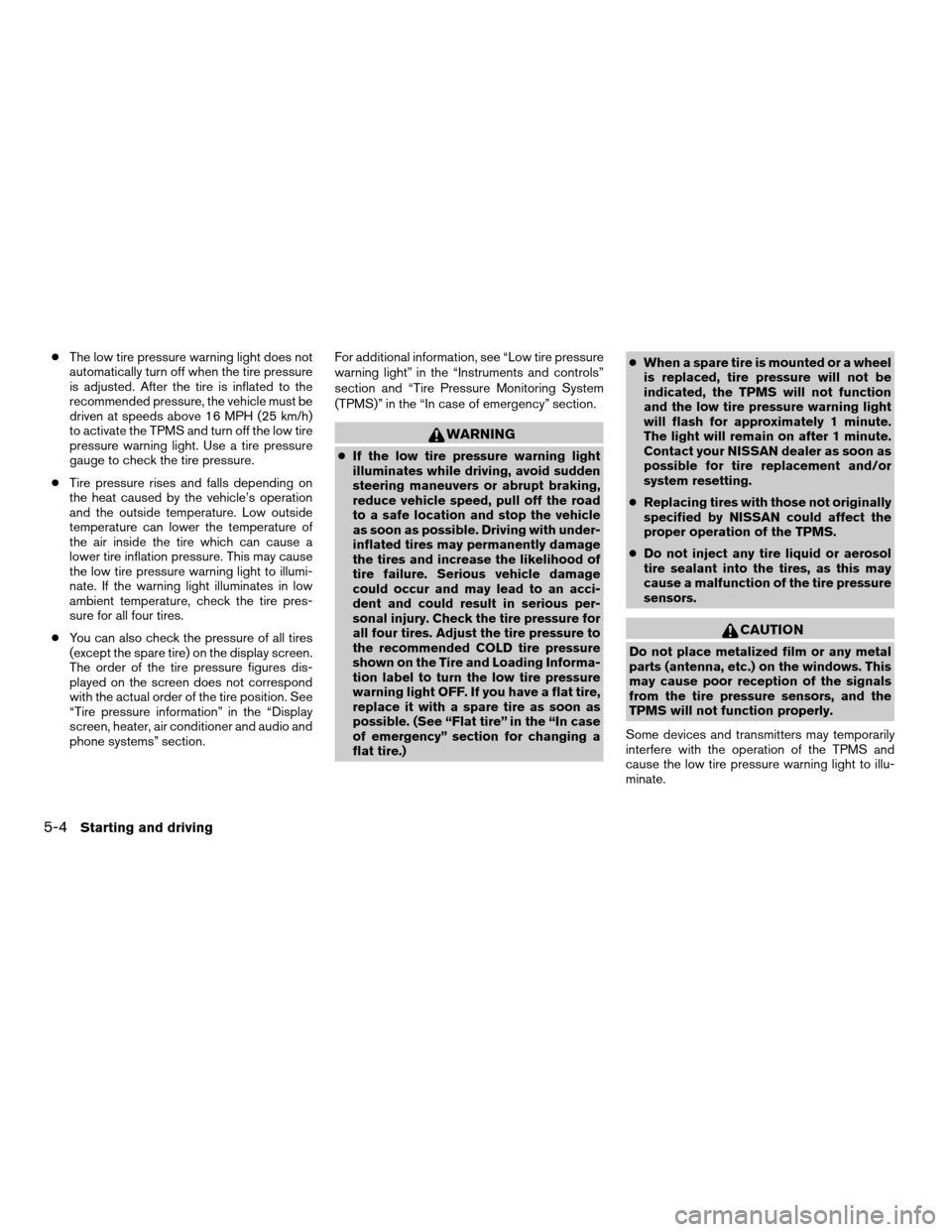
cThe low tire pressure warning light does not
automatically turn off when the tire pressure
is adjusted. After the tire is inflated to the
recommended pressure, the vehicle must be
driven at speeds above 16 MPH (25 km/h)
to activate the TPMS and turn off the low tire
pressure warning light. Use a tire pressure
gauge to check the tire pressure.
cTire pressure rises and falls depending on
the heat caused by the vehicle’s operation
and the outside temperature. Low outside
temperature can lower the temperature of
the air inside the tire which can cause a
lower tire inflation pressure. This may cause
the low tire pressure warning light to illumi-
nate. If the warning light illuminates in low
ambient temperature, check the tire pres-
sure for all four tires.
cYou can also check the pressure of all tires
(except the spare tire) on the display screen.
The order of the tire pressure figures dis-
played on the screen does not correspond
with the actual order of the tire position. See
“Tire pressure information” in the “Display
screen, heater, air conditioner and audio and
phone systems” section.For additional information, see “Low tire pressure
warning light” in the “Instruments and controls”
section and “Tire Pressure Monitoring System
(TPMS)” in the “In case of emergency” section.
WARNING
cIf the low tire pressure warning light
illuminates while driving, avoid sudden
steering maneuvers or abrupt braking,
reduce vehicle speed, pull off the road
to a safe location and stop the vehicle
as soon as possible. Driving with under-
inflated tires may permanently damage
the tires and increase the likelihood of
tire failure. Serious vehicle damage
could occur and may lead to an acci-
dent and could result in serious per-
sonal injury. Check the tire pressure for
all four tires. Adjust the tire pressure to
the recommended COLD tire pressure
shown on the Tire and Loading Informa-
tion label to turn the low tire pressure
warning light OFF. If you have a flat tire,
replace it with a spare tire as soon as
possible. (See “Flat tire” in the “In case
of emergency” section for changing a
flat tire.)cWhen a spare tire is mounted or a wheel
is replaced, tire pressure will not be
indicated, the TPMS will not function
and the low tire pressure warning light
will flash for approximately 1 minute.
The light will remain on after 1 minute.
Contact your NISSAN dealer as soon as
possible for tire replacement and/or
system resetting.
cReplacing tires with those not originally
specified by NISSAN could affect the
proper operation of the TPMS.
cDo not inject any tire liquid or aerosol
tire sealant into the tires, as this may
cause a malfunction of the tire pressure
sensors.
CAUTION
Do not place metalized film or any metal
parts (antenna, etc.) on the windows. This
may cause poor reception of the signals
from the tire pressure sensors, and the
TPMS will not function properly.
Some devices and transmitters may temporarily
interfere with the operation of the TPMS and
cause the low tire pressure warning light to illu-
minate.
5-4Starting and driving
ZREVIEW COPYÐ2008 Quest(van)
Owners ManualÐUSA_English(nna)
06/29/07Ðdebbie
X
Page 324 of 376

If you have a flat tire, see the “In case of
emergency” section of this manual.
TIRE PRESSURE
Tire Pressure Monitoring System
(TPMS)
This vehicle is equipped with the Tire
Pressure Monitoring System (TPMS) . It
monitors tire pressure of all tires except
the spare. When the low tire pressure
warning light is lit, one or more of your
tires is significantly under-inflated. If
equipped, the system also displays pres-sure of all tires (except the spare tire) on
the display screen by sending a signal
from a sensor that is installed in each
wheel.
The TPMS will activate only when the
vehicle is driven at speeds above 16 MPH
(25 km/h) . Also, this system may not de-
tect a sudden drop in tire pressure (for
example a flat tire while driving) .
For more details, refer to “Low tire pres-
sure warning light” in the “Instruments and
controls” section, “Tire pressure informa-
tion” in the “Display screen, heater, air
conditioner and audio and phone sys-
tems” section, “Tire Pressure Monitoring
System (TPMS)” in the “Starting and driv-
ing” section, and “Flat tire” in the “In case
of emergency” section.Tire inflation pressure
Check the tire pressures (including the
spare) often and always prior to long dis-
tance trips. The recommended tire pres-
sure specifications are shown on the
F.M.V.S.S./C.M.V.S.S. certification label
or the Tire and Loading Information labelunder the “Cold Tire Pressure” heading.
The Tire and Loading Information label is
affixed to the driver side center pillar. Tire
pressures should be checked regularly
because:
cMost tires naturally lose air over time.
cTires can lose air suddenly when
driven over potholes or other objects
or if the vehicle strikes a curb while
parking.
The tire pressures should be checked
when the tires are cold. The tires are
considered COLD after the vehicle has
been parked for 3 or more hours, or driven
less than 1 mile (1.6 km) at moderate
speeds.
Incorrect tire pressure, including un-
der inflation, may adversely affect
tire life and vehicle handling.
WDI0210
WHEELS AND TIRES
8-30Maintenance and do-it-yourself
ZREVIEW COPYÐ2008 Quest(van)
Owners ManualÐUSA_English(nna)
06/29/07Ðdebbie
X
Page 361 of 376

A genuine NISSAN Service Manual is the best
source of service and repair information for your
vehicle. Filled with wiring diagrams, illustrations
and step-by-step diagnostic and adjustment pro-
cedures, this manual is the same one used by the
factory-trained technicians working at NISSAN
dealerships. Also available are genuine NISSAN
Owner’s Manuals, and genuine NISSAN Service
and Owner’s Manuals for older NISSAN models.
For USA
For current pricing and availability of genuine
NISSAN Service Manualsfor the 2000 model
year and later contact:
Tweddle Litho Company
1-800-450-9491
www.nissan-techinfo.com
For current pricing and availability of genuine
NISSAN Service Manualsfor the 1999 model
year and prior, see a NISSAN dealer, or contact:
Resolve Corporation
20770 Westwood Drive
Strongsville, OH 44149
1-800-247-5321
For current pricing and availability of genuine
NISSAN Owner’s Manualsfor this model year
and prior, see a NISSAN dealer, or contact:Resolve Corporation
20770 Westwood Drive
Strongsville, OH 44149
1-800-247-5321
For Canada
To purchase a copy of a genuine NISSAN Ser-
vice Manual or Owner’s Manual please contact
your nearest NISSAN dealer. For the phone num-
ber and location of a NISSAN dealer in your area
call the NISSAN Information Center at 1-800-
387-0122 and a bilingual NISSAN representa-
tive will assist you.
Also available are genuine NISSAN Service and
Owner’s Manuals for older NISSAN models.
IN THE EVENT OF A COLLISION
Unfortunately, accidents do occur. In this unlikely
event, there is some important information you
should know.
Many insurance companies routinely authorize
the use of non-genuine collision parts in order to
cut costs, among other reasons.
Insist on the use of genuine NISSAN
collision parts!
If you want your vehicle to be restored using parts
made to NISSAN’s original exacting specifica-
tions – if you want to help it to last and hold itsresale value, the solution is simple.Tell your
insurance agent and your repair shop to
only use Genuine NISSAN Collision Parts.
NISSAN does not warrant non-NISSAN parts,
nor does NISSAN’s warranty apply to damage
caused by a non-genuine part.
Using Genuine NISSAN Parts can help protect
your personal safety, preserve your warranty pro-
tection and maintain the resale value of your
vehicle. And if your vehicle was leased, using
Genuine NISSAN Parts may prevent or limit un-
necessary excess wear and tear expenses at the
end of your lease.
NISSAN designs its hoods with crumple zones to
minimize the risk that the hood will penetrate the
windshield of your vehicle in an accident. Non-
genuine (imitation) parts may not provide such
built-in safeguards. Also, non-genuine parts of-
ten show premature wear, rust and corrosion.
Why should you take a chance?
In over 40 states, the law says you must be
advised if non-genuine parts are used to repair
your vehicle. And some states have enacted laws
that restrict insurance companies from authoriz-
ing the use of non-genuine collision parts during
the new vehicle warranty. These laws help pro-
tect you, so you can take action to protect your-
self.
OWNER’S MANUAL/SERVICE
MANUAL ORDER INFORMATION
Technical and consumer information9-27
ZREVIEW COPYÐ2008 Quest(van)
Owners ManualÐUSA_English(nna)
06/29/07Ðdebbie
X
Page 363 of 376

10 Index
A
Active Head Restraint..............1-7
Adjusting pedal position............3-21
Air bag (See supplemental restraint
system).....................1-52
Air bag system
Front (See supplemental front impact air
bag system).................1-59
Side and curtain
(See supplemental side air bag and
curtain side-impact air bag system). . . .1-63
Air bag warning labels.............1-66
Air bag warning light...........1-66, 2-10
Air cleaner housing filter............8-16
Air conditioner
Air conditioner operation..........4-33
Air conditioner service...........4-43
Air conditioner specification label.....9-11
Air conditioner system refrigerant and oil
recommendations..............9-6
Heater and air conditioner
controls................4-31, 4-40
Rear seat air conditioner..........4-42
Servicing air conditioner..........4-43
Air flow charts..................4-34
Alarm system
(See vehicle security system).........2-14
Anchor point locations.............1-30
Antenna.....................4-65
Anti-lock brake warning light..........2-8Anti-lock Braking System (ABS)........5-18
Audible reminders................2-13
Audio system..................4-43
Compact Disc (CD) changer.......4-59
Compact disc (CD) player.........4-53
FM/AM/SAT radio with compact disc (CD)
changer...................4-56
FM/AM/SAT radio with compact disc (CD)
player....................4-50
MP3 display..................4-6
Radio....................4-43
Rear audio controls.............4-64
Steering wheel audio control switch. . . .4-62
Autolight switch.................2-19
Automatic
Automatic drive positioner.........3-25
Automatic power window switch.....2-38
Automatic transmission position indicator
light.....................2-11
Driving with automatic transmission.....5-8
Transmission selector lever lock
release....................5-10
Automatic anti-glare inside mirror.......3-23
Average speed..................4-4
B
Back button................4-7, 4-18
Battery......................8-13
Charge warning light.............2-8
Before starting the engine............5-7Belt (See drive belt)..............8-14
Bench seat adjustment (3rd row). . . .1-7, 1-12
Block heater
Engine....................5-24
BluetoothThands-free phone system.....4-75
Booster seats..................1-47
Brake
Anti-lock Braking System (ABS)......5-18
Brake fluid..................8-11
Brake light (See stop light).........8-26
Brake system................5-17
Brake warning light..............2-8
Brake wear indicators........2-13, 8-20
Parking brake operation..........5-12
Self-adjusting brakes............8-20
Brakes......................8-20
Break-in schedule................5-14
Brightness control
Instrument panel..............2-21
Brightness/contrast button. . . .4-6, 4-16, 4-28
Bulb check/instrument panel..........2-7
Bulb replacement................8-26
C
Capacities and recommended
fuel/lubricants...................9-2
Captain’s chair adjustment (2nd row)......1-6
Car phone or CB radio.............4-75
Cargo (See vehicle loading information) . . .9-12
CD care and cleaning.............4-61
ZREVIEW COPYÐ2008 Quest(van)
Owners ManualÐUSA_English(nna)
06/29/07Ðdebbie
X
Page 365 of 376

F
Flashers
(See hazard warning flasher switch)......2-23
Flat tire......................6-2
Floor mat positioning aid.............7-4
Fluid
Brake fluid..................8-11
Capacities and recommended
fuel/lubricants.................9-2
Engine coolant................8-7
Engine oil...................8-8
Power steering fluid.............8-11
Window washer fluid............8-12
F.M.V.S.S. certification label..........9-10
Fog light switch.................2-22
Front air bag system
(See supplemental restraint system).....1-59
Front seats....................1-2
Fuel
Capacities and recommended
fuel/lubricants.................9-2
Fuel economy................5-15
Fuel gauge..................2-6
Fuel octane rating..............9-4
Fuel recommendation............9-3
Fuel-filler door and cap...........3-19
Fuel-filler door lock opener lever......3-19
Fuel economy setting........4-4, 4-8, 4-19
Fuses......................8-20
Fusible links...................8-21G
Garage door opener, HomeLinkTUniversal
Transceiver...................2-44
Garment hook..................2-35
Gascap.....................3-19
Gauge
Engine coolant temperature gauge.....2-5
Fuel gauge..................2-6
Odometer...................2-4
Speedometer.................2-4
Tachometer..................2-5
Trip odometer.................2-4
General maintenance..............8-2
Glove box....................2-30
Glove box lock.................2-30
Grocery hooks.................2-31
H
Hands-free phone system, BluetoothT. . . .4-75
Hazard warning flasher switch.........2-23
Head restraints..................1-8
Active Head Restraint............1-7
Headlight and turn signal switch........2-18
Headlight control switch............2-18
Headlights....................8-24
Headphones
(See DVD entertainment system).......4-68
Heated seats..................2-24
Heater
Heater and air conditioner
controls................4-31, 4-40
Heater operation...........4-32, 4-41Rear seat air conditioner..........4-42
HomeLinkTUniversal Transceiver.......2-44
Hood release..................3-14
Horn.......................2-24
I
Ignition switch..................5-6
Immobilizer system..........2-15, 3-2, 5-7
Important vehicle information label.......9-10
In-cabin microfilter...............8-16
Increasing fuel economy............5-15
Indicator lights and audible reminders
(See warning/indicator lights and audible
reminders).....................2-7
Inside automatic anti-glare mirror.......3-23
Inside mirror...................3-23
Instrument brightness control.........2-21
Instrument panel..............0-6, 2-2
Instrument panel dimmer switch........2-21
Interior lights
(see Lights on demand switch)........2-41
ISOFIX child restraints.............1-28
J
Jump starting...................6-7
K
Key ........................3-2
Keyfob battery replacement..........8-23
10-3
ZREVIEW COPYÐ2008 Quest(van)
Owners ManualÐUSA_English(nna)
06/29/07Ðdebbie
X
Page 367 of 376

Overheat
If your vehicle overheats...........6-9
Owner’s manual order form..........9-27
Owner’s manual/service manual order
information....................9-27
P
Parking
Parking brake operation..........5-12
Parking/parking on hills...........5-16
Pedal position adjustment...........3-21
Personal lights.................2-42
Phone, BluetoothThands-free system. . . .4-75
Power
Front seat adjustment............1-4
Power door locks...............3-5
Power outlet.................2-26
Power steering fluid.............8-11
Power steering system...........5-17
Power vent windows............2-38
Power windows...............2-36
Precautions
Maintenance precautions..........8-5
Precautions on child
restraints............1-26, 1-41, 1-47
Precautions on seat belt usage......1-15
Precautions on supplemental restraint
system....................1-52
Precautions when starting and driving . . .5-2
Pre-tensioner seat belt system.........1-64
Programmable features......4-5, 4-11, 4-22
Push starting...................6-9R
Radio
Car phone or CB radio...........4-75
Compact Disc (CD) changer.......4-59
FM/AM/SAT radio with compact disc (CD)
changer...................4-56
FM/AM/SAT radio with compact disc (CD)
player....................4-50
Rear audio controls.............4-64
Steering wheel audio control switch. . . .4-62
Readiness for inspection maintenance (I/M)
test........................9-25
Rear audio controls...............4-64
Rear center seat belt..............1-22
Rear seat air conditioner............4-42
Rear sonar system...............5-21
Rear sonar system off switch.........2-25
Rear view monitor................4-28
Rear window and outside mirror defroster
switch......................2-18
Rear window wiper and washer switches . . .2-17
Recorders
Event data..................9-26
Refrigerant recommendation..........9-6
Registering your vehicle in another country. . .9-9
Remote controller (See DVD entertainment
system).....................4-67
Remote keyless entry system..........3-9
Reporting safety defects (US only)......9-25
Resetting average speed............4-4
Resetting the fuel economy.....4-4, 4-9, 4-19
Resetting trip 1 and trip 2.........4-8, 4-18S
Safety
Child safety sliding door lock........3-9
Child seat belts........1-26, 1-41, 1-47
Reporting safety defects (US only). . . .9-25
Screen (See DVD entertainment system) . . .4-67
Seat adjustment
Front manual seat adjustment........1-2
Front power seat adjustment........1-4
Second row captain’s chair.........1-6
Third row bench seat.........1-7, 1-12
Seat belt
Child safety.................1-17
Infants and small children.........1-18
Injured Person................1-19
Larger children...............1-18
Precautions on seat belt usage......1-15
Pregnant women..............1-19
Pre-tensioner seat belt system.......1-64
Rear center seat belt............1-22
Seat belt extenders.............1-25
Seat belt maintenance...........1-25
Seat belts..................1-15
Shoulder belt height adjustment......1-24
Three-point type with retractor.......1-19
Seat belt warning light.............2-10
Seatback pockets................2-31
Seats
Adjustment..................1-2
Automatic drive positioner.........3-25
Front seats..................1-2
Heated seats................2-24
Manual front seat adjustment........1-2
Second row captain’s chair adjustment.....1-6
10-5
ZREVIEW COPYÐ2008 Quest(van)
Owners ManualÐUSA_English(nna)
06/29/07Ðdebbie
X