2008 NISSAN NOTE Time
[x] Cancel search: TimePage 89 of 235

Operating tips
•In order to improve the heater operation, clear
the snow and ice from the wiper blade and air
inlet in front of the windscreen.
•After parking in the sun, drive for two or three
minutes with the windows open to vent hot air
from the passenger compartment. Then close
the windows to allow the acceleration of the air
conditioner’s cooling operation.
•Keep the windows closed while the air condi-
tioner is operating.
•The air conditioning system should be operated
for about 10 minutes, at least once a month. This
helps prevent damage to the system due to lack
of lubrication.
•If the coolant temperature warning light comes
on, turn the air conditioner off. For additional
information, see “Engine overheat” in the “6. In
case of emergency” section.
•If the engine coolant reaches an extremely high
temperature, the air conditioning system will au-
tomatically turn off. This may happen for example
if the engine runs at idle speed for a long time on
a hot day.
Air flow charts
The following charts show the button, air intake and
dial positions forMAXIMUM AND QUICKheating,
cooling or defrosting.NOTE
The air recirculation mode should not be selected
for either heating or defrosting.
NAA1059
Heating
Heater and air conditioner, and audio system4-5
Page 94 of 235

•If the coolant temperature warning light comes
on, turn the air conditioner off. For additional
information, see “Engine overheat” in the “6. In
case of emergency” section.
•If the engine coolant reaches an extremely high
temperature, the air conditioning system will au-
tomatically turn off. This may happen for example
if the engine runs at idle speed for a long time on
a hot day.
The sensor
j1 on the fascia helps the system to
maintain a constant temperature inside the cabin.
Do not put anything on or around this sensor.
Air conditioner filter
The air conditioning system is equipped with a filter
which collects dirt, pollen, dust, etc. To make sure
air conditioner heats, defogs, and ventilates effi-
ciently, replace the filter regularly. To replace the fil-
ter, contact a NISSAN dealer or qualified workshop.
The filter should be replaced if the air flow isextremely reduced or when the windows get fog
up easily during air conditioning system opera-
tion.
Servicing air conditioner
The air conditioning system in your NISSAN vehicle
is charged with an environmentally friendly refriger-
ant.
NISSAN GREEN PROGRAM
This refrigerant will not harm the earth’s ozone
layer.
Special charging equipment and lubricant are re-
quired when servicing your vehicle’s air conditioner.
Using improper refrigerants or lubricants will cause
severe damage to the air conditioning system. See
“Air conditioning system refrigerant and lubricant
recommendations (where fitted)” in the “9. Techni-
cal information” section of this manual.
A NISSAN dealer or qualified workshop will be able
to service the environmentally “friendly” air condi-
tioning system.The audio system operates when the ignition switch
is in the Acc or ON position. If you want to listen to
the radio or CD while the engine is not running, turn
the ignition switch to the Acc position.Do not use
for an extended period of time with the engine
stopped.
AUDIO OPERATION PRECAUTIONS
WARNING
Do not adjust the audio system while driving so
that full attention may be given to vehicle opera-
tion.
Radio
•Radio reception is affected by station signal
strength, distance from radio transmitter, build-
ings, bridges, mountains and other external influ-
ences. Intermittent changes in reception quality
are normally caused by these external influences.
•Using a mobile phone in or near the vehicle may
influence radio reception quality.
•Use the antenna for the best reception.
Compact Disc (CD) player
•During cold weather or rainy days, the player
may malfunction due to the humidity. If this oc-
curs, remove the CD and dehumidify or ventilate
the player completely.
•The player may skip while driving on rough roads.
NAA901Z
AUDIO SYSTEM
4-10Heater and air conditioner, and audio system
Page 96 of 235

•The USB player sometimes cannot function
when the passenger compartment temperature
is extremely high. Decrease the temperature be-
fore use.
•Do not leave USB memory in a place prone to
static electricity or where the air conditioner
blows directly. The data in the USB memory may
be damaged.
•The vehicle is not equipped with a USB memory
stick.
•A USB device cannot be formatted with this sys-
tem. To format a USB device, use a personal
computer.
•Partitioned USB devices may not be played cor-
rectly.
•Some characters used in other languages (Chi-
nese, Japanese, etc.) are not displayed properly
on the vehicle centre screen. Using English lan-
guage characters with a USB device is recom-
mended.
•Do not connect a USB device if a connector or
cable is wet. Allow the cable and/or connectors
to dry completely before connecting the USB
device. If the connector is exposed to fluids other
than water, evaporative residue may cause a
short between the connector pins.
•Large video podcast files cause slow responses
in an iPod®. The display of the audio system
may momentarily black out, but it will soon re-
cover.
•If an iPod® automatically selects large video
podcast files while in the shuffle mode. The dis-
play of the audio system may momentarily black
out, but it will soon recover.
•Some iPod® operations may not be available
with this system.
•At the time of publication, this audio system was
tested with the latest iPod® players available.
Due to the frequent update of consumer devices
like MP3 players, NISSAN cannot guarantee that
all new iPods launched will be compatible with
this audio system.
•Make sure that the iPod® is updated with the lat-
est firmware.
•iPod® is trademarks of Apple Inc., registered in
the U.S. and other countries.
Bluetooth® audio player (where fitted)
•Some Bluetooth® audio devices may not be
used with this system. For detailed information
about Bluetooth® audio devices that are avail-
able for use with this system, contact a NISSAN
dealer or qualified workshop.
•Before using a Bluetooth® audio system, the ini-
tial registration process for the audio device is
necessary.
•Operation of the Bluetooth® audio system may
vary depending on the audio device that is con-
nected. Confirm the operation procedure before
use.
•The playback of Bluetooth® audio will be paused
under the following conditions. The playback will
be resumed after the following conditions are
completed:
– while using a mobile phone.
– while checking a connection with a mobile
phone.
•The in-vehicle antenna for Bluetooth® communi-
cation is built in the audio system. Do not place
the Bluetooth audio device in an area surrounded
by metal, far away from the system, or in a nar-
row space where the device closely contacts the
body or the seat. Otherwise, sound degradation
or connection interference may occur.
•While a Bluetooth® audio device is connected
through the Bluetooth wireless connection, the
battery power of the device may discharge
quicker than usual.
•This system is compatible with the Bluetooth®
AV profile (A2DP and AVRCP ver. 1.3, 1.0 or
earlier).
m
Bluetooth® is a trademark
owned by Bluetooth SIG, Inc.,
and licensed to Daewoo IS
Corp.
4-12Heater and air conditioner, and audio system
Page 97 of 235

Compact Disc/USB memory with MP3
or WMA (where fitted)
Terms:
•MP3 — MP3 is short for Moving Pictures Ex-
perts Group Audio Layer 3. MP3 is the most well
known compressed digital audio file format. This
format allows for near “CD quality” sound, but at
a fraction of the size of normal audio files. MP3
conversion of an audio track from CD can re-
duce the file size by approximately 10:1 ratio
(Sampling: 44.1 kHz, Bit rate: 128 kbps) with
virtually no perceptible loss in quality. MP3 com-
pression removes the redundant and irrelevant
parts of a sound signal that the human ear
doesn’t hear.
•WMA — Windows Media Audio (WMA)* is a
compressed audio format created by Microsoft
as an alternative to MP3. The WMA codec offers
greater file compression than the MP3 codec,
enabling storage of more digital audio tracks in
the same amount of space when compared to
MP3s at the same level of quality.
•Bit rate — Bit rate denotes the number of bits
per second used by a digital music files. The size
and quality of a compressed digital audio file is
determined by the bit rate used when encoding
the file.
•Sampling frequency — Sampling frequency is
the rate at which the samples of a signal are con-
verted from analog to digital (A/D conversion)
per second.
•Multisession — Multisession is one of the meth-
ods for writing data to media. Writing data once
to the media is called a single session, and writ-
ing more than once is called a multisession.
•ID3/WMA Tag — The ID3/WMA tag is the part
of the encoded MP3 or WMA file that contains
information about the digital music file such as
song title, artist, album title, encoding bit rate,
track time duration, etc. ID3 tag information is
displayed on the Album/Artist/Track title line on
the display.
* Windows® and Windows Media® are registered
trademarks and/or trademarks of Microsoft Cor-
poration in the United States of America and/or
other countries.
A.Root folder
B.Folder
C.Audio file
Playback order:
Music playback order of the CD with MP3 or WMA
is as illustrated above.
NAA984
Heater and air conditioner, and audio system4-13
Page 99 of 235

Troubleshooting guide:
Symptom Cause and Countermeasure
Cannot play Check if the disc was inserted correctly.
Check if the disc is scratched or dirty.
Check if there is condensation inside the player, and if there is, wait until the condensation is gone (about 1 hour) before
using the player.
If there is a temperature increase error, the CD player will play correctly after it returns to the normal temperature.
If there is a mixture of music CD files (CD-DA data) and MP3/WMA files on a CD, only the music CD files (CD-DA data)
will be played.
* Files with extensions other than “.MP3”, “.WMA”, “.mp3” or “.wma” cannot be played. In addition, the character codes
and number of characters for folder names and file names should be in compliance with the specifications.
* Check if the disc or the file is generated in an irregular format. This may occur depending on the variation or the setting
of MP3/WMA writing applications or other text editing applications.
Check if the finalisation process, such as session close and disc close, is done for the disc.
Check if the disc is protected by copyright.
Poor sound quality Check if the disc is scratched or dirty.
* It takes a relatively long time
before the music starts playing.If there are many folder or file levels on the MP3/WMA disc, some time may be required before the music starts playing.
Music cuts off or skips The writing software and hardware combination might not match, or the writing speed, writing depth, writing width, etc.,
might not match the specifications. Try using the slowest writing speed.
Skipping with high bit rate files Skipping may occur with large quantities of data, such as for high bit rate data.
* Move immediately to the next
song when playing.When a non-MP3/WMA file has been given an extension of “.MP3”, “.WMA”, “mp3”, or “.wma” or when play is prohibited
by copyright protection, the player will skip to the next song.
The songs do not play back in the
desired order.The playback order is the order in which the files were written by the writing software, so the files might not play in the
desired order.
* Only models equipped with the FM AM radio with CD player. For details, see “FM AM radio with CD player (where fitted)” later in this section.
Heater and air conditioner, and audio system4-15
Page 101 of 235
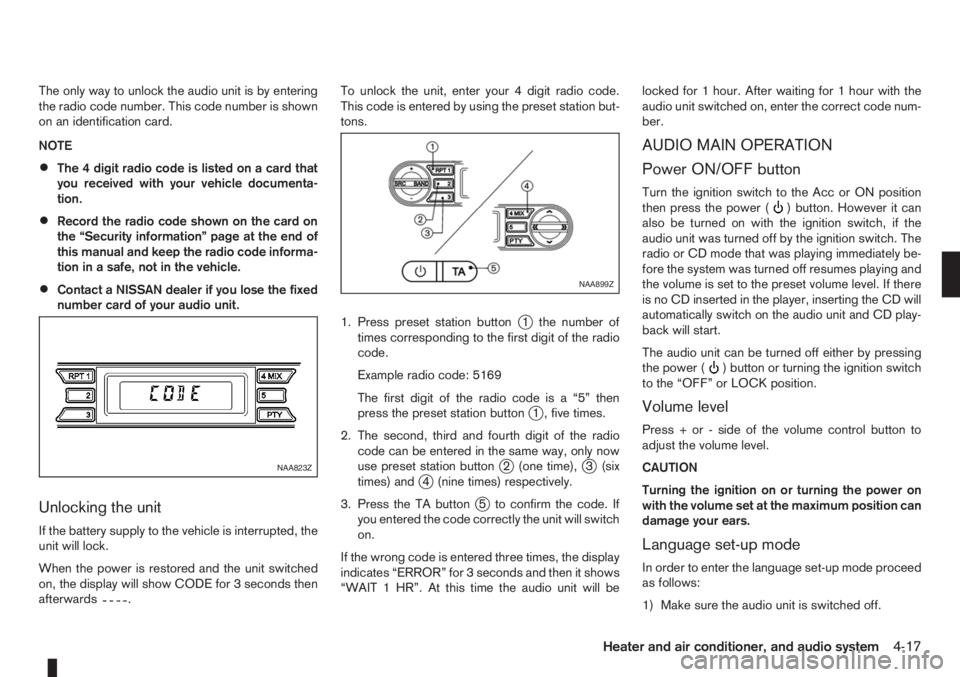
The only way to unlock the audio unit is by entering
the radio code number. This code number is shown
on an identification card.
NOTE
•The 4 digit radio code is listed on a card that
you received with your vehicle documenta-
tion.
•Record the radio code shown on the card on
the “Security information” page at the end of
this manual and keep the radio code informa-
tion in a safe, not in the vehicle.
•Contact a NISSAN dealer if you lose the fixed
number card of your audio unit.
Unlocking the unit
If the battery supply to the vehicle is interrupted, the
unit will lock.
When the power is restored and the unit switched
on, the display will show CODE for 3 seconds then
afterwards
.To unlock the unit, enter your 4 digit radio code.
This code is entered by using the preset station but-
tons.
1. Press preset station button
j1 the number of
times corresponding to the first digit of the radio
code.
Example radio code: 5169
The first digit of the radio code is a “5” then
press the preset station button
j1 , five times.
2. The second, third and fourth digit of the radio
code can be entered in the same way, only now
use preset station button
j2 (one time),j3 (six
times) andj4 (nine times) respectively.
3. Press the TA button
j5 to confirm the code. If
you entered the code correctly the unit will switch
on.
If the wrong code is entered three times, the display
indicates “ERROR” for 3 seconds and then it shows
“WAIT 1 HR”. At this time the audio unit will belocked for 1 hour. After waiting for 1 hour with the
audio unit switched on, enter the correct code num-
ber.
AUDIO MAIN OPERATION
Power ON/OFF button
Turn the ignition switch to the Acc or ON position
then press the power () button. However it can
also be turned on with the ignition switch, if the
audio unit was turned off by the ignition switch. The
radio or CD mode that was playing immediately be-
fore the system was turned off resumes playing and
the volume is set to the preset volume level. If there
is no CD inserted in the player, inserting the CD will
automatically switch on the audio unit and CD play-
back will start.
The audio unit can be turned off either by pressing
the power (
) button or turning the ignition switch
to the “OFF” or LOCK position.
Volume level
Press + or - side of the volume control button to
adjust the volume level.
CAUTION
Turning the ignition on or turning the power on
with the volume set at the maximum position can
damage your ears.
Language set-up mode
In order to enter the language set-up mode proceed
as follows:
1) Make sure the audio unit is switched off.
NAA823Z
NAA899Z
Heater and air conditioner, and audio system4-17
Page 102 of 235
2) Press and hold buttons 1 and 4 simultaneously.
3) Press the power (
) button and the radio will
switch on.
4) Release all the buttons and the display will show
LANGUAGE.
5) Press the
orbutton and the lan-
guage setting display will change as follows:
ENGLISH⇔FRENCH⇔GERMAN⇔ITALIAN
⇔DUTCH⇔SPANISH⇔POLISH⇔ENGLISH
Once the language has been set, switch off and
switch on again the audio unit by pressing the power
button. For details, contact your NISSAN dealer or
qualified workshop.
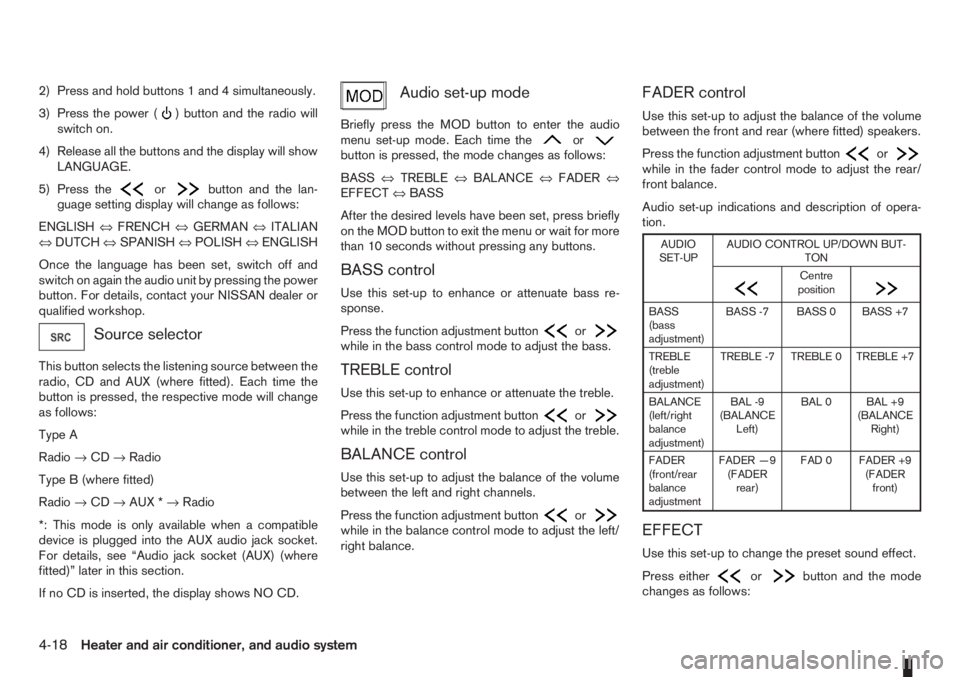
Source selector
This button selects the listening source between the
radio, CD and AUX (where fitted). Each time the
button is pressed, the respective mode will change
as follows:
Type A
Radio→CD→Radio
Type B (where fitted)
Radio→CD→AUX *→Radio
*: This mode is only available when a compatible
device is plugged into the AUX audio jack socket.
For details, see “Audio jack socket (AUX) (where
fitted)” later in this section.
If no CD is inserted, the display shows NO CD.
Audio set-up mode
Briefly press the MOD button to enter the audio
menu set-up mode. Each time theorbutton is pressed, the mode changes as follows:
BASS⇔TREBLE⇔BALANCE⇔FADER⇔
EFFECT⇔BASS
After the desired levels have been set, press briefly
on the MOD button to exit the menu or wait for more
than 10 seconds without pressing any buttons.
BASS control
Use this set-up to enhance or attenuate bass re-
sponse.
Press the function adjustment button
orwhile in the bass control mode to adjust the bass.
TREBLE control
Use this set-up to enhance or attenuate the treble.
Press the function adjustment button
orwhile in the treble control mode to adjust the treble.
BALANCE control
Use this set-up to adjust the balance of the volume
between the left and right channels.
Press the function adjustment button
orwhile in the balance control mode to adjust the left/
right balance.
FADER control
Use this set-up to adjust the balance of the volume
between the front and rear (where fitted) speakers.
Press the function adjustment button
orwhile in the fader control mode to adjust the rear/
front balance.
Audio set-up indications and description of opera-
tion.
AUDIO
SET-UPAUDIO CONTROL UP/DOWN BUT-
TON
m
Centre
position
m
BASS
(bass
adjustment)BASS -7 BASS 0 BASS +7
TREBLE
(treble
adjustment)TREBLE -7 TREBLE 0 TREBLE +7
BALANCE
(left/right
balance
adjustment)BAL -9
(BALANCE
Left)BAL 0 BAL +9
(BALANCE
Right)
FADER
(front/rear
balance
adjustmentFADER —9
(FADER
rear)FAD 0 FADER +9
(FADER
front)
EFFECT
Use this set-up to change the preset sound effect.
Press either
orbutton and the mode
changes as follows:
4-18Heater and air conditioner, and audio system
Page 105 of 235

When the news mode is activated and the radio
receives a news code from a FM broadcasting sta-
tion, the actual playing mode will be interrupted.
Once the news broadcast has finished, the audio
unit will return to the previous source. During the
interruption, the display alternates between NEWS
and the broadcasting station name.
1. NEWS standby mode
•The news standby mode can be activated while
in FM (radio) or CD mode (if FM was previously
selected in the radio mode).
•Pressing thebutton, the news standby
mode will switch off and the NEWS icon will dis-
appear from the display.
2. NEWS interruption mode
•A news interruption will be announced and
NEWS will be displayed when the radio detects
the news code from the tuned station or EON
stations. The audio system will change to the
interrupting station and the name of the interrupt-
ing station will be displayed.
•Pressing thebutton during a news inter-
ruption will cause the audio unit to return to the
previous source. However, news standby mode
remains active.
•When the CD button is pressed during a news
interruption mode, the radio will change to CD
mode and news stand-by mode is not cancelled.
If the radio wave band changes to the MW or LW,
then the news standby mode will be switched off.
USER SET UP MENU
To enter the user set up menu, first press the MOD
button then press again this button and hold it for at
least 2 seconds.
Each time the
orbutton is pressed the
display changes as follows:
•Adjust the traffic announcement volume level (TA
VOL) using the +, -,orbutton.
•Adjust the (mobile) phone volume level (PHONE
VOL) using the +, -,orbutton.
•Press either theorbutton to switch
between the off or on position for the alternative
frequency (AF). The radio will automatically re-
tune to a stronger frequency, if the signal be-
comes weak.
•Press either theorbutton to switch
between the off or on position for the regional
mode (REG). Use this set-up mode to maintain
the audio unit for receiving the radio station which
is broadcasting local (regional) programmes.
See “REG (Regional) mode” earlier in this sec-
tion.NOTE
– If the AF mode is in the OFF position then
the REG mode will not be available for se-
lection.
– If the REG mode is in the OFF position, the
display shows REG OFF for 3 seconds af-
ter the audio unit has been switched on.
•Press either theorbutton to switch
between the on or off position for the Speed
Dependent Volume (SDV). When the SDV is on,
the audio volume will change according to the
vehicle speed.
•Adjust the default turn ON volume level (ON
VOL) using the +, -,orbutton. This
volume will be the maximum level every time the
audio is switched on. However, note that if the
volume before switching off the audio unit is
lower than the ON VOL, the audio unit will switch
on with your adjusted volume.
•To enable or disable the AUX source (where fit-
ted), press either theorbutton to
switch between the on or off position
After the desired levels have been set, the settings
are saved by pressing the mode (MOD) button. The
settings are also saved when waiting for more than
10 seconds without pressing any buttons.
Heater and air conditioner, and audio system4-21