2008 NISSAN NOTE jack
[x] Cancel search: jackPage 102 of 235
2) Press and hold buttons 1 and 4 simultaneously.
3) Press the power (
) button and the radio will
switch on.
4) Release all the buttons and the display will show
LANGUAGE.
5) Press the
orbutton and the lan-
guage setting display will change as follows:
ENGLISH⇔FRENCH⇔GERMAN⇔ITALIAN
⇔DUTCH⇔SPANISH⇔POLISH⇔ENGLISH
Once the language has been set, switch off and
switch on again the audio unit by pressing the power
button. For details, contact your NISSAN dealer or
qualified workshop.
Source selector
This button selects the listening source between the
radio, CD and AUX (where fitted). Each time the
button is pressed, the respective mode will change
as follows:
Type A
Radio→CD→Radio
Type B (where fitted)
Radio→CD→AUX *→Radio
*: This mode is only available when a compatible
device is plugged into the AUX audio jack socket.
For details, see “Audio jack socket (AUX) (where
fitted)” later in this section.
If no CD is inserted, the display shows NO CD.
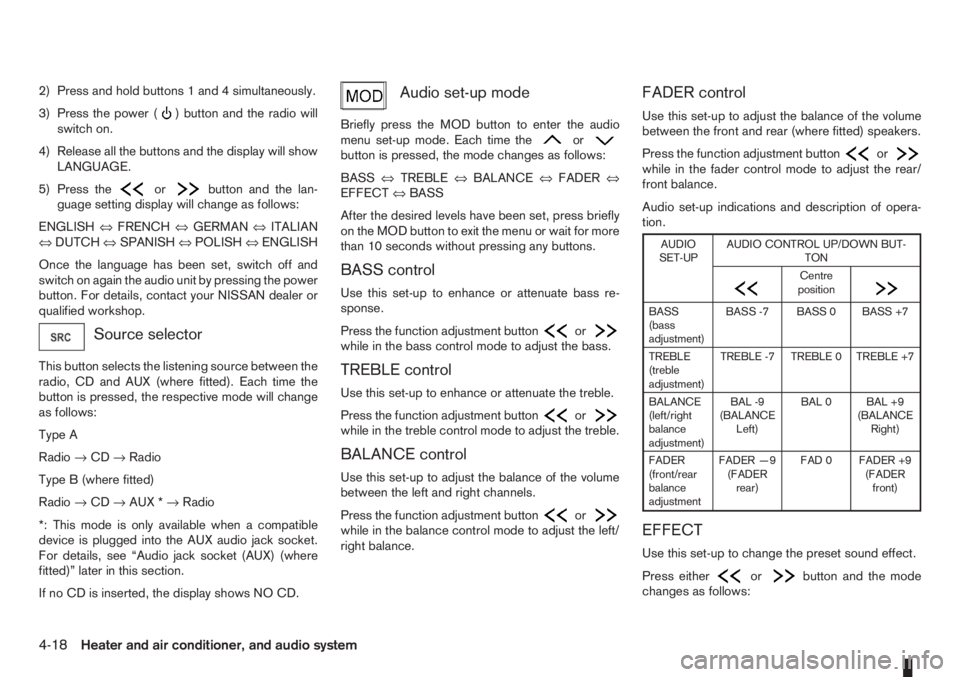
Audio set-up mode
Briefly press the MOD button to enter the audio
menu set-up mode. Each time theorbutton is pressed, the mode changes as follows:
BASS⇔TREBLE⇔BALANCE⇔FADER⇔
EFFECT⇔BASS
After the desired levels have been set, press briefly
on the MOD button to exit the menu or wait for more
than 10 seconds without pressing any buttons.
BASS control
Use this set-up to enhance or attenuate bass re-
sponse.
Press the function adjustment button
orwhile in the bass control mode to adjust the bass.
TREBLE control
Use this set-up to enhance or attenuate the treble.
Press the function adjustment button
orwhile in the treble control mode to adjust the treble.
BALANCE control
Use this set-up to adjust the balance of the volume
between the left and right channels.
Press the function adjustment button
orwhile in the balance control mode to adjust the left/
right balance.
FADER control
Use this set-up to adjust the balance of the volume
between the front and rear (where fitted) speakers.
Press the function adjustment button
orwhile in the fader control mode to adjust the rear/
front balance.
Audio set-up indications and description of opera-
tion.
AUDIO
SET-UPAUDIO CONTROL UP/DOWN BUT-
TON
m
Centre
position
m
BASS
(bass
adjustment)BASS -7 BASS 0 BASS +7
TREBLE
(treble
adjustment)TREBLE -7 TREBLE 0 TREBLE +7
BALANCE
(left/right
balance
adjustment)BAL -9
(BALANCE
Left)BAL 0 BAL +9
(BALANCE
Right)
FADER
(front/rear
balance
adjustmentFADER —9
(FADER
rear)FAD 0 FADER +9
(FADER
front)
EFFECT
Use this set-up to change the preset sound effect.
Press either
orbutton and the mode
changes as follows:
4-18Heater and air conditioner, and audio system
Page 113 of 235

Track details:
A long press on the<
/j5>button will turn the
display into a detailed overview and after a few sec-
onds it returns to the main display, or press
<
/j5>briefly.
CD eject button
CD player:
Press the <
> (eject) button and the CD will be
ejected.
Ejecting CD (with ignition switch in “OFF” or
LOCK):
When the ignition switch is in the “OFF” or LOCK
position it is possible to eject the currently played
CD. However the audio unit will not be activated.
Press the <
> button and the CD will be ejected.
NOTE
•When the CD is ejected and not removed
within 8 seconds, it will automatically retract
into the slot to protect it from damage.
•If an error message appears in the display,
press <> to eject the faulty CD and insert
another CD or check if the ejected CD is in-
serted upside down.
AUX SOCKET
j
AAUX
jBUSB
Audio main operation
Open the lid and connect the lead with the jack of a
compatible player (e.g. MP3 player) to the socket
jA.
Press the
USB MEMORY OPERATION
Connecting USB memory
Open the console lid and connect a USB memory
stick as illustrated. The display will show a notifica-
tion message, for a few seconds, that it is reading
the data.
If the audio system has been turned off while the
USB memory was playing, pressing<
>will start
the USB memory operation.
To operate the USB memory use one of the follow-
ing methods:
•Press the
press
•Press
lighted, then press
NAA1193NAA1194
Heater and air conditioner, and audio system4-29
Page 118 of 235

For details, see the separately provided NISSAN
Connect, Audio with Navigation Owner’s Manual.A.without USB
B.with USB (where fitted)
The audio jack socket
j1 accepts portable personal
stereo audio devices such as a Cassette player, CD
player, MP3 player and the USB socket (where fit-
ted)
j2 accepts USB devices such as USB stick or
iPOD player.
When a compatible device is plugged into the
socket, press the SRC button, see “LW-MW-FM
radio with CD player (where fitted)” earlier in this
section or the AUX button, see “FM AM radio with
CD player (where fitted)” earlier in this section or
the separately provided NISSAN Connect, Audio
with Navigation Owners Manual.
BLUETOOTH®MOBILE PHONE
FEATURE
WARNING
Whilst driving, using the mobile phone is ex-
tremely dangerous because it significantly im-
pairs your concentration and diminishes your re-
action capabilities to sudden changes on the
road, and it may lead to a fatal accident. This
applies to all phone call situations such as when
receiving an incoming call, during a phone con-
versation, when calling through the phone book
search, etc.
CAUTION
Certain country jurisdictions prohibit the use of
the mobile phone in the car without hands-free
support.
This chapter provides information about the NISSAN
hands-free phone system using a Bluetooth
®con-
nection.
NAA1115
NISSAN Connect, Audio with Navigation
NAA1114
NAA1196
AM-FM RADIO WITH CD PLAYER
AND NAVIGATION (where fitted)AUDIO JACK SOCKET (AUX)
(where fitted)MOBILE PHONE INTEGRATION
(where fitted)
4-34Heater and air conditioner, and audio system
Page 156 of 235

installing snow chains. When installing snow
chains, make sure they are of proper size for the
tyres on your vehicle and are installed according
to the snow chain manufacturer’s instructions.
Use chain tensioners when recommended by the
snow chain manufacturer to ensure a tight fit.
Loose end links of the snow chain must be se-
cured or removed to prevent the possibility of
whipping action damage to the wings or under-
carriage. In addition, drive at a reduced speed,
otherwise, your vehicle may be damaged and/or
vehicle handling and performance may be ad-
versely affected.
SPECIAL WINTER EQUIPMENT
It is recommended to carry the following items in the
vehicle during winter:
•A scraper and stiff-bristled brush to remove ice
and snow from the windows.
•A sturdy, flat board to be placed under the jack
to give it firm support.
•A shovel to dig the vehicle out of snowdrifts.
•Extra windscreen washer fluid to refill the reser-
voir tank.
CORROSION PROTECTION
Chemicals used for road surface de-icing are ex-
tremely corrosive and will accelerate corrosion and
the deterioration of underbody components such as
the exhaust system, fuel and brake lines, brake
cables, floor pan, and wings.
In the winter, the underbody must be cleanedperiodically. For additional information, see “Cor-
rosion protection” in the “7. Appearance and
care” section.
For additional protection against rust and corrosion,
which may be required in some areas, consult a
NISSAN dealer or qualified workshop.
5-32Starting and driving
Page 159 of 235

In case of a flat tyre, follow the instructions as de-
scribed below:
STOPPING THE VEHICLE
WARNING
•Make sure that the handbrake is securely ap-
plied.
•For Manual Transmission (MT) models: Make
sure the gear lever is in the R (Reverse) posi-
tion.
For Automatic Transmission (AT) models:
Make sure that the selector lever is in the P
(Park) position.
•Never change tyres when the vehicle is on a
slope, ice or a slippery area. This is hazard-
ous.
•Never change tyres if oncoming traffic is close
to your vehicle. Wait for professional road as-
sistance.
1. Safely move the vehicle off the road, away from
traffic.
2. Switch on the hazard warning flashers.
3. Park on a level surface.
4. Apply the handbrake.
5. Shift the gear lever (MT models) into the R (Re-
verse) position [AT models, move the selector
lever to the P (Park) position].
6. Turn off the engine.7. Open the bonnet (for details, see “Bonnet
release” in the “3. Pre-driving checks and
adjustments” section) in order to:
•Warn other traffic.
•Signal to professional road assistance that
you require assistance.
8. Have all passengers exit the vehicle and stand in
a safe place, away from traffic and clear of the
vehicle.
CHANGING FLAT TYRE (Models with
spare wheel, where fitted)
Blocking the wheels
WARNING
Make sure to block the appropriate wheel to pre-
vent the vehicle from moving, which may cause
personal injury.
Place suitable blocks
j1 in front of and behind thewheel diagonally opposite the flat tyre
jA to prevent
the vehicle from moving when it is on the jack.
MCE0001DZ
FLAT TYRE
In case of emergency6-3
Page 160 of 235

Getting the tools and spare wheel
The spare wheel, jack and tools are located inside
the luggage compartment.
1. Open the back door.
2. Remove the below listed items in the following
sequence:
a. “Flexi-board” system (where fitted)b. Floor carpet
c. Spare wheel (where fitted) — Turn the re-
tainer anticlockwise to remove.
d. Jack
e. Tools
CAUTION
•When removing or replacing the spare wheel,
the rear sliding seat should be moved to the
forward position.
•When carrying the road wheel in the luggage
compartment, the rear sliding seat should be
located in the forward position.
REMOVING WHEEL COVER
(where fitted)
WARNING
Take care when removing the wheel cover as the
cover may detach suddenly.Remove the wheel cover as illustrated with a suit-
able tool or carefully remove the wheel cover with
both hands.
Removing the wheel
WARNING
•Make sure to read the caution label attached
to the jack body before use.
•Do not get under a vehicle that is supported
only by a jack: Use vehicle support stands.
•Use only the jack that is provided with your
vehicle. The jack is designed only for lifting
your vehicle during a tyre change.
•Do not use the jack provided with your vehicle
on other vehicles.
•Use the correct jack-up points. Never use any
other part of the vehicle for jack support.
•Never lift the vehicle more than necessary.
NCE317
SCE0173AZ
NCE176Z
Jack-up points
6-4In case of emergency
Page 161 of 235

•Never use blocks on or under the jack.
•Do not start or run the engine while the ve-
hicle is on the jack. The vehicle may move
suddenly, and this may cause an accident.
•Never allow passengers to stay in the vehicle
while it is on the jack.
•Remove all loads before lifting the vehicle with
the jack.
•Make sure to block the wheel diagonally op-
posite the flat tyre as described earlier in this
section.
CAUTION
The jack should be used on firm, level ground.
1. Place the jack directly under the jack-up point as
illustrated so that the top of the jack contacts the
vehicle at the jack-up point.
2. Align the centre of both the jack head and the
protrusion at the jack-up point as shown.
3. Fit the protrusion of the vehicle in the groove of
the jack head as shown.4. Loosen each wheel bolt by one or two turns
anticlockwise with the wheel wrench.
Do not remove the wheel bolts until the tyre is
off the ground.
Models with wheel lock bolt (where fitted):
If the wheel is equipped with a wheel lock bolt,
insert the wheel lock key
j1 and loosen it as pre-
viously described.
The wheel lock bolt can only be removed with the
wheel lock key. A key number is necessary if you
need to duplicate the wheel lock key.
Record the key number as shown on the key
code card on the “Security information” page at
the end of this manual and keep it in a safe place,
not in the vehicle. If you loose the wheel lock key,
see your NISSAN dealer for a duplicate with the
original wheel lock key code.5. To lift the vehicle, securely hold and turn the
handle clockwise as shown.
6. Carefully raise the vehicle until the tyre clears the
ground.
7. Remove the wheel bolts, then remove the wheel
with the flat tyre.
NCE143Z
NCE318
In case of emergency6-5
Page 162 of 235

CAUTION
The wheel is heavy. Be sure that your feet are
clear of the wheel and use gloves as necessary
to avoid injury.
A.Tighten
B.Loosen
Installing the wheel
WARNING
•The temporary use spare tyre is designed for
emergency use. See “Spare tyre” earlier in
this section.
•Never use wheel bolts that were not provided
with your vehicle. Incorrect wheel bolts or im-
properly tightened wheel bolts may cause the
wheel to become loose or come off. This
could cause an accident.
•Never use oil or grease on the wheel bolts.
This may cause the wheel bolts to become
loose.
1. Clean any mud or dirt from the surface between
the wheel and the hub.
2. Carefully fit the wheel and tighten the wheel bolts
with your fingers.
Models with wheel lock bolt (where fitted):
Insert the wheel lock key into the wheel lock bolt
and tighten into the wheel finger tight.
3. With the wheel wrench, tighten the wheel bolts
alternately and evenly in the sequence as illus-
trated (
j1-j4 ) until they are tight.
4. Lower the vehicle slowly until the tyre touches
the ground.
5. Tighten the wheel bolts securely using the wheel
wrench in the sequence as illustrated.
6. Lower the vehicle completely.
7. Install the wheel cover (where fitted).
NOTE
Before installation, align NISSAN logo (centre
cap) with bolt holes or perpendicular to valve
hole (where fitted), to correctly align to the
centre.
As soon as possible, tighten the wheel bolts to
the specified torque with a torque wrench.Wheel bolt tightening torque:
105 N•m (11 kg-m, 77 ft-lb)
WARNING
Retighten the wheel bolts after the vehicle has
been driven for 1,000 km (600 miles) (also in
cases of a flat tyre, etc.).
The wheel bolts must be kept tightened to specifi-
cation at all times. It is recommended that the wheel
bolts be tightened to specification at each mainte-
nance interval.
Adjust the tyre pressure to the COLD pressure.
COLD pressure is the tyre pressure as measured
after the vehicle has been parked for three hours or
more or driven for less than 1.6 km (1 mile).
COLD tyre pressures are shown on the tyre placard
affixed to the driver’s side centre pillar.
Stowing the wheel and tools
WARNING
Always make sure that the wheel, jack and tools
are properly stored after each use. Such items
can become dangerous projectiles in an acci-
dent or sudden stop.
1. Securely store the tools, wheel with the flat tyre
and jack in the designated location of the lug-
gage compartment.
NCE198Z
6-6In case of emergency