2008 NISSAN MURANO phone
[x] Cancel search: phonePage 4 of 444

Black plate (5,1)
Model "Z51-D" EDITED: 2007/ 10/ 2
NISSAN CARES ...
Both NISSAN and your NISSAN dealer are dedicated to serving all your automotive needs. Your satisfaction with your vehicle and your NISSAN dealer are
our primary concerns. Your NISSAN dealer is always available to assist you with all your automobile sales and service needs.
We appreciate your interest in NISSAN and thank you for buying a quality NISSAN vehicle. However, if there is something that your
NISSAN dealer cannot assist you with or you
would like to provide NISSAN directly with
comments or questions, please contact the
NISSAN Consumer Affairs Department using
our toll-free number:
For U.S. customers
1-800-NISSAN-1
(1-800-647-7261)
For Canadian customers
1-800-387-0122
The Consumer Affairs Department will ask for
the following information:
— Your name, address, and telephone number
— Vehicle identification number (attached to
the top of the instrument panel on the
driver’s side)
— Date of purchase
— Current odometer reading
— Your NISSAN dealer’s name
— Your comments or questions
ORYou can write to NISSAN with the information at:
For U.S. customers
Nissan North America, Inc.
Consumer Affairs Department
P.O. Box 685003
Franklin, TN 37068-5003
For Canadian customers
Nissan Canada Inc.
5290 Orbitor Drive
Mississauga, Ontario L4W 4Z5
NISSAN CUSTOMER CARE
PROGRAM
Page 5 of 444

Black plate (1,1)
Table of
Contents
Model "Z51-D" Edited: 2007/ 10/ 2
Illustrated table of contents
0
Safety — Seats, seat belts and supplemental
restraint system
1
Instruments and controls
2
Pre-driving checks and adjustments
3
Monitor, heater, air conditioner, audio, phone and
voice recognition systems
4
Starting and driving
5
In case of emergency
6
Appearance and care
7
Maintenance and do-it-yourself
8
Technical and consumer information
9
Index
10
Page 10 of 444
Black plate (7,1)
Model "Z51-D" EDITED: 2008/ 6/ 26
SSI0375
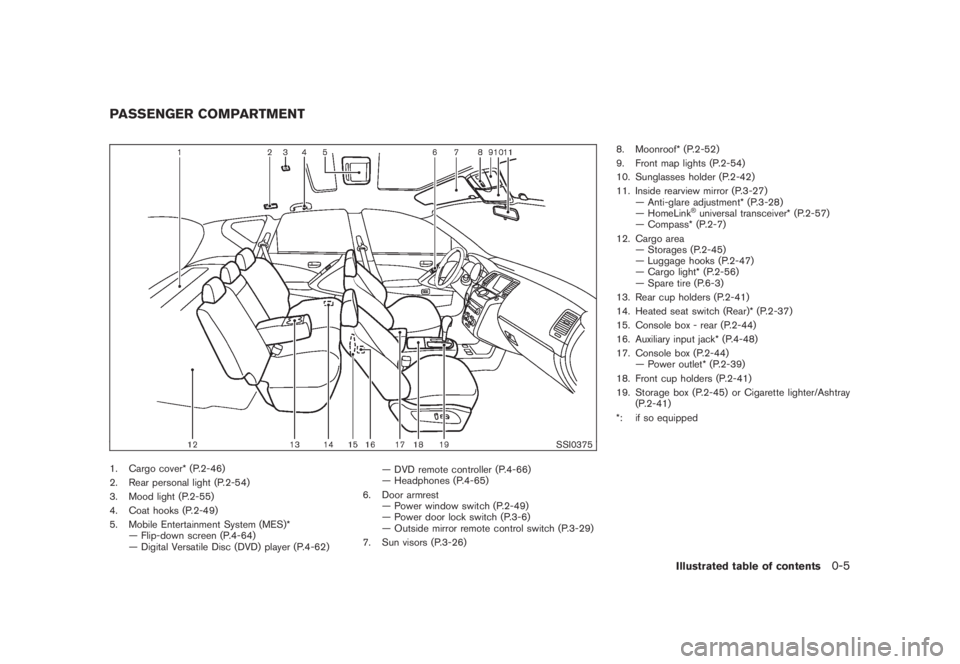
1. Cargo cover* (P.2-46)
2. Rear personal light (P.2-54)
3. Mood light (P.2-55)
4. Coat hooks (P.2-49)
5. Mobile Entertainment System (MES)*
— Flip-down screen (P.4-64)
— Digital Versatile Disc (DVD) player (P.4-62)— DVD remote controller (P.4-66)
— Headphones (P.4-65)
6. Door armrest
— Power window switch (P.2-49)
— Power door lock switch (P.3-6)
— Outside mirror remote control switch (P.3-29)
7. Sun visors (P.3-26)8. Moonroof* (P.2-52)
9. Front map lights (P.2-54)
10. Sunglasses holder (P.2-42)
11. Inside rearview mirror (P.3-27)
— Anti-glare adjustment* (P.3-28)
— HomeLink
®universal transceiver* (P.2-57)
— Compass* (P.2-7)
12. Cargo area
— Storages (P.2-45)
— Luggage hooks (P.2-47)
— Cargo light* (P.2-56)
— Spare tire (P.6-3)
13. Rear cup holders (P.2-41)
14. Heated seat switch (Rear)* (P.2-37)
15. Console box - rear (P.2-44)
16. Auxiliary input jack* (P.4-48)
17. Console box (P.2-44)
— Power outlet* (P.2-39)
18. Front cup holders (P.2-41)
19. Storage box (P.2-45) or Cigarette lighter/Ashtray
(P.2-41)
*: if so equipped
PASSENGER COMPARTMENT
Illustrated table of contents
0-5
Page 11 of 444
Black plate (8,1)
Model "Z51-D" EDITED: 2008/ 6/ 26
SSI0376
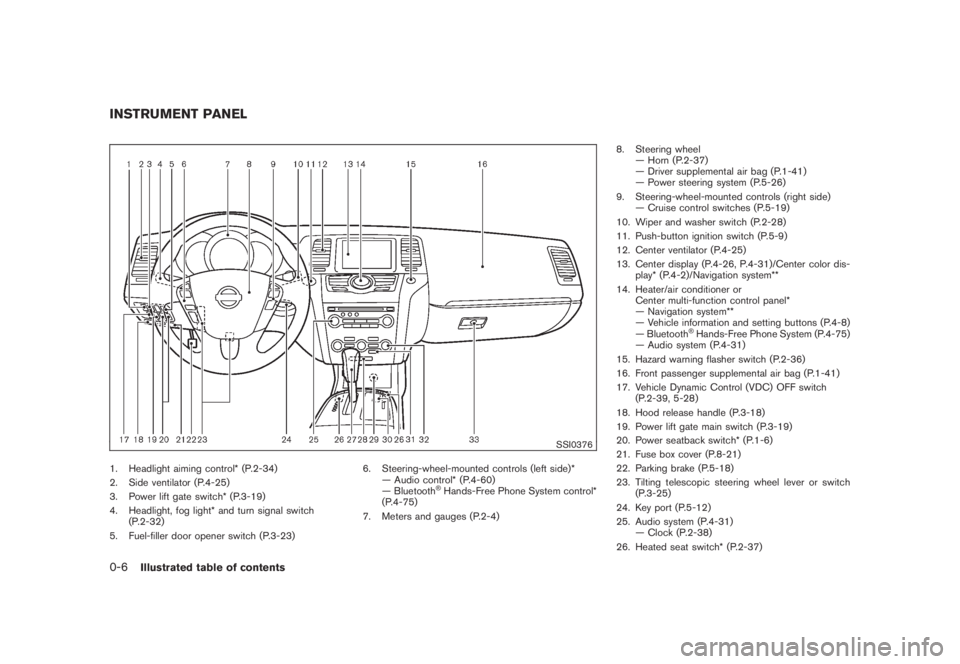
1. Headlight aiming control* (P.2-34)
2. Side ventilator (P.4-25)
3. Power lift gate switch* (P.3-19)
4. Headlight, fog light* and turn signal switch
(P.2-32)
5. Fuel-filler door opener switch (P.3-23)6. Steering-wheel-mounted controls (left side)*
— Audio control* (P.4-60)
— Bluetooth
®Hands-Free Phone System control*
(P.4-75)
7. Meters and gauges (P.2-4)8. Steering wheel
— Horn (P.2-37)
— Driver supplemental air bag (P.1-41)
— Power steering system (P.5-26)
9. Steering-wheel-mounted controls (right side)
— Cruise control switches (P.5-19)
10. Wiper and washer switch (P.2-28)
11. Push-button ignition switch (P.5-9)
12. Center ventilator (P.4-25)
13. Center display (P.4-26, P.4-31)/Center color dis-
play* (P.4-2)/Navigation system**
14. Heater/air conditioner or
Center multi-function control panel*
— Navigation system**
— Vehicle information and setting buttons (P.4-8)
— Bluetooth
®Hands-Free Phone System (P.4-75)
— Audio system (P.4-31)
15. Hazard warning flasher switch (P.2-36)
16. Front passenger supplemental air bag (P.1-41)
17. Vehicle Dynamic Control (VDC) OFF switch
(P.2-39, 5-28)
18. Hood release handle (P.3-18)
19. Power lift gate main switch (P.3-19)
20. Power seatback switch* (P.1-6)
21. Fuse box cover (P.8-21)
22. Parking brake (P.5-18)
23. Tilting telescopic steering wheel lever or switch
(P.3-25)
24. Key port (P.5-12)
25. Audio system (P.4-31)
— Clock (P.2-38)
26. Heated seat switch* (P.2-37)
INSTRUMENT PANEL0-6
Illustrated table of contents
Page 74 of 444

Black plate (70,1)
Model "Z51-D" EDITED: 2008/ 6/ 26
SSI0376
1. Headlight aiming control*
2. Side ventilator
3. Power lift gate switch*
4. Headlight, fog light* and turn signal switch
5. Fuel-filler door opener switch6. Steering-wheel-mounted controls (left side)*
— Audio control*
— Bluetooth
®Hands-Free Phone System control*
7. Meters and gauges8. Steering wheel
— Horn
— Driver supplemental air bag
— Power steering system
9. Steering-wheel-mounted controls (right side)
— Cruise control switches
10. Wiper and washer switch
11. Push-button ignition switch
12. Center ventilator
13. Center display/Center color display*/Navigation
system**
14. Heater/air conditioner or
Center multi-function control panel*
— Navigation system**
— Vehicle information and setting buttons
— Bluetooth
®Hands-Free Phone System
— Audio system
15. Hazard warning flasher switch
16. Front passenger supplemental air bag
17. Vehicle Dynamic Control (VDC) OFF switch
18. Hood release handle
19. Power lift gate main switch
20. Power seatback switch
21. Fuse box cover
22. Parking brake
23. Tilting telescopic steering wheel lever or switch
24. Key port
25. Audio system
— Clock
26. Heated seat switch*
27. Selector lever
28. Front passenger air bag status light
INSTRUMENT PANEL2-2
Instruments and controls
Page 92 of 444
Black plate (88,1)
Model "Z51-D" EDITED: 2008/ 6/ 26
11. Low washer fluid warningThis warning appears when the washer tank fluid
is at a low level. Add washer fluid as necessary.
(See “WINDOW WASHER FLUID” in the “8.
Maintenance and do-it-yourself” section.)12. Door/lift gate open warning (ignition
switch is in the ON position)This warning appears if any of the doors and/or
the lift gate are open or not closed securely. The
vehicle icon indicates which door is open on the
display.13. “Time to rest” indicatorThis indicator appears when the set “time to
rest” indicator activates. You can set the time for
up to 6 hours. (See “TRIP COMPUTER” later in
this section.)14. Low outside temperature warningThis warning appears if the outside temperature
is below 378F(38C) . The warning can be set not
to be displayed. (See “TRIP COMPUTER” later
in this section.)
SIC3578
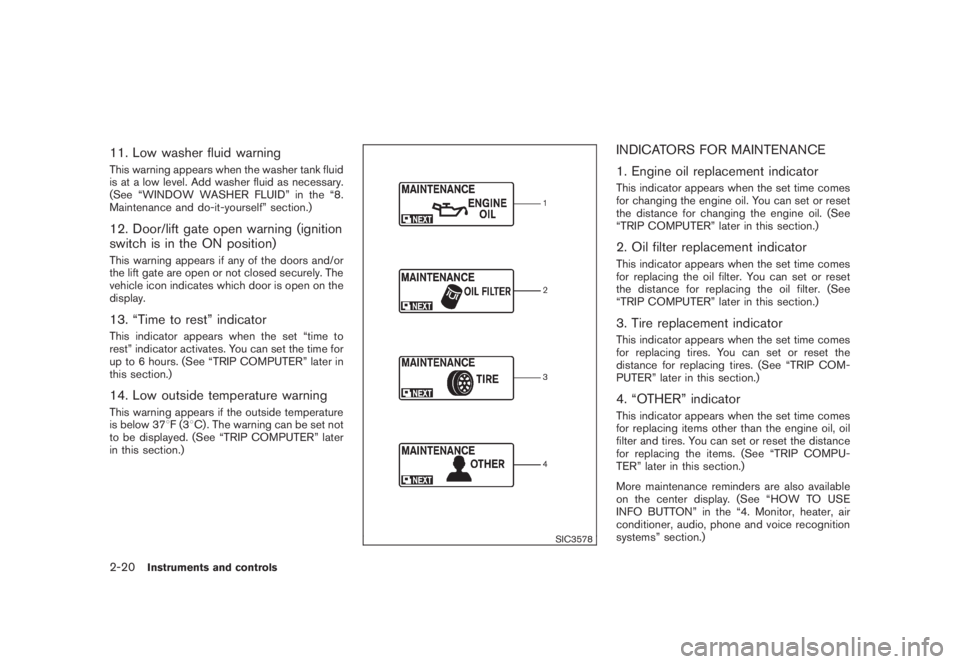
INDICATORS FOR MAINTENANCE
1. Engine oil replacement indicatorThis indicator appears when the set time comes
for changing the engine oil. You can set or reset
the distance for changing the engine oil. (See
“TRIP COMPUTER” later in this section.)2. Oil filter replacement indicatorThis indicator appears when the set time comes
for replacing the oil filter. You can set or reset
the distance for replacing the oil filter. (See
“TRIP COMPUTER” later in this section.)3. Tire replacement indicatorThis indicator appears when the set time comes
for replacing tires. You can set or reset the
distance for replacing tires. (See “TRIP COM-
PUTER” later in this section.)4. “OTHER” indicatorThis indicator appears when the set time comes
for replacing items other than the engine oil, oil
filter and tires. You can set or reset the distance
for replacing the items. (See “TRIP COMPU-
TER” later in this section.)
More maintenance reminders are also available
on the center display. (See “HOW TO USE
INFO BUTTON” in the “4. Monitor, heater, air
conditioner, audio, phone and voice recognition
systems” section.)
2-20
Instruments and controls
Page 105 of 444
Black plate (101,1)
Model "Z51-D" EDITED: 2008/ 6/ 26
SIC3669
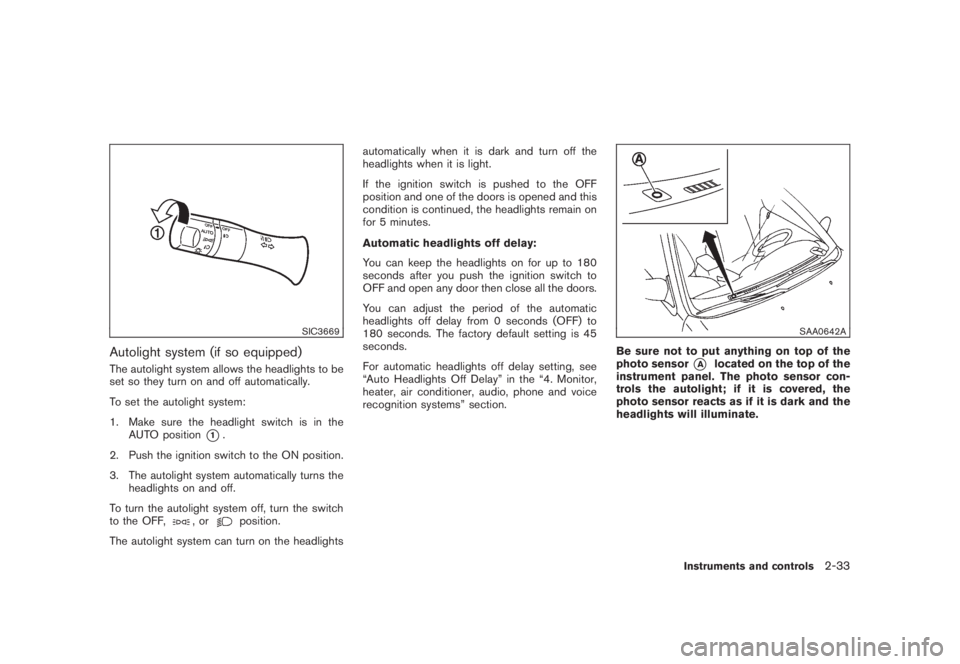
Autolight system (if so equipped)The autolight system allows the headlights to be
set so they turn on and off automatically.
To set the autolight system:
1. Make sure the headlight switch is in the
AUTO position
*1.
2. Push the ignition switch to the ON position.
3. The autolight system automatically turns the
headlights on and off.
To turn the autolight system off, turn the switch
to the OFF,
,or
position.
The autolight system can turn on the headlightsautomatically when it is dark and turn off the
headlights when it is light.
If the ignition switch is pushed to the OFF
position and one of the doors is opened and this
condition is continued, the headlights remain on
for 5 minutes.
Automatic headlights off delay:
You can keep the headlights on for up to 180
seconds after you push the ignition switch to
OFF and open any door then close all the doors.
You can adjust the period of the automatic
headlights off delay from 0 seconds (OFF) to
180 seconds. The factory default setting is 45
seconds.
For automatic headlights off delay setting, see
“Auto Headlights Off Delay” in the “4. Monitor,
heater, air conditioner, audio, phone and voice
recognition systems” section.
SAA0642A
Be sure not to put anything on top of the
photo sensor
*A
located on the top of the
instrument panel. The photo sensor con-
trols the autolight; if it is covered, the
photo sensor reacts as if it is dark and the
headlights will illuminate.
Instruments and controls
2-33
Page 111 of 444
Black plate (107,1)
Model "Z51-D" EDITED: 2008/ 6/ 26
5. Push the CLOCK button
*1
or AUDIO
knob
*2
to enter.
The display will return to the regular clock
display after 10 seconds.
If the power supply is disconnected, the clock
will not indicate the correct time.
Readjust the time.
MODELS WITH COLOR DISPLAYFor adjusting the time, see “Clock settings” in
the “4. Monitor, heater, air conditioner, audio,
phone and voice recognition systems” section.
SIC1881
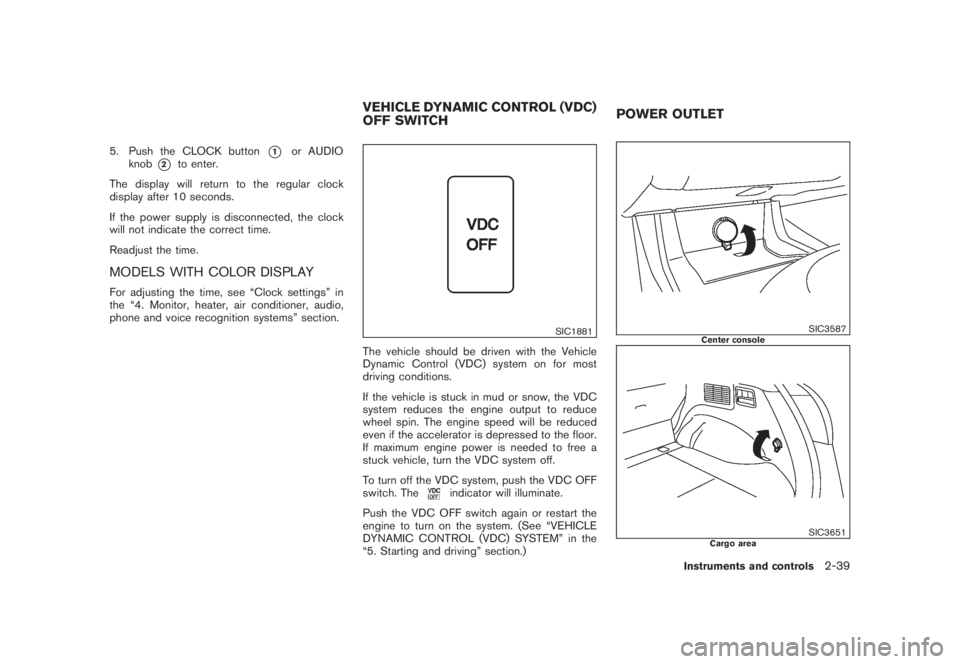
The vehicle should be driven with the Vehicle
Dynamic Control (VDC) system on for most
driving conditions.
If the vehicle is stuck in mud or snow, the VDC
system reduces the engine output to reduce
wheel spin. The engine speed will be reduced
even if the accelerator is depressed to the floor.
If maximum engine power is needed to free a
stuck vehicle, turn the VDC system off.
To turn off the VDC system, push the VDC OFF
switch. The
indicator will illuminate.
Push the VDC OFF switch again or restart the
engine to turn on the system. (See “VEHICLE
DYNAMIC CONTROL (VDC) SYSTEM” in the
“5. Starting and driving” section.)
SIC3587
Center console
SIC3651
Cargo area
VEHICLE DYNAMIC CONTROL (VDC)
OFF SWITCHPOWER OUTLET
Instruments and controls
2-39