2008 NISSAN MURANO Radio
[x] Cancel search: RadioPage 211 of 444

Black plate (207,1)
Model "Z51-D" EDITED: 2008/ 6/ 26
ON·OFF/Volume control:
Push the ignition switch to the ACC or ON
position, and then push the ON·OFF/VOLUME
control knob while the system is off to call up the
mode (radio, CD or AUX) which was playing
immediately before the system was turned off.
While the system is on, pushing the ON·OFF/
VOLUME control knob turns the system off.
Turn the ON·OFF/VOLUME control knob to
adjust the volume.
Adjusting tone quality and speaker bal-
ance:
To adjust Bass, Treble, Balance and Fade, push
the Audio control knob. When the display shows
the setting you want to change (Bass, Treble,
Balance and Fade) , rotate the Audio control
knob to set the desired setting. For the other
setting methods, see “HOW TO USE SETTING
BUTTON” earlier in this section.
This vehicle has some sound effect functions as
follows (if so equipped):
.Speed Sensitive Volume
For more details, see “VEHICLE INFORMATION
AND SETTINGS” earlier in this section.
Switching the display (for models with
navigation system):
Pushing theDISC·AUXbutton will switch thedisplays as follows:
CD?CompactFlash*?DVD*?AUX?
iPod
®*?Music Box*?CD
*: if so equipped
FM-AM-SAT radio operation
radio (FM/AM) band select:
Pushing the radio band select button will
change the band as follows:
AM?FM1?FM2?AMor
radio (SAT) band select:
Pushing the radio band select button will
change the band as follows:
(With navigation system)
SAT1?SAT2?SAT1
(Without navigation system)
AUX?SAT1?SAT2?AUX
When the radio band select button is pushed
while the ignition switch is in the ACC or ON
position, the radio will come on at the station last
played.
The last station/channel played will also come
on when the ON·OFF/VOL control knob ispushed to ON.
The satellite radio mode requires an active XM
®
satellite radio service subscription. Satellite
radio is not available in Alaska, Hawaii and
Guam.
If another audio source is playing when the radio
band select button is turned to ON, the audio
source will automatically be turned off and the
last radio station played will come on.
When the stereo broadcast signal is weak, the
radio will automatically change from stereo to
monaural reception.
TUNE (Tuning):
.For AM and FM radio
Turn the TUNE/FOLDER knob for manual
tuning.
.For XM satellite radio
Turn the TUNE/FOLDER knob to seek
channels from all of the categories when
any CAT is not selected.
SEEK tuning/CATEGORY
(CAT):
.For AM and FM radio
Push the SEEK·CAT or TRACK button
or
to tune from low to high or high to
Monitor, heater, air conditioner, audio, phone and voice recognition systems
4-45
Page 212 of 444
Black plate (208,1)
Model "Z51-D" EDITED: 2008/ 6/ 26
low frequencies and to stop at the next
broadcasting station.
.For XM satellite radio
Push the SEEK·CAT or TRACK buttonor
to tune to the first channel of the
next or previous category.
During satellite radio reception, the following
notices will be displayed under certain condi-
tions.
.NO SIGNAL (No signal is received while the
SAT tuner is connected.)
.OFF AIR (Broadcasting signed off)
.ANTENNA ERROR (Antenna connection
error)
.LOADING (When the initial setting is
performed)
.UPDATING (When the satellite radio sub-
scription is not active)
.INVALID CH (Invalid channel is received.)
SCAN tuning:
Push the SCAN tuning button to tune from low
to high frequencies and stops at each broad-
casting station for 5 seconds. Pushing the
button again during this 5 seconds period will
stop SCAN tuning and the radio will remaintuned to that station.
If the SCAN tuning button is not pushed within 5
seconds, SCAN tuning moves to the next
station.
*1
to
*6
Station memory operations:
Twelve stations/channels can be set for the FM
band (6 for FM1, 6 for FM2) and the SAT radio
(6 for SAT1, 6 for SAT2) , and 6 stations can be
set for the AM band.
1. Choose the radio band using the radio band
select button.
2. Tune to the desired station using the SEEK,
SCAN or TUNE button.
3. Select the desired station/channel and keep
pushing any of the desired station preset
buttons*1
to
*6
until a beep sound is
heard. (The radio mutes when the select
button is pushed.)
4. The channel indicator will then come on and
the sound will resume. Memorizing is now
complete.
5. Other buttons can be set in the same
manner.
If the battery cable is disconnected, or if the fuse
blows, the radio memory will be erased. In that
case, reset the desired stations.Text:
When the “Text” key is selected with the multi-
function controller on the display and then the
ENTER button is pushed while the satellite radio
is being played, the text information will be
displayed on the screen.
.CH Name
.Category
.Name
.Title
.Other
Compact Disc (CD) player/changer op-
erationPush the ignition switch to the ACC or ON
position, push the LOAD button (if so equipped)
and insert the compact disc into the slot with the
label side facing up. The compact disc will be
guided automatically into the slot and start
playing.
After loading the disc, the number of tracks on
the disc and the play time will appear on the
display.
If the radio is already operating, it will auto-
matically turn off and the compact disc will play.
If the system has been turned off while the
compact disc was playing, pushing the ON·-
4-46
Monitor, heater, air conditioner, audio, phone and voice recognition systems
Page 213 of 444
Black plate (209,1)
Model "Z51-D" EDITED: 2008/ 6/ 26
OFF/VOL control knob will start the compact
disc.
CD LOAD (if so equipped):
To insert a CD in the CD changer, push the
LOAD button for less than 1.5 seconds. Select
the loading position by pushing the CD insert
select button
*1
to*6, then insert the CD.
To insert 6 CDs to the CD changer in
succession, push the LOAD button for more
than 1.5 seconds.
The inserted slot numbers will illuminate on the
display.
or
PLAY:
When the DISC (CD play) button is pushed with
the system off and the compact disc loaded, the
system will turn on and the compact disc will
start to play.
When the DISC button is pushed with the
compact disc loaded and the radio playing, the
radio will automatically be turned off and the
compact disc will start to play.
When the DISC button is pushed while a CD is
loaded and a medium is played using the
auxiliary input jacks, you can toggle back and
forth between CD and medium.Text:
When the “Text” key is selected in the screen
using the multi-function controller and then the
ENTER button is pushed while the CD is being
played, the music information below will be
displayed on the screen.
CD:
.Disc title
.Track title
CD with MP3 or WMA:
.Folder title
.File title
.Song title
.Album title
.Artist
FF (Fast Forward) , REW (Re-
wind)/APS (Automatic Pro-
gram Search) FF, APS REW:
When the(fast forward) or
(rewind)
button is pushed for more than 1.5 seconds
while the compact disc is being played, the
compact disc will play while fast forwarding or
rewinding. When the button is released, the
compact disc will return to normal play speed.When the
or
button is pushed for less
than 1.5 seconds while the compact disc is
being played, the next track or the beginning of
the current track on the CD will be played.
The multi-function controller can also be used to
select tracks when a CD is being played.
CD PLAY selection (if so equipped) :
To change to another CD already loaded into the
player, push the CD play select buttons
*1
to
*6
or choose a disc displayed on the screen
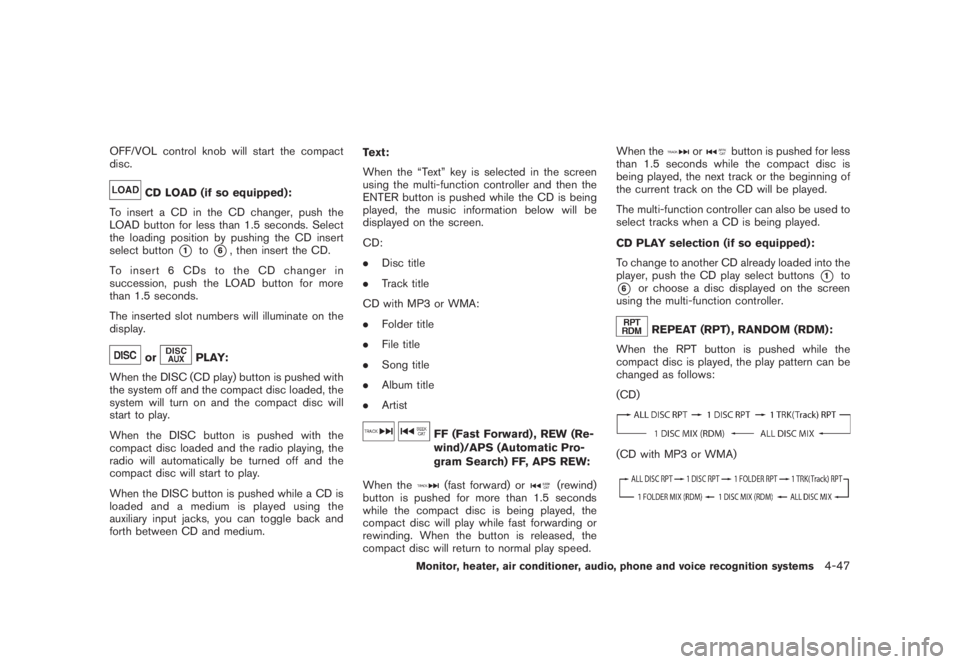
using the multi-function controller.REPEAT (RPT) , RANDOM (RDM):
When the RPT button is pushed while the
compact disc is played, the play pattern can be
changed as follows:
(CD)
(CD with MP3 or WMA)
Monitor, heater, air conditioner, audio, phone and voice recognition systems
4-47
Page 220 of 444
Black plate (216,1)
Model "Z51-D" EDITED: 2008/ 6/ 26
tion.)
Stopping playback:
The system stops playing when:
a. another mode (radio, CD, CompactFlash or
AUX) is selected.
b. the audio system is turned off.
c. the ignition switch is pushed to the OFF
position.
FF (Fast Forward) , REW (Re-
wind)/APS (Automatic Pro-
gram Search) FF, APS REW:
When the(fast forward) or
(rewind)
button is pushed for more than 1.5 seconds
while a track is being played, the track will play
while fast forwarding or rewinding. When the
button is released, the track will return to the
normal play speed.
When the
or
button is pushed for less
than 1.5 seconds while a track is being played,
the next track or the beginning of the current
track will be played.
The multi-function controller can also be used to
select tracks when a track is being played.
Play mode selection:
To change to another album or artist, turn theMP3/WMA folder selector.
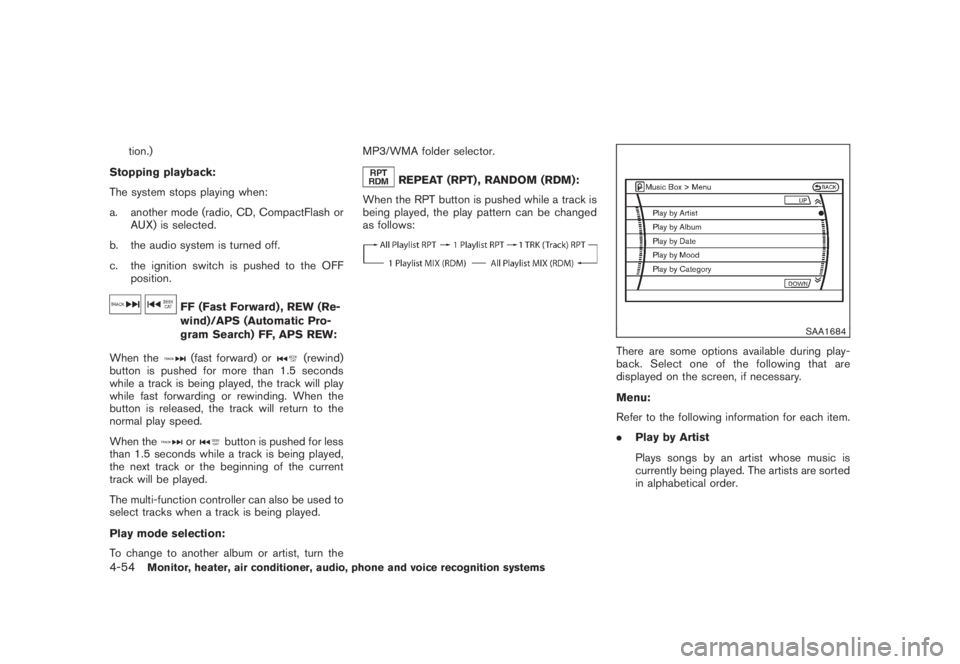
REPEAT (RPT) , RANDOM (RDM):
When the RPT button is pushed while a track is
being played, the play pattern can be changed
as follows:
SAA1684
There are some options available during play-
back. Select one of the following that are
displayed on the screen, if necessary.
Menu:
Refer to the following information for each item.
.Play by Artist
Plays songs by an artist whose music is
currently being played. The artists are sorted
in alphabetical order.
4-54
Monitor, heater, air conditioner, audio, phone and voice recognition systems
Page 226 of 444
Black plate (222,1)
Model "Z51-D" EDITED: 2008/ 6/ 26
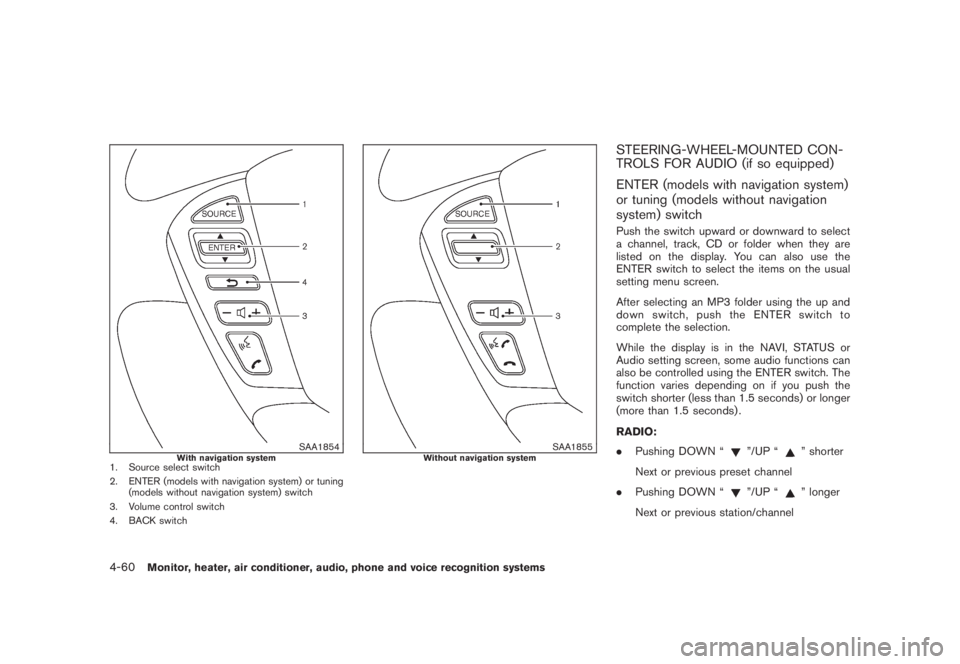
SAA1854
With navigation system
1. Source select switch
2. ENTER (models with navigation system) or tuning
(models without navigation system) switch
3. Volume control switch
4. BACK switch
SAA1855
Without navigation system
STEERING-WHEEL-MOUNTED CON-
TROLS FOR AUDIO (if so equipped)
ENTER (models with navigation system)
or tuning (models without navigation
system) switchPush the switch upward or downward to select
a channel, track, CD or folder when they are
listed on the display. You can also use the
ENTER switch to select the items on the usual
setting menu screen.
After selecting an MP3 folder using the up and
down switch, push the ENTER switch to
complete the selection.
While the display is in the NAVI, STATUS or
Audio setting screen, some audio functions can
also be controlled using the ENTER switch. The
function varies depending on if you push the
switch shorter (less than 1.5 seconds) or longer
(more than 1.5 seconds) .
RADIO:
.Pushing DOWN “
”/UP “
” shorter
Next or previous preset channel
.Pushing DOWN “
”/UP “
” longer
Next or previous station/channel
4-60
Monitor, heater, air conditioner, audio, phone and voice recognition systems
Page 240 of 444
Black plate (236,1)
Model "Z51-D" EDITED: 2008/ 6/ 26
.A new disc may be rough on its
inner and outer edges. Remove the
rough edges using the side of a pen
or pencil as illustrated.
.Never attempt to use a DVD that has
been cracked, deformed, or repaired
using adhesive. Doing so may cause
damage to the equipment.
.Handle the DVD carefully to avoid contam-
ination or flaws. Otherwise, signals may not
be read properly.
.Do not write, draw or attach anything on any
side of the DVD.
.Do not store the DVD in locations with direct
sunlight or in high temperatures or humidity.
.Always place discs in the storage case
when they are not being used.
.Do not put on any sticker or write anything
on either surface of the DVD.When installing a car phone or a CB radio in
your NISSAN, be sure to observe the following
cautions, otherwise the new equipment may
adversely affect the electronic control modules
and electronic control system harness.
WARNING
.A cellular telephone should not be
used while driving so full attention
may be given to vehicle operation.
Some jurisdictions prohibit the use
of cellular telephones while driving.
.If you must make a call while your
vehicle is in motion, the hands-free
cellular phone operational mode (if
so equipped) is highly recom-
mended. Exercise extreme caution
at all times so full attention may be
given to vehicle operation.
.If a conversation in a moving vehicle
requires you to take notes, pull off
the road to a safe location and stop
your vehicle before doing so.
CAUTION
.Keep the antenna as far away as
possible from the electronic control
modules.
.Keep the antenna wire more than 8
in (20 cm) away from the electronic
control system harness. Do not
route the antenna wire next to any
harness.
.Adjust the antenna standing-wave
ratio as recommended by the man-
ufacturer.
.Connect the ground wire from the
CB radio chassis to the body.
.For details, consult a NISSAN deal-
er.
CAR PHONE OR CB RADIO
4-74
Monitor, heater, air conditioner, audio, phone and voice recognition systems
Page 241 of 444
Black plate (237,1)
Model "Z51-D" EDITED: 2008/ 6/ 26
WARNING
.Use a phone after stopping your
vehicle in a safe location. If you
have to use a phone while driving,
exercise extreme caution at all
times so full attention may be given
to vehicle operation.
.If you find yourself unable to devote
full attention to vehicle operation
while talking on the phone, pull off
the road to a safe location and stop
your vehicle before doing so.
CAUTION
To avoid draining the vehicle battery,
use a phone after starting the engine.
Your NISSAN is equipped with Bluetooth
®
Hands-Free Phone System. If you are an owner
of a compatible Bluetooth
®enabled cellular
phone, you can set up the wireless connection
between your cellular phone and the in-vehicle
phone module. With Bluetooth®wireless tech-
nology, you can make or receive a telephone call
with your cellular phone in your pocket.
Once your cellular phone is paired to the in-
vehicle phone module, no phone connectingprocedure is required anymore. Your phone is
automatically connected with the in-vehicle
phonemodulewhentheignitionswitchis
pushed to the ON position with the registered
cellular phone turned on and carried in the
vehicle.
You can register up to 5 different Bluetooth
®
cellular phones in the in-vehicle phone module.
However, you can talk on only one cellular phone
at a time.
The NISSAN Voice Recognition system sup-
ports the phone commands, so dialing a phone
number using your voice is possible. For more
details, see “NISSAN VOICE RECOGNITION
SYSTEM (models with navigation system)” later
in this section; page 4-109.
Before using the Bluetooth
®Hands-Free Phone
System, refer to the following notes.
.Set up the wireless connection between a
cellular phone and the in-vehicle phone
module before using the Bluetooth
®
Hands-Free Phone System.
.Some Bluetooth
®enabled cellular phones
may not be recognized by the in-vehicle
phone module. Please visit
www.nissanusa.com/bluetooth for a recom-
mended phone list.
.You will not be able to use a hands-free
phone under the following conditions:— Your vehicle is outside of the telephone
service area.
— Your vehicle is in an area where it is
difficult to receive radio waves; such as in
a tunnel, in an underground parking
garage, behind a tall building or in a
mountainous area.
— Your cellular phone is locked in order not
to be dialed.
.When the radio wave condition is not ideal
or ambient sound is too loud, it may be
difficult to hear the other person’s voice
during a call.
.Immediately after the ignition switch is
pushed to the ON position, it may be
impossible to receive a call for a short
period of time.
.Do not place the cellular phone in an area
surrounded by metal or far away from the in-
vehicle phone module to prevent tone quality
degradation and wireless connection dis-
ruption.
.While a cellular phone is connected through
the Bluetooth
®wireless connection, the
battery power of the cellular phone may
discharge quicker than usual.
.If the Bluetooth®Hands-Free Phone System
seems to be malfunctioning, please visit
BLUETOOTH
®HANDS-FREE PHONE
SYSTEM WITH NAVIGATION
SYSTEM (for U.S.)
Monitor, heater, air conditioner, audio, phone and voice recognition systems
4-75
Page 251 of 444
Black plate (247,1)
Model "Z51-D" EDITED: 2008/ 6/ 26
WARNING
.Use a phone after stopping your
vehicle in a safe location. If you
have to use a phone while driving,
exercise extreme caution at all
times so full attention may be given
to vehicle operation.
.If you find yourself unable to devote
full attention to vehicle operation
while talking on the phone, pull off
the road to a safe location and stop
your vehicle before doing so.
CAUTION
To avoid draining the vehicle battery,
use a phone after starting the engine.
Your NISSAN is equipped with Bluetooth
®
Hands-Free Phone System. If you are an owner
of a compatible Bluetooth
®enabled cellular
phone, you can set up the wireless connection
between your cellular phone and the in-vehicle
phone module. With Bluetooth®wireless tech-
nology, you can make or receive a telephone call
with your cellular phone in your pocket.
Once your cellular phone is paired to the in-
vehicle phone module, no phone connectingprocedure is required anymore. Your phone is
automatically connected with the in-vehicle
phonemodulewhentheignitionswitchis
pushed to the ON position with the registered
cellular phone turned on and carried in the
vehicle.
You can register up to 5 different Bluetooth
®
cellular phones in the in-vehicle phone module.
However, you can talk on only one cellular phone
at a time.
The NISSAN Voice Recognition system sup-
ports the phone commands, so dialing a phone
number using your voice is possible. For more
details, see “NISSAN VOICE RECOGNITION
SYSTEM (models with navigation system)” later
in this section; page 4-132.
Before using the Bluetooth
®Hands-Free Phone
System, refer to the following notes.
.Set up the wireless connection between a
cellular phone and the in-vehicle phone
module before using the Bluetooth
®
Hands-Free Phone System.
.Some Bluetooth
®enabled cellular phones
may not be recognized by the in-vehicle
phone module. Please visit
www.nissanusa.com/bluetooth for a recom-
mended phone list.
.You will not be able to use a hands-free
phone under the following conditions:— Your vehicle is outside of the telephone
service area.
— Your vehicle is in an area where it is
difficult to receive radio waves; such as in
a tunnel, in an underground parking
garage, behind a tall building or in a
mountainous area.
— Your cellular phone is locked in order not
to be dialed.
.When the radio wave condition is not ideal
or ambient sound is too loud, it may be
difficult to hear the other person’s voice
during a call.
.Immediately after the ignition switch is
pushed to the ON position, it may be
impossible to receive a call for a short
period of time.
.Do not place the cellular phone in an area
surrounded by metal or far away from the in-
vehicle phone module to prevent tone quality
degradation and wireless connection dis-
ruption.
.While a cellular phone is connected through
the Bluetooth
®wireless connection, the
battery power of the cellular phone may
discharge quicker than usual.
.If the Bluetooth®Hands-Free Phone System
seems to be malfunctioning, please visit
BLUETOOTH
®HANDS-FREE PHONE
SYSTEM WITH NAVIGATION
SYSTEM (for Canada)
Monitor, heater, air conditioner, audio, phone and voice recognition systems
4-85