2008 NISSAN FRONTIER lock
[x] Cancel search: lockPage 85 of 352
WARNING
If the supplemental air bag warning light
is on, it could mean that the front air bag,
side air bag, curtain and rollover air bag
and/or pretensioner systems will not op-
erate in an accident. To help avoid injury
to yourself or others, have your vehicle
checked by a NISSAN dealer as soon as
possible
Repair and replacement procedure
The front air bags, side air bags, curtain and
rollover air bags and pretensioners are designed
to inflate on a one-time-only basis. As a reminder,
unless it is damaged, the supplemental air bag
warning light remains illuminated after inflation
has occurred. Repair and replacement of these
supplemental air bag systems should be done
only by a NISSAN dealer.
When maintenance work is required on the ve-
hicle, the front air bags, side air bags, curtain and
rollover air bags, pretensioners and related parts
should be pointed out to the person performing
the maintenance. The ignition key should always
be in the LOCK position when working under the
hood or inside the vehicle.
WARNING
cOnce a front air bag, side air bag, or
curtain and rollover air bag has inflated,
the air bag module will not function
again and must be replaced. Addition-
ally, if any of the front air bags inflate,
the activated pretensioners must also
be replaced. The air bag module and
pretensioners should be replaced by a
NISSAN dealer. The air bag module and
pretensioners cannot be repaired.
cThe front air bag, side air bag, curtain
and rollover air bag systems and the
pretensioner system should be in-
spected by a NISSAN dealer if there is
any damage to the front end or side
portion of the vehicle.
cIf you need to dispose of a supplemen-
tal air bag or pretensioners or scrap the
vehicle, contact a NISSAN dealer. Cor-
rect supplemental air bag and preten-
sioner system disposal procedures are
set forth in the appropriate NISSAN
Service Manual. Incorrect disposal pro-
cedures could cause personal injury.
Safety—Seats, seat belts and supplemental restraint system1-67
ZREVIEW COPYÐ2008 08+ Truck/Frontier(fro)
Owners ManualÐUSA_English(nna)
06/30/07Ðdebbie
X
Page 86 of 352

2 Instruments and controls
Instrument panel...................................2-2
Meters and gauges................................2-3
Speedometer and odometer.....................2-4
Trip computer (if so equipped)...................2-5
Tachometer....................................2-6
Engine coolant temperature gauge...............2-6
Fuel gauge....................................2-7
Engine oil pressure gauge (if so equipped)........2-8
Voltmeter (if so equipped).......................2-8
Compass and outside temperature display
(if so equipped)...................................2-9
Outside temperature display.....................2-9
Compass display..............................2-10
Warning/indicator lights and audible reminders......2-12
Checking bulbs...............................2-13
Warning lights................................2-13
Indicator lights................................2-17
Audible reminders.............................2-21
Security systems (if so equipped)..................2-21
Vehicle security system (if so equipped)..........2-21
NISSAN vehicle immobilizer system
(if so equipped)...............................2-22
Windshield wiper and washer switch...............2-23Switch operation..............................2-23
Rear window and outside mirror defroster switch
(if so equipped)..................................2-24
Headlight and turn signal switch....................2-25
Headlight control switch........................2-25
Daytime running light system (Canada only)......2-27
Instrument brightness control...................2-28
Turn signal switch.............................2-28
Fog light switch (if so equipped)................2-28
Hazard warning flasher switch.....................2-29
Horn............................................2-29
Cargo lamp switch...............................2-30
Heated seat (if so equipped).......................2-30
Vehicle Dynamic Control (VDC) off switch
(if so equipped)..................................2-31
Hill descent control switch (if so equipped)..........2-31
Electronic locking rear differential (E-Lock) system
switch (if so equipped)............................2-32
Clutch interlock (clutch start) switch
(if so equipped)..................................2-33
Power outlet.....................................2-34
Storage.........................................2-35
Storage trays.................................2-35
ZREVIEW COPYÐ2008 08+ Truck/Frontier(fro)
Owners ManualÐUSA_English(nna)
06/30/07Ðdebbie
X
Page 88 of 352
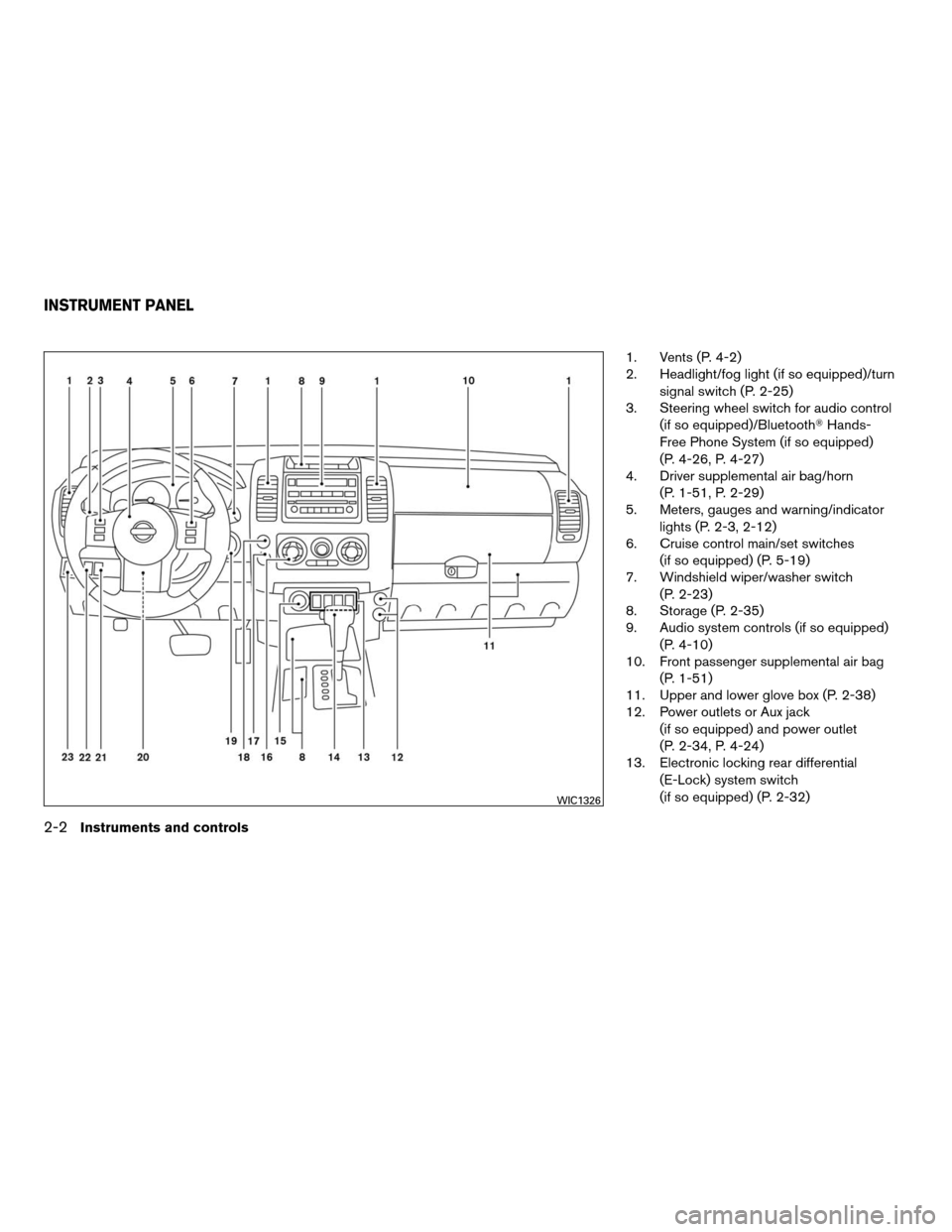
1. Vents (P. 4-2)
2. Headlight/fog light (if so equipped)/turn
signal switch (P. 2-25)
3. Steering wheel switch for audio control
(if so equipped)/BluetoothTHands-
Free Phone System (if so equipped)
(P. 4-26, P. 4-27)
4. Driver supplemental air bag/horn
(P. 1-51, P. 2-29)
5. Meters, gauges and warning/indicator
lights (P. 2-3, 2-12)
6. Cruise control main/set switches
(if so equipped) (P. 5-19)
7. Windshield wiper/washer switch
(P. 2-23)
8. Storage (P. 2-35)
9. Audio system controls (if so equipped)
(P. 4-10)
10. Front passenger supplemental air bag
(P. 1-51)
11. Upper and lower glove box (P. 2-38)
12. Power outlets or Aux jack
(if so equipped) and power outlet
(P. 2-34, P. 4-24)
13. Electronic locking rear differential
(E-Lock) system switch
(if so equipped) (P. 2-32)
WIC1326
INSTRUMENT PANEL
2-2Instruments and controls
ZREVIEW COPYÐ2008 08+ Truck/Frontier(fro)
Owners ManualÐUSA_English(nna)
06/30/07Ðdebbie
X
Page 89 of 352

Heated seat switches (if so equipped)
(P. 2-30)
Hill descent control switch
(if so equipped) (P. 2-31)
Vehicle Dynamic Control (VDC) OFF
switch (if so equipped) (P. 2-31)
14. Shift selector lever (P. 5-12)
15. 4WD shift switch (if so equipped)
(P. 5-21)
16. Climate controls (P. 4-2)
17. Passenger air bag status light (P. 1-60)
18. Hazard warning flasher switch (P. 2-29)
19. Ignition switch (P. 5-8)
20. Tilt steering wheel control
(if so equipped) (P. 3-11)
21. Cargo lamp switch (P. 2-30)
22. Clutch interlock (clutch start) switch
(if so equipped) (P. 2-33)
23. Outside mirror controls (if so equipped)
(P. 3-14)
1. Warning/indicator lights
2. Tachometer
3. Speedometer
4. Fuel gauge
5. Voltmeter (if so equipped)6. Odometer/Twin trip odometer/
Trip computer (if so equipped)
7. Engine oil pressure gauge
(if so equipped)
8. Engine coolant temperature gauge
WIC1040
METERS AND GAUGES
Instruments and controls2-3
ZREVIEW COPYÐ2008 08+ Truck/Frontier(fro)
Owners ManualÐUSA_English(nna)
06/30/07Ðdebbie
X
Page 98 of 352

orAnti-lock Braking System (ABS)
warning lightLow windshield washer fluid warning lightHill descent control indicator light (if so
equipped)
Automatic transmission oil temperature warning
light (if so equipped)Seat belt warning light and chimeMalfunction Indicator Light (MIL)
Automatic transmission park warning light
(model)Supplemental air bag warning lightOverdrive off indicator light (automatic trans-
mission only)
orBrake warning lightAutomatic transmission position indicator lightSecurity indicator light (if so equipped)
Charge warning light (if so equipped)Cruise main switch indicator light (if so
equipped)Slip indicator light for models with ABLS (if so
equipped)
Door open warning lightCruise set switch indicator light (if so
equipped)Slip indicator light for models with VDC (if so
equipped)
Engine oil pressure warning light (if so
equipped)Electronic locking rear differential (E-Lock)
system on indicator light (if so equipped)Transfer 4LO position indicator light
(model)
4WD warning light (model)4WD shift indicator light (model)Turn signal/hazard indicator lights
Low fuel warning lightFront passenger air bag status lightVehicle Dynamic Control off indicator light (if
so equipped)
Low tire pressure warning lightHigh beam indicator light (Blue)
WARNING/INDICATOR LIGHTS AND
AUDIBLE REMINDERS
2-12Instruments and controls
ZREVIEW COPYÐ2008 08+ Truck/Frontier(fro)
Owners ManualÐUSA_English(nna)
06/30/07Ðdebbie
X
Page 99 of 352
CHECKING BULBS
With all doors closed, apply the parking brake
and turn the ignition key to the ON position
without starting the engine. The following lights
will come on:
,or,,,,
The following lights come on briefly and then go
off:
or,,,,,,,
If any light fails to come on, it may indicate
an open circuit in the electrical system.
Have the system repaired promptly.
WARNING LIGHTS
orAnti-lock Braking
System (ABS)
warning light
When the ignition switch is in the ON position,
the Anti-lock Braking System (ABS) warning light
illuminates and then turns off. This indicates the
ABS is operational.
If the ABS warning light illuminates while the
engine is running, or while driving, it may indicate
the ABS is not functioning properly. Have the
system checked by a NISSAN dealer.If an ABS malfunction occurs, the anti-lock func-
tion is turned off. The brake system then operates
normally, but without anti-lock assistance. See
9Brake system9in the9Starting and driving9sec-
tion.
Automatic transmission oil
temperature warning light (if
so equipped)
This light comes on when the automatic transmis-
sion oil temperature is too high. If the light comes
on while driving, reduce the vehicle speed as
soon as safely possible until the light turns off.
CAUTION
Continued vehicle operation when the A/T
oil temperature warning light is on may
damage the automatic transmission.
Automatic transmission park
warning light (
model)
WARNING
cIf the ATP light is ON, this indicates that
the automatic transmission P (Park) po-
sition will not function and the transfer
case is in neutral.cWhen parking, always make sure that
the 4WD shift indicator light illuminates
and the parking brake is set. Failure to
engage the transfer position in 2WD, 4H
or 4LO could result in the vehicle mov-
ing unexpectedly, resulting in serious
personal injury or property damage.
cShift the 4WD switch into the 2WD, 4H
or 4LO position again to turn off the ATP
warning light when the automatic trans-
mission selector lever is in the P posi-
tion and the ATP warning light is ON.
(Before shifting the 4WD switch into the
4LO position, move the automatic
transmission selector lever into the N
position once, shift the selector lever
into P again and make sure the ATP
warning light is OFF.)
This light indicates that the automatic transmis-
sion parking function is not engaged. If the trans-
fer control is not secured in any drive position
while the automatic transmission selector lever is
in the P (Park) position, the transmission will
disengage and the drive wheels will not lock.orBrake warning light
This light functions for both the parking brake and
the foot brake systems.
Instruments and controls2-13
ZREVIEW COPYÐ2008 08+ Truck/Frontier(fro)
Owners ManualÐUSA_English(nna)
06/30/07Ðdebbie
X
Page 103 of 352
Supplemental air bag warning
light
When the ignition switch is pushed to ON or
START position, the supplemental air bag warn-
ing light illuminates for about 7 seconds and then
turns off. This means the system is operational.
If any of the following conditions occur, the front
air bag, side air bag (if so equipped) , curtain and
roll-over air bag (if so equipped) , and preten-
sioner systems need servicing and your vehicle
must be taken to a NISSAN dealer:
cThe supplemental air bag warning light re-
mains on after approximately 7 seconds.
cThe supplemental air bag warning light
flashes intermittently.
cThe supplemental air bag warning light does
not come on at all.
Unless checked and repaired, the supplemental
restraint system (air bag system) and/or the pre-
tensioners may not function properly. For addi-
tional details see “Supplemental restraint sys-
tem” in the “Safety—Seats, seat belts and
supplemental restraint system” section of this
manual.
WARNING
If the supplemental air bag warning light
is on, it could mean that the front air bag,
side air bag (if so equipped) , curtain side-
impact and roll-over air bag systems (if so
equipped) , and/or pretensioner systems
will not operate in an accident. To help
avoid injury to yourself or others, have
your vehicle checked by a NISSAN dealer
as soon as possible.
INDICATOR LIGHTS
Automatic transmission
position indicator light
When the ignition key is turned to the ON posi-
tion, this indicator light shows the automatic
transmission selector lever position. See “Driving
the vehicle” in the “Starting and driving” section
of this manual.
Cruise main switch indicator
light (if so equipped)
The light comes on when the cruise control main
switch is pushed. The light goes out when the
main switch is pushed again. When the cruise
main switch indicator light comes on, the cruise
control system is operational.
Cruise set switch indicator
light (if so equipped)
The light comes on while the vehicle speed is
controlled by the cruise control system. If the light
blinks while the engine is running, it may indicate
the cruise control system is not functioning prop-
erly. Have the system checked by a NISSAN
dealer.
Electronic locking rear
differential (E-Lock) system
on indicator light (if so
equipped)
This light comes on when the electronic locking
rear differential (E-Lock) system clutch is fully
engaged.
The indicator light flashes when the system is first
turned on. When the system fully engages, the
light remains on. If the switch is on and the
indicator light continues to flash, the system is
not engaged.
For additional information, see “Electronic lock-
ing rear differential (E-Lock) system switch” later
in this section and “Electronic locking rear differ-
ential (E-Lock) system” in the “Starting and driv-
ing” section of this manual.
Instruments and controls2-17
ZREVIEW COPYÐ2008 08+ Truck/Frontier(fro)
Owners ManualÐUSA_English(nna)
06/30/07Ðdebbie
X
Page 105 of 352
do not need to have your vehicle towed to
the dealer.
cMalfunction Indicator Light blinking — An
engine misfire has been detected which may
damage the emission control system. To re-
duce or avoid emission control system dam-
age:
– do not drive at speeds above 45 MPH
(72 km/h) .
– avoid hard acceleration or deceleration.
– avoid steep uphill grades.
– if possible, reduce the amount of cargo
being hauled or towed.
The Malfunction Indicator Light may stop blinking
and come on steady. Have the vehicle inspected
by a NISSAN dealer. You do not need to have
your vehicle towed to the dealer.
CAUTION
Continued vehicle operation without hav-
ing the emission control system checked
and repaired as necessary could lead to
poor driveability, reduced fuel economy,
and possible damage to the emission con-
trol system.
Overdrive off indicator light
(A/T models only)
This light comes on when the overdrive function
is OFF.
The automatic transmission overdrive function is
controlled by the overdrive switch.
See “Driving the vehicle” in the “Starting and
driving” section of this manual.
Security indicator light (if so
equipped)
This light blinks whenever the ignition switch is in
the LOCK, OFF or ACC position. This function
indicates the security system equipped on the
vehicle is operational.
For additional information, see “Security sys-
tems” later in this section.
Slip indicator light for models
with ABLS (if so equipped)
This indicator light comes on if the active brake
limited slip is activated. If activated, the system
will apply braking to the slipping drive wheel(s) ,
giving the non-slipping wheel(s) more traction.
Slip indicator light for models
with VDC (if so equipped)
This indicator light will blink when the traction
control system is limiting wheel spin. Slippery
road conditions may exist if the slip indicator
blinks on. If this happens, adjust your driving
accordingly.
The slip indicator light also comes on when you
turn the ignition key to the ON position. The light
will turn off after about 2 seconds if the system is
operational. If the light does not come on or does
not go off, have the traction control system
checked by a NISSAN dealer.
If the battery is removed or discharged, the trac-
tion control system is disabled and the slip indi-
cator light will not turn off after 2 seconds when
the ignition switch is turned to the ON position.
To reset the system, you must perform the reset
procedure. Refer to “Vehicle Dynamic Control
(VDC) system” in the “Starting and driving” sec-
tion of this manual.
If the light does not go off after performing the
reset procedure, have the traction control system
checked by a NISSAN dealer.
Instruments and controls2-19
ZREVIEW COPYÐ2008 08+ Truck/Frontier(fro)
Owners ManualÐUSA_English(nna)
06/30/07Ðdebbie
X