2008 NISSAN ALTIMA warning
[x] Cancel search: warningPage 92 of 352

Maintenance mode
The maintenance mode allows you to set alerts
for the reminding of maintenance intervals for the
following:
cengine oil
coil filter
ctires
cother
Set a desired interval by pushing
to high-
light the maintenance field and pressing.
The reset mode will open up and allow you to
enter the desired distance.Display mode
The LANGUAGE/UNIT screen will appear when
selecting the “Language/Unit” key and
pressing
.
Language: English or French
Unit: US — mile, °F, MPG
Metric — km, °C, L/100 km
You can select the language and unit using
the
button and pressing.
The settings are automatically saved when you
exit the menu by pressing the BACK button or
any other mode button.Warning mode
The warning mode can be selected to view any
warnings that may be present. Once the screen is
selected you have the option of skipping the
warning or viewing it in detail.
Warnings can be present for issues such as an
open door or low fuel. For more information about
potential warnings see “Vehicle Information Dis-
play indicator lights and warnings” later in this
chapter.
LIC1045LIC1047LIC1098
2-20Instruments and controls
ZREVIEW COPYÐ2008 Altima(alt)
Owners ManualÐUSA_English(nna)
03/12/07Ðdebbie
X
Page 93 of 352

Vehicle information display warnings
and indicators
1. Door and trunk open warning
2. Push warning
3. Low fuel warning4. Low windshield washer fluid warning
5. No key warning
6. Parking brake indicator
7. Shift P warning8. Cruise main switch indicator
9. Cruise set switch indicator
10. Engine start operation indicator (CVT mod-
els)
WIC1275
Instruments and controls2-21
ZREVIEW COPYÐ2008 Altima(alt)
Owners ManualÐUSA_English(nna)
03/12/07Ðdebbie
X
Page 94 of 352

11. Engine start operation indicator (MT mod-
els)
12. Intelligent Key insertion indicator
13. Intelligent Key removal indicator
14. Intelligent Key battery discharge indicator
15. Steering lock release malfunction indicator
Door and trunk open warning
This warning illuminates when a door or the trunk
has been opened when the engine is running.
Push warning (CVT models)
After the Shift P warning illuminates, the Push
warning will illuminate if the ignition switch in the
ACC position when the shift selector lever is
moved to the P (Park) position.
See “Shift P warning” in this section for additional
information.
To turn off the Push warning, push the ignition
switch to the ON position and then to the LOCK
position.
Low fuel warning
This warning illuminates when the fuel level in the
fuel tank is getting low. Refuel as soon as it is
convenient, preferably before the fuel gauge
reaches E (Empty) .There will be a small re-serve of fuel in the tank when the fuel
gauge needle reaches E (Empty) .
Low windshield washer fluid warning
This warning illuminates when the windshield
washer fluid is at a low level. Add windshield
washer fluid as necessary. See “Window washer
fluid” in the “Maintenance and do-it-yourself”
section of this manual.
No key warning
This warning illuminates following two condi-
tions:
1. When the ignition switch is pushed and the
Intelligent Key cannot be recognized by the
system. If this warning illuminates, you can-
not start the engine.
Check for the following causes and perform
the assigned remedies:
– The battery of the Intelligent Key carried
with you is discharged completely. Re-
place the battery with a new one.
– The Intelligent Key carried with you is not
registered to the system. Use the regis-
tered Intelligent Key.
– You do not have an Intelligent Key with
you. Carry an Intelligent Key with you.2. When the door is closed with the Intelligent
Key left outside the vehicle and the ignition
switch is in the ACC or ON position. A
chime will also sound.
Parking brake warning
This warning illuminates when the parking brake
is set and the vehicle is driven.
SHIFT P warning (CVT models)
This warning illuminates when the ignition switch
is pushed to stop the engine with the selector
lever in any position except in the P (Park) posi-
tion.
If this warning illuminates, the ignition switch is in
the OFF position. Move the selector lever to the P
(Park) position or push the ignition switch to the
ON position.
An inside warning chime will also sound.
If the shift selector lever is moved to the P (Park)
position, the Push warning will appear. Refer to
“Push warning” in this section.
For additional information about Intelligent Key,
see “Intelligent Key system” in the “Pre-driving
checks and adjustments” section.
Cruise main switch indicator
This indicator illuminates when the cruise control
main switch is pushed. The indicator turns off
2-22Instruments and controls
ZREVIEW COPYÐ2008 Altima(alt)
Owners ManualÐUSA_English(nna)
03/12/07Ðdebbie
X
Page 98 of 352
SWITCH OPERATION
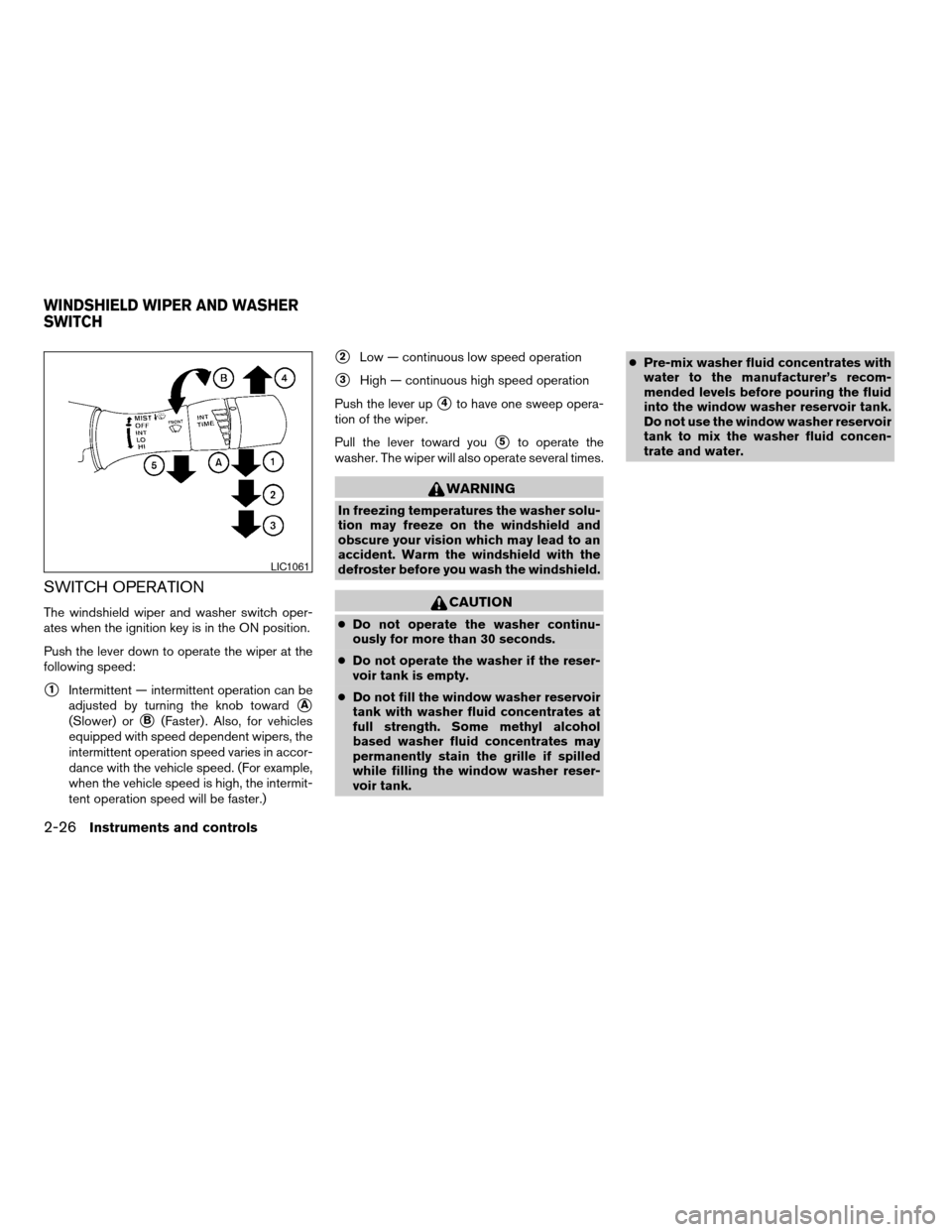
The windshield wiper and washer switch oper-
ates when the ignition key is in the ON position.
Push the lever down to operate the wiper at the
following speed:
s1Intermittent — intermittent operation can be
adjusted by turning the knob toward
sA
(Slower) orsB(Faster) . Also, for vehicles
equipped with speed dependent wipers, the
intermittent operation speed varies in accor-
dance with the vehicle speed. (For example,
when the vehicle speed is high, the intermit-
tent operation speed will be faster.)
s2Low — continuous low speed operation
s3High — continuous high speed operation
Push the lever up
s4to have one sweep opera-
tion of the wiper.
Pull the lever toward you
s5to operate the
washer. The wiper will also operate several times.
WARNING
In freezing temperatures the washer solu-
tion may freeze on the windshield and
obscure your vision which may lead to an
accident. Warm the windshield with the
defroster before you wash the windshield.
CAUTION
cDo not operate the washer continu-
ously for more than 30 seconds.
cDo not operate the washer if the reser-
voir tank is empty.
cDo not fill the window washer reservoir
tank with washer fluid concentrates at
full strength. Some methyl alcohol
based washer fluid concentrates may
permanently stain the grille if spilled
while filling the window washer reser-
voir tank.cPre-mix washer fluid concentrates with
water to the manufacturer’s recom-
mended levels before pouring the fluid
into the window washer reservoir tank.
Do not use the window washer reservoir
tank to mix the washer fluid concen-
trate and water.
LIC1061
WINDSHIELD WIPER AND WASHER
SWITCH
2-26Instruments and controls
ZREVIEW COPYÐ2008 Altima(alt)
Owners ManualÐUSA_English(nna)
03/12/07Ðdebbie
X
Page 99 of 352
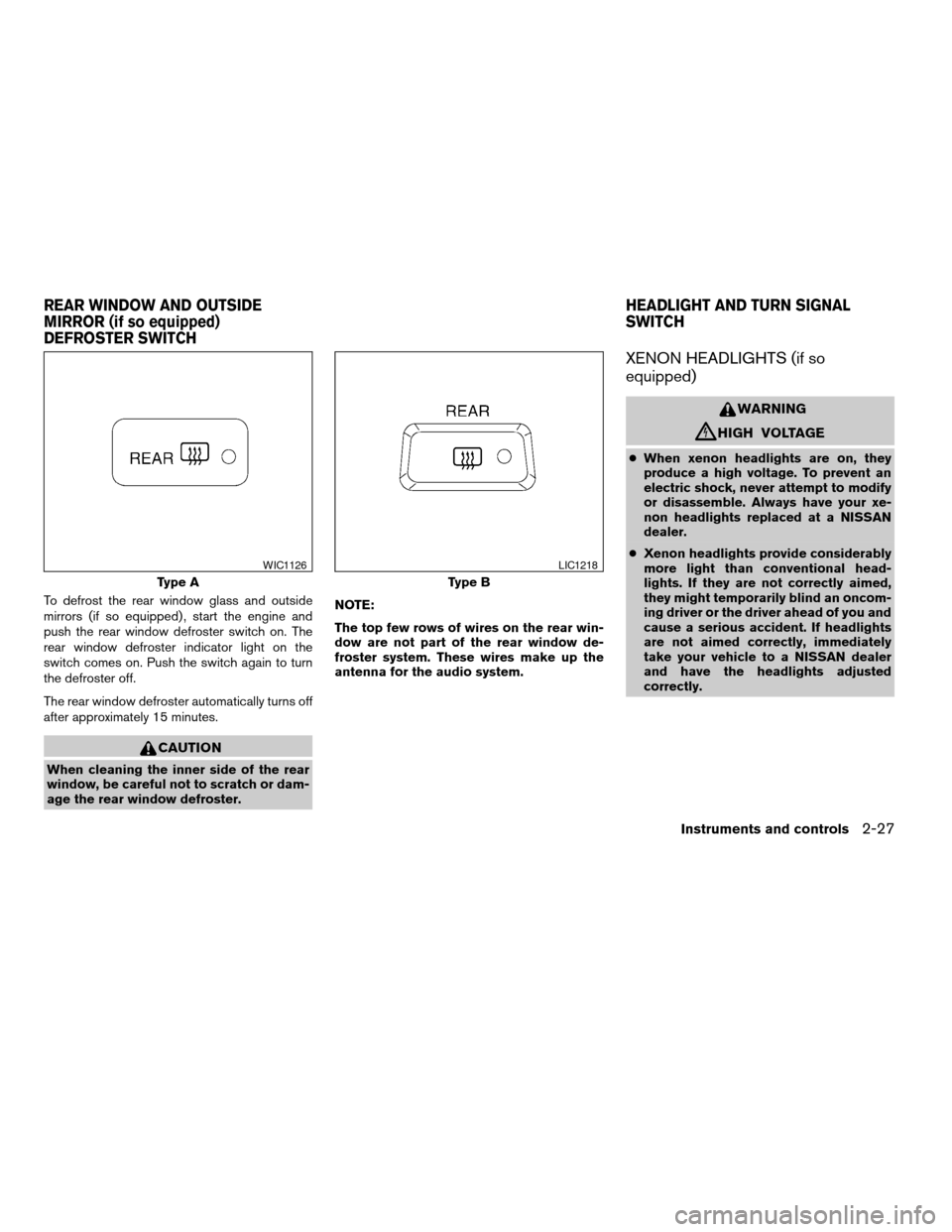
To defrost the rear window glass and outside
mirrors (if so equipped) , start the engine and
push the rear window defroster switch on. The
rear window defroster indicator light on the
switch comes on. Push the switch again to turn
the defroster off.
The rear window defroster automatically turns off
after approximately 15 minutes.
CAUTION
When cleaning the inner side of the rear
window, be careful not to scratch or dam-
age the rear window defroster.NOTE:
The top few rows of wires on the rear win-
dow are not part of the rear window de-
froster system. These wires make up the
antenna for the audio system.
XENON HEADLIGHTS (if so
equipped)
WARNING
cHIGH VOLTAGE
cWhen xenon headlights are on, they
produce a high voltage. To prevent an
electric shock, never attempt to modify
or disassemble. Always have your xe-
non headlights replaced at a NISSAN
dealer.
cXenon headlights provide considerably
more light than conventional head-
lights. If they are not correctly aimed,
they might temporarily blind an oncom-
ing driver or the driver ahead of you and
cause a serious accident. If headlights
are not aimed correctly, immediately
take your vehicle to a NISSAN dealer
and have the headlights adjusted
correctly.
Type A
WIC1126
Type B
LIC1218
REAR WINDOW AND OUTSIDE
MIRROR (if so equipped)
DEFROSTER SWITCHHEADLIGHT AND TURN SIGNAL
SWITCH
Instruments and controls2-27
ZREVIEW COPYÐ2008 Altima(alt)
Owners ManualÐUSA_English(nna)
03/12/07Ðdebbie
X
Page 103 of 352
WARNING
When the daytime running light system is
active, tail lights on your vehicle are not
on. It is necessary at dusk to turn on your
headlights. Failure to do so could cause
an accident injuring yourself and others.
INSTRUMENT BRIGHTNESS
CONTROL
The instrument cluster illuminates when the igni-
tion switch is in ON position.
The instrument brightness control operates when
the headlight control switch is in the
AUTO,
orposition.
Turn the control to adjust the brightness of instru-
ment panel lights when driving at night.
The instrument brightness control will not adjust
the brightness when the headlights or parking
lights are off.
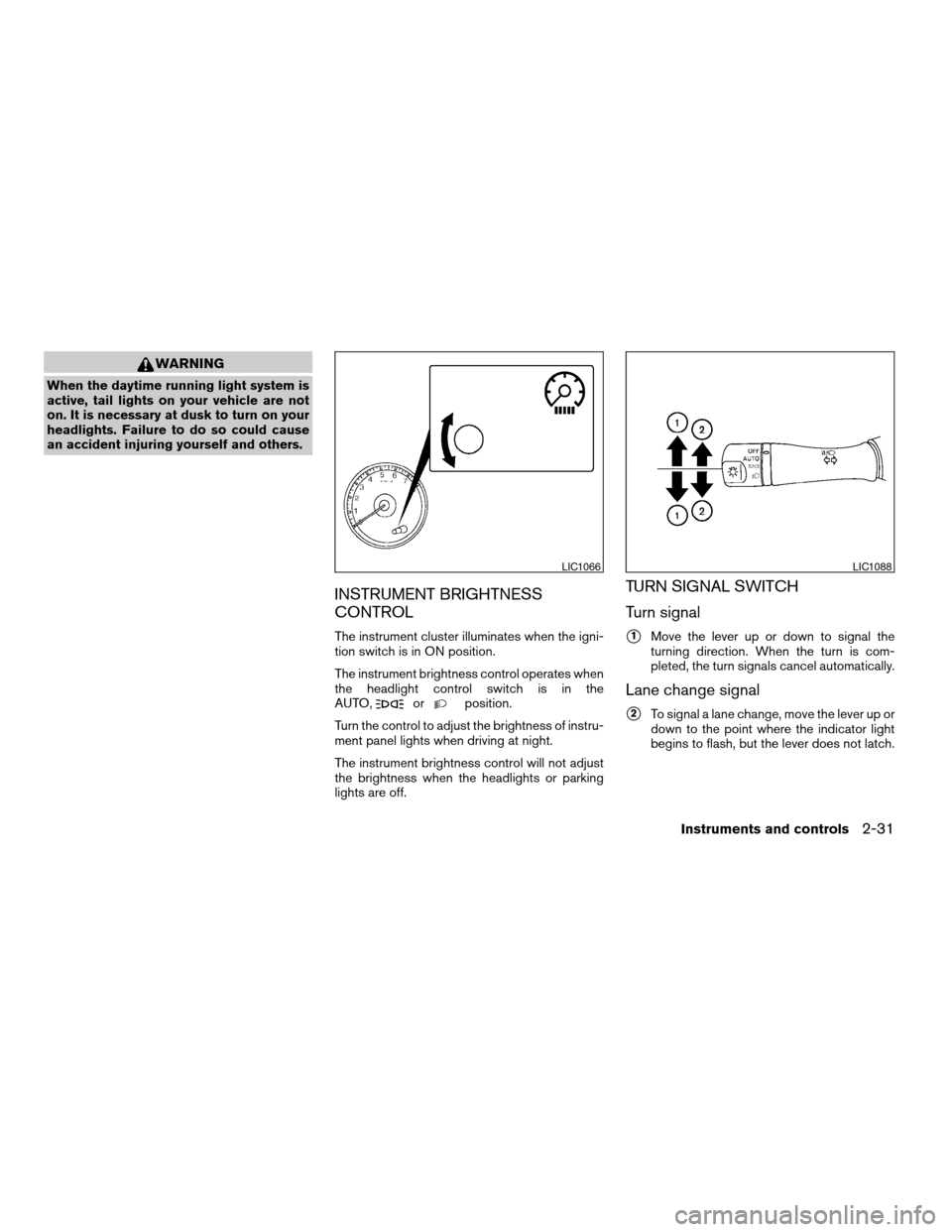
TURN SIGNAL SWITCH
Turn signal
s1Move the lever up or down to signal the
turning direction. When the turn is com-
pleted, the turn signals cancel automatically.
Lane change signal
s2To signal a lane change, move the lever up or
down to the point where the indicator light
begins to flash, but the lever does not latch.
LIC1066LIC1088
Instruments and controls2-31
ZREVIEW COPYÐ2008 Altima(alt)
Owners ManualÐUSA_English(nna)
03/12/07Ðdebbie
X
Page 104 of 352
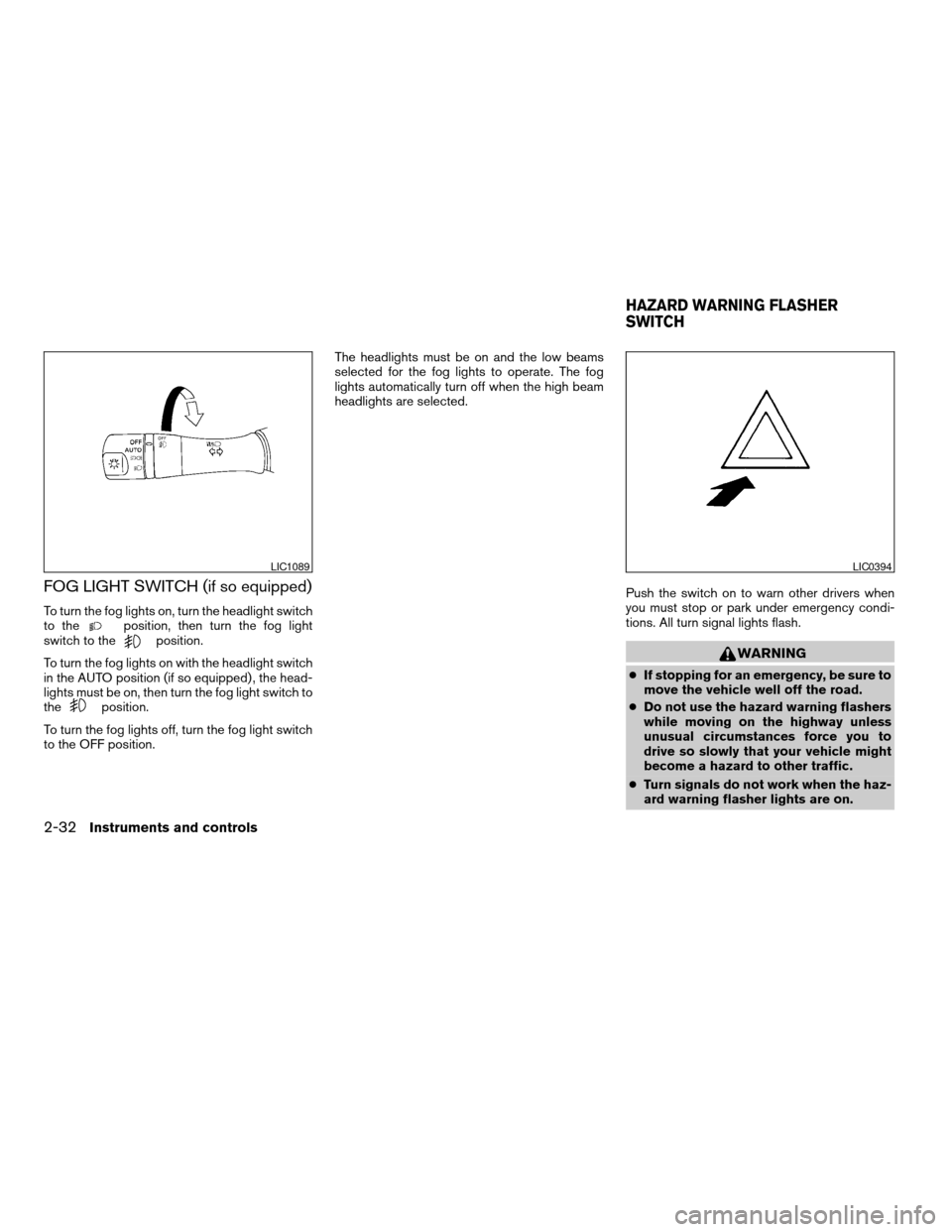
FOG LIGHT SWITCH (if so equipped)
To turn the fog lights on, turn the headlight switch
to theposition, then turn the fog light
switch to theposition.
To turn the fog lights on with the headlight switch
in the AUTO position (if so equipped) , the head-
lights must be on, then turn the fog light switch to
the
position.
To turn the fog lights off, turn the fog light switch
to the OFF position.The headlights must be on and the low beams
selected for the fog lights to operate. The fog
lights automatically turn off when the high beam
headlights are selected.
Push the switch on to warn other drivers when
you must stop or park under emergency condi-
tions. All turn signal lights flash.
WARNING
cIf stopping for an emergency, be sure to
move the vehicle well off the road.
cDo not use the hazard warning flashers
while moving on the highway unless
unusual circumstances force you to
drive so slowly that your vehicle might
become a hazard to other traffic.
cTurn signals do not work when the haz-
ard warning flasher lights are on.
LIC1089LIC0394
HAZARD WARNING FLASHER
SWITCH
2-32Instruments and controls
ZREVIEW COPYÐ2008 Altima(alt)
Owners ManualÐUSA_English(nna)
03/13/07Ðdebbie
X
Page 105 of 352
The flashers will operate with the ignition switch
in any position.
Some state laws may prohibit the use of
the hazard warning flasher switch while
driving.
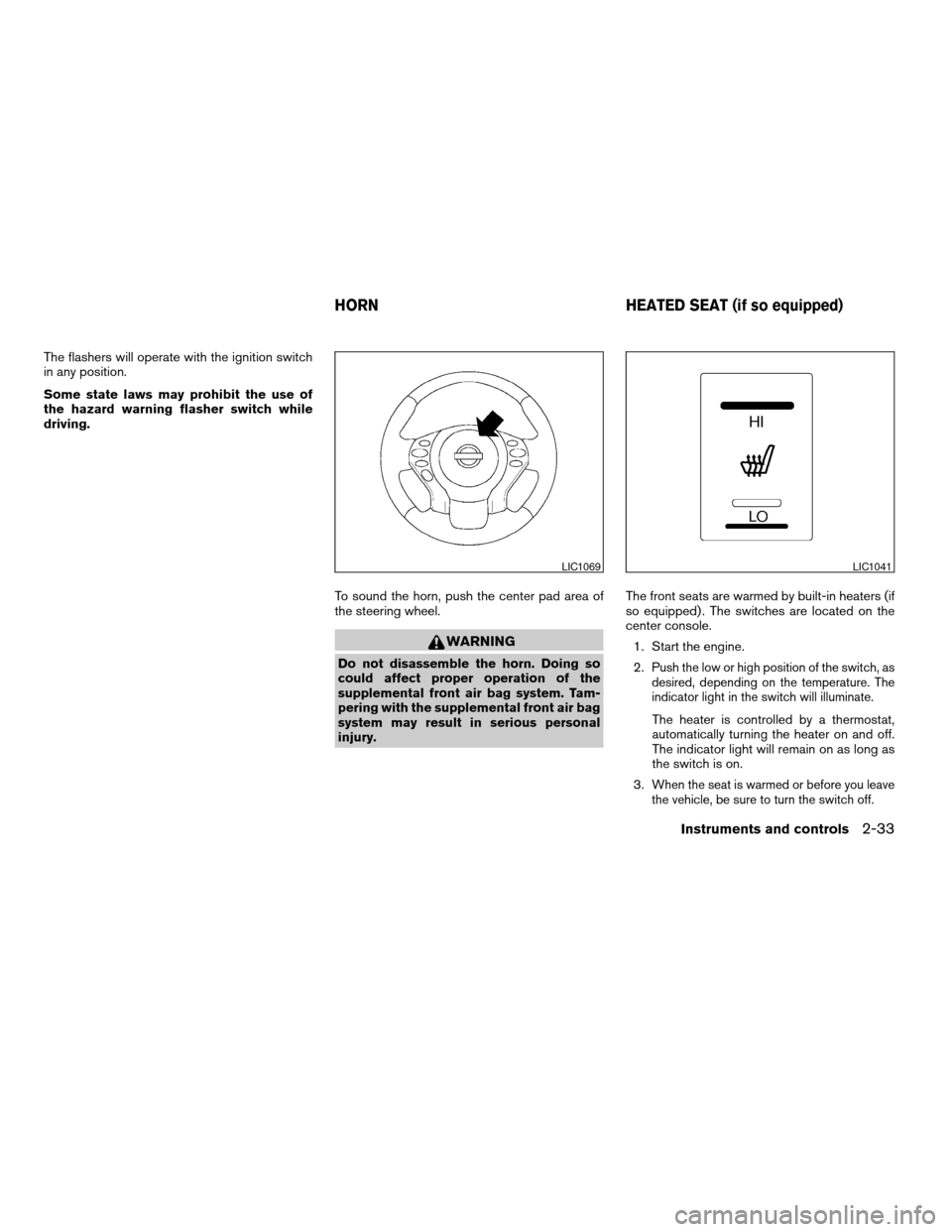
To sound the horn, push the center pad area of
the steering wheel.
WARNING
Do not disassemble the horn. Doing so
could affect proper operation of the
supplemental front air bag system. Tam-
pering with the supplemental front air bag
system may result in serious personal
injury.The front seats are warmed by built-in heaters (if
so equipped) . The switches are located on the
center console.
1. Start the engine.
2.Push the low or high position of the switch, as
desired, depending on the temperature. The
indicator light in the switch will illuminate.
The heater is controlled by a thermostat,
automatically turning the heater on and off.
The indicator light will remain on as long as
the switch is on.
3.
When the seat is warmed or before you leave
the vehicle, be sure to turn the switch off.
LIC1069LIC1041
HORN HEATED SEAT (if so equipped)
Instruments and controls2-33
ZREVIEW COPYÐ2008 Altima(alt)
Owners ManualÐUSA_English(nna)
03/13/07Ðdebbie
X