2008 NISSAN ALTIMA lock
[x] Cancel search: lockPage 277 of 352
WARNING
cProlonged and repeated contact with
used engine oil may cause skin cancer.
cTry to avoid direct skin contact with
used oil. If skin contact is made, wash
thoroughly with soap or hand cleaner
as soon as possible.
cKeep used engine oil out of reach of
children.
CAUTION
Be careful not to burn yourself. The engine
oil may be hot.
cWaste oil must be disposed of prop-
erly.
cCheck your local regulations.
6. Clean and reinstall the drain plug and a new
washer. Securely tighten the drain plug with
a wrench. Do not use excessive force.
Drain plug tightening torque:
22 - 29 ft-lb (29 - 39 N·m)
7. Refill engine with recommended oil through
the oil filler opening, then install the oil filler
cap securely.See “Capacities and recommended
fuel/lubricants” in the “Technical and con-
sumer information” section of this manual for
drain and refill capacity.
The drain and refill capacity depends on the
oil temperature and drain time. Use these
specifications for reference only. Always use
the dipstick to determine when the proper
amount of oil is in the engine.
8. Start the engine. Check for leakage around
the drain plug and oil filter. Correct as re-
quired.
9. Turn the engine off and wait more than 10
minutes. Check the oil level with the dipstick.
Add engine oil if necessary.
CHANGING ENGINE OIL FILTER
1. Park the vehicle on a level surface and apply
the parking brake.
2. Turn the engine off.
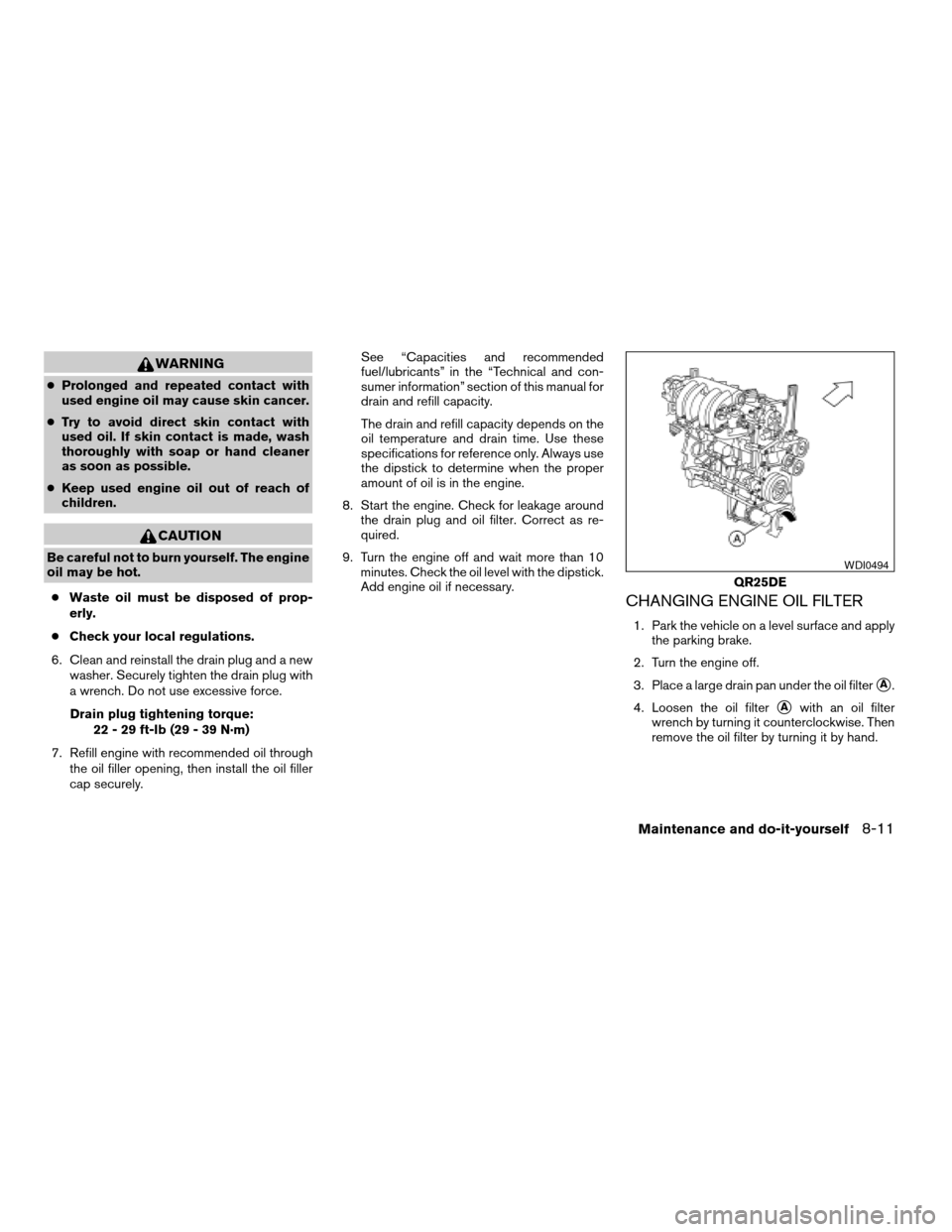
3. Place a large drain pan under the oil filter
sA.
4. Loosen the oil filter
sAwith an oil filter
wrench by turning it counterclockwise. Then
remove the oil filter by turning it by hand.
QR25DE
WDI0494
Maintenance and do-it-yourself8-11
ZREVIEW COPYÐ2008 Altima(alt)
Owners ManualÐUSA_English(nna)
03/13/07Ðdebbie
X
Page 282 of 352
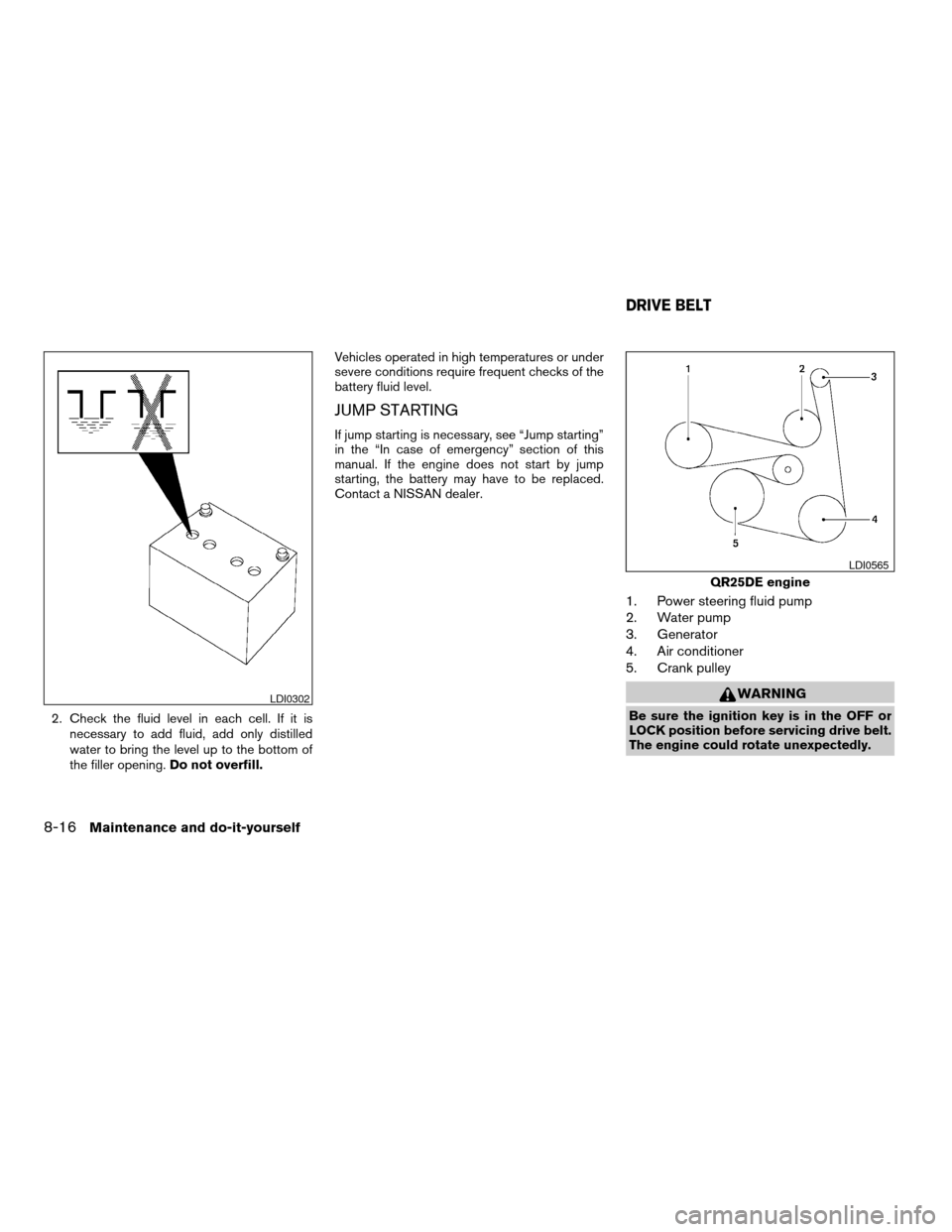
2. Check the fluid level in each cell. If it is
necessary to add fluid, add only distilled
water to bring the level up to the bottom of
the filler opening.Do not overfill.Vehicles operated in high temperatures or under
severe conditions require frequent checks of the
battery fluid level.
JUMP STARTING
If jump starting is necessary, see “Jump starting”
in the “In case of emergency” section of this
manual. If the engine does not start by jump
starting, the battery may have to be replaced.
Contact a NISSAN dealer.
1. Power steering fluid pump
2. Water pump
3. Generator
4. Air conditioner
5. Crank pulley
WARNING
Be sure the ignition key is in the OFF or
LOCK position before servicing drive belt.
The engine could rotate unexpectedly.
LDI0302
QR25DE engine
LDI0565
DRIVE BELT
8-16Maintenance and do-it-yourself
ZREVIEW COPYÐ2008 Altima(alt)
Owners ManualÐUSA_English(nna)
03/13/07Ðdebbie
X
Page 288 of 352
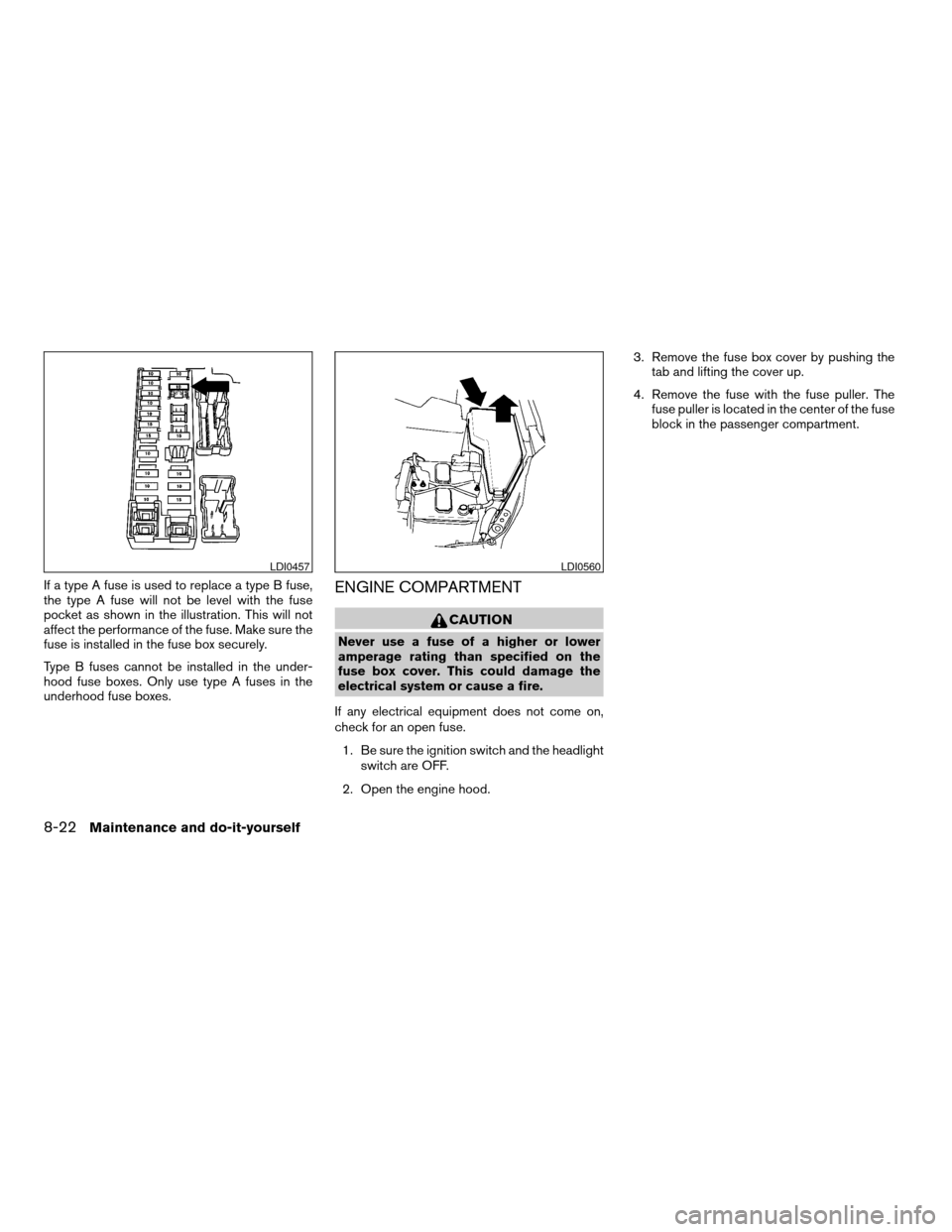
If a type A fuse is used to replace a type B fuse,
the type A fuse will not be level with the fuse
pocket as shown in the illustration. This will not
affect the performance of the fuse. Make sure the
fuse is installed in the fuse box securely.
Type B fuses cannot be installed in the under-
hood fuse boxes. Only use type A fuses in the
underhood fuse boxes.ENGINE COMPARTMENT
CAUTION
Never use a fuse of a higher or lower
amperage rating than specified on the
fuse box cover. This could damage the
electrical system or cause a fire.
If any electrical equipment does not come on,
check for an open fuse.
1. Be sure the ignition switch and the headlight
switch are OFF.
2. Open the engine hood.3. Remove the fuse box cover by pushing the
tab and lifting the cover up.
4. Remove the fuse with the fuse puller. The
fuse puller is located in the center of the fuse
block in the passenger compartment.
LDI0457LDI0560
8-22Maintenance and do-it-yourself
ZREVIEW COPYÐ2008 Altima(alt)
Owners ManualÐUSA_English(nna)
03/13/07Ðdebbie
X
Page 297 of 352

Rear combination light
To access the bulbs in the rear combination light:
s1Remove the fasteners. Carefully push back
the carpet.
s2Remove the 2 nuts and pull out the rear
combination light.
s3Rotate the bulb(s) counterclockwise and
pull out to remove:
sATurn signal light
sBSidemarker light
sCTail/stop light
sDBackup lightIf you have a flat tire, see the “In case of
emergency” section of this manual.
TIRE PRESSURE
Tire Pressure Monitoring System
(TPMS)
This vehicle is equipped with the Tire
Pressure Monitoring System (TPMS) . It
monitors tire pressure of all tires except
the spare. When the low tire pressure
warning light is lit, one or more of your
tires is significantly under-inflated.
The TPMS will activate only when the
vehicle is driven at speeds above 16 MPH
(25 km/h) . Also, this system may not de-
tect a sudden drop in tire pressure (for
example a flat tire while driving) .
For more details, refer to “Low tire pres-
sure warning light” in the “Instruments and
controls” section, “Tire Pressure Monitor-
ing System (TPMS)” in the “Starting and
driving” section, and “Flat tire” in the “In
case of emergency” section.
Trunk light
WDI0343
WHEELS AND TIRES
Maintenance and do-it-yourself8-31
ZREVIEW COPYÐ2008 Altima(alt)
Owners ManualÐUSA_English(nna)
03/13/07Ðdebbie
X
Page 317 of 352

ENGINE
ModelQR25DE VQ35DE
TypeGasoline, 4-cycle, DOHC Gasoline, 4-cycle, DOHC
Cylinder arrangement 4-cylinder in-line 6-cylinder, V-block, Slanted at 60°
Bore x Stroke in (mm) 3.5 x 3.9 (89.0 x 100.0) 3.760 x 3.205 (95.5 x 81.4)
Displacement cu in (cm
3) 151.82 (2,488) 213.45 (3,498)
Firing order1–3–4–2 1–2–3–4–5–6
Idle speed
M/T
CVT (in “N” position) No adjustment is necessary.
Ignition timing (degree B.T.D.C. at idle
speed)
CO % at idle
Spark plugDILKAR6A-11 FXE20HR-11
Spark plug gap (Nominal) in (mm) 0.043 (1.1) 0.043 (1.1)
Camshaft operation Timing chain Timing chain
The spark ignition system of this vehicle meets all requirements of the Canadian Interference-Causing Equipment Regulations.
SPECIFICATIONS
Technical and consumer information9-7
ZREVIEW COPYÐ2008 Altima(alt)
Owners ManualÐUSA_English(nna)
03/13/07Ðdebbie
X
Page 329 of 352
TOWING LOAD/SPECIFICATION
TOWING LOAD / SPECIFICATION
UNIT: lb (kg)
MAXIMUM TOWING
LOAD1,000 (454)
MAXIMUM TONGUE
LOAD100 (45)
TOWING SAFETY
Trailer hitch
Choose a proper hitch for your vehicle and trailer.
A genuine NISSAN trailer hitch is available from
your NISSAN dealer (Canada only) . Make sure
the trailer hitch is securely attached to the ve-
hicle, to help avoid personal injury or property
damage due to sway caused by crosswinds,
rough road surfaces or passing trucks.
WARNING
Trailer hitch components have specific
weight ratings. Your vehicle may be capable
of towing a trailer heavier than the weight
rating of the hitch components. Never ex-
ceed the weight rating of the hitch compo-
nents. Doing so can cause serious personal
injury or property damage.
Hitch ball
Choose a hitch ball of the proper size and weight
rating for your trailer:
cThe required hitch ball size is stamped on
most trailer couplers. Most hitch balls also
have the size printed on the top of the ball.
cChoose the proper class hitch ball based on
the trailer weight.
cThe diameter of the threaded shank of the
hitch ball must be matched to the ball mount
hole diameter. The hitch ball shank should
be no more than 1/16” smaller than the hole
in the ball mount.
cThe threaded shank of the hitch ball must be
long enough to be properly secured to the
ball mount. There should be at least 2
threads showing beyond the lock washer
and nut.
Class I hitch
Class I trailer hitch equipment (receiver, ball
mount and hitch ball) can be used to tow trailers
of a maximum weight of 2,000 lb (909 kg) .You may add Class I trailer hitch equipment that
has a 2,000 lb (909 kg) maximum weight rating to
the vehicle, but your vehicle is only capable of
towing the maximum trailer weights shown in the
Towing Load/Specification Chart earlier in this
section.
CAUTION
cDo not use axle-mounted hitches.
cThe hitch should not be attached to or
affect the operation of the impact-
absorbing bumper.
cDo not modify the vehicle exhaust sys-
tem, brake system, etc. to install a
trailer hitch.
cTo reduce the possibility of additional
damage if your vehicle is struck from
the rear, where practical, remove the
receiver when not in use.
cAfter the hitch is removed, seal the bolt
holes to prevent exhaust fumes, water
or dust from entering the passenger
compartment.
cRegularly check that all trailer hitch
mounting bolts are securely mounted.
Technical and consumer information9-19
ZREVIEW COPYÐ2008 Altima(alt)
Owners ManualÐUSA_English(nna)
03/13/07Ðarosenma
X
Page 331 of 352
cBe certain your rearview mirrors conform to
all federal, state or local regulations. If not,
install any mirrors required for towing before
driving the vehicle.
cDetermine the overall height of the vehicle
and trailer so the required clearance is
known.
Trailer towing tips
In order to gain skill and an understanding of the
vehicle’s behavior, you should practice turning,
stopping and backing up in an area which is free
from traffic. Steering stability and braking perfor-
mance will be somewhat different than under
normal driving conditions.
cAlways secure items in the trailer to prevent
load shift while driving.
cLock the trailer hitch coupler with a pin or
lock to prevent the coupler from inadvert-
ently becoming unlatched.
cAvoid abrupt starts, acceleration or stops.
cAvoid sharp turns or lane changes.
cAlways drive your vehicle at a moderate
speed.
cWhen backing up, hold the bottom of the
steering wheel with one hand. Move your
hand in the direction in which you want thetrailer to go. Make small corrections and
back up slowly. If possible, have someone
guide you when you are backing up.
Always block the wheels on both vehicle and
trailer when parking. Parking on a slope is not
recommended; however, if you must do so:
CAUTION
If you move the shift selector lever to the P
(Park) position before blocking the
wheels and applying the parking brake,
transmission damage could occur.
1. Apply and hold the brake pedal.
2. Have someone place blocks on the downhill
side of the vehicle and trailer wheels.
3. After the wheel blocks are in place, slowly
release the brake pedal until the blocks ab-
sorb the vehicle load.
4. Apply the parking brake.
5. Shift the transmission into P (Park) .
6. Turn off the engine.
To drive away:
1. Start the vehicle.
2. Apply and hold the brake pedal.
3. Shift the transmission into gear.4. Release the parking brake.
5. Drive slowly until the vehicle and trailer are
clear from the blocks.
6. Apply and hold the brake pedal.
7. Have someone retrieve and store the blocks.
cWhen going down a hill, shift into a lower
gear and use the engine braking effect.
When going up a long grade, downshift the
transmission to a lower gear and reduce
speed to reduce chances of engine over-
loading and/or overheating. However, for
long steep grades, do not stay in 1st gear
when driving above 35 MPH (56 km/h) or
2nd gear when driving above 58 MPH (93
km/h) .
cIf the engine coolant rises to an extremely
high temperature when the air conditioner
system is on, turn off the air conditioner.
Coolant heat can be additionally vented by
opening the windows, switching the fan
control to high and setting the temperature
control to the HOT position.
cTrailer towing requires more fuel than normal
circumstances.
cAvoid towing a trailer for your vehicle’s first
500 miles (805 km) .
Technical and consumer information9-21
ZREVIEW COPYÐ2008 Altima(alt)
Owners ManualÐUSA_English(nna)
03/13/07Ðdebbie
X
Page 339 of 352

10 Index
A
Active Head Restraint.............1-11
Air bag (See supplemental restraint system). .1-39
Air bag system
Front (See supplemental front impact air
bag system).................1-46
Air bag warning light...........1-54, 2-13
Air cleaner housing filter............8-18
Air conditioner
Air conditioner operation..........4-13
Air conditioner service...........4-20
Air conditioner specification label.....9-11
Air conditioner system refrigerant and oil
recommendations..............9-6
Heater and air conditioner
controls................4-10, 4-18
Servicing air conditioner..........4-20
Air flow charts..................4-14
Alarm system
(See vehicle security system).........2-24
Anchor point locations.............1-23
Antenna.....................4-45
Anti-lock brake warning light..........2-10
Anti-lock Braking System (ABS)........5-22
Audible reminders................2-16
Audio system..................4-20
Compact Disc (CD) changer. . . .4-34, 4-40
Compact disc (CD) player.........4-29
FM-AM radio with compact disc (CD)
player....................4-27FM/AM/SAT radio with compact disc
(CD) changer.............4-31, 4-38
Radio....................4-20
Autolight switch.................2-29
Automatic
Automatic power window switch.....2-42
Transmission selector lever lock
release....................5-13
Automatic anti-glare inside mirror.......3-22
AUX jack..............4-30, 4-36, 4-42
B
Battery......................8-15
Charge warning light............2-11
Before starting the engine............5-8
Belt (See drive belt)..............8-16
Block heater
Engine....................5-27
BluetoothThands-free phone
system..................4-46, 4-60
Booster seats..................1-34
Brake
Anti-lock Braking System (ABS)......5-22
Brake fluid..................8-13
Brake light (See stop light).........8-27
Brake system................5-21
Brake warning light.............2-11
Brake wear indicators........2-16, 8-21
Parking brake operation..........5-16
Self-adjusting brakes............8-21Brakes......................8-21
Break-in schedule................5-18
Brightness control
Instrument panel..............2-31
Brightness/contrast button...........4-7
Bulb check/instrument panel..........2-10
Bulb replacement................8-27
C
Capacities and recommended
fuel/lubricants...................9-2
Car phone or CB radio.............4-45
Cargo (See vehicle loading information) . . .9-12
CD care and cleaning.............4-43
CD changer (See audio system). . . .4-34, 4-40
CD player (See audio system).........4-29
Child restraint with top tether strap......1-23
Child restraints.......1-14, 1-15, 1-19, 1-21
Precautions on child
restraints............1-19, 1-28, 1-34
Top tether strap anchor point locations . .1-23
Chimes, audible reminders...........2-16
Cleaning exterior and interior..........7-2
Clock.............4-5, 4-28, 4-32, 4-39
(models with navigation system)......4-5
(models without navigation
system)................4-28, 4-32
Clock set..............4-5, 4-28, 4-32
Clutch
Clutch fluid.................8-14
ZREVIEW COPYÐ2008 Altima(alt)
Owners ManualÐUSA_English(nna)
04/04/07Ðdebbie
X