2008 NISSAN ALTIMA HYBRID Meter and gauge
[x] Cancel search: Meter and gaugePage 9 of 351

POWER METER
The power meter indicates the total amount of
power in the hybrid system.
For additional information, see “Meters and
gauges” in the “Instruments and controls” section
of this manual.
HIGH VOLTAGE BATTERY STATUS
METER
The gauge indicates the amount of power in the
high voltage battery.
For additional information, see “Meters and
gauges” in the “Instruments and controls” section
of this manual.
ENERGY FLOW (equipped with
navigation)
When you use this system, make sure the Hybrid
System is in the ready mode.If you use the system with the Hybrid Sys-
tem off (ignition ACC) for a long time, it will
use up all the 12–volt battery power, and
the engine will not start.
Energy flow for various operating modes can be
displayed on the navigation system monitor. The
screen must be set to the Energy Flow mode or
the Energy / Fuel History mode.
To access the Energy Flow screen, you must
agree to the start-up screen. For additional infor-
mation, see “Setting up the start-up screen” in
the “Monitor, climate, audio, phone and voice
recognition systems” section of this manual.
LIC1109WIC1123
HEV-4HEV Overview
ZREVIEW COPYÐ2008 Altima Hybrid Electric
(ahv)
Owners ManualÐUSA_English(nna)
05/31/07Ðdebbie
X
Page 23 of 351

1. Vents (P. 4-10)
2. Headlight/fog light (if so equipped)/turn
signal switch (P. 2-29)3. Steering wheel switch for audio control
(if so equipped)/BluetoothTHands-free
Phone System (if so equipped)
(P. 4-36, 4-39)
4. Meters and gauges (P. 2-3)5. Driver supplemental air bag/horn
(P. 1-34, 2-34)
6.
Cruise control main/set switch (P. 5-14)7. Windshield wiper/washer switch
(P. 2-28)
8. Push-button ignition switch (P. 5-6)
9.
Hazard warning flasher switch (P. 2-33)10. Front passenger air bag status light
(P. 2-15)
11. Front passenger supplemental air bag
(P. 1-34)
12. Glove box (P. 2-38)
13. Navigation system* (if so equipped)
(P. 4-2)
14. Heater and air conditioner (P. 4-11)
15. Shift selector lever (P. 5-10)
16. Audio system controls (P. 4-13)
17. Tilt/telescopic steering wheel controls
(P. 3-21)
18. Vehicle information display controls
(P. 2-18)
19. Hood release (P. 3-17)
20. Intelligent Key port (P. 3-6)
Trunk opener (P. 3-17)
*: Refer to the separate Navigation System Own-
er’s Manual.
See the page number indicated in paren-
theses for operating details.
WIC1258
INSTRUMENT PANEL
0-6Illustrated table of contents
ZREVIEW COPYÐ2008 Altima Hybrid Electric
(ahv)
Owners ManualÐUSA_English(nna)
05/31/07Ðdebbie
X
Page 71 of 351
restraints and booster seats be properly installed
in a rear seat. If this is not possible, the occupant
classification sensor is designed to operate as
described above to turn the front passenger air
bag OFF for specified child restraints as required
by the regulations. Failing to properly secure
child restraints and to use the Automatic Locking
Retractor mode (child restraint mode) may allow
the restraint to tip or move in an accident or
sudden stop. This can also result in the passen-
ger air bag inflating in a crash instead of being
OFF. See “Child restraints” earlier in this section
for proper use and installation.
If the front passenger seat is not occupied, the
passenger air bag is designed not to inflate in a
crash. However, heavy objects placed on the
seat could result in air bag inflation, because of
the object being detected by the occupant clas-
sification sensor. Other conditions could also
result in air bag inflation, such as if a child is
standing on the seat, or if two children are on the
seat, contrary to the instructions in this manual.
Always be sure that you and all vehicle occupants
are seated and restrained properly.
Using the passenger air bag status light, you can
monitor when the front passenger air bag is au-
tomatically turned OFF with the seat occupied.
The light will not illuminate when the front pas-
senger seat is unoccupied.If an adult occupant is in the seat but the passen-
ger air bag status light is illuminated (indicating
that the air bag is OFF) , it could be that the
person is a small adult, or is not sitting on the seat
properly.
If a child restraint must be used in the front seat,
the passenger air bag status light may or may not
be illuminated, depending on the size of the child
and the type of child restraint being used. If the air
bag status light is not illuminated (indicating that
the air bag might inflate in a crash) , it could be
that the child restraint or seat belt is not being
used properly. Make sure that the child restraint is
installed properly, the seat belt is used properly
and the occupant is positioned properly. If the air
bag status light is not illuminated, reposition the
occupant or child restraint in a rear seat.
If the passenger air bag status light will not illu-
minate even though you believe that the child
restraint, the seat belts and the occupant are
properly positioned, the system may be sensing
an unoccupied seat (in which case the air bag is
OFF) . Your NISSAN dealer can check that the
system is OFF by using a special tool. However,
until you have confirmed with your dealer that
your air bag is working properly, reposition the
occupant or child restraint in a rear seat.
The air bag system and passenger air bag status
light will take a few seconds to register a changein the passenger seat status. However, if the seat
becomes unoccupied, the air bag status light will
remain off.
If a malfunction occurs in the front passenger air
bag system, the supplemental air bag warning
light
, located in the meter and gauges area
in the center of the instrument panel, will blink.
Have the system checked by a NISSAN dealer.
Other supplemental front air bag precau-
tions
WARNING
cDo not place any objects on the steer-
ing wheel pad or on the instrument
panel. Also, do not place any objects
between any occupant and the steering
wheel or instrument panel. Such ob-
jects may become dangerous projec-
tiles and cause injury if the supplemen-
tal front air bag inflates.
1-44Safety—Seats, seat belts and supplemental restraint system
ZREVIEW COPYÐ2008 Altima Hybrid Electric
(ahv)
Owners ManualÐUSA_English(nna)
05/31/07Ðdebbie
X
Page 79 of 351

2 Instruments and controls
Instrument panel...................................2-2
Meters and gauges................................2-3
Speedometer and odometer.....................2-3
Power meter...................................2-4
High voltage battery status meter.................2-5
Fuel gauge....................................2-5
Compass display (if so equipped)...................2-6
Compass display...............................2-6
Warning/indicator lights and audible reminders.......2-9
Checking bulbs................................2-9
Warning lights................................2-10
Indicator lights................................2-15
Audible reminders.............................2-17
Vehicle information display.........................2-18
How to use the Vehicle Information Display.......2-18
Security systems.................................2-26
Vehicle security system.........................2-26
NISSAN vehicle immobilizer system.............2-27
Windshield wiper and washer switch...............2-28
Switch operation..............................2-28
Rear window and outside mirror (if so equipped)
defroster switch..................................2-29
Headlight and turn signal switch....................2-29Headlight control switch........................2-29
Daytime running light system (Canada only)......2-32
Instrument brightness control...................2-32
Turn signal switch.............................2-33
Fog light switch (if so equipped)................2-33
Hazard warning flasher switch.....................2-33
Horn............................................2-34
Heated seats (if so equipped)......................2-34
Power outlet.....................................2-35
Storage.........................................2-36
Map pockets..................................2-36
Seatback pockets.............................2-37
Sunglasses holder.............................2-37
Cup holders..................................2-38
Glove box....................................2-38
Console box..................................2-39
Covered storage box...........................2-40
Grocery hooks (if so equipped).................2-40
Cargo net (if so equipped)......................2-41
Windows........................................2-41
Power windows...............................2-41
Sunroof (if so equipped)...........................2-44
Interior light......................................2-45
ZREVIEW COPYÐ2008 Altima Hybrid Electric
(ahv)
Owners ManualÐUSA_English(nna)
05/31/07Ðdebbie
X
Page 81 of 351

1. Vents (P. 4-10)
2. Headlight/fog light (if so equipped)/turn
signal switch (P. 2-29)3. Steering wheel switch for audio control
(if so equipped)/BluetoothTHands-free
Phone System (if so equipped)
(P. 4-36, 4-39)
4. Meters and gauges (P. 2-3)5. Driver supplemental air bag/horn
(P. 1-34, 2-34)
6.
Cruise control main/set switch (P. 5-14)7. Windshield wiper/washer switch
(P. 2-28)
8. Push-button ignition switch (P. 5-6)
9. Hazard warning flasher switch (P. 2-33)
10. Front passenger air bag status light
(P. 2-15)
11. Front passenger supplemental air bag
(P. 1-34)
12. Glove box (P. 2-38)
13. Navigation system* (if so equipped)
(P. 4-2)
14. Heater and air conditioner (P. 4-11)
15. Shift selector lever (P. 5-10)
16. Audio system controls (P. 4-13)
17. Tilt/telescopic steering wheel controls
(P. 3-21)
18. Vehicle information display controls
(P. 2-18)
19. Hood release (P. 3-17)
20. Intelligent Key port (P. 3-6)
Trunk opener (P. 3-17)
*: Refer to the separate Navigation System Own-
er’s Manual.
See the page number indicated in paren-
theses for operating details.
WIC1258
INSTRUMENT PANEL
2-2Instruments and controls
ZREVIEW COPYÐ2008 Altima Hybrid Electric
(ahv)
Owners ManualÐUSA_English(nna)
05/31/07Ðdebbie
X
Page 82 of 351

1. Power meter
2. Speedometer
3. Fuel gauge
4. High voltage battery status meter
5. Odometer/twin trip odometer/trip com-
puter6. Vehicle Information Display1. Speedometer
2. Odometer
3. Change button
SPEEDOMETER AND ODOMETER
Speedometer
The speedometer indicates vehicle speed in
miles per hour (MPH) and kilometers per hour
(km/h) .LIC1106
WIC1260
METERS AND GAUGES
Instruments and controls2-3
ZREVIEW COPYÐ2008 Altima Hybrid Electric
(ahv)
Owners ManualÐUSA_English(nna)
05/31/07Ðdebbie
X
Page 84 of 351
HIGH VOLTAGE BATTERY STATUS
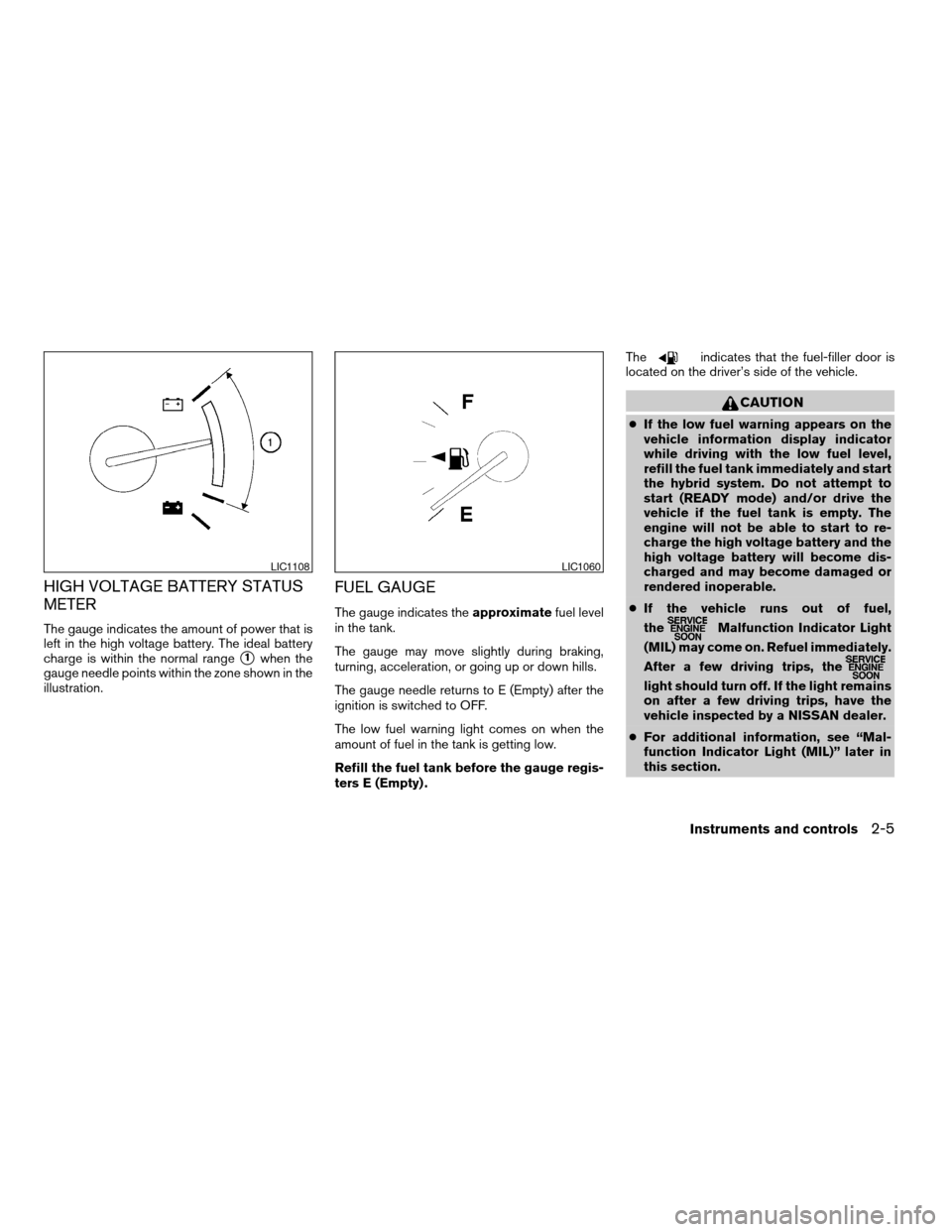
METER
The gauge indicates the amount of power that is
left in the high voltage battery. The ideal battery
charge is within the normal range
s1when the
gauge needle points within the zone shown in the
illustration.
FUEL GAUGE
The gauge indicates theapproximatefuel level
in the tank.
The gauge may move slightly during braking,
turning, acceleration, or going up or down hills.
The gauge needle returns to E (Empty) after the
ignition is switched to OFF.
The low fuel warning light comes on when the
amount of fuel in the tank is getting low.
Refill the fuel tank before the gauge regis-
ters E (Empty) .The
indicates that the fuel-filler door is
located on the driver’s side of the vehicle.
CAUTION
cIf the low fuel warning appears on the
vehicle information display indicator
while driving with the low fuel level,
refill the fuel tank immediately and start
the hybrid system. Do not attempt to
start (READY mode) and/or drive the
vehicle if the fuel tank is empty. The
engine will not be able to start to re-
charge the high voltage battery and the
high voltage battery will become dis-
charged and may become damaged or
rendered inoperable.
cIf the vehicle runs out of fuel,
the
Malfunction Indicator Light
(MIL) may come on. Refuel immediately.
After a few driving trips, the
light should turn off. If the light remains
on after a few driving trips, have the
vehicle inspected by a NISSAN dealer.
cFor additional information, see “Mal-
function Indicator Light (MIL)” later in
this section.
LIC1108LIC1060
Instruments and controls2-5
ZREVIEW COPYÐ2008 Altima Hybrid Electric
(ahv)
Owners ManualÐUSA_English(nna)
06/14/07Ðdebbie
X
Page 256 of 351
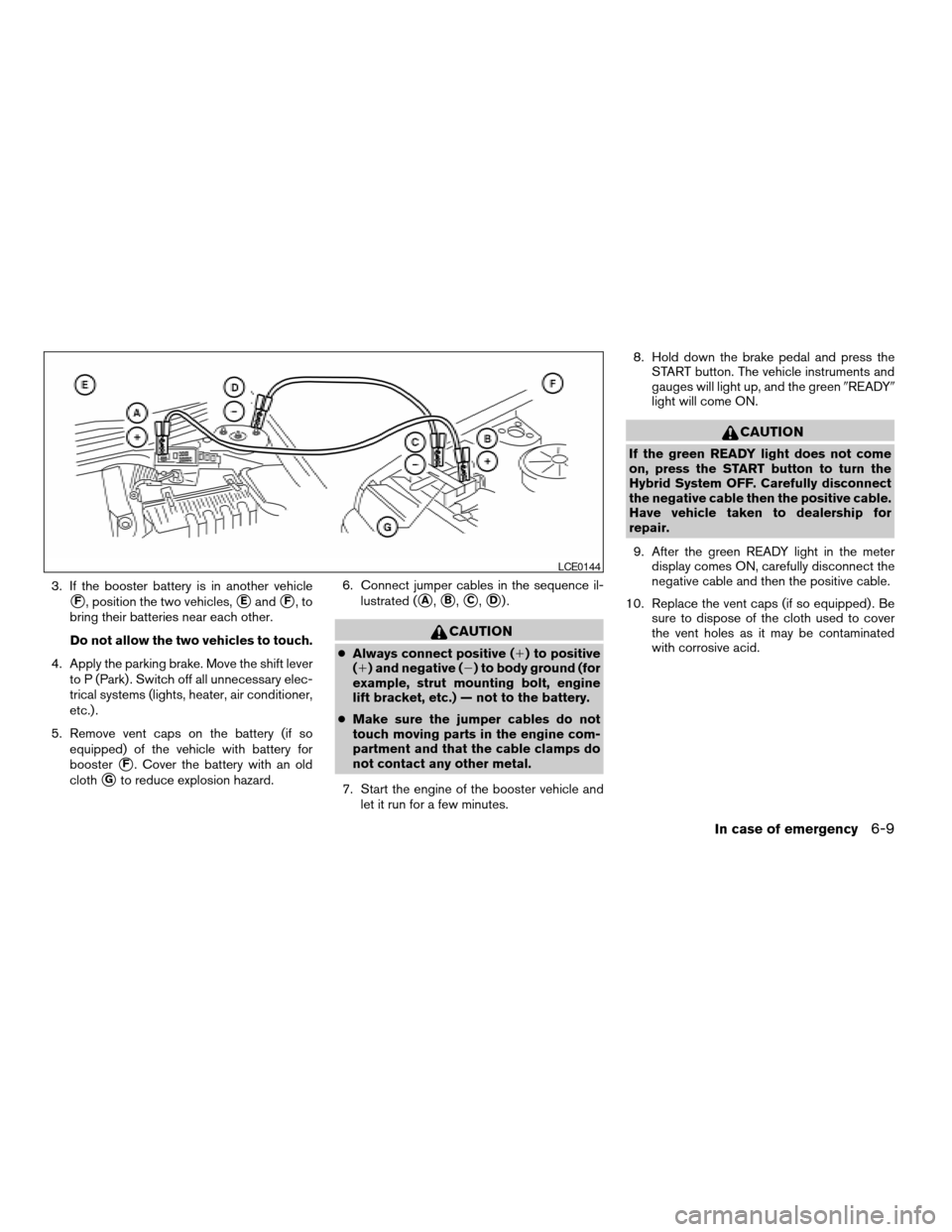
3. If the booster battery is in another vehicle
sF, position the two vehicles,sEandsF,to
bring their batteries near each other.
Do not allow the two vehicles to touch.
4. Apply the parking brake. Move the shift lever
to P (Park) . Switch off all unnecessary elec-
trical systems (lights, heater, air conditioner,
etc.) .
5. Remove vent caps on the battery (if so
equipped) of the vehicle with battery for
booster
sF. Cover the battery with an old
cloth
sGto reduce explosion hazard.6. Connect jumper cables in the sequence il-
lustrated (
sA,sB,sC,sD).
CAUTION
cAlways connect positive (1) to positive
(1) and negative (2) to body ground (for
example, strut mounting bolt, engine
lift bracket, etc.) — not to the battery.
cMake sure the jumper cables do not
touch moving parts in the engine com-
partment and that the cable clamps do
not contact any other metal.
7. Start the engine of the booster vehicle and
let it run for a few minutes.8. Hold down the brake pedal and press the
START button. The vehicle instruments and
gauges will light up, and the green9READY9
light will come ON.
CAUTION
If the green READY light does not come
on, press the START button to turn the
Hybrid System OFF. Carefully disconnect
the negative cable then the positive cable.
Have vehicle taken to dealership for
repair.
9. After the green READY light in the meter
display comes ON, carefully disconnect the
negative cable and then the positive cable.
10. Replace the vent caps (if so equipped) . Be
sure to dispose of the cloth used to cover
the vent holes as it may be contaminated
with corrosive acid.
LCE0144
In case of emergency6-9
ZREVIEW COPYÐ2008 Altima Hybrid Electric
(ahv)
Owners ManualÐUSA_English(nna)
05/31/07Ðdebbie
X