2008 NISSAN ALTIMA HYBRID engine
[x] Cancel search: enginePage 20 of 351

1. Power windows (P. 2-41)
2. Windshield (P. 8-17)
3. Windshield wiper and washer switch
(P. 2-28)
4. Engine hood (P. 3-17)
5. Tie down/towing hooks (P. 6-13)
6. Fog light switch (if so equipped)
(P. 2-33)
7. Headlight and turn signal switch
(P. 2-29)
8. Replacing bulbs (P. 8-24)
9. Tire pressure (P. 8-29)
10. Flat tire (P. 6-2)
11. Tire chains (P. 8-37)
12. Mirrors (P. 3-23)
13. Door locks, Intelligent key system, keys,
request button (P. 3-3, 3-6, 3-2, 3-8)
See the page number indicated in paren-
theses for operating details.
LII0094
EXTERIOR FRONT
Illustrated table of contents0-3
ZREVIEW COPYÐ2008 Altima Hybrid Electric
(ahv)
Owners ManualÐUSA_English(nna)
05/31/07Ðdebbie
X
Page 24 of 351

1. Brake fluid reservoir (P. 8-14)
2. Engine oil filler cap (P. 8-10)
3. Air cleaner (P. 8-17)
4. Fuse/fusible link box/jump-start location
(P. 8-19)
5. Fuse block (P. 8-19)
6. Inverter coolant reservoir (P. 8-9)
7. Engine oil dipstick (P. 8-10)
8. Radiator cap (P. 8-8)
9. Drive belt location (P.8-15)
10. Engine coolant reservoir (P. 8-8)
11. Windshield washer fluid reservoir
(P. 8-14)
See the page number indicated in paren-
theses for operating details.
LDI0577
ENGINE COMPARTMENT CHECK
LOCATIONS
Illustrated table of contents0-7
ZREVIEW COPYÐ2008 Altima Hybrid Electric
(ahv)
Owners ManualÐUSA_English(nna)
05/31/07Ðdebbie
X
Page 25 of 351
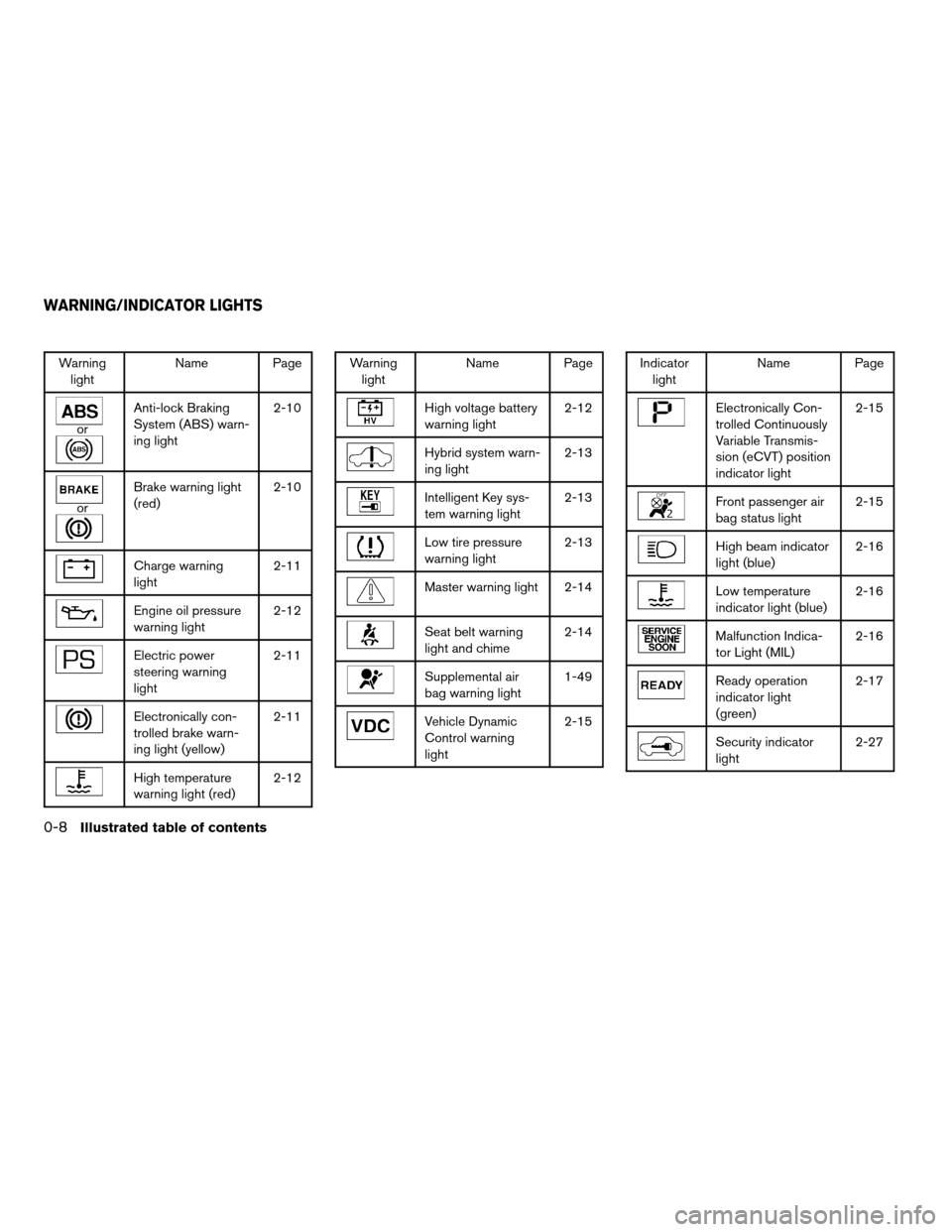
Warning
lightName Page
or
Anti-lock Braking
System (ABS) warn-
ing light2-10
or
Brake warning light
(red)2-10
Charge warning
light2-11
Engine oil pressure
warning light2-12
Electric power
steering warning
light2-11
Electronically con-
trolled brake warn-
ing light (yellow)2-11
High temperature
warning light (red)2-12
Warning
lightName Page
High voltage battery
warning light2-12
Hybrid system warn-
ing light2-13
Intelligent Key sys-
tem warning light2-13
Low tire pressure
warning light2-13
Master warning light 2-14
Seat belt warning
light and chime2-14
Supplemental air
bag warning light1-49
Vehicle Dynamic
Control warning
light2-15
Indicator
lightName Page
Electronically Con-
trolled Continuously
Variable Transmis-
sion (eCVT) position
indicator light2-15
Front passenger air
bag status light2-15
High beam indicator
light (blue)2-16
Low temperature
indicator light (blue)2-16
Malfunction Indica-
tor Light (MIL)2-16
Ready operation
indicator light
(green)2-17
Security indicator
light2-27
WARNING/INDICATOR LIGHTS
0-8Illustrated table of contents
ZREVIEW COPYÐ2008 Altima Hybrid Electric
(ahv)
Owners ManualÐUSA_English(nna)
06/01/07Ðtbrooks
X
Page 84 of 351
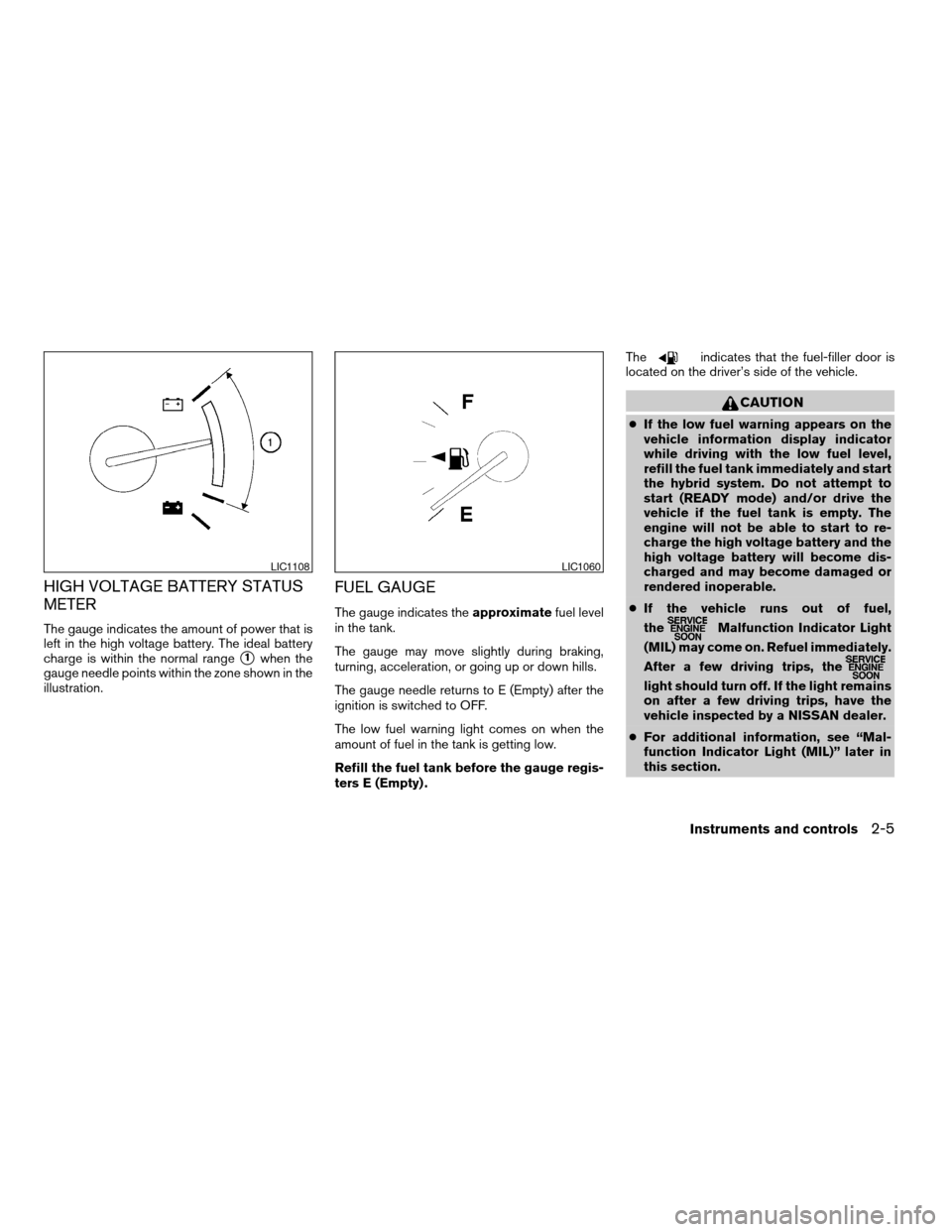
HIGH VOLTAGE BATTERY STATUS
METER
The gauge indicates the amount of power that is
left in the high voltage battery. The ideal battery
charge is within the normal range
s1when the
gauge needle points within the zone shown in the
illustration.
FUEL GAUGE
The gauge indicates theapproximatefuel level
in the tank.
The gauge may move slightly during braking,
turning, acceleration, or going up or down hills.
The gauge needle returns to E (Empty) after the
ignition is switched to OFF.
The low fuel warning light comes on when the
amount of fuel in the tank is getting low.
Refill the fuel tank before the gauge regis-
ters E (Empty) .The
indicates that the fuel-filler door is
located on the driver’s side of the vehicle.
CAUTION
cIf the low fuel warning appears on the
vehicle information display indicator
while driving with the low fuel level,
refill the fuel tank immediately and start
the hybrid system. Do not attempt to
start (READY mode) and/or drive the
vehicle if the fuel tank is empty. The
engine will not be able to start to re-
charge the high voltage battery and the
high voltage battery will become dis-
charged and may become damaged or
rendered inoperable.
cIf the vehicle runs out of fuel,
the
Malfunction Indicator Light
(MIL) may come on. Refuel immediately.
After a few driving trips, the
light should turn off. If the light remains
on after a few driving trips, have the
vehicle inspected by a NISSAN dealer.
cFor additional information, see “Mal-
function Indicator Light (MIL)” later in
this section.
LIC1108LIC1060
Instruments and controls2-5
ZREVIEW COPYÐ2008 Altima Hybrid Electric
(ahv)
Owners ManualÐUSA_English(nna)
06/14/07Ðdebbie
X
Page 88 of 351

orAnti-lock Braking System (ABS)
warning lightHybrid System warning lightFront passenger air bag status light
orBrake warning light (Red)Intelligent Key system warning lightHigh beam indicator light (Blue)
Charge warning lightLow tire pressure warning light (if so equipped)Low temperature indicator light (Blue)
Electronically controlled brake warning light
(Yellow)Master warning lightMalfunction Indicator Light (MIL)
Electric power steering warning lightSeat belt warning light and chimeReady operation indicator light (Green)
Engine oil pressure warning lightSupplemental air bag warning lightSecurity indicator light
High temperature warning light (Red)Vehicle Dynamic Control warning lightSlip indicator light
High voltage battery warning lightElectronically controlled Continuously Variable
Transmission (eCVT) position indicator lightTurn signal/hazard indicator lights
CHECKING BULBS
With all doors closed, apply the parking brake
and push the ignition switch to the ON position
without starting the Hybrid System. The following
lights will come on:
,or,,,,
,,.
The following lights come on when the ignition
switch is pushed ON before the READY light
comes on indicating the Hybrid System is activated:
or,,,.The following light comes on briefly and then
goes off:
If any light fails to come on, it may indicate
a burned-out bulb or an open circuit in the
electrical system. Have the system repaired
promptly.
WARNING/INDICATOR LIGHTS AND
AUDIBLE REMINDERS
Instruments and controls2-9
ZREVIEW COPYÐ2008 Altima Hybrid Electric
(ahv)
Owners ManualÐUSA_English(nna)
05/31/07Ðdebbie
X
Page 91 of 351
cWhen the power steering warning light
illuminates with the Hybrid System in
the READY mode, there will be no
power assist for the steering. You will
still have control of the vehicle but the
steering will be harder to operate. Have
the power steering system checked by a
NISSAN dealer.
When the ignition switch is in the ON position,
the power steering warning light illuminates. After
the Hybrid System is in the READY mode, the
power steering warning light turns off. This indi-
cates the power steering system is operational.
If the power steering warning light illuminates
while the Hybrid System is in the READY mode, it
may indicate the power steering system is not
functioning properly and may need servicing.
Have the power steering system checked by a
NISSAN dealer.
When the power steering warning light illumi-
nates with the Hybrid System in the READY
mode, there will be no power assist for the steer-
ing but you will still have control of the vehicle. At
this time, greater steering effort is required to
operate the steering wheel, especially in sharp
turns and at low speeds.
See “Power steering” in the “Starting and driving”
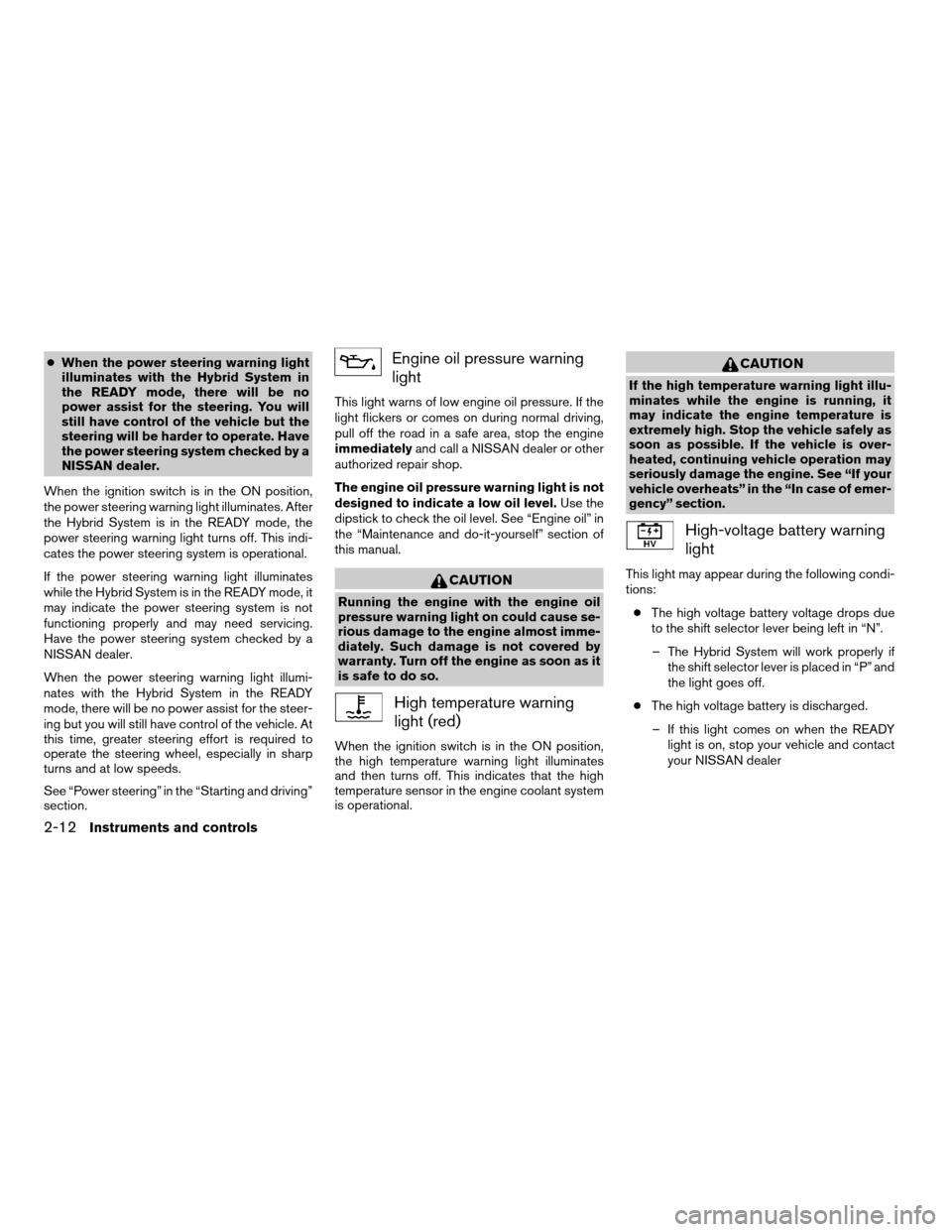
section.Engine oil pressure warning
light
This light warns of low engine oil pressure. If the
light flickers or comes on during normal driving,
pull off the road in a safe area, stop the engine
immediatelyand call a NISSAN dealer or other
authorized repair shop.
The engine oil pressure warning light is not
designed to indicate a low oil level.Use the
dipstick to check the oil level. See “Engine oil” in
the “Maintenance and do-it-yourself” section of
this manual.
CAUTION
Running the engine with the engine oil
pressure warning light on could cause se-
rious damage to the engine almost imme-
diately. Such damage is not covered by
warranty. Turn off the engine as soon as it
is safe to do so.
High temperature warning
light (red)
When the ignition switch is in the ON position,
the high temperature warning light illuminates
and then turns off. This indicates that the high
temperature sensor in the engine coolant system
is operational.
CAUTION
If the high temperature warning light illu-
minates while the engine is running, it
may indicate the engine temperature is
extremely high. Stop the vehicle safely as
soon as possible. If the vehicle is over-
heated, continuing vehicle operation may
seriously damage the engine. See “If your
vehicle overheats” in the “In case of emer-
gency” section.
High-voltage battery warning
light
This light may appear during the following condi-
tions:
cThe high voltage battery voltage drops due
to the shift selector lever being left in “N”.
– The Hybrid System will work properly if
the shift selector lever is placed in “P” and
the light goes off.
cThe high voltage battery is discharged.
– If this light comes on when the READY
light is on, stop your vehicle and contact
your NISSAN dealer
2-12Instruments and controls
ZREVIEW COPYÐ2008 Altima Hybrid Electric
(ahv)
Owners ManualÐUSA_English(nna)
05/31/07Ðdebbie
X
Page 95 of 351

High beam indicator light
(blue)
This blue light comes on when the headlight high
beams are on and goes out when the low beams
are selected.
The high beam indicator light also comes on
when the passing signal is activated.
Low temperature indicator
light (blue)
The low temperature indicator light illuminates
when the engine coolant temperature is low.
When the push-button ignition switch is pushed
to the ON position, the low temperature indicator
light illuminates and then turns off after the engine
coolant has warmed up.
If the low temperature indicator light stays illumi-
nated after the engine has sufficiently warmed
up, it may indicate the low temperature sensor in
the engine coolant system is not functioning
properly and may need servicing. Have the sys-
tem checked, and if necessary repaired, by a
NISSAN dealer promptly.
Malfunction Indicator Light
(MIL)
If this indicator light comes on steady or blinks
while the Hybrid System is in READY mode, it
may indicate a potential emission control mal-
function.
The Malfunction Indicator Light may also come
on steady if the fuel-filler cap is loose or missing,
or if the vehicle runs out of fuel. Check to make
sure the fuel-filler cap is installed and closed
tightly, and that the vehicle has at least 3 gallons
(11.4 liters) of fuel in the fuel tank.
After a few driving trips, the
light should
turn off if no other potential emission control
system malfunction exists.
If this indicator light comes on steady for 20
seconds and then blinks for 10 seconds when
the engine is not running, it indicates that the
vehicle is not ready for an emission control sys-
tem inspection/maintenance test. See “Readi-
ness for inspection/maintenance (I/M) test” in the
“Technical and consumer information” section of
this manual.
Operation
The Malfunction Indicator Light will come on in
one of two ways:cMalfunction Indicator Light on steady — An
emission control system malfunction has
been detected. Check the fuel-filler cap. If
the fuel-filler cap is loose or missing, tighten
or install the cap and continue to drive the
vehicle. The
light should turn off after
a few driving trips. If thelight does not
turn off after a few driving trips, have the
vehicle inspected by a NISSAN dealer. You
do not need to have your vehicle towed to
the dealer.
cMalfunction Indicator Light blinking — An
engine misfire has been detected which may
damage the emission control system. To re-
duce or avoid emission control system dam-
age:
– do not drive at speeds above 45 MPH
(72 km/h) .
– avoid hard acceleration or deceleration.
– avoid steep uphill grades.
– if possible, reduce the amount of cargo
being hauled or towed.
The Malfunction Indicator Light may stop blinking
and come on steady. Have the vehicle inspected
by a NISSAN dealer. You do not need to have
your vehicle towed to the dealer.
2-16Instruments and controls
ZREVIEW COPYÐ2008 Altima Hybrid Electric
(ahv)
Owners ManualÐUSA_English(nna)
05/31/07Ðdebbie
X
Page 100 of 351

Reset mode
The reset mode can be selected in any screen
that allows for preferences to be programmed.
Once the screen is selected, you have the option
to reset their selected distances or time to a new
setting.Maintenance mode
The maintenance mode allows you to set alerts
for the reminding of maintenance intervals for the
following:
cengine oil
coil filter
ctires
cother
Set a desired interval by pushing
to high-
light the maintenance field and pressing.
The reset mode will open up and allow you to
enter the desired distance.Display mode
The LANGUAGE/UNIT screen will appear when
selecting the “Language/Unit” key and
pressing
.
Language: English or French
Unit: US — mile, °F, MPG
Metric — km, °C, L/100 km
You can select the language and unit using
the
button and pressing.
The settings are automatically saved when you
exit the menu by pressing the BACK button or
any other mode button.
LIC1046LIC1045LIC1047
Instruments and controls2-21
ZREVIEW COPYÐ2008 Altima Hybrid Electric
(ahv)
Owners ManualÐUSA_English(nna)
05/31/07Ðdebbie
X