Page 267 of 761
266 Control systems
Instrument cluster control system
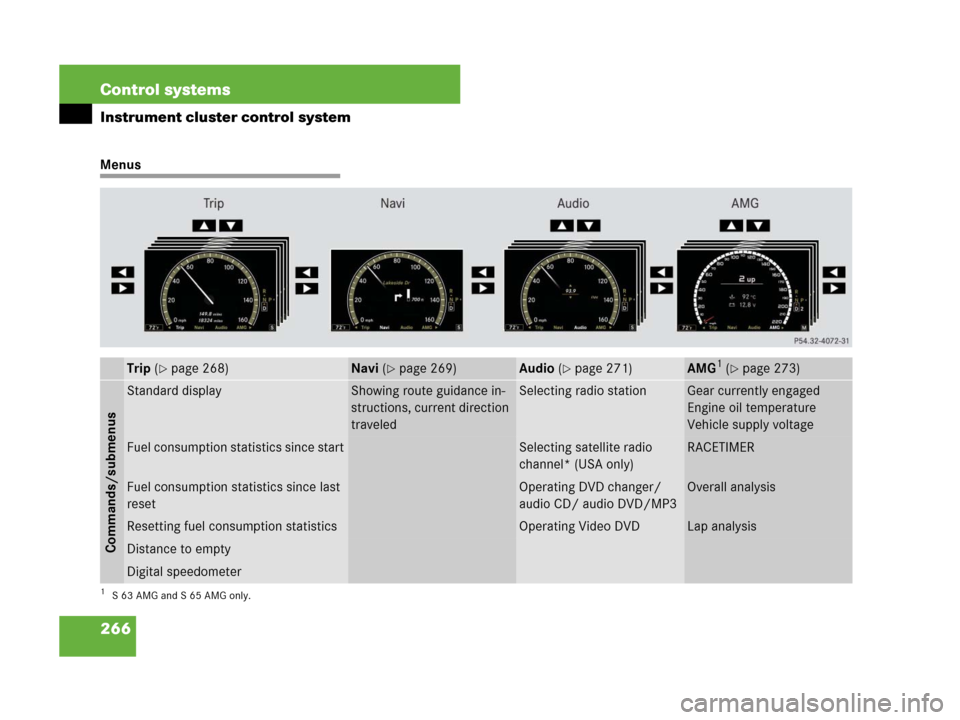
Menus
Trip (�page 268)Navi (�page 269)Audio (�page 271)AMG1 (�page 273)
1S63AMG and S65AMG only.
Commands/submenus
Standard displayShowing route guidance in-
structions, current direction
traveledSelecting radio stationGear currently engaged
Engine oil temperature
Vehicle supply voltage
Fuel consumption statistics since startSelecting satellite radio
channel* (USA only)RACETIMER
Fuel consumption statistics since last
resetOperating DVD changer/
audio CD/ audio DVD/MP3Overall analysis
Resetting fuel consumption statisticsOperating Video DVDLap analysis
Distance to empty
Digital speedometer
Page 274 of 761

273 Control systems
Instrument cluster control system
AMG menu
The main screen of the AMG menu shows
you
�the gear currently engaged
�the engine oil temperature
�the vehicle supply voltage
�Press ( or & to select the
“AMG” menu.
1Gear indicator
2Upshift indicator
3Engine oil temperature
4Vehicle supply voltageIf the engine reaches the overspeed range
in the manual shift program, you will see
“up” 2 next to gear indicator 1 as a re-
minder to upshift.
Use buttons % or $ to select the fol-
lowing functions in the AMG menu:RACETIMER
The RACETIMER allows you to time and
save driving stretches in hours, minutes
and seconds.
�Press ( or & to select the
“AMG” menu.
�Press % to select the RACETIMER.
iThis function is only available in S 63 AMG
and S 65 AMG.
iThe engine oil temperature symbol will be
shown in blue if the engine oil temperature has
not yet reached 176°F (80°C). During this time,
avoid driving at full engine speed.
FunctionPage
RACETIMER273
Overall analysis275
Lap analysis275
Warning!G
The RACETIMER feature is for use only on
roads and in conditions where high speed
driving is permitted. Racing on public roads
is prohibited under all circumstances and
the driver is and must always remain re-
sponsible for following posted speed limits.
��
Page 275 of 761

274 Control systems
Instrument cluster control system
1Gear indicator
2RACETIMER
3Seconds display
4Lap
�Starting RACETIMER: Press æ.
�Displaying intermediate time:
Pressç.
The intermediate time is shown for
5 seconds.
�Stopping RACETIMER: Press æ.
�To select a different display, press
$, ( or &.Saving lap time and starting a new lap
�Press buttonç while the timer is
running.
The intermediate time will be shown for
5 seconds.
�Press buttonç within 5 seconds.
The intermediate time shown will be
saved as a lap time.
The RACETIMER begins timing the new
lap. The new lap begins to be timed as
soon as the intermediate time is called
up.
1Gear indicator
2RACETIMER
3Best lap time
iYou can start the RACETIMER when the en-
gine is running or the starter switch is in
position2 (
�page 344).
iWhile the RACETIMER is being displayed,
you cannot adjust the audio volume using but-
tons æ or ç.
iWhen you stop the vehicle and turn the
Smartkey to position 1 (
�page 344) or, in vehi-
cles with KEYLESS-GO*, turn off the engine and
do not open the driver’s door, the RACETIMER
stops timing. Timing is resumed when you switch
the ignition back on or restart the engine and
then press æ button.
iWhen you switch on the Night View Assist*
(
�page 461) while the RACETIMER is operating,
the RACETIMER will continue to run in the back-
ground but cannot be operated with the multi-
function steering wheel buttons.
To stop the RACETIMER, switch off the Night
View Assist* first.
iYou can save up to 16 laps.
��
Page 276 of 761

275 Control systems
Instrument cluster control system
Resetting current lap
�Press buttonæ while the timer is
running.
The timer stops.
�Press buttonç.
The lap time is reset to “0”.
Deleting all laps
�Press buttonæ while the timer is
running.
The timer stops.
�Pressç for at least 3 seconds.
�Press buttonæ.
The timer starts. The saved laps are de-
leted.Overall analysis
�Press ( or & to select the
“AMG” menu.
�Press $ repeatedly until the overall
analysis appears in the multifunction
display.
1Overall analysis of RACETIMER
2Overall driving time
3Maximum speed
4Overall distance driven
5Average speed
�To select a different display, press
$, ( or &.Lap analysis
�Press ( or & to select the
“AMG” menu.
�Press $ repeatedly until the lap
analysis appears in the multifunction
display.
1Lap number
2Lap time
3Maximum speed
4Lap length
5Average speed during lap
�Press $ or % to see other lap
analyses.
iIt is not possible to delete a single saved lap.
iThese functions are only available if you
have saved at least one lap and have stopped the
RACETIMER.iThese functions are only available if you
have saved at least two laps and have stopped
RACETIMER.
��
Page 751 of 761

750 Index
Power assistance 527
Power closing assist for doors and trunk
lid 342
Power folding exterior rear view
mirrors 362
Power outlet 506
Power tilt/sliding sunroof 486
Emergency operations 674
Opening/closing 486
Opening/closing in an
emergency 674
Synchronizing 488
Power washer 586
Power windows 383
Blocking of rear window operation 63
Cleaning 592
Opening/closing 383Practical hints 612, 668
Premium unleaded gasoline 539, 726,
729
PRE-SAFE
®56
Message in display 623
Messages in display 629
PRE-SAFE
® Brake*
Intermittent signal tone 79
Preventive occupant safety see PRE-SAFE
®
Problems
While driving 393
With vehicle 20
Product information 13
Production options weight 577
Program mode see Automatic transmis-
sion, Automatic shift program
Program mode selector switch
Automatic shift program 409
Proper use of the vehicle 19
PSI 577
Push-start see Tow-startR
RACETIMER see Control system instru-
ment cluster menus, AMG
Radio
FM/AM operation (COMAND) 100
Saving stations, FM/AM
(COMAND) 103
Selecting satellite radio* channel
(Instrument cluster control
system) 271
Selecting stations 271
Submenu overview, FM/AM
(COMAND) 100
Switching wavebands, FM/AM
(COMAND) 101
Tuning in stations/channels 101
Voice Control* 309
Radio transmitters, control and
operation 535
Range (distance to empty) 269
Reading lamps in the front 379
Reading lamps in the rear 379
Real-time traffic (COMAND) 204
Rear door window
Blocking operation 63