2008 MERCEDES-BENZ ML SUV service
[x] Cancel search: servicePage 142 of 381
Off-road driving
139
cause damage to the drive train or the
brake system.
! A function or performance test should
only be carried out on a twin-axle dyna-
mometer. If you wish to operate the vehicle
on such a dynamometer, please consult a
Mercedes-Benz Service Centre in advance.
You could otherwise damage the drive train
or the brake system. DSR (Downhill Speed Regulation)
You will find information about driving off-
road in the "Operation" section
(Y page 235).
DSR is an aid to assist you when driving down-
hill. It keeps the speed of travel at the speed
set on the on-board computer (Y page 134).
The steeper the downhill gradient, the greater
the DSR braking effect on the vehicle. When
driving on flat stretches of road or on an uphill
gradient, the DSR braking effect is minimal or
non-existent. G
Risk of accident
DSR is only an aid designed to assist you
when driving downhill. You are responsible
for keeping control of the vehicle and for assessing whether the downhill gradient
can be managed.
When activating DSR the vehicle may brake
suddenly due to DSR intervening. This is
dependent on the downhill gradient and the
difference between the current speed and
the speed set. DSR may not always be able
to keep to the set speed, depending on road
surface and tyre conditions. You could lose
control of the vehicle and cause an acci-
dent.
Select a set speed suitable for the prevail-
ing conditions and when necessary, apply
the brakes manually.
DSR controls the vehicle's speed when
DIRECT SELECT selector lever positions D,
R and Nare selected. You can drive at a
higher or a lower speed than that set on the
on-board computer at any time by braking or
accelerating. G
Risk of accident
If you depress the accelerator pedal with
DSR activated, then the set speed can be
exceeded. Drive downhill with special care
and always keep in mind that DSR brakes
the vehicle as soon as you remove your foot
from the accelerator pedal. The vehicle may
be heavily braked by DSR depending on the gradient and the difference between the
vehicle's road speed and the set speed. You
could lose control of the vehicle and cause
an accident.
The speed is set to 6 km/h at the factory.
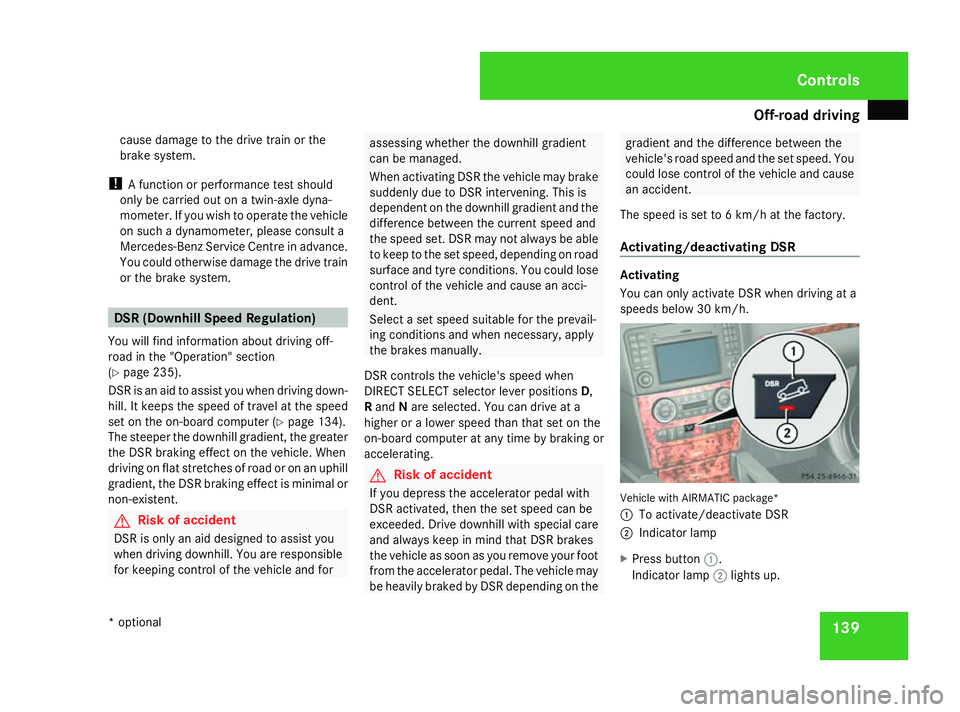
Activating/deactivating DSR Activating
You can only activate DSR when driving at a
speeds below 30 km/h.
Vehicle with AIRMATIC package*
1
To activate/deactivate DSR
2 Indicator lamp
X Press button 1.
Indicator lamp 2lights up. Controls
* optional
164_AKB; 5; 5, en-GB
wobuchh,
Version: 2.10.6 2008-05-11T11:55:12+02:00 - Seite 139 ZDateiname: 6515_4293_02_buchblock.pdf; preflight
Page 171 of 381

Driving sys
tems 168 You are always responsible for safety and
must continue to pay attention to your
immediate surroundings when parking and
manoeuvring. This applies to the areas
behind, in front of and next to the vehicle.
You could otherwise endanger yourself and
others. G
Risk of accident
Under the following circumstances, the
reversing camera will not function, or func-
tion in a limited manner:
R if the tailgate is open.
R in heavy rain, snow or fog. R
at night or in very dark places.
R if the camera is exposed to very bright
white light.
R if the area is lit by fluorescent light (the
display may flicker).
R if there is a sudden change in tempera-
ture, e.g. when driving into a heated
garage in winter.
R if the camera lens is dirty or obstructed.
R if the rear of your vehicle is damaged.
Have the camera position and setting
checked at a qualified specialist work- shop in this case. Mercedes-Benz recom-
mends that you use a Mercedes-Benz
Service Centre for this purpose.
Do not use the reversing camera in these
types of situation. You could otherwise
injure others or damage objects and your
vehicle while you are parking.
Activating the reversing camera X
Make sure that the key is in position 2in
the ignition lock.
X Engage reverse gear.
The area behind the vehicle is shown in the
COMAND APS display. Controls
164_AKB; 5; 5, en-GB
wobuchh
,V ersion: 2.10.6
2008-05-11T11:55:12+02:00 - Seite 168 Dateiname: 6515_4293_02_buchblock.pdf; preflight
Page 173 of 381

Air conditioning
170 General notes
2-zone Thermatic/multi-zone Thermotronic*
controls the temperature and the humidity of
the vehicle interior and filters out undesirable
substances from the air.
2-zone Thermatic/multi-zone Thermotronic*
is only operational when the engine is run-
ning. Optimum operation is only achieved
when you drive with the side windows and
sliding/tilting sunroof* closed. i
Ventilate the vehicle for a brief period
during warm weather, e.g. using the sum-
mer opening feature (Y page 101). This will
speed up the cooling process and the
desired interior temperature will be
reached more quickly.
i The integrated filter filters out most par-
ticles of dust and completely filters out
pollen. A clogged filter reduces the amount
of air supplied to the vehicle interior. For
this reason, you should always observe the interval for replacing the filter, which is
specified in the Service Booklet. As it
depends on environmental conditions, e.g.
heavy air pollution, the interval may be
shorter than stated in the Service Booklet. G
Risk of accident
Observe the settings recommended on the
following pages. The windows could other-
wise mist up. This may obstruct your view
of the traffic situation, thereby causing an
accident. Cont
rols
* optional
164_AKB; 5; 5, en-GB
wobuchh
,V ersion: 2.10.6
2008-05-11T11:55:12+02:00 - Seite 170 Dateiname: 6515_4293_02_buchblock.pdf; preflight
Page 188 of 381

Air conditioning
185
Activating the auxiliary heating/ventila-
tion
If the key is in position 1or 2:
X Press and hold the Xbutton for at least
two seconds.
The red or blue indicator lamp in the X
button lights up.
If the key is removed or in position 0:
X Briefly press the Xbutton.
The red or blue indicator lamp in the X
button lights up.
Deactivating the auxiliary heating/venti-
lation
X Briefly press the Xbutton.
The red or blue indicator lamp in the X
button goes out.
Switching the auxiliary heating/venti-
lation on/off using the remote control Your vehicle comes with one remote control.
You may use two additional remote controls
for your vehicle. For further information, con-
sult a qualified specialist workshop, e.g. a
Mercedes-Benz Service Centre. The remote control has a maximum range of
approximately 300 metres. This range may be
reduced by:
R sources of radio interference
R solid objects between the remote control
and the vehicle
R the remote control being in an unfavoura-
ble position in relation to the vehicle
R transmitting from an enclosed space
i The optimum range can be achieved if you
hold the remote control vertically, pointing
upwards when you press one of the but-
tons.
i A battery symbol appears in the display
when the batteries in the remote control
are low. Replace the remote control bat-
teries (Y page 312).
i More information about the auxiliary
heating can be found in the "Practical
advice" section (Y page 306). Auxiliary heating remote control
1
Display
2 To check the status
3 OFF – to deactivate auxiliary heating/
ventilation
4 ON – to activate auxiliary heating/venti-
lation
5 To check the status
Using the remote control, you can:
R activate or deactivate the auxiliary heat-
ing/ventilation
R check the status of the auxiliary heating/
ventilation
Activating the auxiliary heating/ventila-
tion
X Press the ONbutton. Cont
rols
164_AKB; 5; 5, en-GB
wobuchh
,V ersion: 2.10.6
2008-05-11T11:55:12+02:00 - Seite 185 ZDateiname: 6515_4293_02_buchblock.pdf; preflight
Page 189 of 381

Air conditioning
186
The following messages can appear in the
display: Display Meaning
The auxiliary heating/
ventilation is activated.
A malfunction has occur-
red in the auxiliary heat-
ing/ventilation. The
heating/ventilation
function selected by the
system is not available.
The vehicle battery is not
charged sufficiently or
the system is faulty. The signal transmission
between the transmitter
and the vehicle is faulty.
The heating system has a
fault or there is insuffi-
cient fuel in the fuel tank.
The auxiliary heating is
not working. The auxili-
ary ventilation is still
functioning. Deactivating the auxiliary heating/venti-
lation
The auxiliary heating switches off automati-
cally after 50 minutes.
i
This time limit can be altered. To do this,
visit a qualified specialist workshop, e.g. a
Mercedes-Benz Service Centre.
X Press the OFFbutton.
The following messages can appear in the
display: Display Meaning
The auxiliary heating/
ventilation is deactiva-
ted.
The signal transmission
between the transmitter
and the vehicle is faulty.
Checking the status of the auxiliary heat-
ing
X
Press the por obutton. The following messages can appear in the
display: Display Meaning
The auxiliary heating/
ventilation is deactiva-
ted.
A malfunction has occur-
red in the auxiliary heat-
ing/ventilation. The
heating or ventilation
function selected by the
system is not available.
The vehicle battery is not
charged sufficiently or
the system is faulty.
The signal transmission
between the transmitter
and the vehicle is faulty. Cont
rols
164_AKB; 5; 5, en-GB
wobuchh
,V ersion: 2.10.6
2008-05-11T11:55:12+02:00 - Seite 186 Dateiname: 6515_4293_02_buchblock.pdf; preflight
Page 195 of 381

Loading and stowing
192 Loading guidelines
G
Risk of injury
Secure and position the load as described
in the loading guidelines.
Otherwise, vehicle occupants could
be injured by the load being thrown around
in the event of sharp braking, a sudden
change in direction or an accident. This also
applies to seats which have been removed.
You will find further information in the
"Securing a load" section.
Even if you follow all the loading guidelines,
the load will increase the risk of injury in the
event of an accident. G
Risk of poisoning
Keep the tailgate closed when the engine is
running. Otherwise, you could be poisoned
by exhaust fumes entering the vehicle.
The handling characteristics of a laden vehi-
cle depend on the distribution of the load
within the vehicle. You should therefore load
your vehicle as shown in the illustrations. Load distribution
Observe the following notes when transport-
ing a load:
R
When transporting a load, never exceed the
maximum permissible gross vehicle weight
or the permissible axle loads for the vehicle
(including occupants).
R Position heavy loads as far forwards and as
low down in the luggage compartment as
possible.
R The load must not protrude above the
upper edge of the backrests.
R Always place the load against the front or
rear seat backrests. Make sure that the backrests and the seats are securely
locked into place.
R Secure the load with sufficiently strong and
wear-resistant load restraints. Pad sharp
edges for protection.
i Load restraints are available at any quali-
fied specialist workshop, e.g. a Mercedes-
Benz Service Centre. R
If the rear seats are not occupied, insert the
belt tongue on the outer seat belts into the
buckle of the opposite seat belt. This
increases the restraining effect of the rear
seat backrests. Controls
164_AKB; 5; 5, en-GB
wobuchh,
Version: 2.10.6 2008-05-11T11:55:12+02:00 - Seite 192Dateiname: 6515_4293_02_buchblock.pdf; preflight
Page 209 of 381

Features
206 Mobile phone*
G
Risk of accident
Observe the legal requirements of the
country in which you are currently driving
regarding operating mobile communica-
tions equipment in a vehicle.
If it is permitted by law to operate commu-
nications equipment while the vehicle is in
motion, you must only do so when the traf-
fic situation allows. You could otherwise be
distracted from the traffic conditions,
cause an accident and injure yourself and
others.
Two-way radios and fax equipment used
without low-reflection exterior aerials can
interfere with the vehicle's electronics and
thereby jeopardise the operating safety of
the vehicle and your safety. You must there-
fore only use this equipment if it is correctly
connected to a separate reflection-free
exterior aerial. G
Risk of injury
Excessive electromagnetic radiation may
cause damage to your health and the health
of others. Using an exterior aerial takes into
account current scientific discussions relating to the possible health risk posed by
electromagnetic fields.
i In order to ensure optimum signal quality
for mobile phones and to minimise mutual
interference between the vehicle electron-
ics and mobile phones, Mercedes-Benz rec-
ommends the use of an approved exterior
aerial. An exterior aerial conducts the elec-
tromagnetic fields generated by a wireless
device to the exterior of the vehicle; the
field strength within the vehicle interior is
lower than in a vehicle that does not have
an exterior aerial.
i There are various mobile phone brackets
that may be fitted to your vehicle; in some
cases these are country-specific. You can
obtain these mobile phone brackets from a
qualified specialist workshop, e.g. a
Mercedes-Benz Service Centre. The func-
tions and services available when you use
the phone depend on your mobile phone
model and service provider.
The mobile phone bracket is in the armrest.
X Open the telephone compartment
(Y page 202). Inserting the mobile phone into the
mobile phone bracket If the mobile phone is inserted into the mobile
phone bracket, you can only speak to the per-
son you are calling using the hands-free sys-
tem.
!
Do not attempt to remove the mobile
phone and the telephone bracket together.
You could otherwise damage the mobile
phone bracket.
X Remove the cover of the aerial plug from
the back of the mobile phone and keep it in
a safe place. Cont
rols
* optional
164_AKB; 5; 5, en-GB
wobuchh
,V ersion: 2.10.6
2008-05-11T11:55:12+02:00 - Seite 206 Dateiname: 6515_4293_02_buchblock.pdf; preflight
Page 212 of 381

Features
209Garage door opener*
The remote control integrated in the rear-view
mirror allows you to operate up to three dif-
ferent door and gate systems.
i The garage door opener is only available
for certain countries. Observe the legal
requirements in all countries concerned.
The HomeLink ®
garage door opener is
compatible with most European garage and
gate opener drives. More information on
HomeLink ®
and/or compatible products is
available from:
R any Mercedes-Benz Service Centre
R the HomeLink ®
hotline
(0) 08000 466 354 65 (free of charge) or
+49 (0) 6839 907-27 7(at a charge)
R the internet: www.homelink.com Remote control in the rear-view mirror
1
Indicator lamp
2 Transmitter button
3 Transmitter button
4 Transmitter button G
Risk of accident
Only press the transmitter button on the
integrated remote control if there are no
persons or objects present within the
sweep of the garage door. Persons could
otherwise be injured as the door moves.
Programming the remote control i
You will achieve the best results by insert-
ing new batteries in the garage door's
remote control before programming it. X
Erase the memory of the integrated remote
control (Y page 210) before programming
it for the first time.
X Turn the key to position 2in the ignition
lock.
X Press and hold one of transmitter buttons
2 to4 on the integrated remote control.
Indicator lamp 1starts to flash after a
short while. It flashes about once a second.
i Indicator lamp 1flashes immediately
the first time the transmitter button is pro-
grammed. If this transmitter button has
already been programmed, indicator
lamp 1will only start flashing at a rate of
once a second after 20 seconds have
elapsed.
X Keep the transmitter buttons depressed.
X Point the garage door's remote control with
the transmitter towards the left-hand side
of the rear-view mirror from a distance of 5
to 20 cm.
i The distance between the garage door's
remote control and the integrated garage
door opener depends on the system of the
garage door drive. You might require sev-
eral attempts. You should test every posi- Controls
* optional
164_AKB; 5; 5, en-GB
wobuchh,
Version: 2.10.6 2008-05-11T11:55:12+02:00 - Seite 209 ZDateiname: 6515_4293_02_buchblock.pdf; preflight