Page 399 of 601

398 Operation
Tires and wheels
If you wish to confirm activation:
�Press buttonæ.
The following message will appear in
the multifunction display:
Run Flat Indicator
Restarted
After a certain “learning phase”, the Run
Flat Indicator checks the set pressure val-
ues for all four tires.
If you wish to cancel activation:
�Press buttonç.
or
�Wait until the message
Restart
Run Flat Indicator?
Yes
Cancel
disappears.Checking tire pressure electronically
with the Tire Pressure Monitoring
System (TPMS), (USA only)
The TPMS only functions on wheels that
are equipped with the proper electronic
sensors. It monitors the tire inflation pres-
sure, as selected by the driver, in all four
tires. A warning is issued to alert you to a
decrease in pressure in one or more of the
tires.
iThe Tire Pressure Monitoring System
(TPMS) is equipped with a combination low tire
pressure/TPMS malfunction telltale in the
instrument cluster (
�page 27). Depending on
how the telltale illuminates, it indicates a low tire
pressure condition or a malfunction in the TPMS
system itself:
�If the telltale illuminates continuously,
one or more of your tires is significantly
underinflated. There is no malfunction in the
TPMS.
�If the telltale flashes for 60 seconds and
then stays illuminated, the TPMS system
itself is not operating properly.
iThis device complies with Part 15 of the
FCC Rules. Operation is subject to the following
two conditions:
(1) This device may not cause harmful interfer-
ence, and
(2) this device must accept any interference
received, including interference that may
cause undesired operation.
Any unauthorized modification to this device
could void the user’s authority to operate the
equipment.
164.boo Seite 398 Freitag, 30. März 2007 12:54 12
Page 402 of 601

401 Operation
Tires and wheels
�Switch on the ignition (�page 42).
�Press buttonè orÿ on the mul-
tifunction steering wheel repeatedly
until the standard display menu ap-
pears in the multifunction display
(
�page 155).
�Press buttonj or k repeatedly
until you see the following message:
Tire Pressure Monitor
Active
Menu: R-Button
�Press the reset button (�page 152).
The following message will appear in
the multifunction display:
Restart tire
pressure monitor?
�Press buttonæ.
The following message will appear in
the multifunction display:
Tire Pressure Monitor
Restarted
After driving a few minutes the system
verifies that the current tire inflation
pressures are within the system’s
specified range. Afterwards the current
tire inflation pressures are accepted as
reference pressures and then moni-
tored.
If you wish to cancel activation:
�Press buttonç.Checking tire pressure electronically
with the Advanced Tire Pressure Moni-
toring System (Advanced TPMS)*,
(Canada only)
The TPMS only functions on wheels that
are equipped with the proper electronic
sensors. It monitors the tire inflation pres-
sure, as selected by the driver, in all four
tires. A warning is issued to alert you to a
decrease in pressure in one or more of the
tires.
Tire pressure inquiries are made using the
multifunction display. The present inflation
pressures are displayed only after a few
minutes’ travel time.
iRestart the TPMS after adjusting the tire in-
flation pressure to the inflation pressure recom-
mended for the vehicle operating condition. Tire
pressure should only be adjusted on cold tires.
Observe the recommended tire inflation pres-
sure on the Tire and Loading Information placard
on the driver’s door B-pillar (
�page 388). Some
vehicles may have supplemental tire inflation
pressure information for driving at high speeds
(
�page 394) or for vehicle loads less than the
maximum loaded vehicle condition
(
�page 394). If such information is provided, it
can be found on the inside of the fuel filler flap.
iThis device complies with RSS-210 of Indus-
try Canada. Operation is subject to the following
two conditions:
(1) This device may not cause interference, and
(2) this device must accept any interference
received, including interference that may
cause undesired operation of the device.
Any unauthorized modification to this device
could void the user’s authority to operate the
equipment.
164.boo Seite 401 Freitag, 30. März 2007 12:54 12
Page 466 of 601
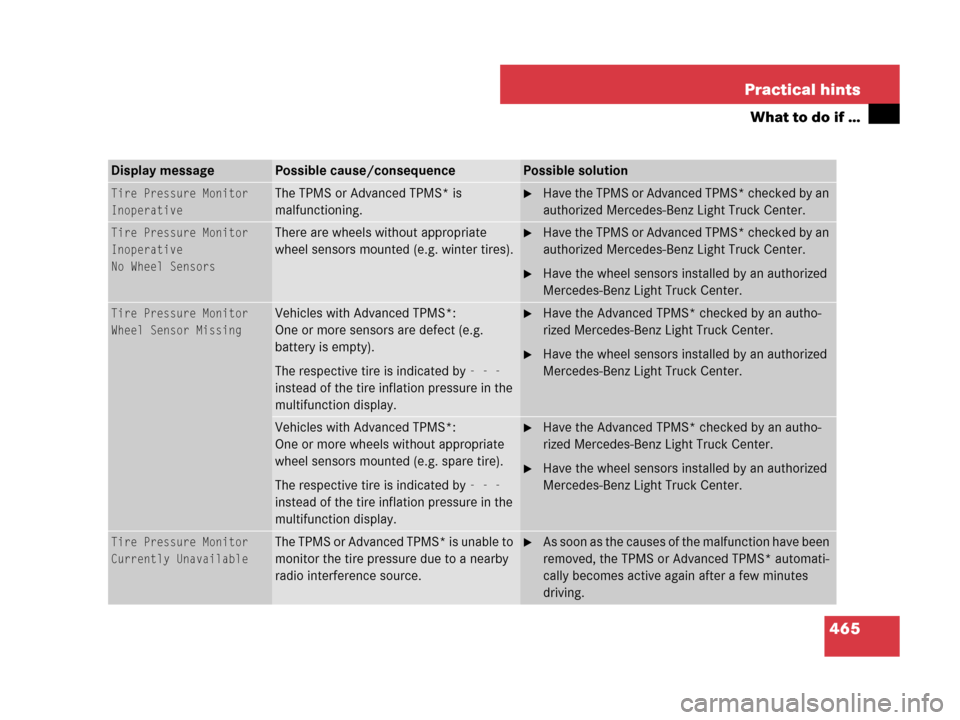
465 Practical hints
What to do if …
Display messagePossible cause/consequencePossible solution
Tire Pressure Monitor
InoperativeThe TPMS or Advanced TPMS* is
malfunctioning.�Have the TPMS or Advanced TPMS* checked by an
authorized Mercedes-Benz Light Truck Center.
Tire Pressure Monitor
Inoperative
No Wheel SensorsThere are wheels without appropriate
wheel sensors mounted (e.g. winter tires).�Have the TPMS or Advanced TPMS* checked by an
authorized Mercedes-Benz Light Truck Center.
�Have the wheel sensors installed by an authorized
Mercedes-Benz Light Truck Center.
Tire Pressure Monitor
Wheel Sensor MissingVehicles with Advanced TPMS*:
One or more sensors are defect (e.g.
battery is empty).
The respective tire is indicated by
- - -
instead of the tire inflation pressure in the
multifunction display.
�Have the Advanced TPMS* checked by an autho-
rized Mercedes-Benz Light Truck Center.
�Have the wheel sensors installed by an authorized
Mercedes-Benz Light Truck Center.
Vehicles with Advanced TPMS*:
One or more wheels without appropriate
wheel sensors mounted (e.g. spare tire).
The respective tire is indicated by
- - -
instead of the tire inflation pressure in the
multifunction display.
�Have the Advanced TPMS* checked by an autho-
rized Mercedes-Benz Light Truck Center.
�Have the wheel sensors installed by an authorized
Mercedes-Benz Light Truck Center.
Tire Pressure Monitor
Currently UnavailableThe TPMS or Advanced TPMS* is unable to
monitor the tire pressure due to a nearby
radio interference source.�As soon as the causes of the malfunction have been
removed, the TPMS or Advanced TPMS* automati-
cally becomes active again after a few minutes
driving.
164.boo Seite 465 Freitag, 30. März 2007 12:54 12