2008 MERCEDES-BENZ E-CLASS SALOON lights
[x] Cancel search: lightsPage 289 of 401
Troubleshooting
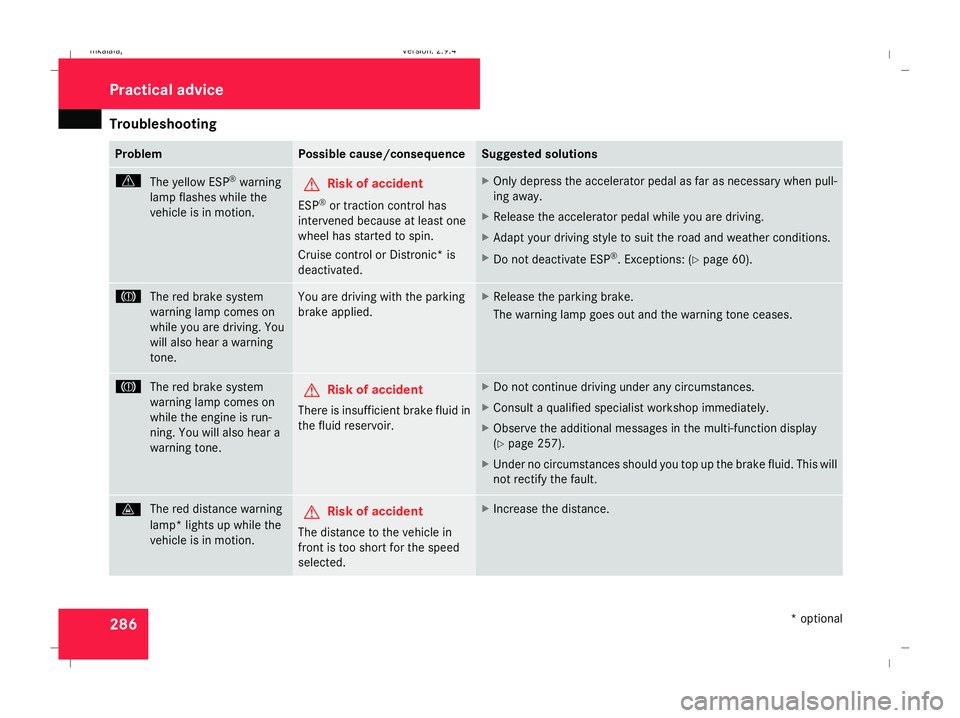
286 Problem Possible cause/consequence Suggested solutions
v
The yellow ESP ®
warning
lamp flashes while the
vehicle is in motion. G
Risk of accident
ESP ®
or traction control has
intervened because at least one
wheel has started to spin.
Cruise control or Distronic* is
deactivated. X
Only depress the accelerator pedal as far as necessary when pull-
ing away.
X Release the accelerator pedal while you are driving.
X Adapt your driving style to suit the road and weather conditions.
X Do not deactivate ESP ®
. Exceptions: (Y page 60). 3
The red brake system
warning lamp comes on
while you are driving. You
will also hear a warning
tone. You are driving with the parking
brake applied. X
Release the parking brake.
The warning lamp goes out and the warning tone ceases. 3
The red brake system
warning lamp comes on
while the engine is run-
ning. You will also hear a
warning tone. G
Risk of accident
There is insufficient brake fluid in
the fluid reservoir. X
Do not continue driving under any circumstances.
X Consult a qualified specialist workshop immediately.
X Observe the additional messages in the multi-function display
(Y page 257).
X Under no circumstances should you top up the brake fluid. This will
not rectify the fault. l
The red distance warning
lamp* lights up while the
vehicle is in motion. G
Risk of accident
The distance to the vehicle in
front is too short for the speed
selected. X
Increase the distance. Practical advice
* optional
211_AKB; 2; 5, en-GB
mkalafa
,V ersion: 2.9.4
2008-02-29T16:57:07+01:00 - Seite 286 Dateiname: 6515_3416_02_buchblock.pdf; preflight
Page 290 of 401

Troubleshooting
287Problem Possible cause/consequence Suggested solutions
l
The red distance warning
lamp* lights up while the
vehicle is in motion. You
will also hear a warning
tone. G
Risk of accident
You are approaching a vehicle in
front at too great a speed or Dis-
tronic* has detected a stationary
obstacle in your line of travel. X
Be prepared to brake immediately.
X Pay careful attention to the traffic situation. You may have to brake
or take evasive action. D
The red coolant warning
lamp comes on while the
engine is running. There is insufficient coolant in the
expansion tank.
The coolant is too hot and the
engine is no longer being cooled
sufficiently. X
Stop the vehicle as soon as possible. Pay attention to the traffic
conditions as you do so.
X Allow the engine and coolant to cool.
X Check the coolant level. Observe the warning notes
(Y page 225). Top up the coolant if necessary.
X Have the coolant system checked at a qualified specialist work-
shop if the coolant needs topping up more often than usual. D
The red coolant warning
lamp comes on while the
engine is running. If the coolant level is correct, the
radiator fan may be faulty.
The coolant is too hot and the
engine is no longer being cooled
sufficiently. X
If the coolant temperature is less than 120 †, youcan continue
driving to the nearest qualified specialist workshop.
X In doing so, avoid heavy loads on the engine (e.g. driving in moun-
tainous terrain) and stop-and-go driving. Practical advice
* optional
211_AKB; 2; 5, en-GB
mkalafa
,V ersion: 2.9.4
2008-02-29T16:57:07+01:00 - Seite 287 ZDateiname: 6515_3416_02_buchblock.pdf; preflight
Page 293 of 401
Troubleshooting
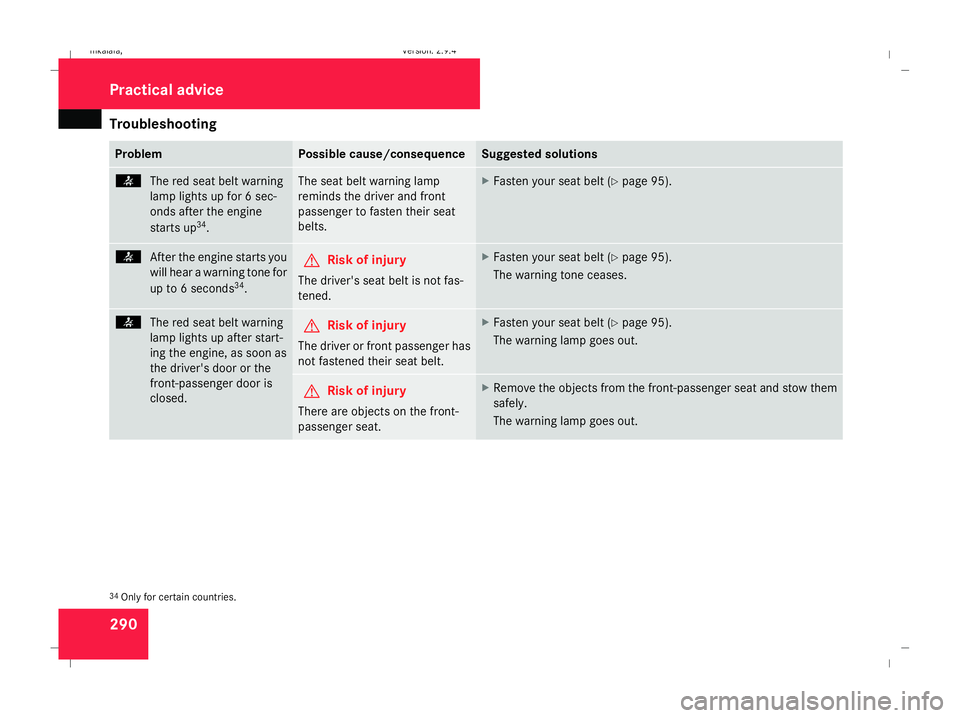
290 Problem Possible cause/consequence Suggested solutions
<
The red seat belt warning
lamp lights up for 6 sec-
onds after the engine
starts up 34
. The seat belt warning lamp
reminds the driver and front
passenger to fasten their seat
belts. X
Fasten your seat belt (Y page 95).<
After the engine starts you
will hear a warning tone for
up to 6 seconds 34
. G
Risk of injury
The driver's seat belt is not fas-
tened. X
Fasten your seat belt (Y page 95).
The warning tone ceases. <
The red seat belt warning
lamp lights up after start-
ing the engine, as soon as
the driver's door or the
front-passenger door is
closed. G
Risk of injury
The driver or front passenger has
not fastened their seat belt. X
Fasten your seat belt (Y page 95).
The warning lamp goes out. G
Risk of injury
There are objects on the front-
passenger seat. X
Remove the objects from the front-passenger seat and stow them
safely.
The warning lamp goes out. 34
Only for certain countries. Practical advice
211_AKB; 2; 5, en-GB
mkalafa
,V ersion: 2.9.4
2008-02-29T16:57:07+01:00 - Seite 290 Dateiname: 6515_3416_02_buchblock.pdf; preflight
Page 295 of 401
Troubleshooting
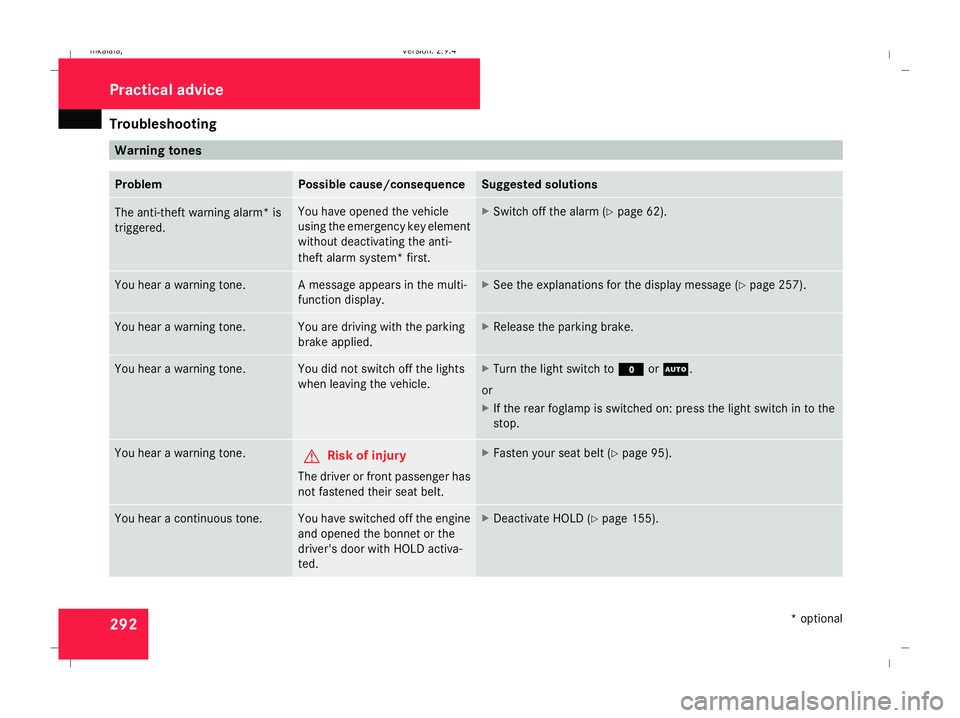
292 Warning tones
Problem Possible cause/consequence Suggested solutions
The anti-theft warning alarm* is
triggered. You have opened the vehicle
using the emergency key element
without deactivating the anti-
theft alarm system* first. X
Switch off the alarm (Y page 62).You hear a warning tone. A message appears in the multi-
function display. X
See the explanations for the display message (Y page 257).You hear a warning tone. You are driving with the parking
brake applied. X
Release the parking brake. You hear a warning tone. You did not switch off the lights
when leaving the vehicle. X
Turn the light switch to MorU.
or
X If the rear foglamp is switched on: press the light switch in to the
stop. You hear a warning tone.
G
Risk of injury
The driver or front passenger has
not fastened their seat belt. X
Fasten your seat belt (Y page 95).You hear a continuous tone. You have switched off the engine
and opened the bonnet or the
driver's door with HOLD activa-
ted. X
Deactivate HOLD (Y page 155). Practical advice
* optional
211_AKB; 2; 5, en-GB
mkalafa
,V ersion: 2.9.4
2008-02-29T16:57:07+01:00 - Seite 292 Dateiname: 6515_3416_02_buchblock.pdf; preflight
Page 301 of 401

Troubleshooting
298 Parktronic*
Problem Possible cause/consequence Suggested solutions
Only the red segments in the
Parktronic warning display are lit.
You also hear a warning tone for
approximately two seconds.
Parktronic is deactivated after
approximately 20 seconds and
the indicator lamp in the Park-
tronic button lights up. Parktronic has malfunctioned
and has switched itself off. X
If problems persist, have Parktronic checked at a qualified spe-
cialist workshop. Only the red segments in the
Parktronic warning display are lit.
Parktronic is deactivated after
approximately 20 seconds. The Parktronic sensors are dirty
or there is interference. X
Clean the Parktronic sensors ( Ypage 248).
X Switch the ignition back on. Only the red segments in the
Parktronic warning display are lit.
Parktronic is deactivated after
approximately 20 seconds. The problem may be caused by an
external source of radio or ultra-
sound waves. X
See if Parktronic functions in a different location. Practical advice
* optional
211_AKB; 2; 5, en-GB
mkalafa
,V ersion: 2.9.4
2008-02-29T16:57:07+01:00 - Seite 298 Dateiname: 6515_3416_02_buchblock.pdf; preflight
Page 313 of 401
Changing the batteries
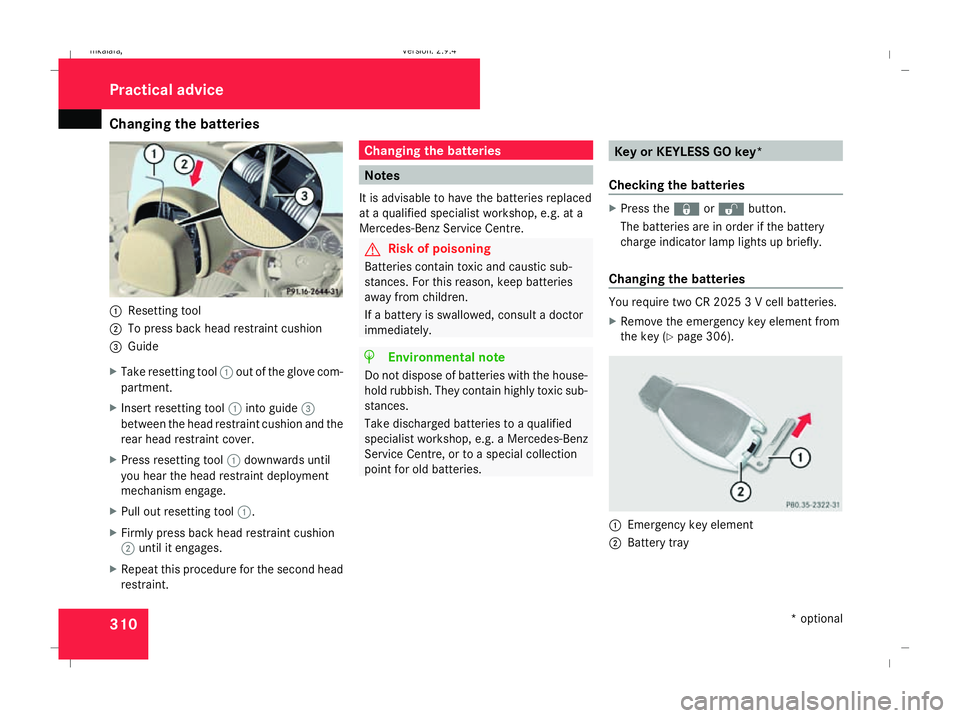
3101
Resetting tool
2 To press back head restraint cushion
3 Guide
X Take resetting tool 1out of the glove com-
partment.
X Insert resetting tool 1into guide 3
between the head restraint cushion and the
rear head restraint cover.
X Press resetting tool 1downwards until
you hear the head restraint deployment
mechanism engage.
X Pull out resetting tool 1.
X Firmly press back head restraint cushion
2 until it engages.
X Repeat this procedure for the second head
restraint. Changing the batteries
Notes
It is advisable to have the batteries replaced
at a qualified specialist workshop, e.g. at a
Mercedes-Benz Service Centre. G
Risk of poisoning
Batteries contain toxic and caustic sub-
stances. For this reason, keep batteries
away from children.
If a battery is swallowed, consult a doctor
immediately. H
Environmental note
Do not dispose of batteries with the house-
hold rubbish. They contain highly toxic sub-
stances.
Take discharged batteries to a qualified
specialist workshop, e.g. a Mercedes-Benz
Service Centre, or to a special collection
point for old batteries. Key or KEYLESS GO key*
Checking the batteries X
Press the jork button.
The batteries are in order if the battery
charge indicator lamp lights up briefly.
Changing the batteries You require two CR 2025 3 V cell batteries.
X
Remove the emergency key element from
the key (Y page 306). 1
Emergency key element
2 Battery tray Practical advice
* optional
211_AKB; 2; 5, en-GB
mkalafa,
Version: 2.9.4 2008-02-29T16:57:07+01:00 - Seite 310Dateiname: 6515_3416_02_buchblock.pdf; preflight
Page 316 of 401

Changing the bulbs
313
Front bulbs Bulb Type
1 Additional turn
signal lamp
LEDs
35 2 Turn signal lamp PY 21 W
3 Dipped-beam
headlamp
H7 55 W
36
or
D1S 35 W* 37 4 Main-beam
headlamp H7 55 W
Side lamp/park-
ing lamp W 5 W
or
LED*
35 5 Front foglamp
H11 55 W
35 Rear bulbs
Bulb Type
6 Third brake
lamp
LED
35 7 Rear foglamp
HiP
35 Side lamp/park-
ing lamp
HiP
35 Reversing lamp
HiP
35 Brake lamp
HiP
35
or
LED* 35 Turn signal lamp
HiP
35 8 Licence plate
lamp C 5 W Before changing bulbs
You can replace the following bulbs:
R
Dipped-beam headlamps (vehicles with
halogen headlamps)
R Main-beam headlamp
R Replacing the bulb in the side lamp/park-
ing lamp (vehicles with halogen headlamps)
R Turn signal lamp (front)
R Licence plate lamp
Observe the following points:
R Use only the bulb types specified here.
R To prevent a short-circuit, switch off the
lights before changing a bulb.
R Only hold bulbs with a clean, lint-free cloth.
R Do not work with wet or greasy fingers.
R If the new bulb still does not light up, con-
sult a qualified specialist workshop, e.g. a
Mercedes-Benz Service Centre.
i Have the headlamp setting checked reg-
ularly at a qualified specialist workshop,
e.g. a Mercedes-Benz Service Centre.
35 These bulbs must be replaced at a qualified specialist workshop, e.g. a Mercedes-Benz Service Centre.
36 Vehicles with halogen headlamps.
37 Vehicles with xenon headlamps*: always have these bulbs changed at a qualified specialist workshop, e.g. a Mercedes-Benz Service Centre. Practical advice
* optional
211_AKB; 2; 5, en-GB
mkalafa,
Version: 2.9.4
2008-02-29T16:57:07+01:00 - Seite 313 ZDateiname: 6515_3416_02_buchblock.pdf; preflight
Page 317 of 401

Changing the bulbs
314 Changing the front bulbs
Halogen or bi-xenon* headlamps
1
Bulb holder for turn signal
2 Bulb holder for main-beam headlamp
3 Bulb holder for side/parking lamp
4 Housing cover for dipped-beam headlamp
(halogen/bi-xenon headlamps)
Replacing dipped-beam headlamps
(vehicles with halogen headlamps) X
Switch off the lights.
X Open the bonnet.
X Turn housing cover 4anti-clockwise and
remove it.
X Turn the bulb holder anti-clockwise until it
is released. X
Pull out the bulb holder.
X Change the bulb.
X Insert the bulb holder into the headlamp
and turn it clockwise until it engages.
X Place housing cover 4back on and turn it
clockwise until it engages.
Replacing the bulbs in the main-beam
headlamp X
Switch off the lights.
X Open the bonnet.
X Turn bulb holder 2anti-clockwise and
remove it together with the bulb.
X Pull the bulb out of bulb holder 2.
X Insert the new bulb into bulb holder 2.
X Insert bulb holder 2into the headlamp
and turn it clockwise until it engages.
Replacing the bulb in the side lamp/
parking lamp (vehicles with halogen
headlamps) X
Switch off the lights.
X Open the bonnet. X
Turn bulb holder 3anti-clockwise and pull
it out.
X Pull the bulb out of bulb holder 3.
X Insert the new bulb into bulb holder 3.
X Insert bulb holder 3into the headlamp
and turn it clockwise until it engages.
Replacing the bulbs in the turn signal
lamps X
Switch off the lights.
X Open the bonnet.
X Turn bulb holder 1anti-clockwise and
remove it along with the bulb.
X Turn the bulb anti-clockwise, applying
slight pressure, and remove it from bulb
holder 1.
X Insert the new bulb into bulb holder 1and
turn it clockwise.
X Insert bulb holder 1into the headlamp
and turn it clockwise until it engages. Practical advice
* optional
211_AKB; 2; 5, en-GB
mkalafa,
Version: 2.9.4 2008-02-29T16:57:07+01:00 - Seite 314Dateiname: 6515_3416_02_buchblock.pdf; preflight