Page 30 of 481
29 At a glance
Center console
�Center console
Upper partItemPage
14-zone automatic climate
control188
2COMAND system, see sepa-
rate operating instructions
3Seat heating*, front passen-
ger side121
Seat ventilation*, front pas-
senger side122
4Electronic Stability Program
(ESP®) control switch
94
5Central locking switch116
ItemPage
6Opening/closing button for
CD changer, see separate
COMAND operating instruc-
tions
7Rear seat head restraints
switch, folding down119
8Rear window sunshade*
switch185
9Seat heating*, driver’s side121
Seat ventilation*, driver’s
side122
aHazard warning flasher
switch132
bFront passenger front
air bag off indicator lamp75
Page 34 of 481
33 At a glance
Storage compartments
ItemPage
1Glove box243
2Front passenger seat storage
compartment with first aid kit393
3Door pocket
4Ashtray249
5Ruffled storage bag245
6Door pocket
7Side storage pocket in trunk
8Luggage box under the trunk
floor397
9Door pocket
aRuffled storage bag 245
bAshtray249
cDoor pocket
dDriver’s seat storage compart-
ment244
ItemPage
eSun visor card clip184
fCD changer, see separate
COMAND operating instruc-
tions
gParcel net in front passenger
footwell245
hAshtray with cigarette lighter248
jCup holders246
kStorage compartment/tele-
phone* compartment under
the center armrest243
lCup holder in the rear center
console247
mRear storage compartment in
the rear center console244
nCup holder in the rear armrest248
oStorage compartment in the
rear armrest244
Page 150 of 481
149 Controls in detail
Control system
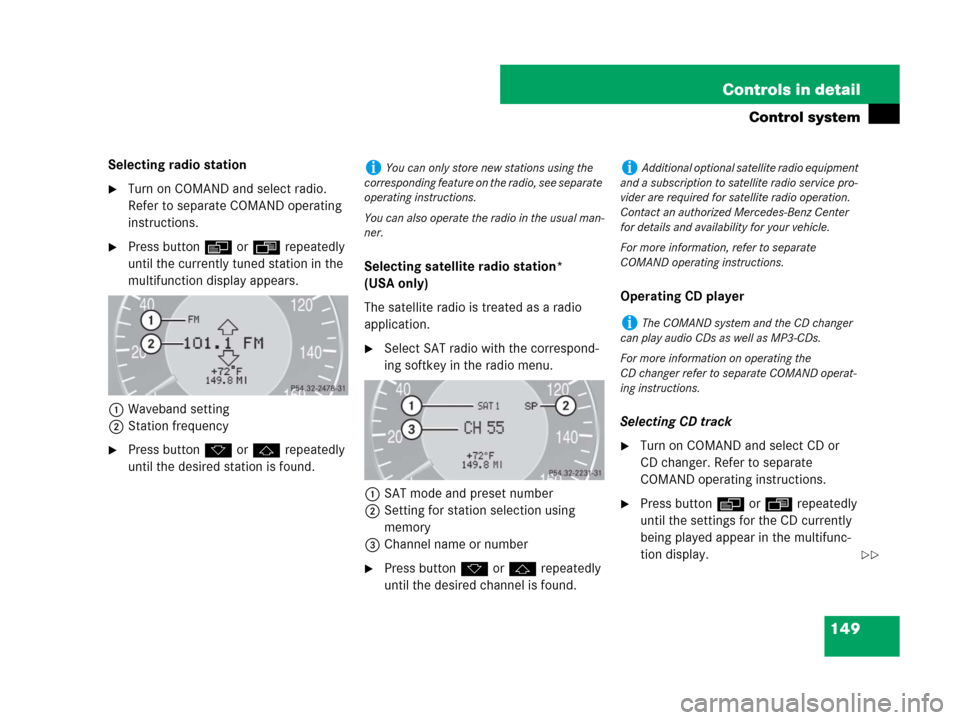
Selecting radio station
�Turn on COMAND and select radio.
Refer to separate COMAND operating
instructions.
�Press buttonè orÿ repeatedly
until the currently tuned station in the
multifunction display appears.
1Waveband setting
2Station frequency
�Press buttonk orj repeatedly
until the desired station is found.Selecting satellite radio station*
(USA only)
The satellite radio is treated as a radio
application.
�Select SAT radio with the correspond-
ing softkey in the radio menu.
1SAT mode and preset number
2Setting for station selection using
memory
3Channel name or number
�Press buttonk orj repeatedly
until the desired channel is found.Operating CD player
Selecting CD track
�Turn on COMAND and select CD or
CD changer. Refer to separate
COMAND operating instructions.
�Press buttonè orÿ repeatedly
until the settings for the CD currently
being played appear in the multifunc-
tion display.
iYou can only store new stations using the
corresponding feature on the radio, see separate
operating instructions.
You can also operate the radio in the usual man-
ner.iAdditional optional satellite radio equipment
and a subscription to satellite radio service pro-
vider are required for satellite radio operation.
Contact an authorized Mercedes-Benz Center
for details and availability for your vehicle.
For more information, refer to separate
COMAND operating instructions.
iThe COMAND system and the CD changer
can play audio CDs as well as MP3-CDs.
For more information on operating the
CD changer refer to separate COMAND operat-
ing instructions.
��
Page 151 of 481

150 Controls in detail
Control system
1Current CD (for CD changer)
2Current track
�Press buttonk orj repeatedly
until the desired track is selected.Selecting MP3-CD track
�Turn on COMAND and select CD or
CD changer*. Refer to separate
COMAND operating instructions.
�Press buttonè orÿ repeatedly
until the settings for the MP3-CD cur-
rently being played appear in the multi-
function display.
1MP3 mode
2Current track
NAV* menu
The
NAV menu contains the functions
needed to operate your navigation system.
�Press buttonè orÿ repeatedly
until the message
NAV appears in the
multifunction display.
�If COMAND is switched off, the mes-
sage
NAV off is shown in the multi-
function display.
�With COMAND switched on but route
guidance not activated, the direction of
travel and, if available, the name of the
street currently traveled on appear in
the multifunction display.
�With COMAND switched on and route
guidance activated, the direction of
travel and maneuver instructions ap-
pear in the multifunction display.
Please refer to the COMAND manual for
instructions on how to activate the route
guidance system.
iTo select a CD from the CD changer maga-
zine, press a number on the COMAND system
key pad located in the center console.
iLevel of information displayed will vary de-
pending on the information contained on the
MP3-CD insert in the single CD player of the
COMAND system.
To select a MP3-CD from the CD changer maga-
zine, press a number on the COMAND system
key pad located in the center console.
��

