Page 46 of 481

45 Getting started
Adjusting
Steering wheel adjustment
The stalk for steering wheel adjustment is
located on the steering column (lower left).
1Adjusting steering column, in or out
2Adjusting steering column, up or down
Adjusting steering column in or out
�Move stalk in direction of arrows1
until a comfortable steering wheel posi-
tion is reached with your arms slightly
bent at the elbow.Adjusting steering column up or down
�Move stalk in direction of arrows2.
Make sure your legs can move freely
and that all the displays (incl. malfunc-
tion and indicator lamps) on the instru-
ment cluster are clearly visible.
Easy-entry/exit feature
This feature allows for easier entry into and
exit from the vehicle. When entering and
exiting the vehicle, the steering wheel is in
its uppermost position.
The easy-entry/exit feature can be activat-
ed or deactivated in the
Convenience sub-
menu of the control system (
�page 163).
iThe memory function (�page 123) lets you
store the setting for the seat position together
with the setting for the steering wheel and the
exterior rear view mirrors.
Warning!G
You must make sure no one can become
trapped or injured by the moving steering
wheel when the easy-entry/exit feature is
activated.
To stop steering wheel movement, do one of
the following:
�Move steering wheel adjustment stalk
(
�page 45).
�Press one of the memory position but-
tons or the memory buttonM
(
�page 124).
Do not leave children unattended in the ve-
hicle, or with access to an unlocked vehicle.
Children could open the driver’s door and
unintentionally activate the easy-entry/exit
feature, which could result in an accident
and/or serious personal injury.
Page 48 of 481

47 Getting started
Adjusting
Mirrors
Adjust the interior and exterior rear view
mirrors before driving so that you have a
good view of the road and traffic condi-
tions.
Interior rear view mirror
�Manually adjust the interior rear view
mirror.
For more information, see “Rear view mir-
rors” (
�page 183).
Exterior rear view mirrorsThe buttons are located on the driver’s
door.
1Passenger-side exterior rear view mir-
ror button
2Adjustment button
3Driver’s side exterior rear view mirror
button
�Switch on the ignition (�page 38).
�Press button3 for the driver’s side
exterior rear view mirror or button1
for the passenger-side exterior rear
view mirror.
�Push adjustment button2 up, down,
left or right according to the desired
setting.For more information, see “Activating exte-
rior rear view mirror parking position”
(
�page 184).
For more information, see “Rear view mir-
rors” (
�page 183).Warning!G
Exercise care when using the passen-
ger-side exterior rear view mirror. The mirror
surface is convex (outwardly curved surface
for a wider field of view). Objects in mirror
are closer than they appear. Check your
interior rear view mirror or glance over your
shoulder before changing lanes.
!If an exterior rear view mirror was forcibly
pushed forward (hit from the rear) or forcibly
pushed rearward (hit from the front), reposition
it by applying firm pressure until it snaps into
place. The mirror housing is now properly posi-
tioned and you can adjust the mirror normally.
iThe memory function (�page 123) lets you
store the setting for the seat position together
with the setting for the steering wheel and the
exterior rear view mirrors.
At low ambient temperatures, the exterior rear
view mirrors will be heated automatically.
Page 124 of 481
123 Controls in detail
Memory function
�Memory function
Prior to operating the vehicle, the driver
should check and adjust the seat height,
seat position fore and aft, and seat back-
rest angle if necessary, to ensure adequate
control, reach and comfort. The head re-
straint should also be adjusted for proper
height. See also the section on air bags
(
�page 66) for more information on prop-
er seat positioning.
In addition, adjust the steering wheel to
ensure adequate control, reach, operation
and comfort. Both the interior and exterior
rear view mirrors should be adjusted for
adequate rear vision.
Fasten seat belts. Infants and small chil-
dren should be seated in a properly se-
cured restraint system that complies with
U.S. Federal Motor Vehicle Safety Stan-
dards 213 and 225 and Canadian Motor
Vehicle Safety Standards 213 and 210.2.With the memory function you can store up
to three different configurations.
Each stored position on the driver’s side in-
cludes the following settings:
�Seat position
�Multicontour seat*: previously saved
setting
�Steering wheel position
�Exterior rear view mirror positionsEach stored position on the passenger side
includes the following settings:�Seat position
�Multicontour seat*: previously saved
setting
Warning!G
Do not activate the memory function while
driving. Activating the memory function
while driving could cause the driver to lose
control of the vehicle.
Page 125 of 481
124 Controls in detail
Memory function
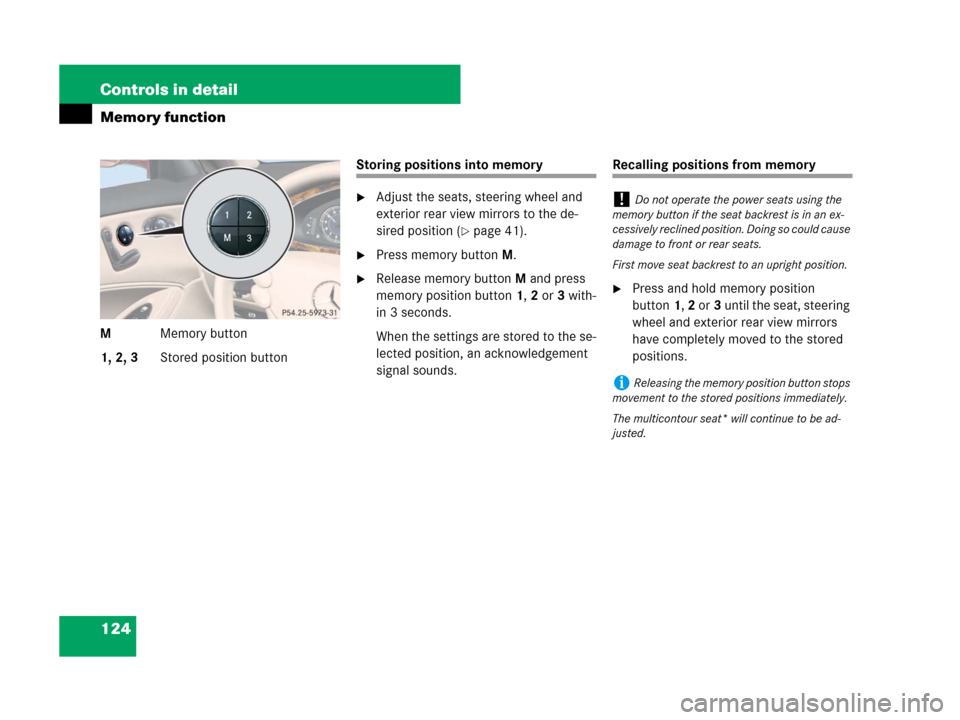
MMemory button
1, 2, 3Stored position button
Storing positions into memory
�Adjust the seats, steering wheel and
exterior rear view mirrors to the de-
sired position (
�page 41).
�Press memory buttonM.
�Release memory buttonM and press
memory position button 1, 2 or 3 with-
in 3 seconds.
When the settings are stored to the se-
lected position, an acknowledgement
signal sounds.
Recalling positions from memory
�Press and hold memory position
button1, 2 or3 until the seat, steering
wheel and exterior rear view mirrors
have completely moved to the stored
positions.
!Do not operate the power seats using the
memory button if the seat backrest is in an ex-
cessively reclined position. Doing so could cause
damage to front or rear seats.
First move seat backrest to an upright position.
iReleasing the memory position button stops
movement to the stored positions immediately.
The multicontour seat* will continue to be ad-
justed.
Page 126 of 481
125 Controls in detail
Memory function
Storing exterior rear view mirror
parking position
For easier parking, you can adjust the pas-
senger-side exterior rear view mirror so
that you can see the right rear wheel as
soon as you engage reverse gearR.
For information on activating the parking
position, see “Activating exterior rear view
mirror parking position” (
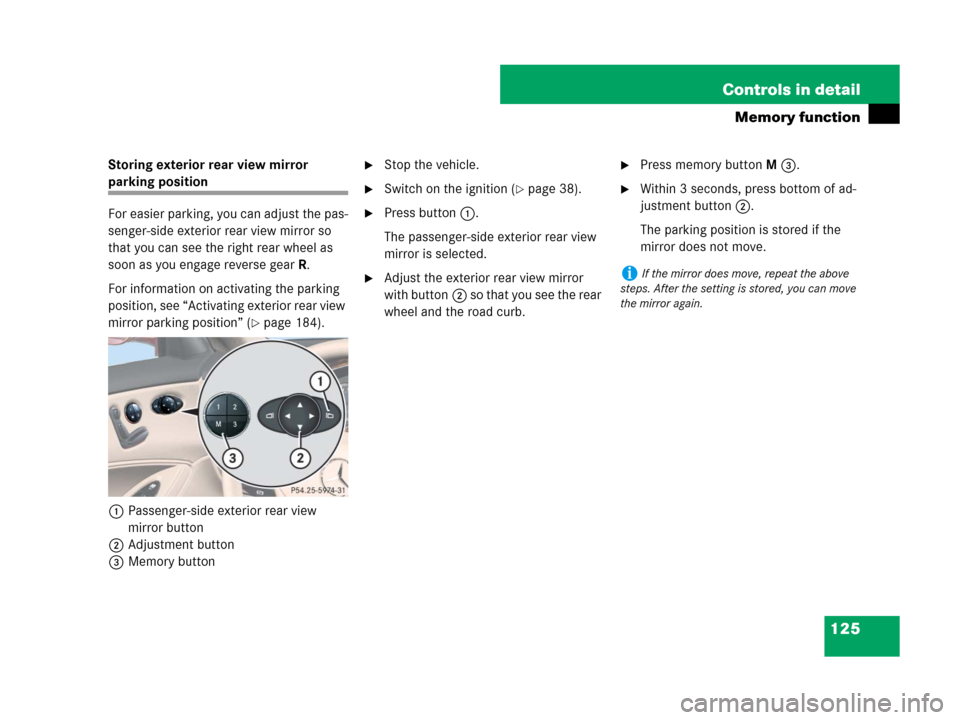
�page 184).
1Passenger-side exterior rear view
mirror button
2Adjustment button
3Memory button
�Stop the vehicle.
�Switch on the ignition (�page 38).
�Press button1.
The passenger-side exterior rear view
mirror is selected.
�Adjust the exterior rear view mirror
with button2 so that you see the rear
wheel and the road curb.
�Press memory buttonM3.
�Within 3 seconds, press bottom of ad-
justment button2.
The parking position is stored if the
mirror does not move.
iIf the mirror does move, repeat the above
steps. After the setting is stored, you can move
the mirror again.
Page 135 of 481
134 Controls in detail
Lighting
Manual control
Switching front/rear interior lighting on
and off
�Press front/rear interior lighting
switch4 or2 to switch on the
desired interior light.
�Press front/rear interior lighting
switch4 or2 again to switch off the
respective interior light.
Switching front reading lamps on and off
The front reading lamps are located in the
interior rear view mirror.
�Press front reading lamp
switch1or5 to switch on the
desired front reading lamp.
�Press front reading lamp
switch1or5 again to switch off the
respective front reading lamp.Ambient lighting
You can switch the ambient lighting7
(
�page 133) on and off, using the “Control
system” (
�page 161).
Interior lighting in the rear
The overhead control panel is located
above the rear seat bench.
1Left reading lamp on/off
2Left reading lamp
3Right reading lamp
4Right reading lamp on/off
5Rear interior lamp
Page 184 of 481

183 Controls in detail
Good visibility
�Good visibility
For information on windshield wipers, see
“Windshield wipers” (
�page 56).
Headlamp cleaning system*
The headlamps will automatically be
cleaned with a high-pressure water jet
when you have
�switched on the headlamps
and
�operated the windshield wipers with
washer fluid five times
When you switch off the ignition, the
counter resets.
For information on filling up the washer
reservoir, see “Washer system and
headlamp cleaning system*”
(
�page 292).
Rear view mirrors
For more information on setting the rear
view mirrors, see “Mirrors” (
�page 47).
Auto-dimming mirrors
The reflection brightness of the exterior
rear view mirror on the driver’s side and
the interior rear view mirror will respond
automatically to glare when
�the ignition is switched on
and
�incoming light from headlamps falls on
the sensor in the interior rear view mir-
ror
The rear view mirrors will not react if
�reverse gear is engaged
�the interior lighting is turned on
Warning!G
The auto-dimming function does not react if
incoming light is not aimed directly at the
sensors in the interior rear view mirror.
The interior rear view mirror and the exterior
rear view mirror on the driver’s side do not
react, for example, if the rear window sun-
shade* is in raised position.
Light hitting the mirror(s) at certain angles
incident light) could blind you. As a result,
you may not be able to observe traffic con-
ditions and could cause an accident.
Warning!G
Exercise care when using the passen-
ger-side exterior rear view mirror. The mirror
surface is convex (outwardly curved surface
for a wider field of view). Objects in mirror
are closer than they appear. Check your in-
terior rear view mirror or glance over your
shoulder before changing lanes.
Page 185 of 481

184 Controls in detail
Good visibility
Activating exterior rear view mirror
parking position
Follow these steps to activate the mirror
parking position so that the passen-
ger-side exterior rear view mirror will be
turned downward to the stored position.
The buttons are located on the driver’s
door.
1Driver’s side exterior rear view mirror
button
2Passenger-side exterior rear view
mirror button�Switch on the ignition (�page 38).
�Make sure you have stored a parking
position for the passenger-side exterior
rear view mirror (
�page 125).
�Press button2 for the passenger-side
exterior rear view mirror.
�Place the gear selector lever in reverse
gearR.
The passenger-side exterior rear view
mirror will be turned downward to the
stored position.The exterior rear view mirror returns to its
previously stored driving position:
�10 seconds after you put the gear
selector lever out of positionR
�immediately once you exceed a vehicle
speed of approximately 6 mph
(10 km/h)
�immediately when you press button1
for driver’s side mirror.
Sun visors
The sun visors protect you from sun glare
while driving.
Warning!G
Do not use the vanity mirror while driving.
Keep the mirrors in the sun visors closed
while vehicle is in motion. Reflected glare
can endanger you and others.