2008 MERCEDES-BENZ A-CLASS HATCHBACK service
[x] Cancel search: servicePage 77 of 305
Seat belts
74 intended level of protection. Under certain
circumstances this could cause severe or
even fatal injuries.
For this reason, check regularly that the
seat belts are not damaged or dirty.
Always have damaged seat belts or seat
belts that have been subjected to a load in
an accident replaced at a qualified special-
ist workshop. Choose a qualified specialist
workshop which has the necessary special-
ist knowledge and tools for the work
required. Mercedes-Benz recommends
that you use a Mercedes-Benz Service
Centre for this purpose.
For safety reasons, Mercedes-Benz recom-
mends that you only use seat belts which
have been approved by Mercedes-Benz for
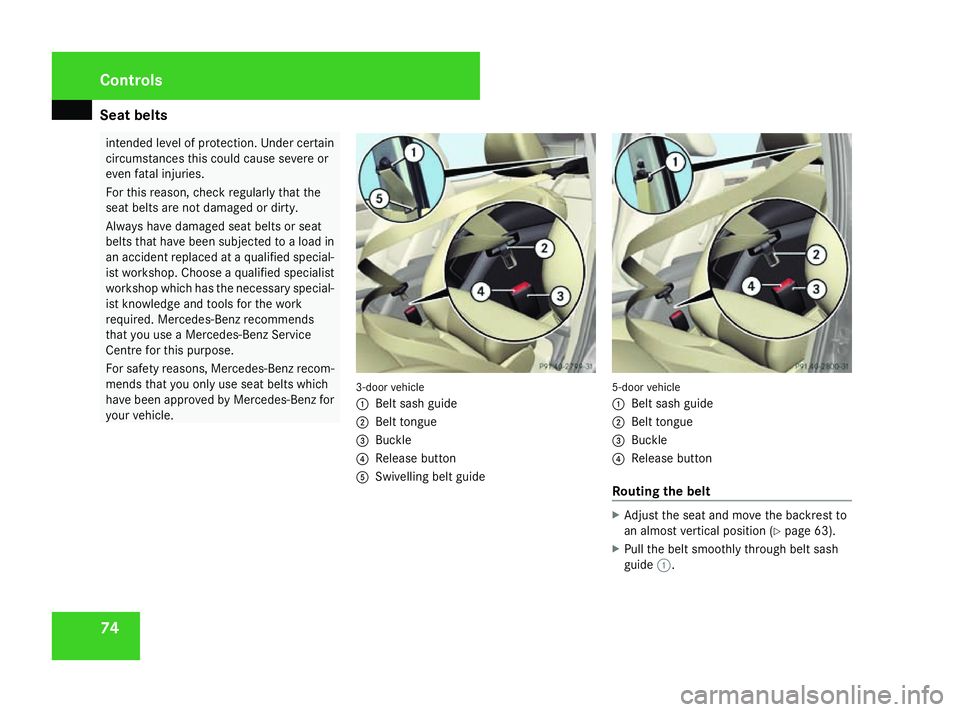
your vehicle. 3-door vehicle
1
Belt sash guide
2 Belt tongue
3 Buckle
4 Release button
5 Swivelling belt guide 5-door vehicle
1
Belt sash guide
2 Belt tongue
3 Buckle
4 Release button
Routing the belt X
Adjust the seat and move the backrest to
an almost vertical position (Y page 63).
X Pull the belt smoothly through belt sash
guide 1. Controls
169_AKB; 2; 4, en-GB
wdomann,
Version: 2.10.6
2008-07-16T08:52:06+02:00 - Seite 74 Dateiname: 6515_0315_02_buchblock.pdf; preflight
Page 80 of 305

Lights
77
Make sure that:
R
you are as far away from the driver's front
airbag as possible
R you are sitting in a normal upright posi-
tion
R you can fasten the seat belt properly
R you have moved the backrest to an
almost vertical position
R you have set the seat angle so that your
thighs are gently supported
R you can depress the pedals properly
R you have adjusted the head restraint so
that the back of your head is supported
at eye level by the central area of the
head restraint
X Check whether steering wheel 1is adjus-
ted properly (Y page 70).
Make sure that:
R you can hold the steering wheel with your
arms slightly bent
R you can move your legs freely
R you can see all the displays in the instru-
ment cluster clearly
X Check whether you have fastened seat belt
2 properly (Y page 73). It should:
R
fit snugly across your body
R be routed across the middle of your
shoulder
R routed in your pelvic area across the hip
joints Lights
Light switch
For safety reasons, Mercedes-Benz recom-
mends that you drive with the lights switched
on even during the daytime. In some coun-
tries, daytime operation of headlamps varies
due to legal and voluntary requirements. In
these countries, the constant headlamp
mode is automatically switched on when the
engine is started.
i If you drive in countries in which traffic
drives on the opposite side of the road to
the country where the vehicle is registered,
oncoming traffic may be dazzled by the
asymmetrical dipped-beam headlamps.
Have the headlamps changed to symmet-
rical dipped beam when driving in these
countries. You can obtain information
about this from any Mercedes-Benz Service
Centre. Controls
169_AKB; 2; 4, en-GB
wdomann,
Version: 2.10.6 2008-07-16T08:52:06+02:00 - Seite 77 ZDateiname: 6515_0315_02_buchblock.pdf; preflight
Page 100 of 305

Instrument cluster
97Instrument cluster
Points to remember
You will find an illustration of the instrument
cluster in the "At a glance" section
(Y page 26). G
Risk of accident
No further messages can be displayed if the
instrument cluster and/or the multi-func-
tion display fails.
This means that you will not see information
about the driving situation, such as the
speed, outside temperature, warning/indi-
cator lamps, display messages or system
failures. The vehicle's handling character-
istics may be affected. Adjust your driving
style and speed accordingly.
Immediately consult a qualified specialist
workshop which has the necessary special-
ist knowledge and tools to carry out the
work required. Mercedes-Benz recom-
mends that you use a Mercedes-Benz
Service Centre for this purpose. In particu-
lar, work relevant to safety or on safety-
related systems must be carried out at a
qualified specialist workshop. Activating the multi-function display
X Switch on the ignition. The multi-function display is also activated
when you:
R
switch on the lights
R press reset button 1
R open the driver's door Adjusting the instrument cluster
ligh
ting
X Brighter or dimmer: briefly turn reset but-
ton 1clockwise or anti-clockwise to the
stop and release.
The brightness of the instrument cluster
lighting changes by one level. There are
several possible levels. Coolant temperature gauge
The coolant temperature gauge is in the
instrument cluster on the left-hand side.
Under normal operating conditions and with
the specified coolant level, the coolant tem-
perature may rise to 120 †. The coolant tem-
perature may rise to the top end of the scale
at high outside temperatures and on long
uphill stretches. Controls
169_AKB; 2; 4, en-GB
wdomann, Version: 2.10.6 2008-07-16T08:52:06+02:00 - Seite 97 ZDateiname: 6515_0315_02_buchblock.pdf; preflight
Page 105 of 305

On-board computer
102 Function
1
Operation
menu (Ypage 102)
R trip meter and total distance
recorder (standard display)
(Y page 103)
R tyre pressure loss warning
(Y page 179)
R digital speedometer or outside tem-
perature (Y page 103)
R ASSYST PLUS service interval dis-
play (Y page 191)
R Engine oil level* (Y page 173)2
Audio*/DVD*menu (Y
page 103)
R radio station (Y page 103)
R CD player* (Y page 104)
R audio drive or
media* ( Ypage 104)
R DVD video* (Y page 105) 3
Navigation* menu (NAV)
(Y
page 105) Function
4
Message memory
10
menu (Display
messages) ( Ypage 106) 5
Settings
menu (Ypage 106)
R resetting to factory settings
(Y page 106)
R selecting submenus (Y page 107) 6
Trip computer
menu (Ypage 112)
R consumption statistics
(Y page 112)
R range (Y page 113) 7
Telephone* menu (Y
page 113) The number of menus shown depends on the
optional equipment in the vehicle.
The generic terms in the table overview are
intended to help you navigate through the
menus. The terms themselves are not always
displayed in the multi-function display.
For the Audio 5*, the on-board computer dis-
plays the
Audio* and Telephone* menus in
English. The language for these menus is not
dependent on the language selected for the
multi-function display. Audio 20*, Audio 50 APS* and COMAND
APS*:
Depending on the audio system* fitted, the
Audio*, Navigation* and Telephone*
menus are slightly different. The examples
given in this Owner's Manual apply to vehicles
equipped with COMAND APS*. Operation menu
i Please refer to the menu overview
(Y page 101).
Use the buttons on the multi-function steer-
ing wheel.
X Press the èor· button to select the
standard display.
You can select the following functions in the
Operation menu by pressing the jor
k button:
R trip meter and total distance recorder
(standard display)
R tyre pressure loss warning (Y page 179)
R digital speedometer or outside tempera-
ture
10 The menu is only visible when there is a display message. Controls
* optional
169_AKB; 2; 4, en-GB
wdomann,
Version: 2.10.6
2008-07-16T08:52:06+02:00 - Seite 102 Dateiname: 6515_0315_02_buchblock.pdf; preflight
Page 106 of 305

On-board computer
103
R
ASSYST PLUS service interval display
(Y page 191)
R engine oil level* (Y page 173)
Standard display 1
Trip meter
2 Total distance
Displaying the digital speedometer or
outside temperature If you have selected the digital speedometer
for the status line (Y
page 108), select the
outside temperature display here 11
. Digital speedometer (example)
X
Press the jork button to select
digital speedometer 1or the outside tem-
perature. Audio*/DVD* menu
Use the functions in the Audio/DVDmenu to
operate the audio equipment* or COMAND
APS*.
i Please refer to the menu overview
(Y page 101).
Use the buttons on the multi-function steer-
ing wheel. Selecting a radio station You can only store new stations using the
audio system
*or COMAND APS* (see sepa-
rate operating instructions).
X Switch on the audio system* or COMAND
APS* and select Radio (see separate oper-
ating instructions).
X Use the èor· button to select the
Audio/DVD menu.
Audio 5*:
X Press the jork button to select the
desired station.
The type of search depends on the radio
station selection settings (Y page 111).
The next stored station is selected, or the
station search starts.
11 Vehicles for the United Kingdom: the outside temperature is displayed permanently. Controls
* optional
169_AKB; 2; 4, en-GB
wdomann,
Version: 2.10.6 2008-07-16T08:52:06+02:00 - Seite 103 ZDateiname: 6515_0315_02_buchblock.pdf; preflight
Page 116 of 305

On-board computer
113
Resetting X
Using èor·, select From start.
X Press the jork button to select the
function that you wish to reset.
X Press and hold the reset button on the left
of the instrument cluster until the values
have reverted to "0".
Calling up the range X
Using èor·, select From start.
X Press the jork button to select
Range:.
The multi-function display shows the esti-
mated range of the vehicle, based on the
current driving style and the fuel level. If
there is only a small amount of fuel remain-
ing in the fuel tank, a vehicle refuelling
¿ appears instead of the range. Telephone menu*
Functions and displays depend on the
optional equipment installed in your vehicle.
You can place your mobile phone in the
mobile phone bracket* (Y page 164), or set
up a Bluetooth connection to the audio sys-
tem* or COMAND APS* (see separate oper-
ating instructions). G
Risk of accident
You must observe the legal requirements
for the country in which you are currently
driving when operating a mobile phone in
the vehicle.
If it is permitted to operate a mobile phone
while the vehicle is in motion, only operate
it when road and traffic conditions permit.
You could otherwise be distracted from the
traffic conditions, cause an accident and
injure yourself and others.
i Please refer to the menu overview
(Y page 101).
Use the buttons on the multi-function steer-
ing wheel. X
Switch on the mobile phone and audio
equipment* or COMAND APS* (see sepa-
rate operating instructions).
X Press the èor· button to select the
Telephone menu.
Mobile phone on PIN code not yet entered
Once you have inserted the mobile phone into
the mobile phone bracket*, the multi-func-
tion display shows the
PINdisplay message.
X Enter the PIN using the mobile phone, Lin-
guatronic*, the audio system *or COMAND
APS*.
The mobile phone will search for a network.
Mobile phone operational
You will see Readyor the name of the mobile
phone network provider in the multi-function
display. If the operational readiness symbol
of the mobile phone goes out, your vehicle is
outside the transmission and reception
range. In this case you will see No Service
in the multi-function display. Controls
* optional
169_AKB; 2; 4, en-GB
wdomann,
Version: 2.10.6 2008-07-16T08:52:06+02:00 - Seite 113 ZDateiname: 6515_0315_02_buchblock.pdf; preflight
Page 133 of 305
Air conditioning
130 General notes
The air-conditioning system*/
Thermotronic* controls the temperature and
the humidity of the vehicle interior and filters
out undesirable substances from the air.
Heatmatic/the air-conditioning system*/
Thermotronic* is only operational when the
engine is running. Optimum operation is ach-
ieved only when you drive with the side win-
dows and panorama louvred sliding sun-
roof* closed. i
Ventilate the vehicle for a brief period
during warm weather, e.g. using the con-
venience opening feature (Y page 86). This
will speed up the cooling process and the
desired vehicle interior temperature will be
reached more quickly.
i The integrated filter filters out most par-
ticles of dust and completely filters out pol-
len. A clogged filter reduces the amount of
air supplied to the vehicle interior. For this
reason, you should always observe the interval for replacing the filter, which is
specified in the Service Booklet. As it
depends on environmental conditions, e.g.
heavy air pollution, the interval may be
shorter than stated in the Service Booklet. G
Risk of accident
Observe the settings recommended on the
following pages. The windows could other-
wise mist up. This may obstruct your view
of the traffic situation, thereby causing an
accident. Cont
rols
* optional
169_AKB; 2; 4, en-GB
wdomann
,V ersion: 2.10.6
2008-07-16T08:52:06+02:00 - Seite 130 Dateiname: 6515_0315_02_buchblock.pdf; preflight
Page 149 of 305
Loading and stowing
146
R
Always place the load against the rear seat
backrests or the seat cushions if these
have been folded forwards.
R The maximum load capacity of the stowage
well under the luggage compartment floor
is 25 kg.
R Always place the load behind unoccupied
seats if possible.
R Secure the load with sufficiently strong and
wear-resistant load restraints. Pad sharp
edges for protection.
i Load restraints are available at any quali-
fied specialist workshop, e.g. a Mercedes-
Benz Service Centre. R
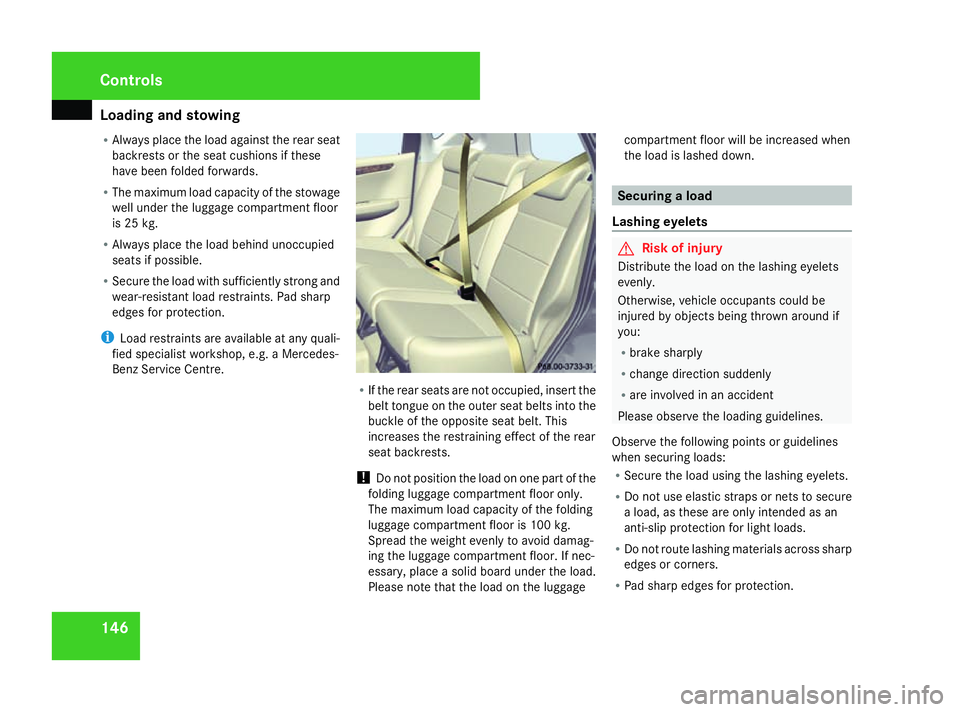
If the rear seats are not occupied, insert the
belt tongue on the outer seat belts into the
buckle of the opposite seat belt. This
increases the restraining effect of the rear
seat backrests.
! Do not position the load on one part of the
folding luggage compartment floor only.
The maximum load capacity of the folding
luggage compartment floor is 100 kg.
Spread the weight evenly to avoid damag-
ing the luggage compartment floor. If nec-
essary, place a solid board under the load.
Please note that the load on the luggage compartment floor will be increased when
the load is lashed down. Securing a load
Lashing eyelets G
Risk of injury
Distribute the load on the lashing eyelets
evenly.
Otherwise, vehicle occupants could be
injured by objects being thrown around if
you:
R brake sharply
R change direction suddenly
R are involved in an accident
Please observe the loading guidelines.
Observe the following points or guidelines
when securing loads:
R Secure the load using the lashing eyelets.
R Do not use elastic straps or nets to secure
a load, as these are only intended as an
anti-slip protection for light loads.
R Do not route lashing materials across sharp
edges or corners.
R Pad sharp edges for protection. Controls
169_AKB; 2; 4, en-GB
wdomann,
Version: 2.10.6 2008-07-16T08:52:06+02:00 - Seite 146Dateiname: 6515_0315_02_buchblock.pdf; preflight