2008 MERCEDES-BENZ A-CLASS HATCHBACK heating
[x] Cancel search: heatingPage 118 of 305

Driving sys
tems 115Driving systems
Overview of driving systems
The vehicle's driving systems are described
on the following pages:
R Cruise control* and Speedtronic*, which
are used to control the speed of the vehicle
R Parktronic * and active parking assist*,
which can help you to find a parking space,
to manoeuvre and park
R ECO Start-Stop function*, helps you to
save fuel
The ABS, BAS, adaptive brake lights, ESP ®
and STEER CONTROL driving safety systems
are described in the "Driving safety systems"
section ( Ypage 55). Cruise control*
Cruise control maintains a constant road
speed for you. You must select a low gear in
good time on long and steep downhill gradi-
ents, especially if the vehicle is laden or tow-
ing a trailer. By doing so you will make use of
the braking effect of the engine, which
relieves the load on the brake system and
prevents the brakes from overheating and
wearing too quickly. G
Risk of accident
Never depress the brake pedal continu-
ously while the vehicle is in motion, e.g.
never cause the brakes to rub by applying
constant slight pedal pressure. This causes
the brake system to overheat, increases
the braking distance and can lead to the
brakes failing completely. G
Risk of accident
Do not change down for additional engine
braking on a slippery road surface. This
could cause the drive wheels to lose their
grip and the vehicle could skid.
Use cruise control only if road and traffic con-
ditions make it appropriate to maintain a
steady speed for a prolonged period. You can
store any road speed above 30 km/h. G
Risk of accident
Cruise control cannot take account of road
and traffic conditions.
Always pay attention to traffic conditions
even when cruise control is activated.
Cruise control is only an aid designed to
assist driving. You are responsible for the
vehicle's speed and for braking in good
time. G
Risk of accident
Do not use cruise control:
R in road and traffic conditions which do
not allow you to maintain a constant
speed (e.g. heavy traffic or winding
roads). You could otherwise cause an
accident.
R on slippery roads. Braking or accelerat-
ing could cause the drive wheels to lose
traction and the vehicle could then skid.
R when there is poor visibility, e.g. due to
fog, heavy rain or snow
Cruise control lever You can operate cruise control and variable
Speedtronic with the cruise control lever. Controls
* optional
169_AKB; 2; 4, en-GB
wdomann,
Version: 2.10.6 2008-07-16T08:52:06+02:00 - Seite 115 ZDateiname: 6515_0315_02_buchblock.pdf; preflight
Page 120 of 305
Driving sys
tems 117
Setting a speed X
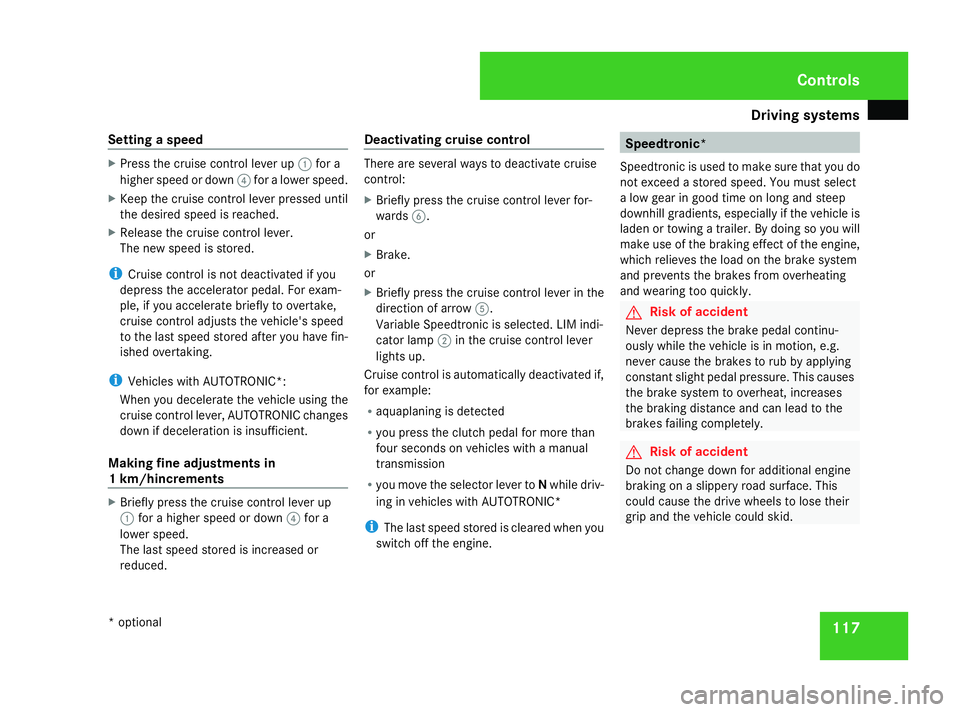
Press the cruise control lever up 1for a
higher speed or down 4for a lower speed.
X Keep the cruise control lever pressed until
the desired speed is reached.
X Release the cruise control lever.
The new speed is stored.
i Cruise control is not deactivated if you
depress the accelerator pedal. For exam-
ple, if you accelerate briefly to overtake,
cruise control adjusts the vehicle's speed
to the last speed stored after you have fin-
ished overtaking.
i Vehicles with AUTOTRONIC*:
When you decelerate the vehicle using the
cruise control lever, AUTOTRONIC changes
down if deceleration is insufficient.
Making fine adjustments in
1 km/hincrements X
Briefly press the cruise control lever up
1 for a higher speed or down 4for a
lower speed.
The last speed stored is increased or
reduced. Deactivating cruise control There are several ways to deactivate cruise
control:
X Briefly press the cruise control lever for-
wards 6.
or
X Brake.
or
X Briefly press the cruise control lever in the
direction of arrow 5.
Variable Speedtronic is selected. LIM indi-
cator lamp 2in the cruise control lever
lights up.
Cruise control is automatically deactivated if,
for example:
R aquaplaning is detected
R you press the clutch pedal for more than
four seconds on vehicles with a manual
transmission
R you move the selector lever to Nwhile driv-
ing in vehicles with AUTOTRONIC*
i The last speed stored is cleared when you
switch off the engine. Speedtronic*
Speedtronic is used to make sure that you do
not exceed a stored speed. You must select
a low gear in good time on long and steep
downhill gradients, especially if the vehicle is
laden or towing a trailer. By doing so you will
make use of the braking effect of the engine,
which relieves the load on the brake system
and prevents the brakes from overheating
and wearing too quickly. G
Risk of accident
Never depress the brake pedal continu-
ously while the vehicle is in motion, e.g.
never cause the brakes to rub by applying
constant slight pedal pressure. This causes
the brake system to overheat, increases
the braking distance and can lead to the
brakes failing completely. G
Risk of accident
Do not change down for additional engine
braking on a slippery road surface. This
could cause the drive wheels to lose their
grip and the vehicle could skid. Controls
* optional
169_AKB; 2; 4, en-GB
wdomann,
Version: 2.10.6 2008-07-16T08:52:06+02:00 - Seite 117 ZDateiname: 6515_0315_02_buchblock.pdf; preflight
Page 132 of 305
Air conditioning
129Air conditioning
Overview of air-conditioning systems
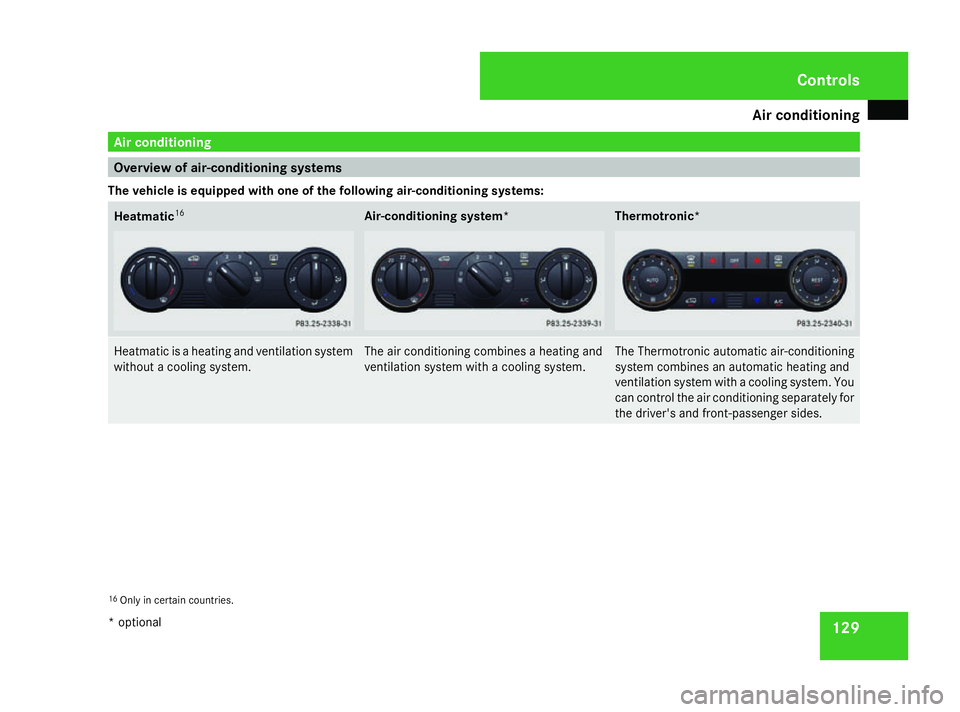
The vehicle is equipped with one of the following air-conditioning systems: Heatmatic
16 Air-conditioning system* Thermotronic*
Heatmatic is a heating and ventilation system
without a cooling system. The air conditioning combines a heating and
ventilation system with a cooling system. The Thermotronic automatic air-conditioning
system combines an automatic heating and
ventilation system with a cooling system. You
can control the air conditioning separately for
the driver's and front-passenger sides.
16
Only in certain countries. Cont
rols
* option al
169_AKB; 2; 4, en-GB
wdomann
,V ersion: 2.10.6
2008-07-16T08:52:06+02:00 - Seite 129 ZDateiname: 6515_0315_02_buchblock.pdf; preflight
Page 134 of 305
Air conditioning
131Overview of air-conditioning system functions
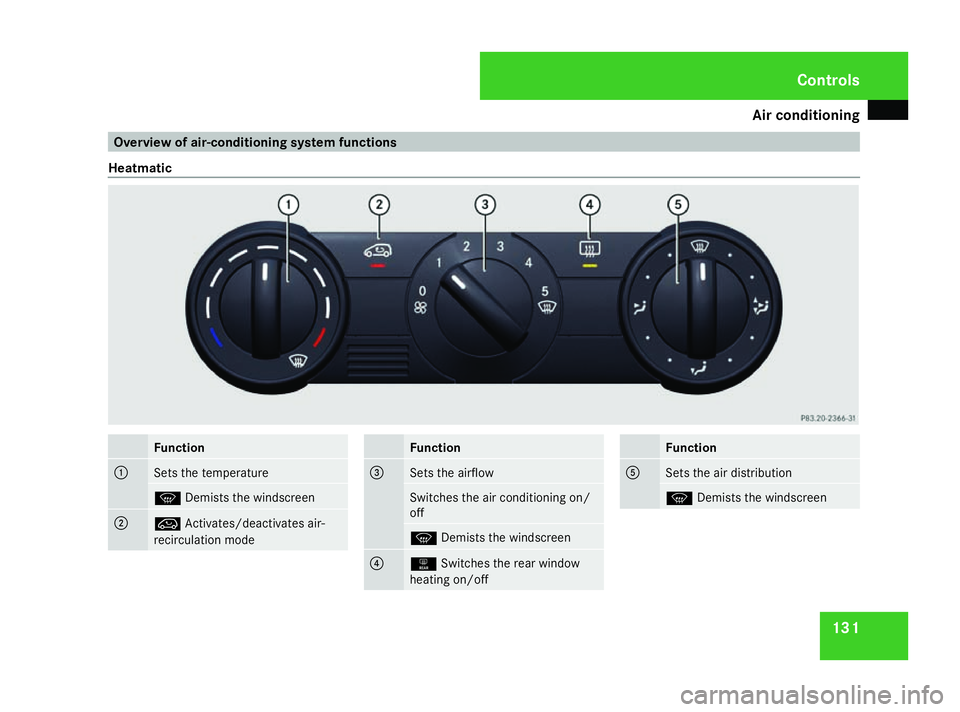
Heatmatic Function
1
Sets the temperature
P
Demists the windscreen 2
Ä
Activates/deactivates air-
recirculation mode Function
3
Sets the airflow
Switches the air conditioning on/
off
P
Demists the windscreen 4
1
Switches the rear window
heating on/off Function
5
Sets the air distribution
P
Demists the windscreen Cont
rols
169_AKB; 2; 4, en-GB
wdomann,
Version: 2.10.6
2008-07-16T08:52:06+02:00 - Seite 131 ZDateiname: 6515_0315_02_buchblock.pdf; preflight
Page 136 of 305

Air conditioning
133Function
1
Sets the temperature
P
Demists the windscreen 2
Ä
Activates/deactivates air-
recirculation mode 3
Sets the airflow
Switches the air conditioning on/
off
P
Demists the windscreen Function
4
1
Switches the rear window
heating on/off 5
Sets the air distribution
P
Demists the windscreen 6
œ
Switches cooling with air
dehumidification on/off i
Notes and recommendations on optimum
air conditioning:
R Activate the air conditioning by turning
control knob 3clockwise to the desired
position (except position 0).
R Set the temperature to 22 †. R
Only use the "demisting" function until
the windscreen is clear again.
R Only use the "air-recirculation mode"
briefly, e.g. when there are unpleasant
outside odours or when in a tunnel. Oth-
erwise, the windows could mist up due
to a lack of fresh air in air-recirculation
mode. Cont
rols
169_AKB; 2; 4, en-GB
wdomann,
Version: 2.10.6 2008-07-16T08:52:06+02:00 - Seite 133 ZDateiname: 6515_0315_02_buchblock.pdf; preflight
Page 137 of 305
Air conditioning
134
Thermotronic*
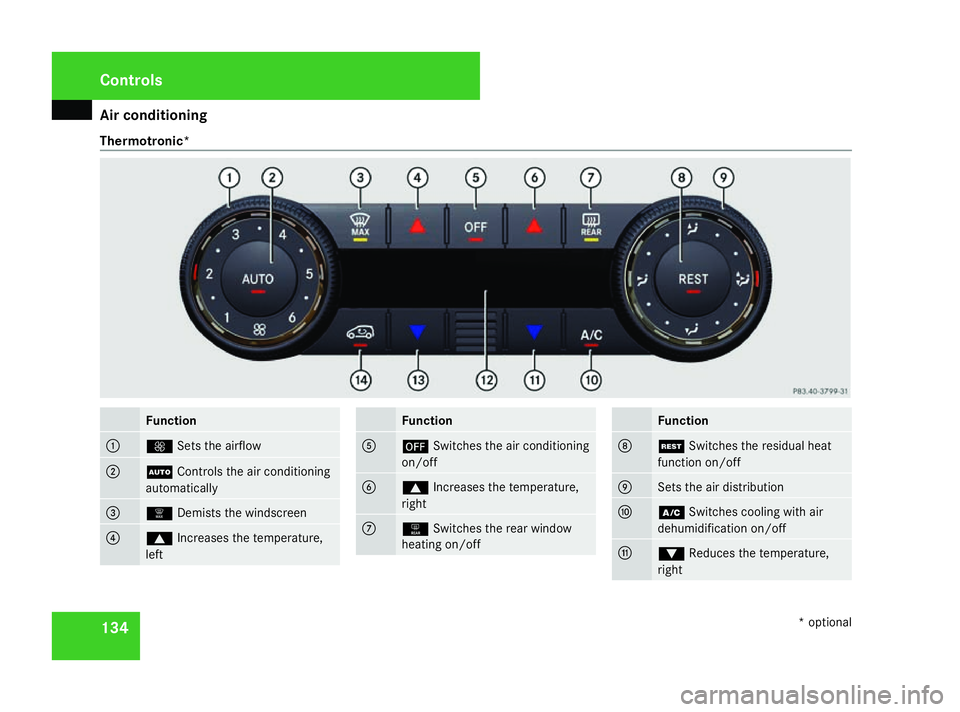
Function
1
Q
Sets the airflow 2
U
Controls the air conditioning
automatically 3
|
Demists the windscreen 4
$
Increases the temperature,
left Function
5
´
Switches the air conditioning
on/off 6
$
Increases the temperature,
right 7
1
Switches the rear window
heating on/off Function
8
T
Switches the residual heat
function on/off 9
Sets the air distribution
a
œ
Switches cooling with air
dehumidification on/off b
%
Reduces the temperature,
right Cont
rols
* optional
169_AKB; 2; 4, en-GB
wdomann
,V ersion: 2.10.6
2008-07-16T08:52:06+02:00 - Seite 134 Dateiname: 6515_0315_02_buchblock.pdf; preflight
Page 140 of 305

Air conditioning
137
Thermotronic* Different temperatures can be set for the
driver's and front-passenger sides.
X Turn the key to position 2in the ignition
lock.
X To increase/reduce: press the$or
% button. Only change the temperature
setting in small increments. Start at 22 †.
The temperature is shown in the display. Adjusting the air vents
G
Risk of injury
Very hot or very cold air can flow from the
air vents. This could cause burns or frost-
bite to bare skin in the immediate vicinity
of the vents. Keep bare skin away from
these air outlets. If necessary, direct the
airflow away to a different area of the vehi-
cle interior.
Please observe the following notes to ensure
that the air can flow freely through the air
vents:
R keep the air inlet between the windscreen
and the bonnet free of deposits, such as ice, snow and foliage, to guarantee the sup-
ply of fresh air into the vehicle interior.
R never cover the vents or air inlet and outlet
grilles in the vehicle interior.
i Position the sliders for the centre air
vents in the central detent position for vir-
tually draught-free ventilation.
Setting the centre air vents 1
Centre air vent, left
2 Centre air vent, right
3 Thumbwheel for centre air vent, right
4 Thumbwheel for centre air vent, left
X To open/close: turn thumbwheels 3and
4 up or down. Adjusting the side air vents
X
To open/close: turn thumbwheel 3up or
down.
i Demister vent 1is never shut com-
pletely, even if side air vent 2is shut.
Setting the glove compartment air
vent* The glove compartment can be ventilated, for
instance, to cool its contents, when the air
conditioning*/Thermotronic* is activated.
The level of airflow depends on the airflow and
air distribution settings.
! Close the glove compartment air vent
when heating mode is activated. Open the
air vent and activate "cooling with air dehu- Cont
rols
* option al
169_AKB; 2; 4, en-GB
wdomann
,V ersion: 2.10.6
2008-07-16T08:52:06+02:00 - Seite 137 ZDateiname: 6515_0315_02_buchblock.pdf; preflight
Page 143 of 305

Air conditioning
140
or
X
Press one of the $or% temperature
buttons.
The indicator lamp in the |button goes
out. The air distribution is directed towards
the windscreen. The air conditioning
switches to manual mode.
or
X Turn thumbwheel 1clockwise or anti-
clockwise (Y page 134).
The indicator lamp in the |button goes
out. The air distribution is directed towards
the windscreen. The air conditioning
switches to manual mode. Demisting the windows
Windows misted up on the inside X
Activate the "cooling with air dehumidifica-
tion" function 19
.
X Activate the automatic air conditioning. 20
X If the windows continue to mist up, activate
the "demisting" function.
Windows misted up on the outside X
Activate the windscreen wipers.
X Turn the air distribution thumbwheel to the
Y ora symbol.
i You should only select this setting until
the windscreen is clear again. Switching the rear window heating
on/off
G
Risk of accident
Clear all windows of ice or snow before set-
ting off. Impaired visibility could otherwise
endanger you and others.
i The rear window heating has a high cur-
rent draw. You should therefore switch it
off as soon as the window is clear, as it only
switches off automatically after several
minutes.
i If the battery voltage is too low, the rear
window heating may switch off.
X Turn the key to position 2in the ignition
lock.
X To activate, press the 121
/F 22
but-
ton.
The indicator lamp in the 1/Fbut-
ton lights up or goes out.
19 Vehicles with air conditioning*/Thermotronic*.
20 Vehicles with Thermotronic*.
21 Vehicles with an air-conditioning system*/Thermotronic*.
22 Vehicles with Heatmatic. Cont
rols
* optional
169_AKB; 2; 4, en-GB
wdomann
,V ersion: 2.10.6
2008-07-16T08:52:06+02:00 - Seite 140 Dateiname: 6515_0315_02_buchblock.pdf; preflight