39
Before
UseGetting
started
Routing
Character Entry
To enter
the street
name, city
name, and
other.
To enter
the house
phone
number,
and other.
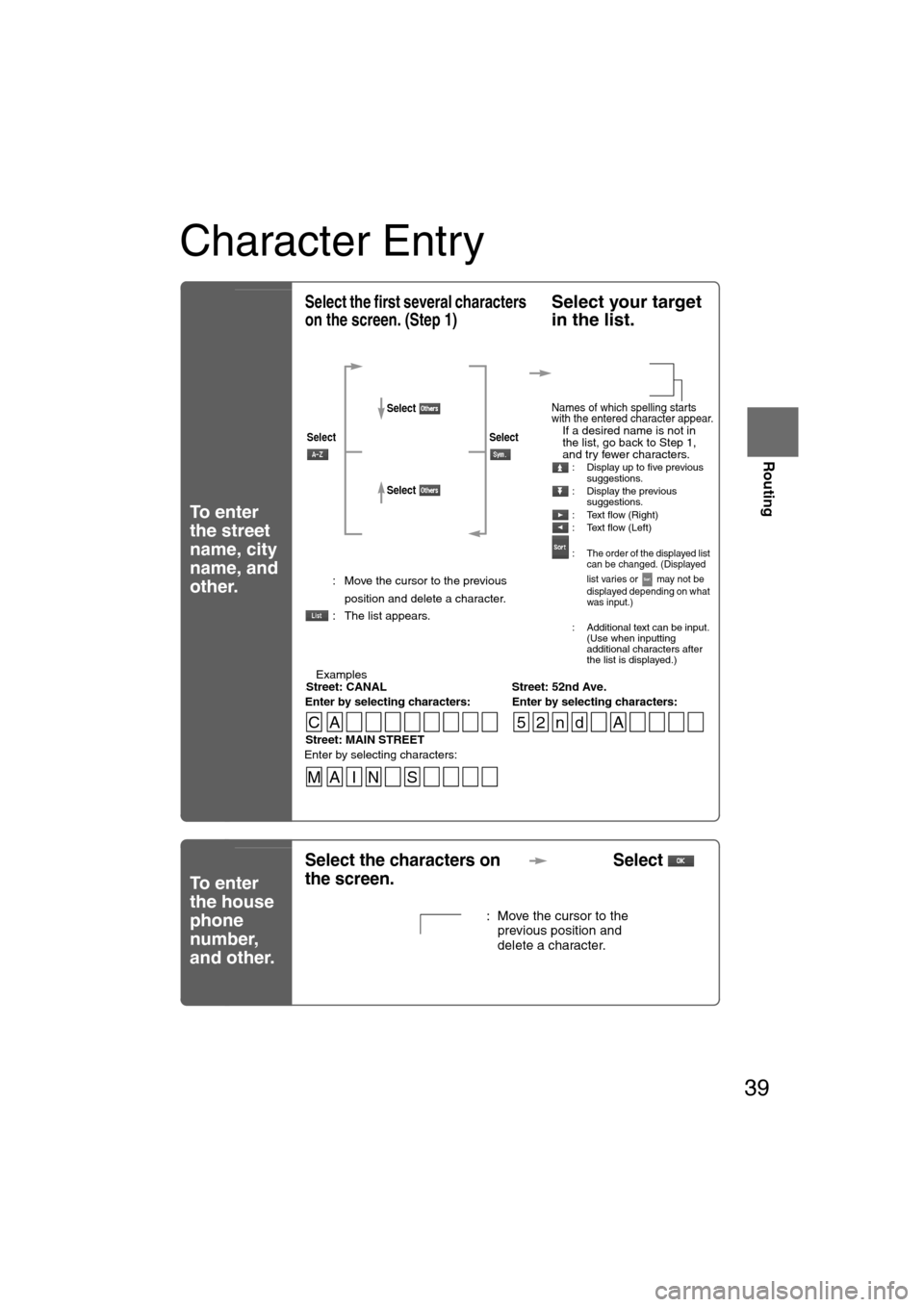
Select the first several characters
on the screen. (Step 1)Select your target
in the list.
lIf a desired name is not in
the list, go back to Step 1,
and try fewer characters.
: Display up to five previous
suggestions.
: Display the previous suggestions.
: Text flow (Right)
: Text flow (Left)
:
The order of the displayed list
can be changed. (Displayed
list varies or may not be
displayed depending on what
was input.)
: Additional text can be input. (Use when inputting
additional characters after
the list is displayed.)
: Move the cursor to the previous
position and delete a character.
: The list appears.
lExamples-Street: CANAL Street: 52nd Ave.
Enter by selecting characters: Enter by selecting characters:
SelectSelect
Select
Select
Names of which spelling starts
with the entered character appear.
-Street: MAIN STREET
Enter by selecting characters:
CA 52nd A
MA I N S
Select the characters on
the screen. Select
: Move the cursor to the
previous position and
delete a character.
1%>(%�C2%:-C)%�FSSO��4EKI�����8YIWHE]��%TVMP����������������41
47
Before
UseGetting
started
Routing
Address Book
Set a memory
point using your
preferred method.
Select a memory
point to be modified : Allows the display icon to be
selected. Page 1 and 2 contain
standard icons, whereas the
With Sound page contains icons
which also playback sounds.
(With direction icon function)
The beep alert only activates
when the vehicle approaches to
within about 500m of the memory
point from the set direction.
: Allows the name to be changed. When editing has been
completed, select .
Furthermore, select to
display names on the map, or
if these names are not to
be displayed.
: Allows memory points to be checked and modified on the
map screen. After checking.
: Allows the telephone number to be modified. When editing has
been completed, select .
Select a memory
point to be stored
in Preset
Destinations or
Home.:
Allows the storage
category to be
changed. Select the
button corresponding
to the new category. :Changes the category to
Preset Destinations
:Changes the category to Home
Select a memory
point to be
deleted.
: Cancel the deletion.
: Cancel the deletion.
Show all
icon or
ENTER
1%>(%�C2%:-C)%�FSSO��4EKI�����8YIWHE]��%TVMP����������������41