2008 MAZDA MODEL 3 5-DOOR water
[x] Cancel search: waterPage 81 of 412

Black plate (81,1)
NOTElAll doors and the liftgate cannot be locked
when any door or the liftgate is open and
the key is in the ignition switch.
lConfirm that all doors and the liftgate are
locked visually or audibly by use of the
double click.
Unlock button
To unlock the driver's door, press the
unlock button and the hazard warning
lights will flash twice.
To unlock all doors and the liftgate, press
the unlock button again within 5 seconds.
NOTE
(Without theft-deterrent system)
The hazard warning lights will flash twice to
indicate that all doors and the liftgate are
unlocked.
(With theft-deterrent system)
lThe hazard warning lights will not flash.lThe hazard warning lights only flash when
the theft deterrent system is armed or
turned off, refer to the theft-deterrent
system (page 3-27).
NOTE
Auto re-lock function
After unlocking with the transmitter, all doors
and the liftgate will automatically lock if one
of the doors or the liftgate is not opened within
about 30 seconds.
Panic button
If you witness from a distance someone
attempting to break into or damage your
vehicle, pressing the panic button will
activate the vehicle's alarm.
NOTE
The panic button will work whether any door
or the liftgate is open or closed.
Turning on the alarm
Pressing the panic button for 1 second or
more will trigger the alarm for about 2
minutes and 30 seconds, and the
following will occur:
lThe horn sounds intermittently.lThe hazard warning lights flash.
Turning off the alarm
Press any button on the transmitter.
q Transmitter Maintenance
CAUTION
Ø Make sure the battery is installed
with the correct pole facing
upward. Battery leakage could
occur if it is not installed correctly.
Ø When replacing the battery, be
careful not to bend the electrical
terminals or get oil on them. Also
be careful not to get dirt in the
transmitter as it could be
damaged.
Ø There is the danger of explosion if
the battery is not correctly
replaced.
Ø Replace only with the same type
battery.
ØIntegrated key type: CR1620 or
equivalent
ØNon-key type: CR2025 or
equivalent
Ø Dispose of used batteries
according to the following
instructions.
ØInsulate the plus and minus
terminals of the battery using
cellophane or equivalent tape.
ØNever disassemble.
ØNever throw the battery into
fire and/or water.
ØNever deform or crush.
Knowing Your Mazda
Doors and Locks
3-5
Mazda3_8Y64-EA-08A_Edition1 Page81
Tuesday, November 27 2007 9:0 AM
Form No.8Y64-EA-08A
Page 99 of 412
Black plate (99,1)
Moonroofí
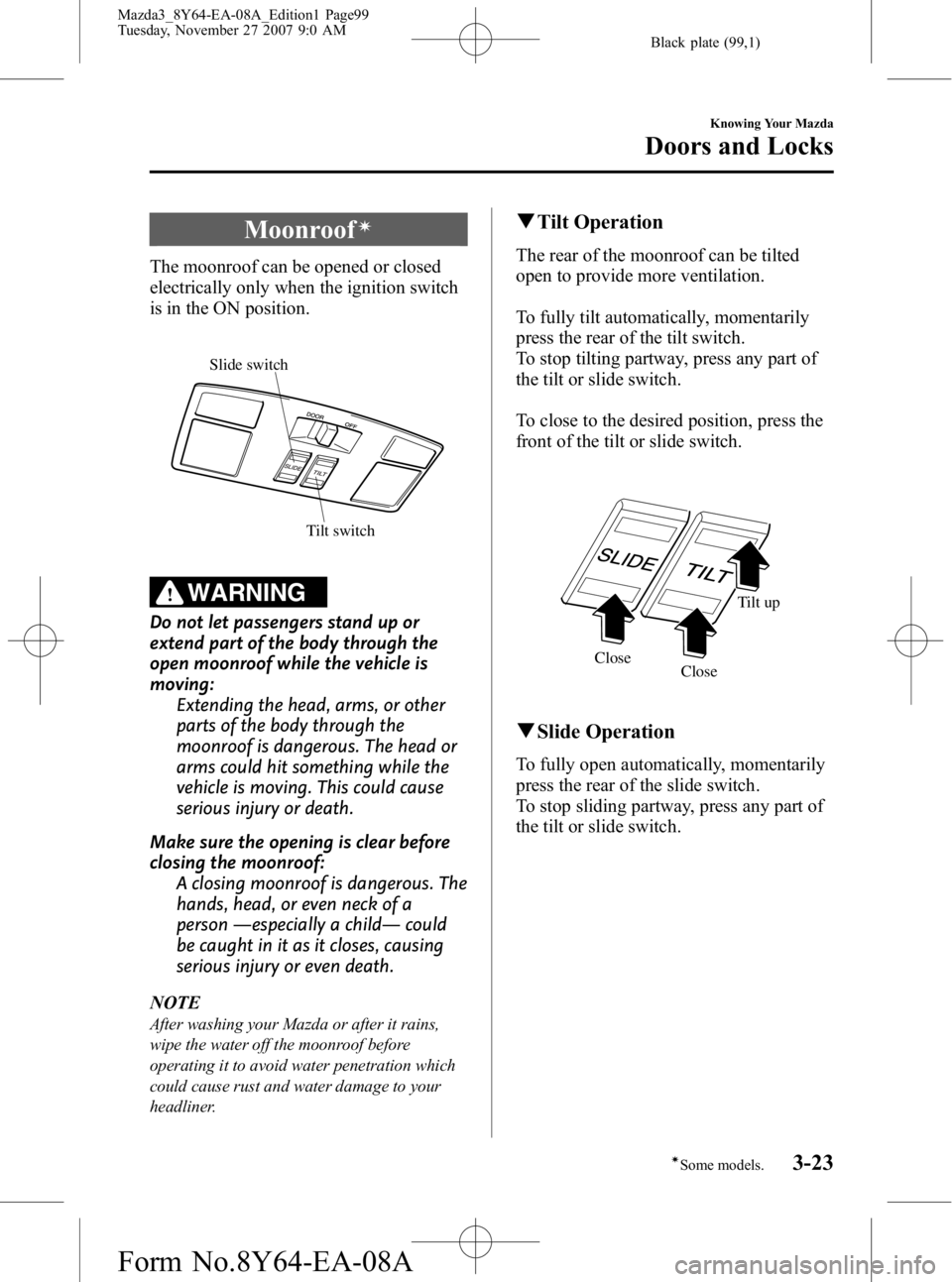
The moonroof can be opened or closed
electrically only when the ignition switch
is in the ON position.
Tilt switch
Slide switch
WARNING
Do not let passengers stand up or
extend part of the body through the
open moonroof while the vehicle is
moving:
Extending the head, arms, or other
parts of the body through the
moonroof is dangerous. The head or
arms could hit something while the
vehicle is moving. This could cause
serious injury or death.
Make sure the opening is clear before
closing the moonroof: A closing moonroof is dangerous. The
hands, head, or even neck of a
person ―especially a child ―could
be caught in it as it closes, causing
serious injury or even death.
NOTE
After washing your Mazda or after it rains,
wipe the water off the moonroof before
operating it to avoid water penetration which
could cause rust and water damage to your
headliner.
q Tilt Operation
The rear of the moonroof can be tilted
open to provide more ventilation.
To fully tilt automatically, momentarily
press the rear of the tilt switch.
To stop tilting partway, press any part of
the tilt or slide switch.
To close to the desired position, press the
front of the tilt or slide switch.
Close Tilt up
Close
q Slide Operation
To fully open automatically, momentarily
press the rear of the slide switch.
To stop sliding partway, press any part of
the tilt or slide switch.
Knowing Your Mazda
Doors and Locks
3-23íSome models.
Mazda3_8Y64-EA-08A_Edition1 Page99
Tuesday, November 27 2007 9:0 AM
Form No.8Y64-EA-08A
Page 116 of 412

Black plate (116,1)
Hazardous Driving
WARNING
Be extremely careful if it is necessary to
downshift on slippery surfaces:Downshifting into lower gear while
driving on slippery surfaces is
dangerous. The sudden change in tire
speed could cause the tires to skid.
This could lead to loss of vehicle
control and an accident.
Do not rely on ABS as a substitute for
safe driving: The ABS cannot compensate for
unsafe and reckless driving, excessive
speed, tailgating (following another
vehicle too closely), driving on ice and
snow, and hydroplaning (reduced tire
friction and road contact because of
water on the road surface). You can
still have an accident.
When driving on ice or in water, snow,
mud, sand, or similar hazards:
lBe cautious and allow extra distance
for braking.
lAvoid sudden braking and sudden
maneuvering.
lIf your vehicle is not equipped with
ABS, brake with the pedal by using a
light up-down motion. Do not hold the
pedal down constantly.
If your vehicle is equipped with ABS,
do not pump the brakes. Continue to
press down on the brake pedal.
Refer to Anti-Lock Brake System
(ABS) on page 5-7.
lIf you get stuck, select a lower gear and
accelerate slowly. Do not spin the front
wheels.
lFor more traction in starting on
slippery surfaces such as ice or packed
snow, use sand, rock salt, carpeting, or
other nonslip material under the front
wheels.
NOTE
Use snow chains only on the front wheels.
4-8
Before Driving Your Mazda
Driving Tips
Mazda3_8Y64-EA-08A_Edition1 Page116
Tuesday, November 27 2007 9:0 AM
Form No.8Y64-EA-08A
Page 119 of 412

Black plate (119,1)
Driving In Flooded Area
WARNING
Dry wet brakes by driving very slowly
and applying the brakes lightly until
brake performance returns to normal:Driving with wet brakes is
dangerous. Increased stopping
distance or the vehicle pulling to one
side when braking could result in a
serious accident. Light braking will
indicate whether the brakes have
been affected.
CAUTION
Do not drive the vehicle on flooded
roads as it could cause short
circuiting of electrical/electronic
parts, or engine damage or stalling
from water absorption. If the vehicle
has been immersed in water, consult
an Authorized Mazda Dealer.
Overloading
WARNING
Be careful not to overload your vehicle:The gross axle weight rating (GAWR)
and the gross vehicle weight rating
(GVWR) of your vehicle are on the
Motor Vehicle Safety Standard Label
on the driver's door frame. Exceeding
these ratings can cause an accident
or vehicle damage. You can estimate
the weight of your load by weighing
the items (or people) before putting
them in the vehicle.
Before Driving Your Mazda
Driving Tips
4-11
Mazda3_8Y64-EA-08A_Edition1 Page119
Tuesday, November 27 2007 9:0 AM
Form No.8Y64-EA-08A
Page 130 of 412

Black plate (130,1)
WARNING
Do not rely on ABS as a substitute for
safe driving:The ABS cannot compensate for
unsafe and reckless driving, excessive
speed, tailgating (following another
vehicle too closely), driving on ice and
snow, and hydroplaning (reduced tire
friction and road contact because of
water on the road surface). You can
still have an accident.
NOTE
lBraking distances may be longer on loose
surfaces (snow or gravel, for example)
which usually have a hard foundation. A
vehicle with a normal braking system may
require less distance to stop under these
conditions because the tires will build up a
wedge of surface layer when the wheels
skid.
lThe sound of the ABS operating may be
heard when starting the engine or
immediately after starting the vehicle.
However, it does not indicate a malfunction.
q ABS Warning Lightí
The warning light stays on for a few
seconds when the ignition switch is turned
to the ON position. If the ABS warning light stays on while
you're driving, the ABS control unit has
detected a system malfunction. If this
occurs, your brakes will function normally
as if the vehicle had no ABS.
Should this happen, consult an Authorized
Mazda Dealer as soon as possible.
NOTE
When the engine is jump-started to charge the
battery, uneven rpm occurs and the ABS
warning light comes on. This is due to a weak
battery, not a malfunction.
Recharge the battery.
q
Electronic Brake Force
Distribution System Warningí
If the electronic brake force distribution
control unit determines that some
components are operating incorrectly, the
control unit may turn the brake system
warning light and the ABS warning light
on at the same time. The problem is likely
to be the electronic brake force
distribution system.
5-8
Driving Your Mazda
íSome models.
Starting and Driving
Mazda3_8Y64-EA-08A_Edition1 Page130
Tuesday, November 27 2007 9:0 AM
Form No.8Y64-EA-08A
Page 145 of 412

Black plate (145,1)
Traction Control System
(TCS)
í
The Traction Control System (TCS)
enhances traction and safety by
controlling engine torque and braking.
When the TCS detects driving wheel
slippage, it lowers engine torque and
operates the brakes to prevent loss of
traction.
This means that on a slick surface, the
engine adjusts automatically to provide
optimum power to the drive wheels
without causing them to spin and lose
traction.
WARNING
Do not rely on the traction control
system as a substitute for safe driving:The traction control system (TCS)
cannot compensate for unsafe and
reckless driving, excessive speed,
tailgating (following another vehicle
too closely), and hydroplaning
(reduced tire friction and road
contact because of water on the road
surface). You can still have an
accident.
Use snow tires or tire chains and drive
at reduced speeds when roads are
covered with ice and/or snow: Driving without proper traction
devices on snow and/or ice-covered
roads is dangerous. The traction
control system (TCS) alone cannot
provide adequate traction and you
could still have an accident.
NOTE
To turn off the TCS, press the DSC OFF switch
(page 5-25).
q TCS/DSC Indicator Light
This indicator light stays on for a few
seconds when the ignition switch is turned
to the ON position. If the TCS or DSC is
operating, the indicator light flashes.
If the light stays on, the TCS or DSC may
have a malfunction and they may not
operate correctly. Take your vehicle to an
Authorized Mazda Dealer.
NOTE
lIn addition to the indicator light flashing, a
slight lugging sound will come from the
engine. This indicates that the TCS is
operating properly.
lOn slippery surfaces, such as fresh snow, it
will be impossible to achieve high rpm
when the TCS is on.
Driving Your Mazda
Starting and Driving
5-23íSome models.
Mazda3_8Y64-EA-08A_Edition1 Page145
Tuesday, November 27 2007 9:0 AM
Form No.8Y64-EA-08A
Page 146 of 412

Black plate (146,1)
Dynamic Stability Control
(DSC)
í
The Dynamic Stability Control (DSC)
automatically controls braking and engine
torque in conjunction with systems such
as ABS and TCS to help control side slip
when driving on slippery surfaces, or
during sudden or evasive maneuvering,
enhancing vehicle safety.
Refer to ABS (page 5-7) and TCS (page
5-23).
DSC operation is possible at speeds
greater than20 km/h (12 mph).
WARNING
Do not rely on the dynamic stability
control as a substitute for safe driving:The dynamic stability control (DSC)
cannot compensate for unsafe and
reckless driving, excessive speed,
tailgating (following another vehicle
too closely), and hydroplaning
(reduced tire friction and road
contact because of water on the road
surface). You can still have an
accident.
CAUTION
ØThe DSC may not operate correctly
unless the following are observed:
ØUse tires of the correct size
specified for your Mazda on all
four wheels.
ØUse tires of the same
manufacturer, brand and tread
pattern on all four wheels.
ØDo not mix worn tires.
Ø The DSC may not operate correctly
when tire chains are used or a
temporary spare tire is installed
because the tire diameter changes.
NOTE
After turning the ignition switch to the ON
position, a clicking sound may be heard behind
the dashboard. This sound is the result of the
DSC system self-check operation and does not
indicate an abnormality.
q TCS/DSC Indicator Light
This indicator light stays on for a few
seconds when the ignition switch is turned
to the ON position. If the TCS or DSC is
operating, the indicator light flashes.
If the light stays on, the TCS or DSC may
have a malfunction and they may not
operate correctly. Take your vehicle to an
Authorized Mazda Dealer.
5-24
Driving Your Mazda
íSome models.
Starting and Driving
Mazda3_8Y64-EA-08A_Edition1 Page146
Tuesday, November 27 2007 9:0 AM
Form No.8Y64-EA-08A
Page 151 of 412

Black plate (151,1)
Adjust the tire pressure to the correct tire
pressure. Refer to the specification charts
(page 10-8).
CAUTION
When replacing/repairing the tires or
wheels or both, have the work done
by an Authorized Mazda Dealer, or
the tire pressure sensors may be
damaged.NOTE
lPerform tire pressure adjustment when the
tires are cold. Tire pressure will vary
according to the tire temperature, therefore
let the vehicle stand for 1 hour or only drive
it 1.6 km (1 mile) or less before adjusting
the tire pressures. When pressure is
adjusted on hot tires to the cold inflation
pressure, the TPMS warning light/beep may
turn on after the tires cool and pressure
drops below specification.
Also, an illuminated TPMS warning light,
resulting from the tire air pressure dropping
due to cold ambient temperature, may go
out if the ambient temperature rises. In this
case, it will also be necessary to adjust the
tire air pressures. If the TPMS warning
light illuminates due to a drop in tire air
pressure, make sure to check and adjust the
tire air pressures.
lAfter adjusting the tire air pressures, it may
require some time for the TPMS warning
light to go out. If the TPMS warning light
remains illuminated, drive the vehicle at a
speed of at least 25 km/h (16 mph) for 10
minutes, and then verify that it goes out.
lTires can loose a little air quite naturally
over time and the TPMS cannot tell if the
tires are getting too soft over time or you
have a flat. However, when you find one
low tire in a set of four - that is an
indication of trouble; you should have
someone drive the vehicle slowly forward
so you can inspect any low tire for cuts and
any metal sticking through tread or
sidewall. Put a few drops of water in the
valve stem to see if it bubbles indicating a
bad valve. Leaks need to be addressed by
more than simply refilling the trouble tire as
leaks are dangerous - take it to an
Authorized Mazda Dealer which has all the
equipment to fix tires, TPMS systems and
order the best replacement tire for your
vehicle.
Driving Your Mazda
Starting and Driving
5-29
Mazda3_8Y64-EA-08A_Edition1 Page151
Tuesday, November 27 2007 9:0 AM
Form No.8Y64-EA-08A