Page 3 of 352
Maintenance and Specifications 308
Engine compartment 309
Engine oil 312
Battery 315
Engine coolant 317
Fuel information 323
Air filter(s) 335
Part numbers 338
Maintenance product specifications and capacities 339
Engine data 342
Accessories 345
Index 347
All rights reserved. Reproduction by any means, electronic or mechanical
including photocopying, recording or by any information storage and retrieval
system or translation in whole or part is not permitted without written
authorization from Ford Motor Company. Ford may change the contents without
notice and without incurring obligation.
Copyright © 2007 Ford Motor Company
Table of Contents
3
2008 Navigator(nav)
Owners Guide (post-2002-fmt)
USA(fus)
Page 11 of 352
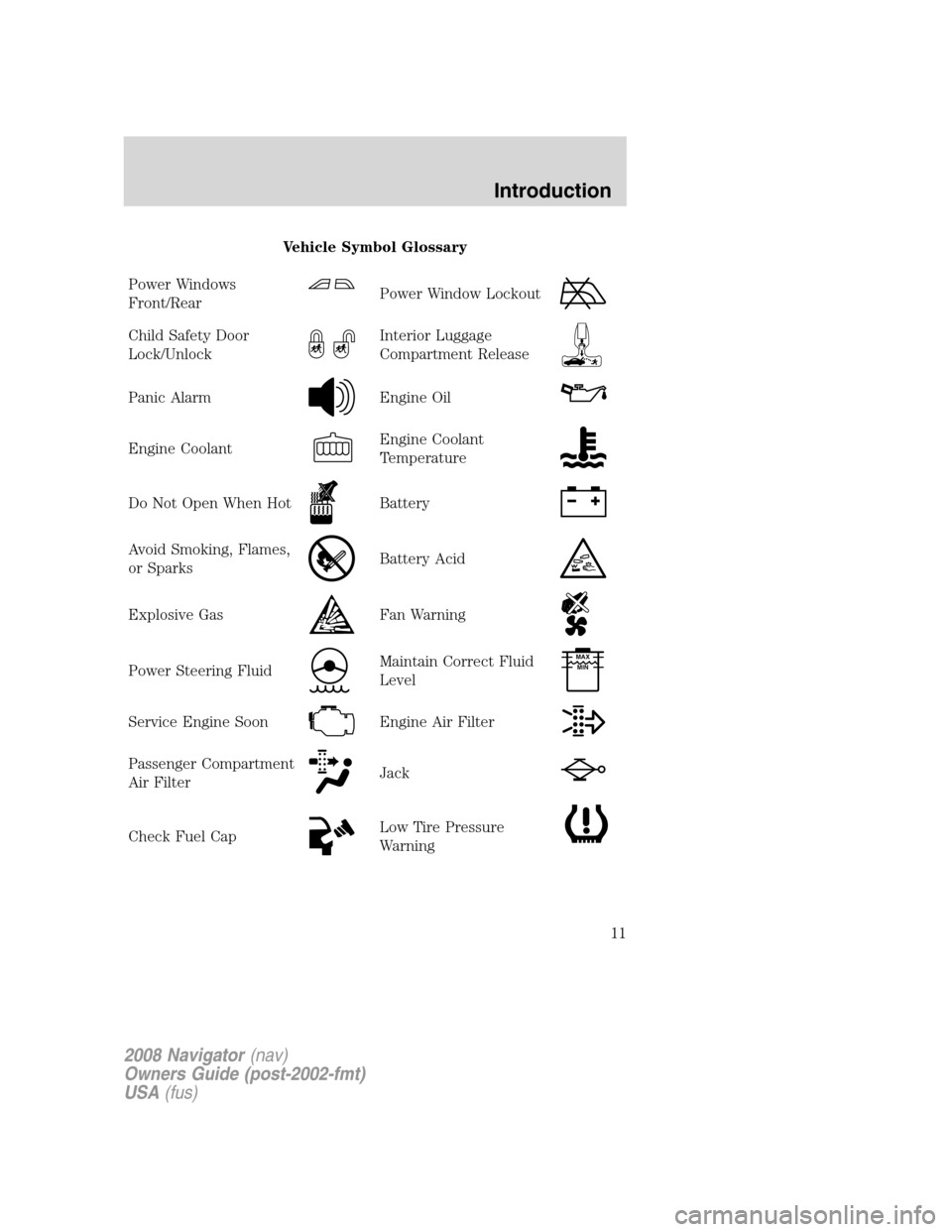
Vehicle Symbol Glossary
Power Windows
Front/Rear
Power Window Lockout
Child Safety Door
Lock/UnlockInterior Luggage
Compartment Release
Panic AlarmEngine Oil
Engine CoolantEngine Coolant
Temperature
Do Not Open When HotBattery
Avoid Smoking, Flames,
or SparksBattery Acid
Explosive GasFan Warning
Power Steering FluidMaintain Correct Fluid
LevelMAX
MIN
Service Engine SoonEngine Air Filter
Passenger Compartment
Air FilterJack
Check Fuel CapLow Tire Pressure
Warning
2008 Navigator(nav)
Owners Guide (post-2002-fmt)
USA(fus)
Introduction
11
Page 14 of 352

Airbag readiness:If this light fails
to illuminate when the ignition is
turned to ON, continues to flash or
remains on, have the system
serviced immediately by your authorized dealer. A chime will also sound
when a malfunction in the supplemental restraint system has been
detected.
Safety belt:Reminds you to fasten
your safety belt. A Belt-Minder�
chime will also sound to remind you
to fasten your safety belt. Refer to
theSeating and safety restraints
chapter to activate/deactivate the Belt-Minder�chime feature.
Charging system (RTT):Displays
when the battery is not charging
properly.
Anti-theft system:Flashes when
the SecuriLock™ Passive Anti-theft
System has been activated.
Engine oil pressure (RTT):
Displays when the oil pressure falls
below the normal range. Refer to
Engine oilin theMaintenance
and Specificationschapter.
Engine coolant temperature
(RTT):Displays when the engine
coolant temperature is high. Stop
the vehicle as soon as safely
possible, switch off the engine and
let it cool. Refer toEngine coolant
in theMaintenance and Specificationschapter.
Never remove the coolant reservoir cap while the engine is
running or hot.
2008 Navigator(nav)
Owners Guide (post-2002-fmt)
USA(fus)
Instrument Cluster
14
Page 19 of 352

Fuel gauge:Indicates
approximately how much fuel is left
in the fuel tank (when the ignition
is in the ON position). The fuel
gauge may vary slightly when the
vehicle is in motion or on a grade.
The ignition should be in the OFF position while the vehicle is being
refueled. When the gauge first indicates empty, there is a small amount
of reserve fuel in the tank. When refueling the vehicle from empty
indication, the amount of fuel that can be added will be less than the
advertised capacity due to the reserve fuel.
The FUEL icon and arrow indicates which side of the vehicle the fuel
filler door is located.
Refer toFilling the tankin theMaintenance and Specifications
chapter for more information.
Battery voltage gauge:Indicates
the battery voltage when the
ignition is in the ON position. If the
pointer moves and stays outside the
normal operating range, have the
vehicle’s electrical system checked
by your authorized dealer as soon as possible.
Engine oil pressure gauge:
Indicates engine oil pressure. The
needle should stay in the normal
operating range (between “L” and
“H”). If the needle falls below the
normal range, stop the vehicle, turn
off the engine and check the engine oil level. Add oil if needed. If the oil
level is correct, have your vehicle checked by your authorized dealer.
2008 Navigator(nav)
Owners Guide (post-2002-fmt)
USA(fus)
Instrument Cluster
19
Page 27 of 352
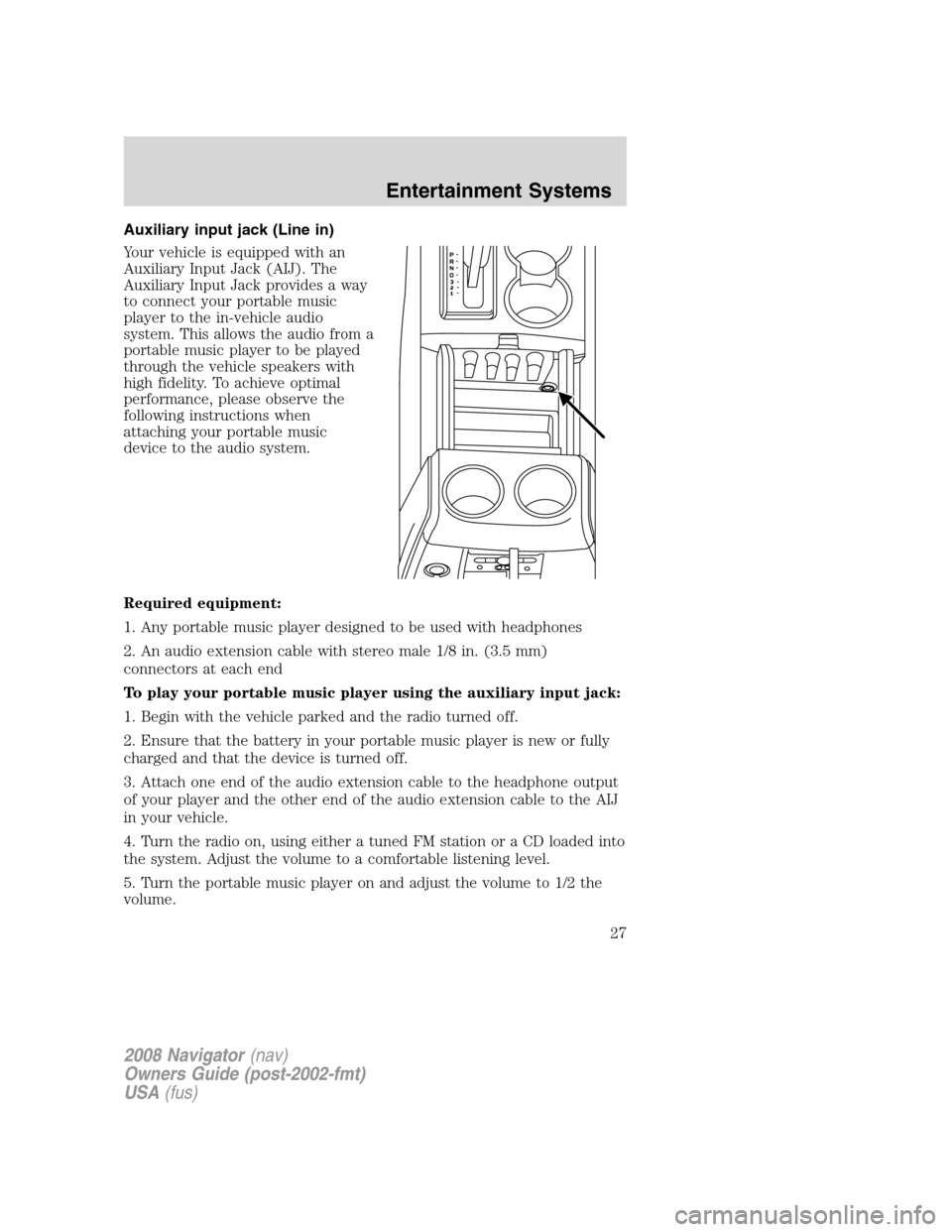
Auxiliary input jack (Line in)
Your vehicle is equipped with an
Auxiliary Input Jack (AIJ). The
Auxiliary Input Jack provides a way
to connect your portable music
player to the in-vehicle audio
system. This allows the audio from a
portable music player to be played
through the vehicle speakers with
high fidelity. To achieve optimal
performance, please observe the
following instructions when
attaching your portable music
device to the audio system.
Required equipment:
1. Any portable music player designed to be used with headphones
2. An audio extension cable with stereo male 1/8 in. (3.5 mm)
connectors at each end
To play your portable music player using the auxiliary input jack:
1. Begin with the vehicle parked and the radio turned off.
2. Ensure that the battery in your portable music player is new or fully
charged and that the device is turned off.
3. Attach one end of the audio extension cable to the headphone output
of your player and the other end of the audio extension cable to the AIJ
in your vehicle.
4. Turn the radio on, using either a tuned FM station or a CD loaded into
the system. Adjust the volume to a comfortable listening level.
5. Turn the portable music player on and adjust the volume to 1/2 the
volume.
2008 Navigator(nav)
Owners Guide (post-2002-fmt)
USA(fus)
Entertainment Systems
27
Page 46 of 352
23.ILLUMINATION: Press to illuminate the remote control and
backlight all of the buttons.
Battery replacement
Batteries are supplied with the remote control unit. Since all batteries
have a limited shelf life, replace them when the unit fails to control the
DVD player.
Remove the screw and unlatch the battery cover to access the batteries.
The remote control unit uses two AAA batteries which are supplied with
the unit.
2008 Navigator(nav)
Owners Guide (post-2002-fmt)
USA(fus)
Entertainment Systems
46
Page 47 of 352
Headphones
Wireless headphones
Your FES system is equipped with
two sets of battery powered,
infrared wireless headphones. Two
AAA batteries are needed to operate
the headphones. (Batteries are
included.)
Additional infrared wireless
headphones may be purchased for
use with the system. Also, wired
headphones may be purchased and
plugged in where indicated on the
left and right hand sides of the
system. Refer toWired
Headphonesbelow.
2008 Navigator(nav)
Owners Guide (post-2002-fmt)
USA(fus)
Entertainment Systems
47
Page 48 of 352
To install the batteries, remove the screw at the bottom of the cover.
Then, lightly press down on top and slide the cover off.
When replacing the batteries, use two new batteries (alkaline
recommended) and install them with the correct orientation as indicated
in the battery housing.
2008 Navigator(nav)
Owners Guide (post-2002-fmt)
USA(fus)
Entertainment Systems
48