Page 15 of 352

Low tire pressure warning:
Illuminates when your tire pressure
is low. If the light remains ON at
start up or while driving, the tire
pressure should be checked. Refer
toInflating Your Tiresin theTires, Wheels and Loadingchapter.
When the ignition is first turned to ON, the light will illuminate for 3
seconds to ensure the bulb is working. If the light does not turn ON or
begins to flash, have the system inspected by your authorized dealer. For
more information on this system, refer toUnderstanding Your Tire
Pressure Monitoring Systemin theTires, Wheels and Loading
chapter.
Low fuel (RTT) (if equipped):
Displays when the fuel level in the
fuel tank is at or near empty (refer
toFuel gaugein this chapter).
Check fuel cap (RTT) (if
equipped):Displays when the fuel
cap may not be properly installed.
Continued driving with this light on
may cause the Service engine soon
warning light to come on. Refer to
Fuel filler capin theMaintenance and Specificationschapter.
Low washer fluid (RTT) (if
equipped):Displays when the
windshield washer fluid is low.
O/D off:Illuminates when the
overdrive function of the
transmission has been turned off,
refer to theDrivingchapter. If the
light flashes steadily or does not illuminate, have the transmission
serviced soon, or damage may occur.
AdvanceTrac�(RTT) (if
equipped):Displays when the
AdvanceTrac�with RSC system is
active. If the light remains on, have
the system serviced immediately by
your authorized dealer.
O/D
OFF
2008 Navigator(nav)
Owners Guide (post-2002-fmt)
USA(fus)
Instrument Cluster
15
Page 17 of 352
Parking brake ON warning chime:Sounds when the parking brake is
set, the engine is running and the vehicle is driven more than 3 mph
(5 km/h).
Turn signal chime:Sounds when the turn signal lever has been
activated to signal a turn and not turned off after the vehicle is driven
more than 1.5 miles (2.4 km).
Message center activation chime:Sounds when some warning
messages appear in the message center display for the first time.
Reverse warning chime (if equipped):Sounds when the vehicle is in
reverse. Refer to theDrivingchapter for more information.
GAUGES
Speedometer:Indicates the
current vehicle speed.
2008 Navigator(nav)
Owners Guide (post-2002-fmt)
USA(fus)
Instrument Cluster
17
Page 18 of 352
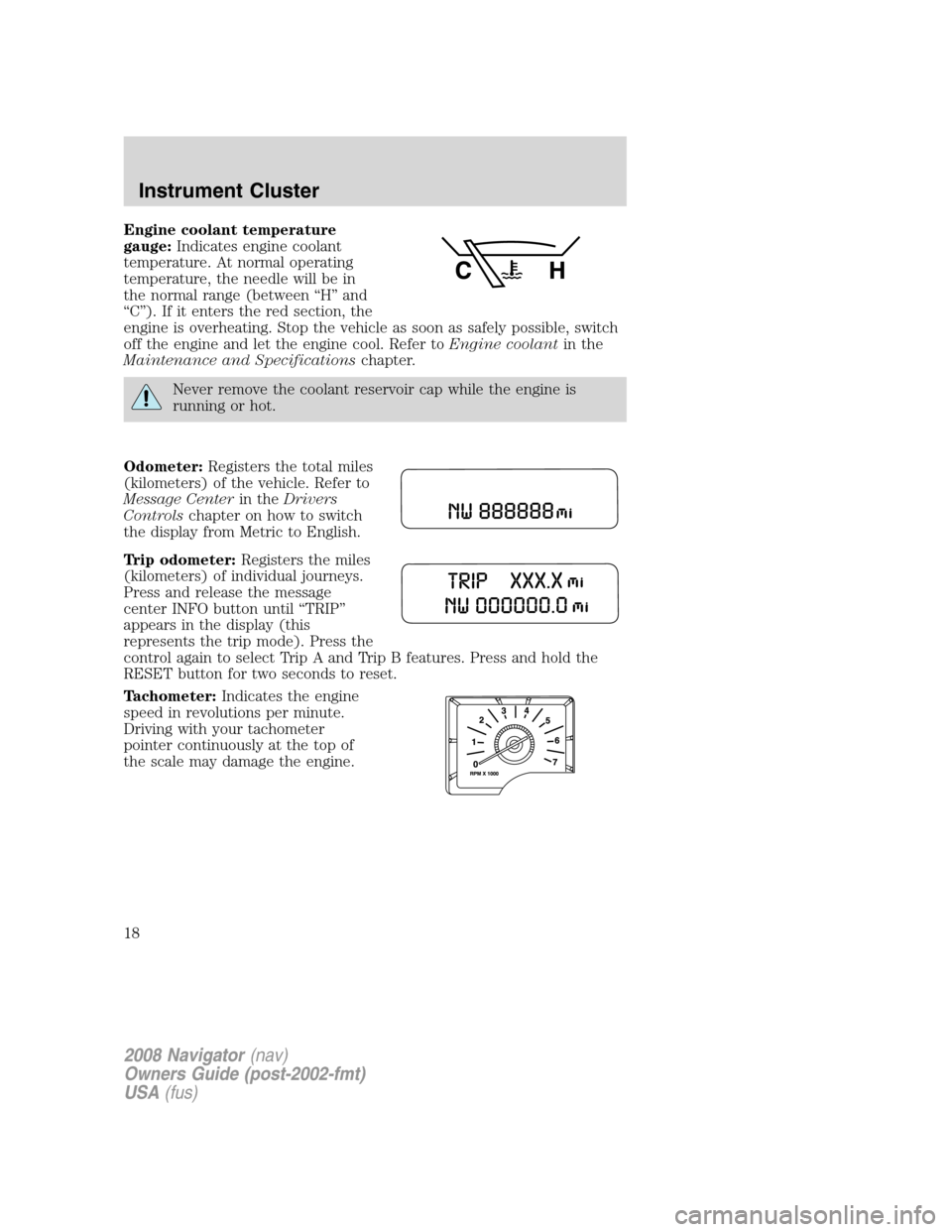
Engine coolant temperature
gauge:Indicates engine coolant
temperature. At normal operating
temperature, the needle will be in
the normal range (between “H” and
“C”). If it enters the red section, the
engine is overheating. Stop the vehicle as soon as safely possible, switch
off the engine and let the engine cool. Refer toEngine coolantin the
Maintenance and Specificationschapter.
Never remove the coolant reservoir cap while the engine is
running or hot.
Odometer:Registers the total miles
(kilometers) of the vehicle. Refer to
Message Centerin theDrivers
Controlschapter on how to switch
the display from Metric to English.
Trip odometer:Registers the miles
(kilometers) of individual journeys.
Press and release the message
center INFO button until “TRIP”
appears in the display (this
represents the trip mode). Press the
control again to select Trip A and Trip B features. Press and hold the
RESET button for two seconds to reset.
Tachometer:Indicates the engine
speed in revolutions per minute.
Driving with your tachometer
pointer continuously at the top of
the scale may damage the engine.
2008 Navigator(nav)
Owners Guide (post-2002-fmt)
USA(fus)
Instrument Cluster
18
Page 19 of 352

Fuel gauge:Indicates
approximately how much fuel is left
in the fuel tank (when the ignition
is in the ON position). The fuel
gauge may vary slightly when the
vehicle is in motion or on a grade.
The ignition should be in the OFF position while the vehicle is being
refueled. When the gauge first indicates empty, there is a small amount
of reserve fuel in the tank. When refueling the vehicle from empty
indication, the amount of fuel that can be added will be less than the
advertised capacity due to the reserve fuel.
The FUEL icon and arrow indicates which side of the vehicle the fuel
filler door is located.
Refer toFilling the tankin theMaintenance and Specifications
chapter for more information.
Battery voltage gauge:Indicates
the battery voltage when the
ignition is in the ON position. If the
pointer moves and stays outside the
normal operating range, have the
vehicle’s electrical system checked
by your authorized dealer as soon as possible.
Engine oil pressure gauge:
Indicates engine oil pressure. The
needle should stay in the normal
operating range (between “L” and
“H”). If the needle falls below the
normal range, stop the vehicle, turn
off the engine and check the engine oil level. Add oil if needed. If the oil
level is correct, have your vehicle checked by your authorized dealer.
2008 Navigator(nav)
Owners Guide (post-2002-fmt)
USA(fus)
Instrument Cluster
19
Page 60 of 352

FULL(enabled): The FES has control over the primary (speaker) and
secondary (headphone) audio sources.
LOCAL: The FES has control over the secondary source (headphones)
only. The radio will ignore button presses that affect the primary
(speaker) audio source.
LOCKED(disabled): The FES buttons are locked and all FES button
presses are ignored by the radio and the FES except for load and eject.
When the DVD system is ON, you
can then press the memory preset
controls 2 and 4 simultaneously to
toggle between Single Play and Dual Play. In Single Play mode, all
speakers listen to the same media. In Dual Play mode, rear seat
passengers can use the infrared wireless, or wired (not included)
headphones to listen to a different playing media than the front seat
passengers.
General information
Note:DVDs are formatted by
regions. US and Canada systems can
only play region 1 DVDs and Mexico
systems can only play region 4
DVDs. Systems sold in vehicles
targeted for other parts of the world
would have different regions. If a
playback problem is encountered,
please ensure that you are using a
disc designed for your region. The
region coding can be found stamped
on the disc or on the box, and can say ’region-1’ or ’region 4’, etc. They
may also be marked by a numerical symbol.
Macrovision:This product incorporates copyright protection technology
that is protected by method claims of certain U.S. patents and other
intellectual property rights owned by Macrovision Corporation and other
rights owners. Use of this copyright protection technology must be
authorized by Macrovision Corporation, and is intended for home and
other limited viewing uses only unless otherwise authorized by
Macrovision Corporation. Reverse engineering or disassembly is
prohibited.
MP3:Supply of this product only conveys a license for private,
non-commercial use and does not convey a license nor imply any right to
123456
2008 Navigator(nav)
Owners Guide (post-2002-fmt)
USA(fus)
Entertainment Systems
60
Page 71 of 352
REAR WINDOW DEFROSTER
The rear defroster control is located
on the climate control panel and
works to clear the rear window of
fog and thin ice.
The engine must be running in
order to operate the rear window
defroster.
The rear defroster turns off automatically after 15 minutes or when the
ignition is turned to the 1 (LOCK) position. To manually turn off the
defroster before 15 minutes have passed, push the control again.
Do not use razor blades or other sharp objects to clean the inside
of the rear window or to remove decals from the inside of the
rear window. This may cause damage to the heated grid lines and
will not be covered by your warranty.
2008 Navigator(nav)
Owners Guide (post-2002-fmt)
USA(fus)
Climate Controls
71
Page 88 of 352

CLOCK
Press the right (+) control to move
the time display forwards.
Press the left (-) control to move
the time display backwards.
AUXILIARY POWER POINT (12VDC)
Power outlets are designed for accessory plugs only. Do not insert
any other object in the power outlet as this will damage the
outlet and blow the fuse. Do not hang any type of accessory or
accessory bracket from the plug. Improper use of the power
outlet can cause damage not covered by your warranty.
An auxiliary power point is located
by the passenger’s ankle near the
floor in the front console bin.
Do not use the power point for
operating the cigarette lighter
element (if equipped).
To prevent the fuse from being
blown, do not use the power
point(s) over the vehicle capacity of
12 VDC/180W. If the power point or
cigar lighter socket is not working, a fuse may have blown. Refer to
Fuses and relaysin theRoadside Emergencieschapter for information
on checking and replacing fuses.
To prevent the battery from being discharged, do not use the power
point longer than necessary when the engine is not running.
Always keep the power point caps closed when not being used.
2008 Navigator(nav)
Owners Guide (post-2002-fmt)
USA(fus)
Driver Controls
88
Page 107 of 352

Outside air temperature (if equipped)
Press and hold the INFO button for
2 seconds to display the outside
temperature. To switch from a blank
display to the temperature display,
hold the INFO button for 2 seconds
until the temperature is seen in the
display. To switch the temperature display to compass display, hold the
INFO button again for 2 seconds until the compass heading is seen in the
display
Compass display (if equipped)
The compass reading may be affected when you drive near large
buildings, bridges, power lines and powerful broadcast antenna. Magnetic
or metallic objects placed in, on or near the vehicle may also affect
compass accuracy.
Usually, when something affects the compass readings, the compass will
correct itself after a few days of operating your vehicle in normal
conditions. If the compass still appears to be inaccurate, a manual
calibration may be necessary. Refer toCompass zone/calibration
adjustment.
Most geographic areas (zones) have a magnetic north compass point that
varies slightly from the northerly direction on maps. This variation is four
degrees between adjacent zones and will become noticeable as the
vehicle crosses multiple zones. A correct zone setting will eliminate this
error. Refer toCompass zone/calibration adjustment.
Compass zone/calibration adjustment
1. Determine your magnetic zone by
referring to the zone map.
2. Turn ignition to the ON position.
3. Start the engine.
4. From Setup menu, select the
Update Zone function.
1 2 3
4
5
6 7 8 9 101112 13 14 15
2008 Navigator(nav)
Owners Guide (post-2002-fmt)
USA(fus)
Driver Controls
107

