Page 278 of 487
276
3-6. Other interior features
RX400h_U
Multi-display light control
With navigation system
Owners of models equipped with a navigation system should refer to
the “Navigation System Owner's Manual”.
Without navigation system Adjusts the brightness of the
light
Push and release the button until
the desired brightness is
obtained.
Page 282 of 487

280
3-6. Other interior features
RX400h_U
Seat heaters (if equipped)
■The seat heaters can be used when
The engine switch is in the ON position.
■When not in use
Turn the knob counterclockwise. The indicator light turns off.
Press the knob into the recessed position.
CAUTION
■Burns
●Use caution when seating the following persons in a seat with the seat heater on
to avoid the possibility of burns:
• Babies, small children, the elderly, the sick and the disabled
• Persons with sensitive skin
• Persons who are fatigued
• Persons who have taken alcohol or drugs that induce sleep (sleeping drugs,cold remedies, etc.)
●Do not cover the seat with anything when using the seat heater.
Using the seat heater with a blanket or cushion increases the temperature of the
seat and may lead to overheating.
Pops the switch out
ON
The indicator light comes on.
Adjusts the seat temperature
The further you turn the knob
clockwise, the warmer the seat
becomes.
Driver’s
seat Front
passenger’s
seat
Page 289 of 487
287
3-6. Other interior features
3
Interior features
RX400h_U
Garage door opener
The garage door opener (HomeLink Universal Transceiver) is manufactured
under license from HomeLink.
Programming the HomeLink (for U.S.A. owners)
The HomeLink
compatible transceiver in your vehicle has 3 buttons
which can be programmed to operate 3 different devices. Refer to the
programming method below appropriate for the device.
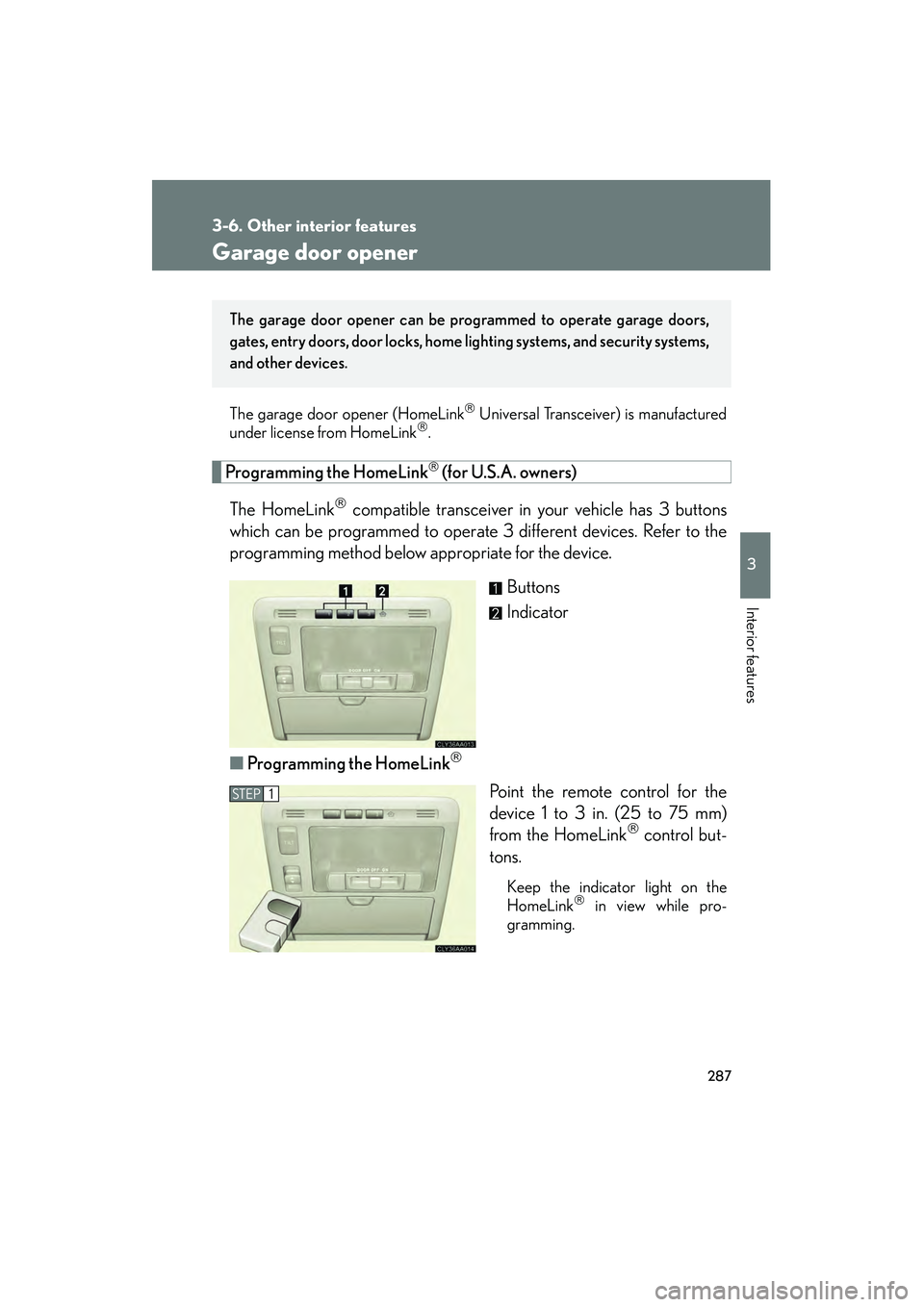
Buttons
Indicator
■ Programming the HomeLink
Point the remote control for the
device 1 to 3 in. (25 to 75 mm)
from the HomeLink
control but-
tons.
Keep the indicator light on the
HomeLink in view while pro-
gramming.
The garage door opener can be pr ogrammed to operate garage doors,
gates, entry doors, door locks, home lighting systems, and security systems,
and other devices.
STEP1
Page 290 of 487
288
3-6. Other interior features
RX400h_UPress and hold down one of the
buttons on the HomeLink
and
the button on the transmitter.
When the indicator light on the
HomeLink
changes from a slow
to a rapid flash after 20 seconds,
you can release both buttons.
Test the operation of the
HomeLink
by pressing the newly
programmed button.
If programming a garage door
opener, check to see if the garage
door opens and closes. If the
garage door does not operate, see
if your garage transmitter is of the
Rolling Code type. Press and hold
the programmed HomeLink
but-
ton. The garage door has the roll-
ing code feature if the indicator
light (on the HomeLink
) flashes
rapidly for 2 seconds and then
remains lit. If your transmitter is the
Rolling Code type, proceed to the
heading “Programming a rolling
code system”.
Repeat the steps above to program another device for each of
the remaining HomeLink buttons.
STEP2
STEP3
STEP4
Page 291 of 487

289
3-6. Other interior features
3
Interior features
RX400h_U■
Programming a Rolling Code sy stem (for U.S.A. owners)
If your device is Rolling Code equipped, follow the steps under the
heading “Programming the HomeLink
” before proceeding with the
steps listed below.
Locate the training button on the ceiling mounted garage door
opener motor. The exact location and color of the button may
vary by brand of garage door opener.
Refer to the operation manual supplied with the garage door opener
for the location of the training button.
Press the training button.
Press and release the vehicle’s programmed HomeLink
button
twice. The garage door may open.
If the garage door opens, the programming process is complete. If the
door does not open, press and release the button a third time. This third
press and release will complete the programming process by opening
the garage door.
The ceiling mounted garage door op ener motor should now recognize
the HomeLink
transceiver and operate the garage door.
Repeat the steps above to program another rolling code system
for any of the remaining HomeLink buttons.
■ Programming an entry gate (for U.S.A. owners)/Programming all
devices in the Canadian market
Place your transmit ter 1 to 3 in. (25 to 75 mm) away from the sur-
face of the HomeLink
.
Keep the indicator light on the HomeLink in view while programming.
Press and hold the selected HomeLink button.
Repeatedly press and release (cycle) the device’s remote control
button for two seconds each until step 4 is complete.
When the indicator light on the HomeLink
compatible trans-
ceiver start to flashing rapidly, release the buttons.
STEP1
STEP2
STEP3
STEP4
STEP1
STEP2
STEP3
STEP4
Page 292 of 487

290
3-6. Other interior features
RX400h_UTest the operation of the HomeLink
by pressing the newly pro-
grammed button. Check to see if the gate/device operates cor-
rectly.
Repeat the steps above to program another device for each of
the remaining HomeLink
buttons.
■ Programming other devices
To program other devices such as home security systems, home door
locks or lighting, contact your authorized Lexus dealer for assistance.
■ Reprogramming a button
The individual HomeLink
buttons cannot be erased but can be
reprogrammed. To reprogram a button, follow the “Programming the
HomeLink
” instructions.
Operating the HomeLink
Press the appropriate HomeLink button. The HomeLink indicator
light on the HomeLink transceiver should turn on.
The HomeLink continues to send a signal for up to 20 seconds as long as
the button is pressed.
Erasing the entire HomeLink memory (all three programs)
Press and hold down the 2 outside
buttons for 20 seconds until the
indicator light flashes.
If you sell your vehicle, be sure to
erase the programs stored in the
HomeLink
memory.
STEP5
STEP6
Page 299 of 487

Maintenance and care4
297
RX400h_U
4-1. Maintenance and care ............................... 298
Cleaning and protecting the vehicle exterior............ 298
Cleaning and protecting the vehicle interior ............... 301
4-2. Maintenance .................. 304 Maintenance requirements ....................... 304
General maintenance .......... 306
Emission inspection and maintenance (I/M)
programs............................... 309 4-3. Do-it-yourself
maintenance ................. 310
Do-it-yourself service precautions ............................ 310
Hood ........................................... 313
Positioning a floor jack .......... 314
Engine compartment ............ 316
Tires............................................. 331
Tire inflation pressure........... 340
Wheels ...................................... 344
Air conditioning filter ........... 346
Wireless remote control battery .................................... 348
Rear seat entertainment system controller ................ 350
Checking and replacing fuses ........................................ 352
Headlight aim (vehicles with discharge
headlights) ............................ 364
Light bulbs................................ 365
Page 302 of 487

300
4-1. Maintenance and care
RX400h_U
NOTICE
■To protect your vehicle’s painted surfaces
Do not use organic cleaners such as benzene or gasoline.
■To protect your vehicle’s
Do not splash water on the electric components in the engine compartment. This
may cause malfunction of the electric components.
■If the windshield washer nozzle become blocked
Contact your Lexus dealer. Do not try to clear it with a pin or other object.
This may damage the nozzle.
■Cleaning the exterior lights
●Wash carefully. Do not use organic substances or scrub with a hard brush.
This may damage the surfaces of the lights.
●Do not apply wax on the surfaces of the lights.
Wax may cause damage to the lenses.
■When using an automatic car wash (vehicles with the rain-sensing windshield
wipers)
■To prevent damage to the windshield wiper arms
When lifting the wiper arms away from the windshield, pull the driver side wiper
arm upward first, and repeat for the passenger side. When returning the wipers to
their original position, do so from the passenger side first.
Set the wiper switch to the off position.
If the wiper switch is in AUTO, the wipers may
operate and the wiper blades may be dam-
aged.
Off