Page 135 of 462
134
2-2. Instrument cluster
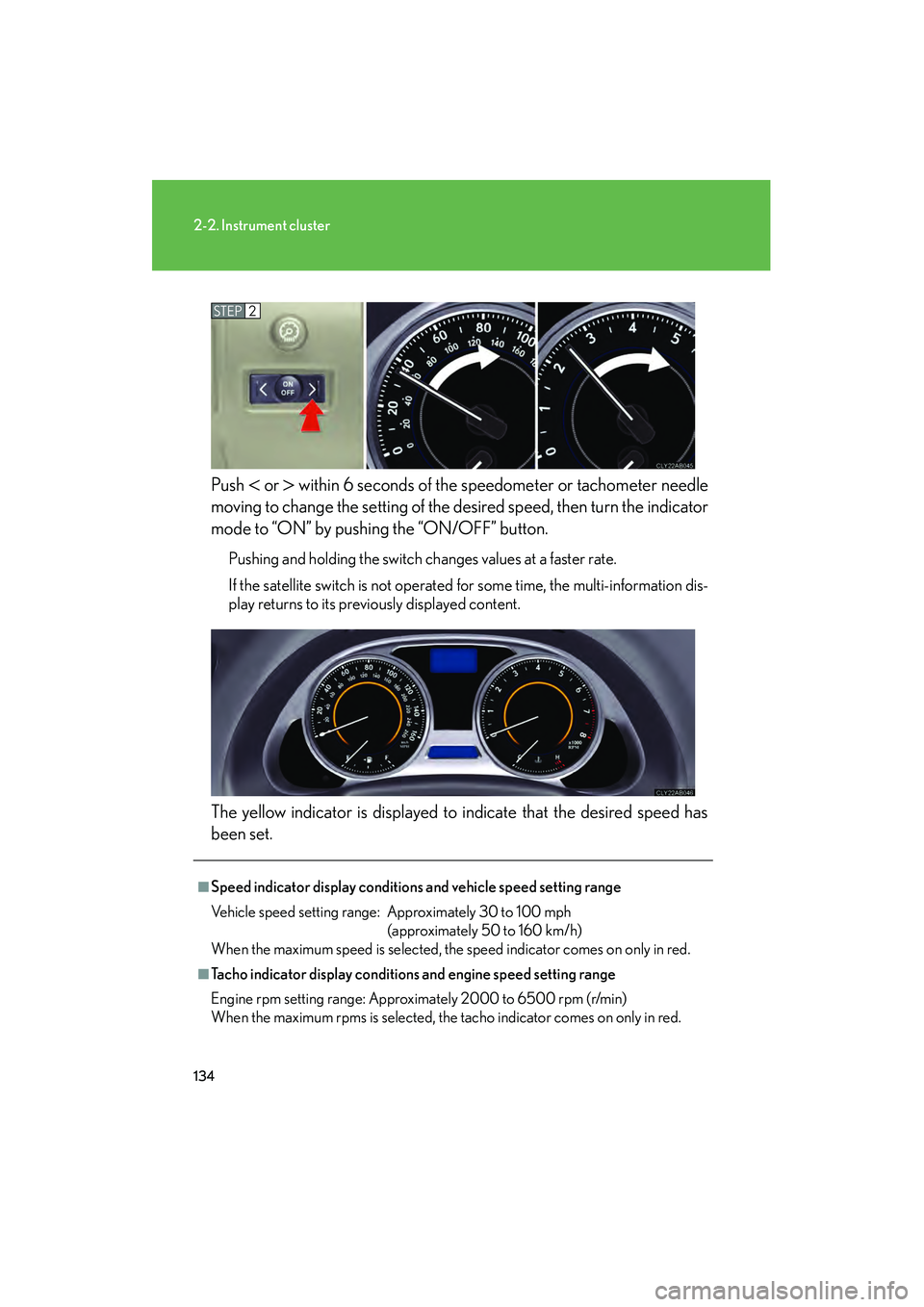
08_IS350/250_U_(L/O_0708)Push
< or > within 6 seconds of the speedometer or tachometer needle
moving to change the setting of the de sired speed, then turn the indicator
mode to “ON” by pushing the “ON/OFF” button.
Pushing and holding the switch changes values at a faster rate.
If the satellite switch is not operated for some time, the multi-information dis-
play returns to its previously displayed content.
The yellow indicator is displayed to indicate that the desired speed has
been set.
STEP2
■Speed indicator display conditions and vehicle speed setting range
Vehicle speed setting range: Approximately 30 to 100 mph (approximately 50 to 160 km/h)
When the maximum speed is selected, the speed indicator comes on only in red.
■Tacho indicator display conditions and engine speed setting range
Engine rpm setting range: Approximately 2000 to 6500 rpm (r/min)
When the maximum rpms is selected, the tacho indicator comes on only in red.
Page 137 of 462
136
2-2. Instrument cluster
08_IS350/250_U_(L/O_0708)
Indicators and warning lights
The indicator and warning lights on the instrument cluster and center
panel inform the driver of the status of the vehicle’s various systems.
Instrument cluster
The units used on the speedometer and the tachometer gauge display may
differ depending on the model/type.
Center panel
Page 138 of 462
137
2-2. Instrument cluster
2
When driving
08_IS350/250_U_(L/O_0708)
■Indicators
The indicators inform the driver of the operating state of the vehi-
cle’s various systems.
Turn signal indicator
(
→P. 1 2 8 )(vehicles with
an automatic
transmission)
“ECT SNOW” indicator
(
→P. 1 2 3 )
Headlight high beam indi-
cator (
→P. 1 4 3 )(vehicles with
a manual
transmission)
“ETCS SNOW” indicator
(
→P. 1 2 6 )
(U.S.A.)
Headlight indicator
(
→P. 1 4 3 )(vehicles with
an automatic
transmission)
“ECT PWR” indicator
(
→P. 1 2 3 )
(CANADA)
Tail light indicator
(
→P. 1 4 3 )
Cruise control indicator
(
→P. 1 5 2 )
Front fog light indicator
(
→P. 1 4 6 ) (if equipped)
“AFS OFF” indicator light
(
→P. 144)
(vehicles with an automatic trans-
mission)
Shift position and shift range indica-
tors (
→P. 122)
(if equipped)
Intuitive parking assist
indicator (
→P. 1 6 4 )
Slip indicator (→P. 171)
“VSC OFF” indicator
(
→P. 1 7 2 )
SRS airbag on-off indica-
tor (
→P. 9 0 )
*
*
*
*
Page 139 of 462

138
2-2. Instrument cluster
08_IS350/250_U_(L/O_0708)
CAUTION
■If a safety system warning light does not come on
Should a safety system light such as the ABS and SRS warning light not come on
when you start the engine, this could mean that these systems are not available to
help protect you in an accident, which could result in death or serious injury. Have
the vehicle inspected by your Lexus dealer immediately if this occurs.
■Warning lights
Warning lights inform the driver of malfunctions in any of the vehi-
cle’s systems. (→P. 360)
*: These lights turn on when the “ENGINE START STOP” switch is turned
to IGNITION ON mode to indicate that a system check is being per-
formed. They will turn off after the engine is started, or after a few sec-
onds. There may be a malfunction in a system if a light does not come on,
or if the lights do not turn off. Have the vehicle inspected by your Lexus
dealer.
(U.S.A.)(Canada)(Canada)(U.S.A.)
(Canada)(U.S.A.)(if equipped)
******
******
Page 140 of 462
139
2-2. Instrument cluster
2
When driving
08_IS350/250_U_(L/O_0708)
Multi-information display
The multi-information display presents the driver with a variety of driving-
related data, including the current outside air temperature.
●Trip information ( →P. 1 4 0 )
Displays driving range, fuel con-
sumption and other cruising
related information.
●Satellite switch mode display
(→P. 245)
This switch is used to configure
various function settings.
●Intuitive parking assist dis-
play (if equipped)
Automatically displayed when
using intuitive parking assist.
●Dynamic radar cruise con-
trol display (if equipped)
(→P. 1 5 5 )
Automatically displayed when
using dynamic radar cruise con-
trol.
●Warning messages
(→P. 369)
Automatically displayed when a
malfunction occurs in one of the
vehicle’s systems.
Page 141 of 462
140
2-2. Instrument cluster
08_IS350/250_U_(L/O_0708)
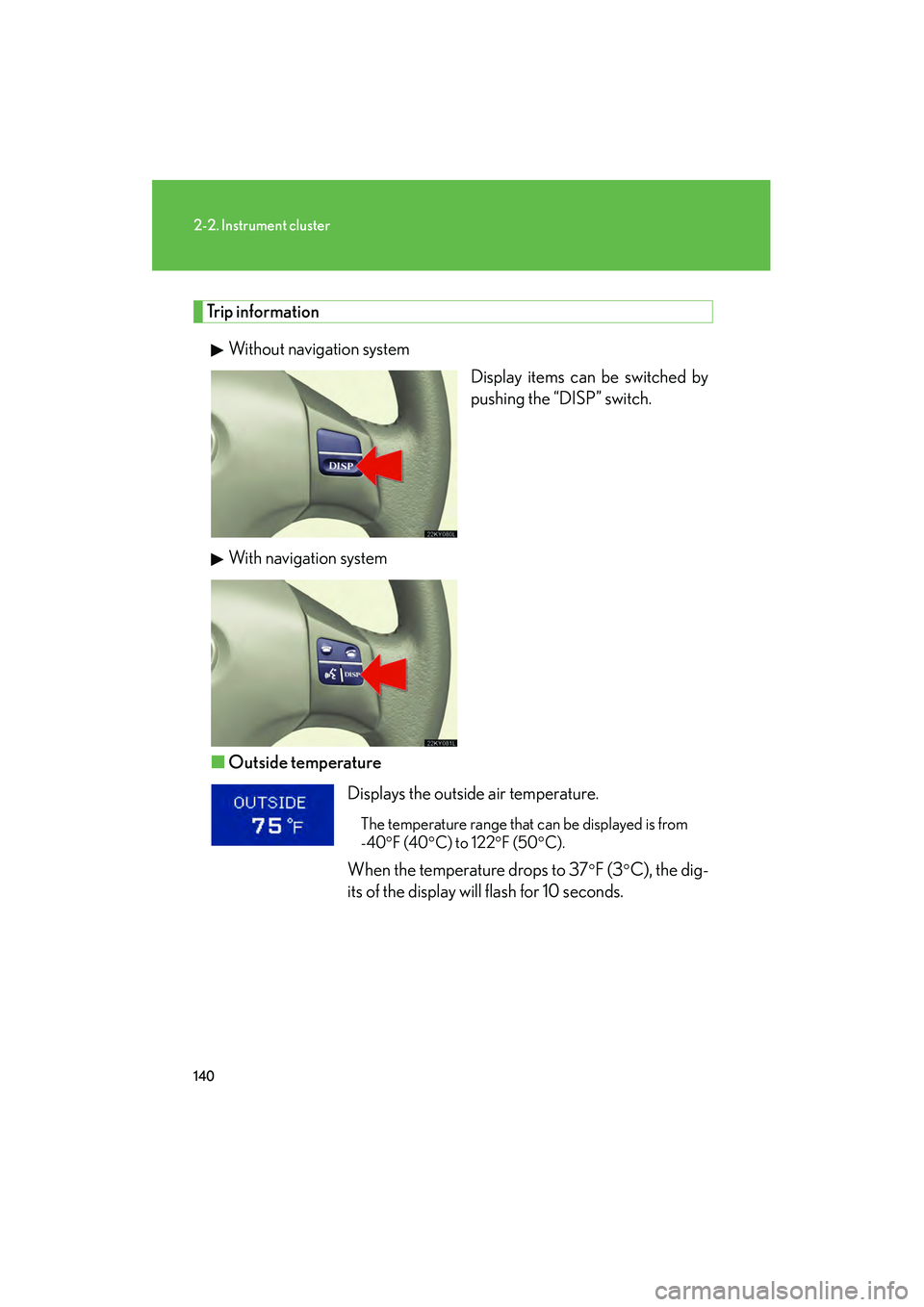
Trip informationWithout navigation system Display items can be switched by
pushing the “DISP” switch.
With navigation system
■ Outside temperature
Displays the outside air temperature.
The temperature range that can be displayed is from
-40
°F (40°C) to 122°F (50°C).
When the temperature drops to 37°F (3°C), the dig-
its of the display will flash for 10 seconds.
Page 143 of 462

142
2-2. Instrument cluster
08_IS350/250_U_(L/O_0708)■
Gear position display
(vehicles with an automatic transmission only)
Indicates the current gear, and the range of gears
that is available when the shift lever is in the S or D
position. the gear range is shown by the number of
dots ( •) and the current gear is shown as a number.
The transmission automatically selects the gears
within the driver selected gear range.
In the illustration to the left, a range of 6 available gears
(1 through 6) has been selected by the driver. (The shift
lever is in the D or S position with 6 ranges enabled) It is
possible for the transmission to automatically select
between all 6 of the gears. In this case, the transmission
has selected third gear.
■System check display
After switching the “ENGINE START ST OP” switch to IGNITION ON mode,
“CHECK” is displayed while system operation is checked. When the system check
is complete, “COMPLETED” is displayed before returning to the normal screen.
CAUTION
■The information display at low temperatures
Allow the interior of the vehicle to warm up before using the liquid crystal informa-
tion display. At extremely low temperatures, the information display monitor may
respond slowly, and display changes may be delayed.
For example, there is a lag between the driver's shifting and the new gear number
appearing on the display. This lag could cause the driver to downshift again, causing
rapid and excessive engine braking and possibly an accident resulting in personal
death or injury.
Page 162 of 462

161
2-4. Using other driving systems
2
When driving
08_IS350/250_U_(L/O_0708)
■CertificationFor vehicles sold in U.S.A.
For vehicles sold in Canada
CAUTION
■Before using dynamic radar cruise control
Do not overly rely on vehicle-to-vehicle distance control.
Be aware of the set vehicle speed. If automatic deceleration/acceleration is not
appropriate, adjust the vehicle speed, as well as the distance between your vehicle
and vehicles ahead by applying the brakes, etc.
■To avoid inadvertent cruise control activation
Keep the “ON-OFF” button off when not in use.
FCC WARNING
Changes or modifications not expressly approved by the party responsible for
compliance could void the user's authority to operate the equipment.
FCC RF exposure information
This device complies with the FCC RF exposure requirements.
Operation is subject to the following two conditions;
(1) This device may not cause interference, and
(2) This device must accept any interference received, including interference
that may cause undesired operation of the device.