Page 185 of 599
183
2-4. Using other driving systems
2
When driving
GS_HV_U
June 19, 2008 1:15 pm
Sensor detection display, obstacle distance and beepsWhen the intuitive parking assist is activated, the approximate distance to
the obstacle is displayed. Also, if an obstacle with which a collision is pos-
sible is detected, a warning beep will sound.
■ Dual sensor
• If the shift lever is in “R”, only the corner sensors will detect obstacles.
Approximate
distance to obstacleMulti-informa-
tion display
To u c h s c r e e n
With beeps(danger of collision)No beeps
(no danger of collision)
3.0 ft. (100 cm)
to 1.5 ft. (50 cm)
(continuous)(continuous)(continuous)
1.5 ft. (50 cm) to
1.1 ft. (37.5 cm)
(continuous)(continuous)(continuous)
1.1 ft. (37.5 cm) to
0. 8 f t . (25 cm)
(continuous)(continuous)(continuous)
Less than 0.8 ft.
(25 cm)
(blinking)(continuous)
GS450h_HV_U.book Page 183 Thursday, June 19, 2008 1:44 PM
Page 189 of 599

187
2-4. Using other driving systems
2
When driving
GS_HV_U
June 19, 2008 1:15 pm
Steering guide symbolDisplays the steering maneuvers required to avoid an obstacle. Move the
steering wheel in the direction shown by the arrow. The steering guide symbol only
shows the maneuvers necessary to
avoid an obstacle.
When using the system, always
check your surroundings for
safety.
Beeps and obstacle distance
A beep sounds when an obstacle with which there is a danger of collision
is detected. As the vehicle moves closer to the obstacle, the interval of
the beep becomes shorter.
● When the following obstacle distances are reached, the beep changes
from intermittent to continuous:
• If the distance to the obstacle detected by the dual sensors or rear corner
sensors is less than 0.8 ft. (25 cm).
• If the distance to the obstacle detected by the back sensors is less than 1.1
ft. (35 cm).
● If obstacles are detected by the dual sensors in 2 places at once, or if
both rear corner sensors detect obstacles at the same time, the system
will sound a warning beep for the closer of the 2 obstacles.
GS450h_HV_U.book Page 187 Thursday, June 19, 2008 1:44 PM
Page 190 of 599

188
2-4. Using other driving systems
GS_HV_U
June 19, 2008 1:15 pm
●If multiple obstacles are detected in front and behind the vehicle at the
same time, the warning beep will change in the following manner:
• If an obstacle has been detected within 0.8 ft. (25 cm) of the front or rear
of the vehicle (a continuous beep is sounding), and a new obstacle is
detected near a different area of the vehicle, the warning beep will sound
6 beeps then one continuous beep.
• If an obstacle has been detected within 0.8 ft. (25 cm) of the front or rear of the vehicle (a continuous beep is sounding), and a new obstacle is
detected within 0.8 ft. (25 cm) of a different area of the vehicle, the warn-
ing beeps will sound 2 beeps then one continuous beep.
●You can change the volume of the warning beeps. ( →P. 1 8 9 )
Obstacle detection range
About 10.0 ft. (300 cm)
About 3.0 ft. (100 cm)
About 5.0 ft. (150 cm)
About 1.5 ft. (50 cm)
The detection area of the sensors is
shown to the left.
If obstacles move too close to the
sensors, they will not be detected.
If the malfunction screen is dis-
played, the dual sensor detection
range will be shortened from 3.0 ft.
(100 cm) to 1.5 ft. (50 cm).
GS450h_HV_U.book Page 188 Thursday, June 19, 2008 1:44 PM
Page 191 of 599
189
2-4. Using other driving systems
2
When driving
GS_HV_U
June 19, 2008 1:15 pm
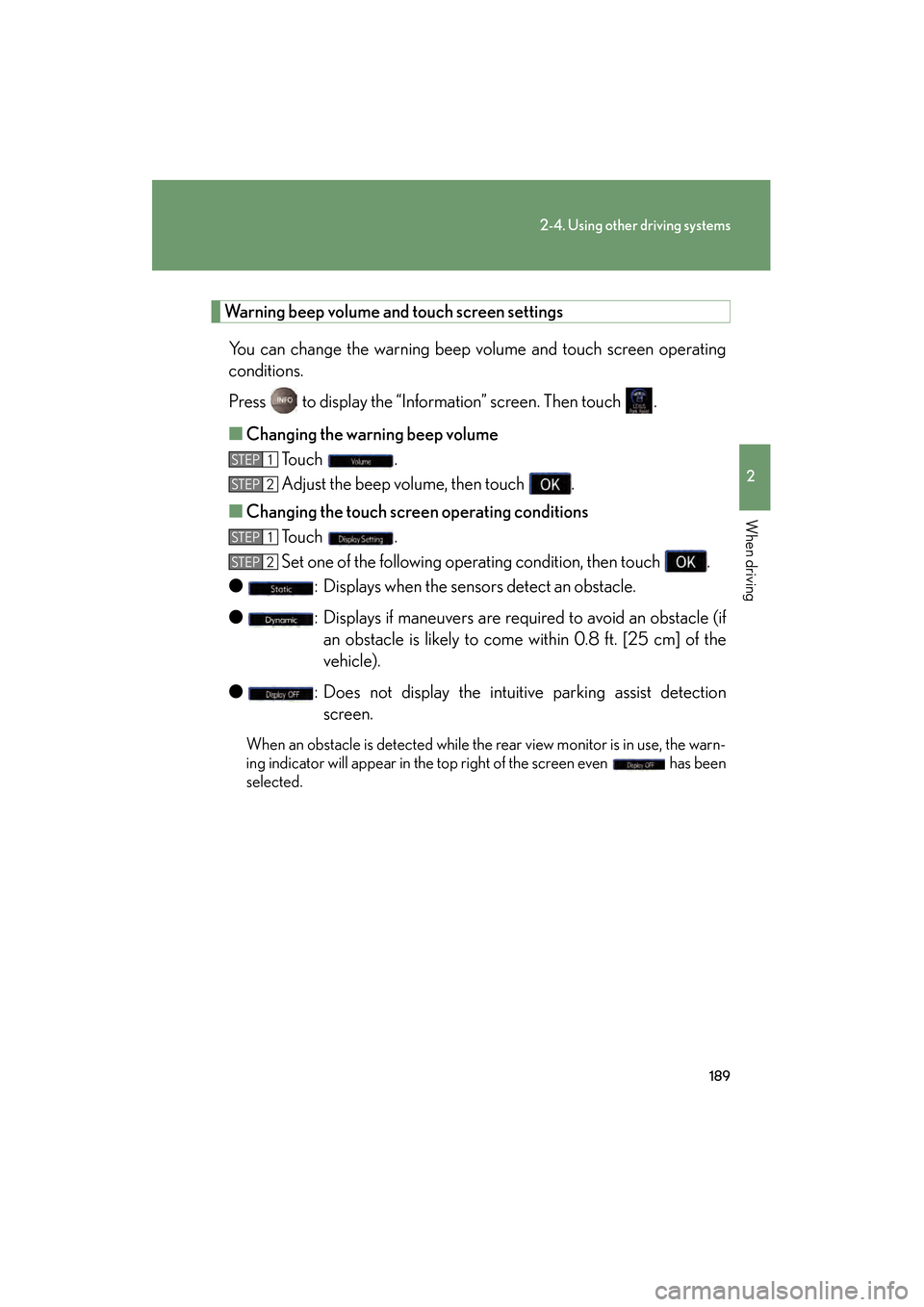
Warning beep volume and touch screen settingsYou can change the warning beep volume and touch screen operating
conditions.
Press to display the “Information” screen. Then touch .
■ Changing the warning beep volume
To u c h .
Adjust the beep volume, then touch .
■ Changing the touch scr een operating conditions
To u c h .
Set one of the following operating condition, then touch .
● : Displays when the sensors detect an obstacle.
● : Displays if maneuvers are required to avoid an obstacle (if
an obstacle is likely to come within 0.8 ft. [25 cm] of the
vehicle).
● : Does not display the intuitive parking assist detection
screen.
When an obstacle is detected while the rear view monitor is in use, the warn-
ing indicator will appear in the top right of the screen even has been
selected.
STEP1
STEP2
STEP1
STEP2
GS450h_HV_U.book Page 189 Thursday, June 19, 2008 1:44 PM
Page 192 of 599

190
2-4. Using other driving systems
GS_HV_U
June 19, 2008 1:15 pm
■The intuitive parking assist can be operated when
The “POWER” switch is in the ON mode.
■When the system malfunctions
●If a malfunction occurs and no obstacles have been detected, a warning is dis-
played, and a malfunction beep sounds for 7 seconds.
If an obstacle has been detected, or another malfunction occurs in a different
sensor, the malfunction beeps will not sound.
●In the following circumstances the displayed warning will disappear:
• If you switch the screen to a different mode.
• If you turn off the intuitive parking assist main switch.
• If the vehicle speed exceeds 6 mph (10 km/h). Once the vehicle speed dropsbelow 6 mph (10 km/h), the warning will be displayed again.
●If the malfunction screen is displayed, the detection range of the dual sensors is
shortened. In this case, the necessity for obstacle evasion (whether the obstacle
will come within 0.8 ft. [25 cm] of the vehicle or not) will not be calculated.
GS450h_HV_U.book Page 190 Thursday, June 19, 2008 1:44 PM
Page 193 of 599
191
2-4. Using other driving systems
2
When driving
GS_HV_U
June 19, 2008 1:15 pm
■When using the intuitive parking assist
●The sensors’ detection areas and reaction times are limited. When moving for-
ward or reversing, check the areas surrounding the vehicle (especially the sides
of the vehicle) for safety, and drive slowly, using the brake to control the vehicle’s
speed.
• The sensors’ detection areas are limited to the areas around the vehicle’s frontand rear bumpers.
• Depending on the shape of the obstacle and other factors, the detection dis- tance may shorten, or detection may be impossible.
• There will be a short delay between obstacle detection and display. Even at
slow speeds, there is a possibility that the obstacle will come within 0.8 ft. (25
cm) of the vehicle before the display is shown and the warning beep sounds.
• Braking distance may differ according to the road conditions (rain, gravel etc.).
• It might be difficult to hear beeps due to the volume of audio system or air flow noise of air conditioning system.
• For long obstacles such as walls, the obstacle warning may change as the obstacle gets closer.
GS450h_HV_U.book Page 191 Thursday, June 19, 2008 1:44 PM
Page 207 of 599

205
2-4. Using other driving systems
2
When driving
GS_HV_U
June 19, 2008 1:15 pm
CAUTION
■The hill-start assist control may not operate effectively when
●On steep inclines.
●On icy surfaces.
■When the VSC is activated
The slip indicator light flashes and a warning buzzer sounds. Always drive carefully.
Reckless driving may cause an accident. Exercise particular care when the indica-
tor light flashes and a buzzer sounds.
■When TRAC and VSC are off
Be especially careful and drive at a speed appropriate to the road conditions. As
these are systems to ensure vehicle stability and driving force, do not turn off TRAC
and VSC unless necessary.
■Replacing tires
Make sure that all tires are of the same size, brand, tread pattern and total load
capacity. In addition, make sure that the tires are inflated to the specified tire pres-
sure level.
The ABS and VSC will not function correctly if different tires are fitted on the vehi-
cle.
Contact your Lexus dealer for further information when replacing tires or wheels.
■Handling of tires and suspension
Using tires with any kind of problem or modifying the suspension will affect the driv-
ing assist systems, and may cause the system to malfunction.
GS450h_HV_U.book Page 205 Thursday, June 19, 2008 1:44 PM
Page 210 of 599

208
2-4. Using other driving systems
GS_HV_U
June 19, 2008 1:15 pm
■Conditions that may trigger the system even if there is no danger of collision
●When there is an object by the roadside at the entrance to a curve
●When passing an oncoming vehicle on a curve
●When driving over a narrow iron bridge
●When there is a metal object on the road surface
●When driving on an uneven road surface
●When passing an oncoming vehicle on a left-turn
●When your vehicle rapidly closes on the vehicle in front
When the system is activated in the situations described above there is also a possi-
bility that the seat belts will retract quickly and the brakes will be applied with a force
greater than normal. When the seat belt is locked in the retracted position, stop the
vehicle in a safe place, release the seat belt and refasten.
■When there is a malfunction in the system
Warning lights and/or warning messages will turn on or flash. ( →P. 4 9 2 , 5 0 2 )
GS450h_HV_U.book Page 208 Thursday, June 19, 2008 1:44 PM